Geekzone: technology news, blogs, forums
Guest
Welcome Guest.
You haven't logged in yet. If you don't have an account you can register now.


View this topic in a long page with up to 500 replies per page Create new topic
1 | 2 
Jase2985
13735 posts

Uber Geek
+1 received by user: 6217

ID Verified
Lifetime subscriber

  #3215103 6-Apr-2024 15:54
Send private message

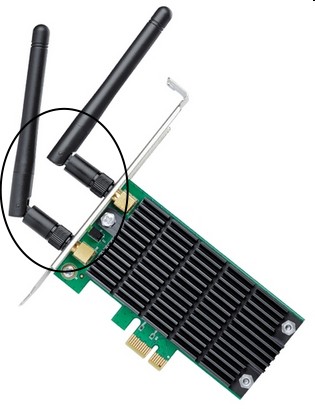
you need the aerials on the back


As for IPv6 it sometimes causes issues and it just doesnt need to be on in your home environment 


Qazzy03
546 posts

Ultimate Geek
+1 received by user: 492


  #3215104 6-Apr-2024 16:01
Send private message

Yup, put those aerials back on to help with connection issues and signal strenght.


Spyware
3818 posts

Uber Geek
+1 received by user: 1366

Lifetime subscriber

  #3215111 6-Apr-2024 16:31
Send private message

I think leaving the antennas off can damage the radios. The interfaces should be terminated at all times.


Spark Max Fibre using Mikrotik CCR1009-8G-1S-1S+, CRS125-24G-1S, Unifi UAP, U6-Pro, UAP-AC-M-Pro, Apple TV 4K (2022), Apple TV 4K (2017), iPad Air 1st gen, iPad Air 4th gen, iPhone 13, SkyNZ3151 (the white box). If it doesn't move then it's data cabled.


RunningMan
9191 posts

Uber Geek
+1 received by user: 4842


  #3215112 6-Apr-2024 16:33
Send private message

What is the wifi link speed, both when it works and when it doesn't?


Reanalyse
398 posts

Ultimate Geek
+1 received by user: 311


  #3215120 6-Apr-2024 16:57
Send private message

One possible faultfinding approach could be to source a cheap wifi dongle. As an example only, here is one on trademe


Plug it in to your PC and it should automatically install and configure. That allows you to isolate the issue internally (to the PC) or externally (the WAN). 


If it works the fault is somewhere in the PC, if not then you need to look at the Wan. For the Wan do other devices (smartphone) work on the Wifi ?


sezsays

14 posts

Geek
+1 received by user: 8


  #3215158 6-Apr-2024 20:28
Send private message

Reanalyse:


One possible faultfinding approach could be to source a cheap wifi dongle. As an example only, here is one on trademe


Plug it in to your PC and it should automatically install and configure. That allows you to isolate the issue internally (to the PC) or externally (the WAN). 


If it works the fault is somewhere in the PC, if not then you need to look at the Wan. For the Wan do other devices (smartphone) work on the Wifi ?


Hi thanks for the tip. Yes I've mentioned a few times in this thread that all other devices connect to wifi without any issues at all. It's just this PC. I have a laptop, ipads, several smart home devices, phone, two smart tv's, and when family comes to visit, their devices also connect just fine. I have just managed to connect on the PC just fine, and my mum is currently on her laptop and we're watching netflix as well - all via wifi. 


Thanks :)


Shop now for Lego sets and other gifts (affiliate link).
sezsays

14 posts

Geek
+1 received by user: 8


  #3215159 6-Apr-2024 20:30
Send private message

RunningMan:


What is the wifi link speed, both when it works and when it doesn't?


When it's working - which it currently is; 520 mbps. Next time it's not working I'll check again and come back to you. 


Cheers :)


OK - it just stopped working while I was browsing..... speed still says 520 Mbps - My laptops says 1.2Gbps 😐


sezsays

14 posts

Geek
+1 received by user: 8


  #3215160 6-Apr-2024 20:32
Send private message

Spyware:


I think leaving the antennas off can damage the radios. The interfaces should be terminated at all times.


Good to know - I don't know for sure it's ever had them to be honest. I'm assuming I can buy them separately? I'll check it out. 
This computer was built at least 3-4 years ago and it's worked well up to the recent windows upgrade. 


Thanks :)


sezsays

14 posts

Geek
+1 received by user: 8


  #3215161 6-Apr-2024 20:35
Send private message

Jase2985:


you need the aerials on the back


As for IPv6 it sometimes causes issues and it just doesnt need to be on in your home environment 


Cheers for that. I've been out and come back home and started up and it connected straight away so perhaps disabling the IPv6 has helped. I'll see how it goes over the next few days. As for the aerials, I don't think it's ever had them to be honest and the PC was built at least 3-4 years ago. Everything was working well with wifi etc up until that windows update. I'll but aerials and put them on though if that will help eliminate a potential issue. 


Thanks again :)


Spyware
3818 posts

Uber Geek
+1 received by user: 1366

Lifetime subscriber

  #3215162 6-Apr-2024 20:48
Send private message


Spark Max Fibre using Mikrotik CCR1009-8G-1S-1S+, CRS125-24G-1S, Unifi UAP, U6-Pro, UAP-AC-M-Pro, Apple TV 4K (2022), Apple TV 4K (2017), iPad Air 1st gen, iPad Air 4th gen, iPhone 13, SkyNZ3151 (the white box). If it doesn't move then it's data cabled.


Reanalyse
398 posts

Ultimate Geek
+1 received by user: 311


  #3215172 6-Apr-2024 21:28
Send private message

You could just go for a full bypass at low cost and use a "high speed WiFi" as your wired connection with a cheap Tenda AC15. I have one and works well in that role, both amplifying and repeating both 2.5 and 5GHz wifi as well as providing a wired connection.


Shop now on Samsung phones, tablets, TVs and more (affiliate link).
Reanalyse
398 posts

Ultimate Geek
+1 received by user: 311


  #3215174 6-Apr-2024 21:37
Send private message

Sorry, I just remembered a problem I had with wifi a while ago, have you powered off and on the main router. This has happened to me with newly installed wifi security cameras becoming unstable until I did a full router "power off, wait 10 seconds then power off routine. This may be the cause of the unstable wifi to your PC.


Tinkerisk
4800 posts

Uber Geek
+1 received by user: 3660


  #3215260 7-Apr-2024 10:45
Send private message

I don't know if this is true, but I once had a WiFi connection that was „too good“ at a short distance from the AP. I puzzled around a bit and then came up with the idea of reducing the RX sensitivity in Windows and then it worked perfectly.


  • Qui nihil scit, omnia credere debet.
  • Firewalls do NOT stop dragons.
  • In effect we have everything to hide from someone, and no idea who someone is.

sezsays

14 posts

Geek
+1 received by user: 8


  #3224090 29-Apr-2024 11:25
Send private message

huckster:


That all looks ok to me. I also assume you have the aerials screwed on at the back of the PC?


So... Things have been going much better after trying the other suggestions given, but I still haven't replaced the aerials - I just looked them up and it turns out that it's cheaper just to buy the whole network adapter again which is very tempting, plus I can get it today rather than wait for delivery. (yes, I'm impatient). But if I'm going to buy a whole new unit, should I just replace like with like, or is there a better/faster one I should get instead? 


1 | 2 
View this topic in a long page with up to 500 replies per page Create new topic


Geekzone Live »

Try automatic live updates from Geekzone directly in your browser, without refreshing the page, with Geekzone Live now.


Are you subscribed to our RSS feed? You can download the latest headlines and summaries from our stories directly to your computer or smartphone by using a feed reader.