Geekzone: technology news, blogs, forums
Guest
Welcome Guest.
You haven't logged in yet. If you don't have an account you can register now.


View this topic in a long page with up to 500 replies per page Create new topic
1 | 2 | 3
nztim
4013 posts

Uber Geek
+1 received by user: 2710

ID Verified
Trusted
TEAMnetwork
Subscriber

  #3251892 22-Jun-2024 14:41
Send private message

kiwifidget:

@lxsw20 @nztim thanks guys for your advice, much appreciated.


Create an Instant On account enter the MAC address of the first unit, configure it in the cloud, then plug in second unit and it will auto detect and add to cluster, just make sure you disable “mesh” as they will both be connected by backhaul ethernet


Any views expressed on these forums are my own and don't necessarily reflect those of my employer. 


RunningMan
9186 posts

Uber Geek
+1 received by user: 4840


kiwifidget

"Cookie"
3640 posts

Uber Geek
+1 received by user: 1969

Lifetime subscriber

  #3252020 22-Jun-2024 22:21
Send private message

@runningman thx, I did spot that. May as well go for AX over AC at this stage.


Delete cookies?! Are you insane?!


nztim
4013 posts

Uber Geek
+1 received by user: 2710

ID Verified
Trusted
TEAMnetwork
Subscriber

  #3252022 22-Jun-2024 23:09
Send private message

And I would take Aruba over grandstream any day.


Any views expressed on these forums are my own and don't necessarily reflect those of my employer. 


kiwifidget

"Cookie"
3640 posts

Uber Geek
+1 received by user: 1969

Lifetime subscriber

  #3254585 30-Jun-2024 06:26
Send private message

@lxsw20 @nztim


Arubas are installed now, but not by me, the brother-in-law did it.


Sorry to say the results are barely better than the Ciscos.


I'll be heading there today to have a look.


Firstly I'm going to plug the ethernet cables that goes into the APs into my laptop to check they are gigabit all the way through, though I'm pretty sure they are.


Do I need to unplug the PoE bit first to avoid damage to my laptop?


Any gotchas I need to check for in the configuration?


Delete cookies?! Are you insane?!


nztim
4013 posts

Uber Geek
+1 received by user: 2710

ID Verified
Trusted
TEAMnetwork
Subscriber

  #3254589 30-Jun-2024 07:59
Send private message

Poor Cabling? POR Injectors bad?


Any views expressed on these forums are my own and don't necessarily reflect those of my employer. 


Support Geekzone with one-off or recurring donations Donate via PressPatron.
kiwifidget

"Cookie"
3640 posts

Uber Geek
+1 received by user: 1969

Lifetime subscriber

  #3254591 30-Jun-2024 08:19
Send private message

Is it safe to plug the AP end of the cable with PoE running through it into my laptop, or should I disconnect the PoE injector? 


Delete cookies?! Are you insane?!


nztim
4013 posts

Uber Geek
+1 received by user: 2710

ID Verified
Trusted
TEAMnetwork
Subscriber

  #3254593 30-Jun-2024 08:53
Send private message

kiwifidget:


Is it safe to plug the AP end of the cable with PoE running through it into my laptop, or should I disconnect the PoE injector? 


if it is 802.3x compliant then yes, the injector wont supply power unless the port has detects PoE


Any views expressed on these forums are my own and don't necessarily reflect those of my employer. 


RunningMan
9186 posts

Uber Geek
+1 received by user: 4840


  #3254595 30-Jun-2024 09:17
Send private message

nztim:


if it is 802.3x compliant then yes, the injector wont supply power unless the port has detects PoE


But if it's non compliant (passive) then it will fry whatever you plug in.


nztim
4013 posts

Uber Geek
+1 received by user: 2710

ID Verified
Trusted
TEAMnetwork
Subscriber

  #3254597 30-Jun-2024 09:32
Send private message

RunningMan:


nztim:


if it is 802.3x compliant then yes, the injector wont supply power unless the port has detects PoE


But if it's non compliant (passive) then it will fry whatever you plug in.


From the photo earlier it's a TP-Link TL-POE150S which is 802.3af complaint


it is obviously the OPs responsibility to double confirm that before plugging his laptop in 


Any views expressed on these forums are my own and don't necessarily reflect those of my employer. 


kiwifidget

"Cookie"
3640 posts

Uber Geek
+1 received by user: 1969

Lifetime subscriber

  #3254598 30-Jun-2024 09:37
Send private message

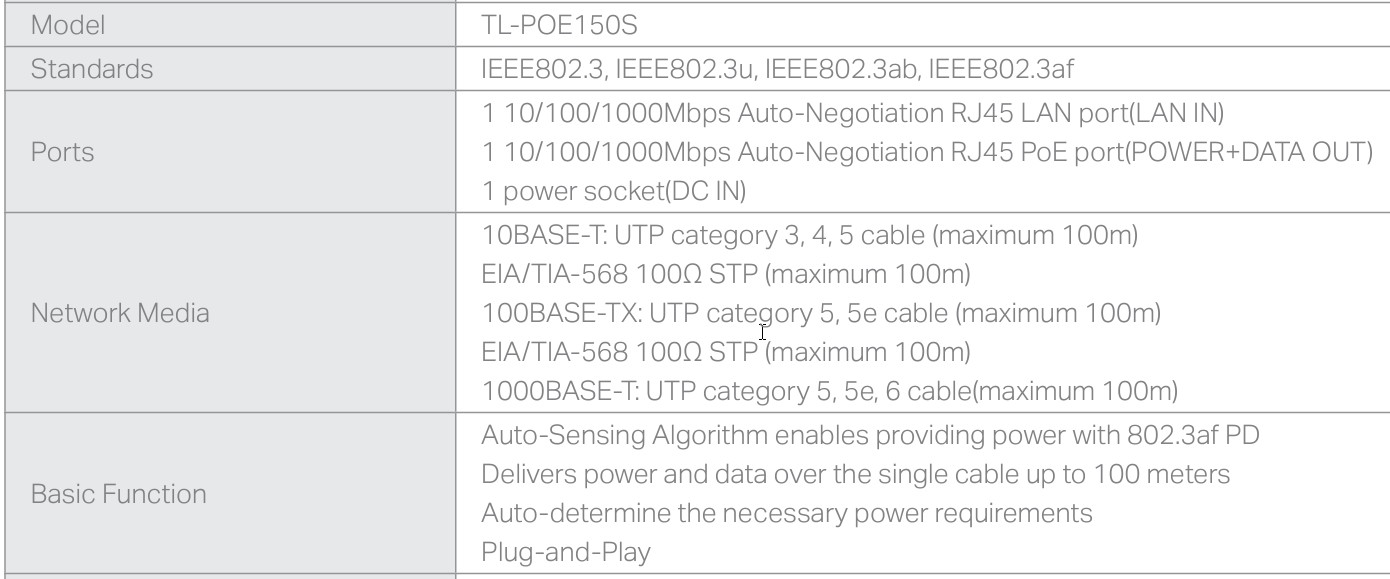
Thanks, I have double and triple confirmed, TL-POE150S-V4 is 802.3af compliant. 


Support datasheet says the following:


Delete cookies?! Are you insane?!


HP


Shop now for HP laptops and other devices (affiliate link).
kiwifidget

"Cookie"
3640 posts

Uber Geek
+1 received by user: 1969

Lifetime subscriber

  #3254692 30-Jun-2024 13:49
Send private message

OK, I know where the problem is, the why is a mystery.


It's a definitely a cable problem, to both Arubas.


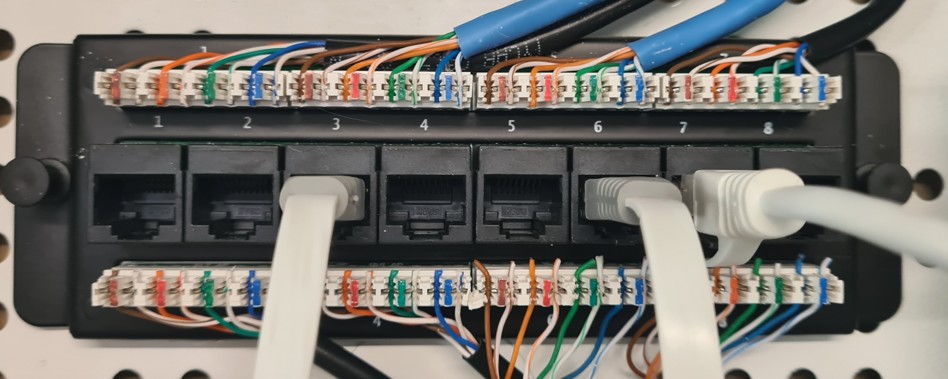
The top pin block is 1,3,5,7, and the bottom is 2,4,6,8.


Patches 5,6,8 seem to run at 100Mbps. 2,3,4,7 seem to be 1000Mbps. Unable to determine where 1 goes if anywhere.


6 and 8 run to the Aruba locations. Hall1 and Hall2 respectively.


If I connect my laptop to the cable at Hall1  I get 100Mbps even though I can see Cat6 written on the cable at the ceiling end and in the roof just above the patch cabinet. If I tug the cable at each end it moves freely so I dont think there is anything between the 2 points other than just the cable.


If I connect my laptop to the cable at Hall2  I get 100Mbps. I can see Cat6 written on the cable at the ceiling end but its a more difficult run from there to the cabinet so I cant do a tug test. It is probable it's also just a cat6 run of one cable point to point like Hall1.


Any ideas from here please.


BTW, plugging the Arubas into patch3 gave fast wifi at about 500-800Mbps so we are happy with them.


Delete cookies?! Are you insane?!


kiwifidget

"Cookie"
3640 posts

Uber Geek
+1 received by user: 1969

Lifetime subscriber

  #3254798 30-Jun-2024 16:34
Send private message

Current workaround has been to use patch 3 and 4 for the Arubas, it aint pretty but it works.


My recommendation is to re-run with new cable for patch 6 and 8, and 5.


A job for later and for someone who isnt me. 😀


Delete cookies?! Are you insane?!


RunningMan
9186 posts

Uber Geek
+1 received by user: 4840


  #3254801 30-Jun-2024 16:44
Send private message

Looks to be sparky installed not data cabler installed. The twist isn't maintanied up to the IDC and the bottom right ones aren't trimmed neatly. The implication being there are other faults to discover like poorly punched connections or swapped pairs...


kiwifidget

"Cookie"
3640 posts

Uber Geek
+1 received by user: 1969

Lifetime subscriber

  #3254804 30-Jun-2024 16:52
Send private message

RunningMan:


Looks to be sparky installed not data cabler installed. The twist isn't maintanied up to the IDC and the bottom right ones aren't trimmed neatly. The implication being there are other faults to discover like poorly punched connections or swapped pairs...


Are you saying the cable may actually be fine, its just been punched badly?


Delete cookies?! Are you insane?!


1 | 2 | 3
View this topic in a long page with up to 500 replies per page Create new topic


Geekzone Live »

Try automatic live updates from Geekzone directly in your browser, without refreshing the page, with Geekzone Live now.


Are you subscribed to our RSS feed? You can download the latest headlines and summaries from our stories directly to your computer or smartphone by using a feed reader.