
Geekzone: technology news, blogs, forums
Guest
Welcome Guest.
You haven't logged in yet. If you don't have an account you can register now.


View this topic in a long page with up to 500 replies per page Create new topic
1 | 2 
tangerz
662 posts

Ultimate Geek
+1 received by user: 199


  #3383398 12-Jun-2025 22:22
Send private message

neon:


shk292:


As mentioned above, a travel router is ideal for this, for example


https://www.pbtech.co.nz/product/NETTPL1502/TP-Link-TL-WR1502X-AX1500-Dual-Band-Wi-Fi-6-Protab


Tempted. Are you sure that's not going to have the same issue though? I don't want to be in a position to spend 130 on more networking gear that may end up being a paper weight. I'm just jot familiar on travel routers, are they meant to tackle this situation where other routers supposedly can't? 


From page 7 of the user manual...
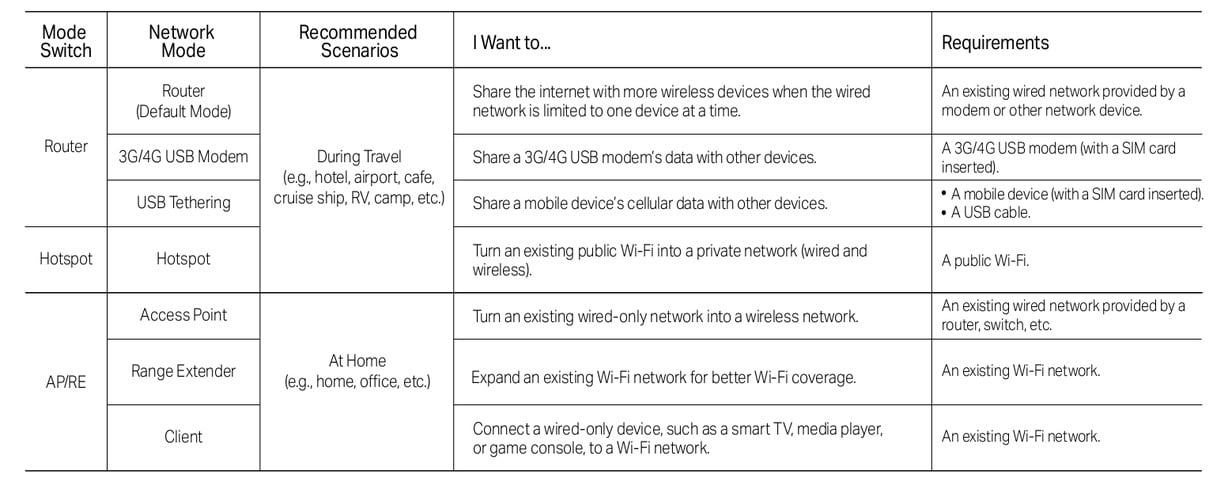


Select "Hotspot" mode. Job done.


But seriously, this is exactly what you're asking for and will do just what you want in your situation, (hardwire port for your NAS and your own private network).


SomeoneSomewhere
1882 posts

Uber Geek
+1 received by user: 1086

Lifetime subscriber

  #3383399 12-Jun-2025 22:28
Send private message

Theoretically, the WiFi-as-internet-source mode on the Fritzbox should have done exactly the same.


If something's preventing that (e.g. some kind of repeater detection on the guest network), it might block the travel router too.


I would be trying a few more options on the FB before spending money, though:


  • Triple check it's actually successfully connected to the guest network. 
  • Disable the WiFi host so that only the connection via WiFi is to the guest network. Use the Deco as an AP if this works.
  • Use the FB in bridge/client mode without routing and see if it's a NAT/DHCP/something else issue. 

tangerz
662 posts

Ultimate Geek
+1 received by user: 199


  #3383494 13-Jun-2025 09:35
Send private message

SomeoneSomewhere:


Theoretically, the WiFi-as-internet-source mode on the Fritzbox should have done exactly the same.


If something's preventing that (e.g. some kind of repeater detection on the guest network), it might block the travel router too.


I would be trying a few more options on the FB before spending money, though:


  • Triple check it's actually successfully connected to the guest network. 
  • Disable the WiFi host so that only the connection via WiFi is to the guest network. Use the Deco as an AP if this works.
  • Use the FB in bridge/client mode without routing and see if it's a NAT/DHCP/something else issue. 


True, it should work the same way.


Other things to check would be that the "WAN" connection (guest WiFi side) is setup to get an IP address via DHCP and that any VLAN tagging is off, (assuming the Fritzbox was previously used for fibre or VDSL).


Also ensure the IP address range used on the WAN side is different to that being used on the LAN side. That is to say the Fritzbox default LAN address range may be the same as that being used by the WiFi network you are connecting to.


1 | 2 
View this topic in a long page with up to 500 replies per page Create new topic


Geekzone Live »

Try automatic live updates from Geekzone directly in your browser, without refreshing the page, with Geekzone Live now.


Are you subscribed to our RSS feed? You can download the latest headlines and summaries from our stories directly to your computer or smartphone by using a feed reader.