Geekzone: technology news, blogs, forums
Guest
Welcome Guest.
You haven't logged in yet. If you don't have an account you can register now.


View this topic in a long page with up to 500 replies per page Create new topic
1 | 2 
nitro
762 posts

Ultimate Geek
+1 received by user: 340


  #3438200 28-Nov-2025 14:31
Send private message

richms:


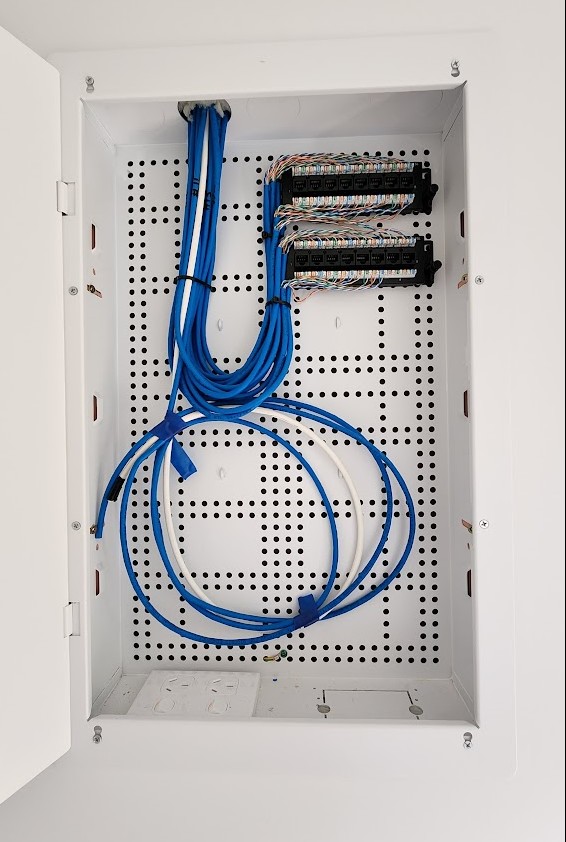
Not seeing any labelling on those 2 small patch panels so... ummm yeah, good luck.


cheap cable tracer would sort that out. but this is just for 16 ports, so i wouldn't really be that bothered.


i would also be looking at an ethernet router, a switch and an access point (or 2) for this type of deployments. or if not all 16 ports are required, something like the GWN7003 and an access point. depending on the budget, of course.


SpartanVXL
1504 posts

Uber Geek
+1 received by user: 667


  #3438314 28-Nov-2025 17:49
Send private message

Testing ports is as easy as plugging something in the room and then checking each plug in the cabinet to see which one turns on.


Given you may want simple, go with the ISP provided router. Use a ethernet cable from the ONT to the router out to a room with two ports. Use one port for the router then plug another to the rojters LAN back to the cabinet, use that for a switch if you want the rest of the homes ports to be useful.


Tinkerisk
4814 posts

Uber Geek
+1 received by user: 3684


  #3439042 1-Dec-2025 15:18
Send private message

Blurtie:


For context - it's a 120m2, 3bed house - bedrooms have 3 data points (2 + 1) each, with the rest in the living and kitchen area..


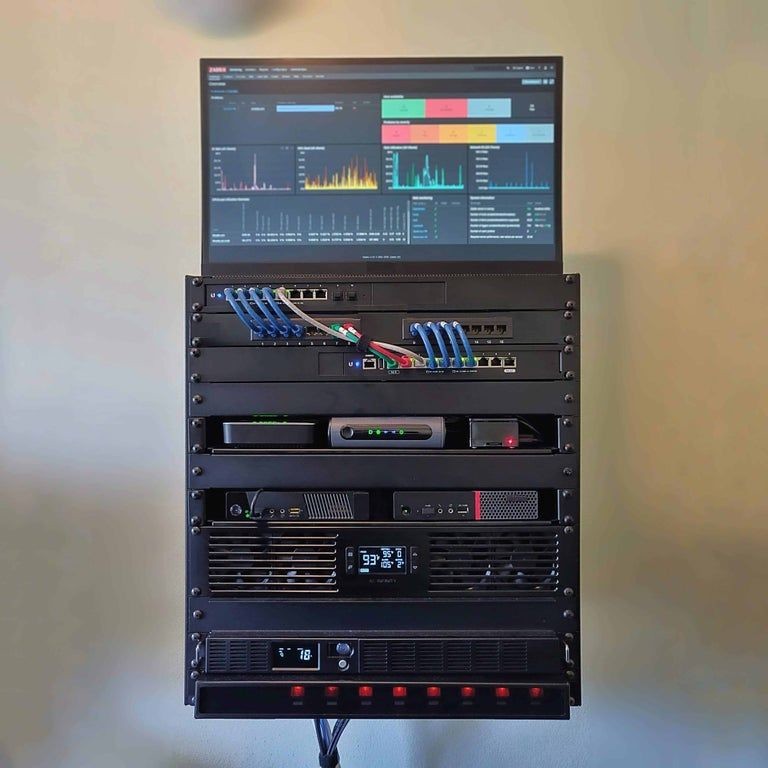
I would take the door off the oil sardine tin and put something like the one in the (sample) photo over it – but I'm by no means a benchmark for such actions ... 😁 


The white cable appears to be a power cable, doesn't it? Well then, let's get started!


  • Qui nihil scit, omnia credere debet. - He who knows nothing must believe everything.
  • Firewalls do NOT stop dragons!
  • I avoid Big Tech, they try hard to dictate technology and culture across borders.
  • In effect we have everything to hide from someone, and no idea who someone is.


Blurtie

487 posts

Ultimate Geek
+1 received by user: 131


  #3439053 1-Dec-2025 15:48
Send private message

Thanks for the comments guys, much appreciated. I knew there was a good reason I put in two ports to different locations - sorta just picked up on that from reading the various posts on here but wasn't entirely sure why... now I do! :)


nitro
762 posts

Ultimate Geek
+1 received by user: 340


  #3439060 1-Dec-2025 16:14
Send private message

Tinkerisk:


The white cable appears to be a power cable, doesn't it? Well then, let's get started!


bet it's fibre from the ETP, as there are already two 240vac outlets at the bottom of the cabinet.


KiwiSurfer
1732 posts

Uber Geek
+1 received by user: 999

ID Verified
Lifetime subscriber

  #3439061 1-Dec-2025 16:16
Send private message

Could be TV as if Chrous hasn't installed fibre yet there wouldn't be anything fibre related there yet.


Shop now on Samsung phones, tablets, TVs and more (affiliate link).
nitro
762 posts

Ultimate Geek
+1 received by user: 340


  #3439062 1-Dec-2025 16:24
Send private message

KiwiSurfer:


Could be TV as if Chrous hasn't installed fibre yet there wouldn't be anything fibre related there yet.


i've seen this (fibre from ETP) done by builders on new builds, especially townhouses/MDUs. also,


  • no evidence of any other coax distribution in that cabinet,
  • i've never seen RG-6 taped at the end


Tinkerisk
4814 posts

Uber Geek
+1 received by user: 3684


  #3439070 1-Dec-2025 17:03
Send private message

nitro:


Tinkerisk:


The white cable appears to be a power cable, doesn't it? Well then, let's get started!


bet it's fibre from the ETP, as there are already two 240vac outlets at the bottom of the cabinet.


Okay, but that makes my suggestion even easier to implement (because that's all it will be anyway, and an inexpensive rack (w/o door) with 2-3 shelves and a switch will suffice for now. But we'll keep everything open for the future). The ONT could stay in the tin can, patch the rooms to the front panel and put the router and switch in the rack. If necessary, UPS, Ventilation, an office old monitor on top for the stats and maybe a raspberry pi and/or mini-PCs or compact NAS for future services – and voilà, you have a new altar hobby. 12RU rocks! 🙂


  • Qui nihil scit, omnia credere debet. - He who knows nothing must believe everything.
  • Firewalls do NOT stop dragons!
  • I avoid Big Tech, they try hard to dictate technology and culture across borders.
  • In effect we have everything to hide from someone, and no idea who someone is.

Blurtie

487 posts

Ultimate Geek
+1 received by user: 131


  #3439476 2-Dec-2025 11:25
Send private message

nitro:


KiwiSurfer:


Could be TV as if Chrous hasn't installed fibre yet there wouldn't be anything fibre related there yet.


i've seen this (fibre from ETP) done by builders on new builds, especially townhouses/MDUs. also,


  • no evidence of any other coax distribution in that cabinet,
  • i've never seen RG-6 taped at the end


Yep, nitro's got it. The white cable is fibre from the ETP location, the builder/sparky has bundled the red fibre lead in conduit with the white fibre cable at a convenient ETP location - for hopefully quick and easy installation by Enable.


Does anyone know if the Enable has a close down period over the Christmas break? 


Blurtie

487 posts

Ultimate Geek
+1 received by user: 131


  #3439837 3-Dec-2025 14:03
Send private message

At the risk of overthinking it.. where would you place the ONT in that cabinet? Top left corner or somewhere else?


TIA


nitro
762 posts

Ultimate Geek
+1 received by user: 340


  #3439959 3-Dec-2025 20:47
Send private message

if you're going with the RSP router in the living room (or some other central location), the only things going in that cabinet would be the ONT and a switch. this gives you ample space.


connections to the ONT is not something you fiddle with once it's setup, so pretty much anywhere. for future upgrades, you might want to leave space in there for an ethernet router (RB5009, GWN7003, etc.) along with the switch.


Shop now for Lego sets and other gifts (affiliate link).
razor2000nz
229 posts

Master Geek
+1 received by user: 36


  #3440032 3-Dec-2025 23:26
Send private message

I'm also moving into a new house, and first time with a comms cabinet. What is generally best practice, ONT, Router (wifi off) and switch in cabinet then Mesh system connected to Lan ports throughout house? Or ONT in cabinet, output to Router in to a room with dual Lan socket to run back to comms cabinet with a switch to liven up remaining Lan ports in house. 


Currently using a d-link 3 node mesh system in (AX1873) so would like to plug and play that system at new place so don't have to reconfigure a whole heap of stuff. Emby server etc. 


Blurtie

487 posts

Ultimate Geek
+1 received by user: 131


  #3440217 4-Dec-2025 13:57
Send private message

nitro:


if you're going with the RSP router in the living room (or some other central location), the only things going in that cabinet would be the ONT and a switch. this gives you ample space.


connections to the ONT is not something you fiddle with once it's setup, so pretty much anywhere. for future upgrades, you might want to leave space in there for an ethernet router (RB5009, GWN7003, etc.) along with the switch.


Yes, will go with the RSP router out in a central location.


Sorry dumb question - what's the benefit of having an ethernet router in the cabinet along with a switch?


For the switch - is TP-Link decent? Thinking of getting SG116E, SG1016D, or SG108PE (although I'm not sure if I'll need the PoE - nice to have I guess). Any other suggestions for around that budget would be welcome.


nitro
762 posts

Ultimate Geek
+1 received by user: 340


  #3440223 4-Dec-2025 14:31
Send private message

Blurtie:


Yes, will go with the RSP router out in a central location.


Sorry dumb question - what's the benefit of having an ethernet router in the cabinet along with a switch?


For the switch - is TP-Link decent? Thinking of getting SG116E, SG1016D, or SG108PE (although I'm not sure if I'll need the PoE - nice to have I guess). Any other suggestions for around that budget would be welcome.


it means you don't waste 2 ports on the patch panel to connect to the all-in-one router in the living room, then back to the comms cabinet to the switch (and then the other patch panel ports to other rooms in the house.


if using enterprise/commercial grade ethernet only routers potentially gives you more features/functionality... and separate access points mean you can upgrade WAPs, e.g. to newer wifi standards, independent of the router.


TP-Link make pretty good stuff these days. with their network switches, i don't think you'd be wanting more. you would only need PoE if you intend to connect (to the switch) devices that are powered via PoE - most commonly, access points.


1 | 2 
View this topic in a long page with up to 500 replies per page Create new topic


Geekzone Live »

Try automatic live updates from Geekzone directly in your browser, without refreshing the page, with Geekzone Live now.


Are you subscribed to our RSS feed? You can download the latest headlines and summaries from our stories directly to your computer or smartphone by using a feed reader.