Geekzone: technology news, blogs, forums
Guest
Welcome Guest.
You haven't logged in yet. If you don't have an account you can register now.


Blurtie

487 posts

Ultimate Geek
+1 received by user: 131


#323398 28-Nov-2025 11:34
Send private message

Hey team, 


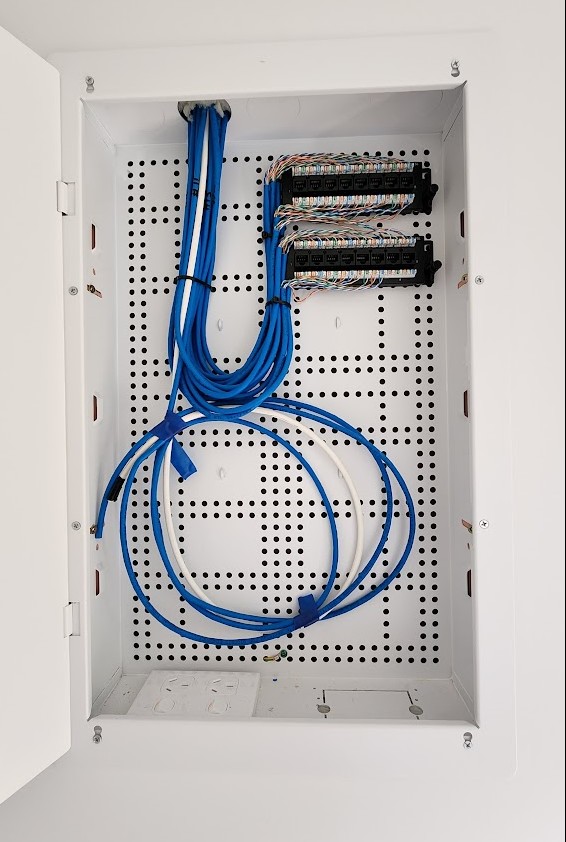
After suggestions/recommendations on what sorta kit to get the for new home. Please be gentle, pretty much a noob in this area. I know I need a switch, but any suggestions? I understand the cabinet is on the small size so might be limited in terms of what I can fit in there. Pic below.


For context - it's a 120m2, 3bed house - bedrooms have 3 data points (2 + 1) each, with the rest in the living and kitchen area..


View this topic in a long page with up to 500 replies per page Create new topic
 1 | 2
SpartanVXL
1498 posts

Uber Geek
+1 received by user: 666


  #3438158 28-Nov-2025 12:02
Send private message

Do you have internet service already? If not that white cable might be the fibre, you’ll need to get an ONT installed which will take up more space. Sign up with a ISP and it will get the install procedure started.


If you sign up with a provider and get a  provided router it will usually have four LAN ports which will be enough to start with. Get a 8 port 1Gbe switch when you need more connections.


KiwiSurfer
1722 posts

Uber Geek
+1 received by user: 993

ID Verified
Lifetime subscriber

  #3438161 28-Nov-2025 12:09
Send private message

I think we have the same (or at least very similar) comms cabinet.


Have you had your ONT installed yet? I got Chrous to put the ONT in our comms cabient.


For routing I currently use the EdgeRouter in ours but not sure I'd recommend it now -- the last firmware update wasn't great and I've had to reboot it a couple of times in the last few months as the OS tend to slow down and eventually hangs (but switching/routing continues fine as these are offloaded). I've seen some good reviews here about Grandstream options which I may try next. If you have the ONT in the cabinet, then you can just pair it with a router that doesn't do Wifi.


For Wifi I have a Orbi which sits in the living room, attached to a switch (which also links in the Xbox and Smart TV) which is then connected to a ethernet cable that runs back to the comms cupboard and plugged into the EdgeRouter.


My comms cupboard has 3 cables going to living room (as mentioned, goes to Orbi Wifi, Xbox and Smart TV), bedroom 1 (goes direct to our smart TV), and bedroom 2 (to a switch for my home server, desktop, and smart TV).


For a while I had a little Raspberry Pi home server -- was nice to hide it away in the comms cupboard. Since replaced with an x86 tower which obviously doesn't live in the comms cabinet anymore!


You may also want to look into a 4-plug power board as sometimes it's tricky getting the power bricks to fit otherwise.


richms
29098 posts

Uber Geek
+1 received by user: 10208

Trusted
Lifetime subscriber

  #3438162 28-Nov-2025 12:10
Send private message

Based on the excessive jacket removal I would be opening up the wall outlet ends and seeing how badly they have been done too and getting the person that did this work back to resolve it.


Richard rich.ms


nickb800
2735 posts

Uber Geek
+1 received by user: 829

Trusted

  #3438165 28-Nov-2025 12:18
Send private message

richms:


Based on the excessive jacket removal I would be opening up the wall outlet ends and seeing how badly they have been done too and getting the person that did this work back to resolve it.


Agree, though I'd be getting someone different to resolve it


Blurtie

487 posts

Ultimate Geek
+1 received by user: 131


  #3438170 28-Nov-2025 12:25
Send private message

Thanks guys - yes yet to book the ONT install, but that will also go in the cabinet.


Richms/Nickb - can you please elaborate a bit more on what I should be looking for in terms of the bad install? and if asking for it to be redone - how it should look...?


trig42
5889 posts

Uber Geek
+1 received by user: 2094

ID Verified

  #3438172 28-Nov-2025 12:33
Send private message

It doesn't look too bad to me.


They haven't untwisted the pairs, just stripped the outer blue casing back.


@OP - if the pairs in networking cables are untwisted it can affect them (but you'd be pretty unlucky if it did). You could check inside the wall plugs in the bedrooms etc. to see if they've untwisted the little white/coloured wires before punching them down, but you're probably perfectly fine.


Shop now for Dell laptops and other devices (affiliate link).
richms
29098 posts

Uber Geek
+1 received by user: 10208

Trusted
Lifetime subscriber

  #3438174 28-Nov-2025 12:39
Send private message

trig42:


It doesn't look too bad to me.


They haven't untwisted the pairs, just stripped the outer blue casing back.


@OP - if the pairs in networking cables are untwisted it can affect them (but you'd be pretty unlucky if it did). You could check inside the wall plugs in the bedrooms etc. to see if they've untwisted the little white/coloured wires before punching them down, but you're probably perfectly fine.


The pairs in jackets have different twist rates since they are close, between jackets there is more spacing so that the same twist rate doesn't really matter. If you pull them all out of the jacket and bundle them like that there will be more cross talk at this point where they are twisted in sync with each other and pulled really close. It it was in free air - no change to performance.


It will probably not matter. But to flagrantly do something that is known not to do like that because you think its a power panel and are removing the sheath to be able to make it neater shows a lack of understanding of best practice and there may be other issues that they have done because they were not data installers.


Richard rich.ms

RunningMan
9184 posts

Uber Geek
+1 received by user: 4834


  #3438176 28-Nov-2025 12:43
Send private message

You need all four twisted pairs the same length ideally - looks like they've been cut differently. Looks neat and tidy, so probably done by someone used to working at 50Hz, but isn't the correct approach for data cable.


It will probably work OK, but isn't best practise.


Blurtie

487 posts

Ultimate Geek
+1 received by user: 131


  #3438178 28-Nov-2025 12:57
Send private message

Thanks for the mini heart attack guys.. haha is there any way to easily check if it works okay? Assume it's a case of plugging things at both ends - any tool/device i can use here?


Pretty sure it was a sparky that did this rather than an actual data installer..


I guess as a bit of a lay person, as long as it works for day-to-day household stuff - then I'm okay with that. I understand that other true geeks on here would/should demand more!


nztim
4012 posts

Uber Geek
+1 received by user: 2710

ID Verified
Trusted
TEAMnetwork
Subscriber

  #3438186 28-Nov-2025 13:42
Send private message

Never let electricians do data cabling


Any views expressed on these forums are my own and don't necessarily reflect those of my employer. 


evnafets
567 posts

Ultimate Geek
+1 received by user: 269

Trusted
Lifetime subscriber

  #3438187 28-Nov-2025 13:46
Send private message

So with regards to what will be going into that box:

ONT - the fibre 'modem' that converts from fibre into ethernet cable.
ISP Provided switch/router - which also doubles as a basic Wifi access point.  Connects to the ONT and provides 'internet' to your house.  


Some other things to consider: 
How many of those ports are you wanting to activate?
Will you want to use mainly wires?  Or wifi?

The standard switch/routers you get have 4-5 outputs for home use, so you would possibly need another switch to get enough to have a cable plugged into every one of those ports (15/16 of them?)


For WIFI, the box in the garage may not be the best spot for putting the access point :-)
Generally you want a 'central' location - like the lounge.  So you might consider getting a wireless access point for there. 


Shop now for Lenovo laptops and other devices (affiliate link).
richms
29098 posts

Uber Geek
+1 received by user: 10208

Trusted
Lifetime subscriber

  #3438190 28-Nov-2025 13:57
Send private message

In general, you will get the ONT installed in there, and then take the output of it to one of the plugs at the top, and that will then go to your living room or study or wherever and you put the router there. Then take its LAN output and plug it into a second port in the same room to bring the LAN back here. The in this cupboard you would have an 8-16 port small switch and put the return from the router into it, and then connect all the other ports to the rooms you want wired devices in. 


This does need a location with multiple ports available which you said you have. 


I would recommend getting 3 different colours of patch cables. One colour for ont to the router (2 of them, one short in cupboard, one longer at the other end) Another colour for the router back to the switch (again one long and one short) and then a third colour for everything else.


Not seeing any labelling on those 2 small patch panels so... ummm yeah, good luck.


Richard rich.ms

nztim
4012 posts

Uber Geek
+1 received by user: 2710

ID Verified
Trusted
TEAMnetwork
Subscriber

  #3438195 28-Nov-2025 14:14
Send private message

evnafets:


For WIFI, the box in the garage may not be the best spot for putting the access point :-)
Generally you want a 'central' location - like the lounge.  So you might consider getting a wireless access point for there. 


Ideally a celling mounted AP facing downwards


Any views expressed on these forums are my own and don't necessarily reflect those of my employer. 


wellygary
8810 posts

Uber Geek
+1 received by user: 5287


  #3438196 28-Nov-2025 14:14
Send private message

Blurtie:


Thanks for the mini heart attack guys.. haha is there any way to easily check if it works okay? Assume it's a case of plugging things at both ends - any tool/device i can use here?


Pretty sure it was a sparky that did this rather than an actual data installer..


I guess as a bit of a lay person, as long as it works for day-to-day household stuff - then I'm okay with that. I understand that other true geeks on here would/should demand more!


You could get a cable tester. but in reality its just as easy to use a device once its set up,


If you connect a router/switch to the ports in the comms cabinet, and then just plug a laptop or something else that has external LEDs on the ethernet port, it will start dancing like a Christmas tree if there is a live connection,  -


KiwiSurfer
1722 posts

Uber Geek
+1 received by user: 993

ID Verified
Lifetime subscriber

  #3438198 28-Nov-2025 14:18
Send private message

I would not ever use anything sitting in the comms cupboard as a Wifi AP. All good to use ISP provided gear, but defintielty 100% disable the wifi and use a separate Wifi AP. I generally disable DHCP and all that stuff on the Wifi APs itself so it's just passing through DHCP from the router and everything in the house is on the same subnet. Over the years i've used Unifi, Ruckus, Orbi as the Wifi AP -- using Microtik/EdgeRouter/etc as the router only.


 1 | 2
View this topic in a long page with up to 500 replies per page Create new topic


Geekzone Live »

Try automatic live updates from Geekzone directly in your browser, without refreshing the page, with Geekzone Live now.


Are you subscribed to our RSS feed? You can download the latest headlines and summaries from our stories directly to your computer or smartphone by using a feed reader.
