Geekzone: technology news, blogs, forums
Guest
Welcome Guest.
You haven't logged in yet. If you don't have an account you can register now.


View this topic in a long page with up to 500 replies per page Create new topic
1 | 2 | 3 | 4
alisam

916 posts

Ultimate Geek
+1 received by user: 89


  #3499009 1-Jun-2026 08:06
Send private message quote this post

Please offer some advice.


I had an old 6TB Drive (which I knew had errors and didn't really want to use it) and put it into Drive 1.


Drive 2 contains the good 6TB Drive.


The NAS rebuilt the Storage Pool.


In the meantime, I purchased an 8TB NAS Drive. I have not fitted it yet.


This morning:


1) Both drives critical. Then (and I didn't do anything) about 30 minutes later ...


2) Drive 1 Healthy, Drive 2 Critical. Then (and I didn't do anything...) about another 30 minutes later ...


3) Both drives Healthy.


So, I am thinking.


The original problem was:


Drive 1 - Critical


Drive 2 - Healthy


So, put the new 8TB Drive in Drive 1 and let it do its think and see what happens.


PC: Dell Inspiron 16 5640 (Windows 11 Home), Dell Inspiron 7591 2n1 (Windows 11 Pro), HP ProBook 470G1 (Windows 10 Pro), Intel NUC7I5BNH (Zorin)
Net: Grandstream 1 x GWN7062 Router, 1 x GWN7665 Access Point
Storage: Synology DS216play NAS, 2 x 6TB
Media: 3 x Amazon FireTV. Echo, Dot, Spot
TV: 2 x Samsung H6400 55" LED TV, Panasonic TH-P50G10Z 50" Plasma TV
Mobile: Samsung Galaxy A52 5G
Wearable: Gear S3 Frontier


Behodar
11209 posts

Uber Geek
+1 received by user: 6234

Trusted
Lifetime subscriber

  #3499012 1-Jun-2026 08:24
Send private message quote this post

It's been a while since I've had a failed drive but it might be the case that it reports both drives as critical while it's rebuilding, as the loss of either drive at that point will result in a catastrophic failure. Once the rebuild has completed, the pool is then healthy again.


alisam

916 posts

Ultimate Geek
+1 received by user: 89


  #3499013 1-Jun-2026 08:31
Send private message quote this post

Behodar:


It's been a while since I've had a failed drive but it might be the case that it reports both drives as critical while it's rebuilding, as the loss of either drive at that point will result in a catastrophic failure. Once the rebuild has completed, the pool is then healthy again.


As far as I could ascertain, the pool had been rebuilt as there were no messages in Storage Manager.


PC: Dell Inspiron 16 5640 (Windows 11 Home), Dell Inspiron 7591 2n1 (Windows 11 Pro), HP ProBook 470G1 (Windows 10 Pro), Intel NUC7I5BNH (Zorin)
Net: Grandstream 1 x GWN7062 Router, 1 x GWN7665 Access Point
Storage: Synology DS216play NAS, 2 x 6TB
Media: 3 x Amazon FireTV. Echo, Dot, Spot
TV: 2 x Samsung H6400 55" LED TV, Panasonic TH-P50G10Z 50" Plasma TV
Mobile: Samsung Galaxy A52 5G
Wearable: Gear S3 Frontier


Tinkerisk
4906 posts

Uber Geek
+1 received by user: 3824


  #3499014 1-Jun-2026 08:53
Send private message quote this post

alisam:


Behodar:


It's been a while since I've had a failed drive but it might be the case that it reports both drives as critical while it's rebuilding, as the loss of either drive at that point will result in a catastrophic failure. Once the rebuild has completed, the pool is then healthy again.


As far as I could ascertain, the pool had been rebuilt as there were no messages in Storage Manager.


I don't have DSM, so I can't really comment on that. However, you might be able to access the S.M.A.R.T. parameters of each HDD and check how many errors are recorded there. Sometimes, an assessment is also provided there to help you interpret the significance of the diagnostic data—or to warn you of an impending drive failure.


In the best-case scenario, it was just a hiccup; in the worst case, you'll have to trade in another kidney—this time for the other drive. 😉


  • Qui nihil scit, omnia credere debet. - He who knows nothing must believe everything.
  • Firewalls do NOT stop dragons. Really not!
  • I avoid Big Tech. They try hard to dictate technology and „culture“ across borders.
  • In effect we have everything to hide from someone, and no idea who „someone“ is.

fearandloathing
544 posts

Ultimate Geek
+1 received by user: 212

ID Verified
Lifetime subscriber

  #3499015 1-Jun-2026 09:07
Send private message quote this post

For longevity of drives in Synology. 
don’t hibernate drives, let them spin 24/7
enable monthly smart tests


Enable 3 monthly Full RAID scrubbing; this is the important one, as it reads and writes the entire drive surface regularly. 


dafman
4091 posts

Uber Geek
+1 received by user: 2695

Trusted
Subscriber

  #3499030 1-Jun-2026 10:37
Send private message quote this post

fearandloathing:


For longevity of drives in Synology. 
don’t hibernate drives, let them spin 24/7
enable monthly smart tests


Enable 3 monthly Full RAID scrubbing; this is the important one, as it reads and writes the entire drive surface regularly. 


Thanks for this. I run DS220+ with 2 x 8TB WD red. I just checked storage manager and last time data scrubbing was completed was 2020 (I bought the DS in 2020).


So I should run a data scrub now and set up a 3-monthly schedule?


Shop now for Dyson appliances (affiliate link).
Jase2985
13772 posts

Uber Geek
+1 received by user: 6254

ID Verified
Lifetime subscriber

  #3499031 1-Jun-2026 10:39
Send private message quote this post

dafman:


fearandloathing:


For longevity of drives in Synology. 
don’t hibernate drives, let them spin 24/7
enable monthly smart tests


Enable 3 monthly Full RAID scrubbing; this is the important one, as it reads and writes the entire drive surface regularly. 


Thanks for this. I run DS220+ with 2 x 8TB WD red. I just checked storage manager and last time data scrubbing was completed was 2020 (I bought the DS in 2020).


So I should run a data scrub now and set up a 3-monthly schedule?


yes


i would go 6 monthly as the absolute max for it. its checking all the data for any errors and recovering it if possible.


freitasm
BDFL - Memuneh
80944 posts

Uber Geek
+1 received by user: 41698

Administrator
ID Verified
Trusted
Geekzone
Lifetime subscriber

  #3499038 1-Jun-2026 11:03
Send private message quote this post

@alisam please, whatever you do, do not remove the original good drive for now. You replaced the failed drive with a drive that you knew had errors already. Not good.


Wait until it says the pool is healthy.


When it does, disable the drive you installed, the one you know had errors. 


The pool will go unhealthy again. Swap with the new, good drive. Let the NAS do its work.


And make sure you have a backup of your important data.


Referral links: Quic Broadband (free setup code: R587125ERQ6VE) | Samsung | AliExpress | Wise | Sharesies 


Support Geekzone by subscribing (browse ads-free), or making a one-off or recurring donation through PressPatron.


Behodar
11209 posts

Uber Geek
+1 received by user: 6234

Trusted
Lifetime subscriber

  #3499451 2-Jun-2026 10:58
Send private message quote this post

fearandloathing:


Enable 3 monthly Full RAID scrubbing; this is the important one, as it reads and writes the entire drive surface regularly. 


Thanks for posting this: it prompted me to check my settings. I had scrubbing set for every six months, but it last ran in 2020! It turns out that although the schedule was set up, it had somehow become unlinked from the storage pool. I'd encourage everyone to review their settings and make sure that it's running.


freitasm
BDFL - Memuneh
80944 posts

Uber Geek
+1 received by user: 41698

Administrator
ID Verified
Trusted
Geekzone
Lifetime subscriber

  #3499452 2-Jun-2026 11:02
Send private message quote this post

Behodar:


fearandloathing:


Enable 3 monthly Full RAID scrubbing; this is the important one, as it reads and writes the entire drive surface regularly. 


Thanks for posting this: it prompted me to check my settings. I had scrubbing set for every six months, but it last ran in 2020! It turns out that although the schedule was set up, it had somehow become unlinked from the storage pool. I'd encourage everyone to review their settings and make sure that it's running.


Scrubbing is quite an intensive operation, as it reads all data and, if it contains checksums, calculates them. I schedule it for every six months, and make sure it doesn't coincide with SMART checks either.


Referral links: Quic Broadband (free setup code: R587125ERQ6VE) | Samsung | AliExpress | Wise | Sharesies 


Support Geekzone by subscribing (browse ads-free), or making a one-off or recurring donation through PressPatron.


alisam

916 posts

Ultimate Geek
+1 received by user: 89


  #3499552 2-Jun-2026 16:42
Send private message quote this post

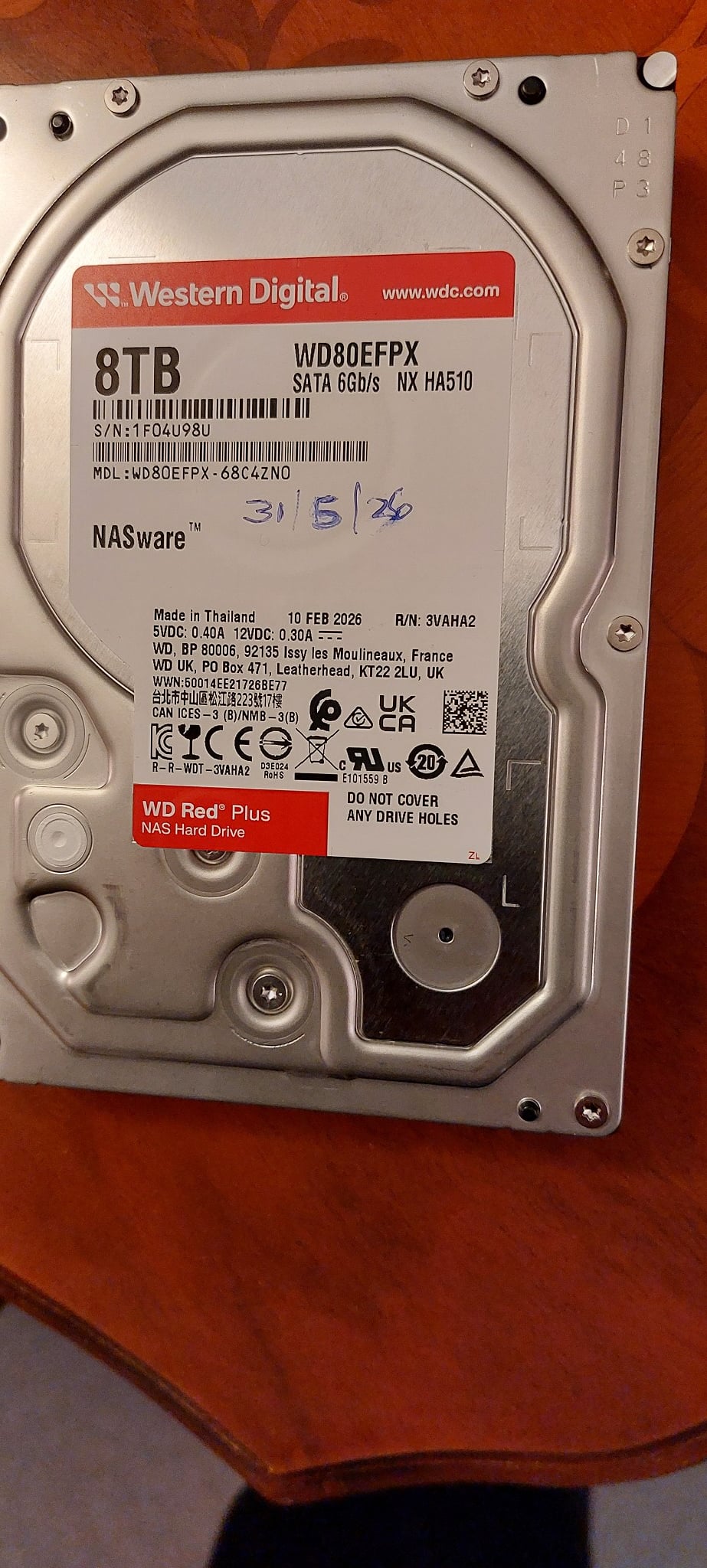
I believe I have just ruined a brand new 8GB WD Red NAS drive in 30 seconds.


I put the new disk in Drive 1. As I replace drives so infrequently, I found it hard to slide the drive evenly into the slot.


The DS216 Play has 2 drive slots, one on top of each other.


After inserting the disk, DSM did not recognise it (PS I had checked that the DS216PLAY would take a maximum disk of 8TB)


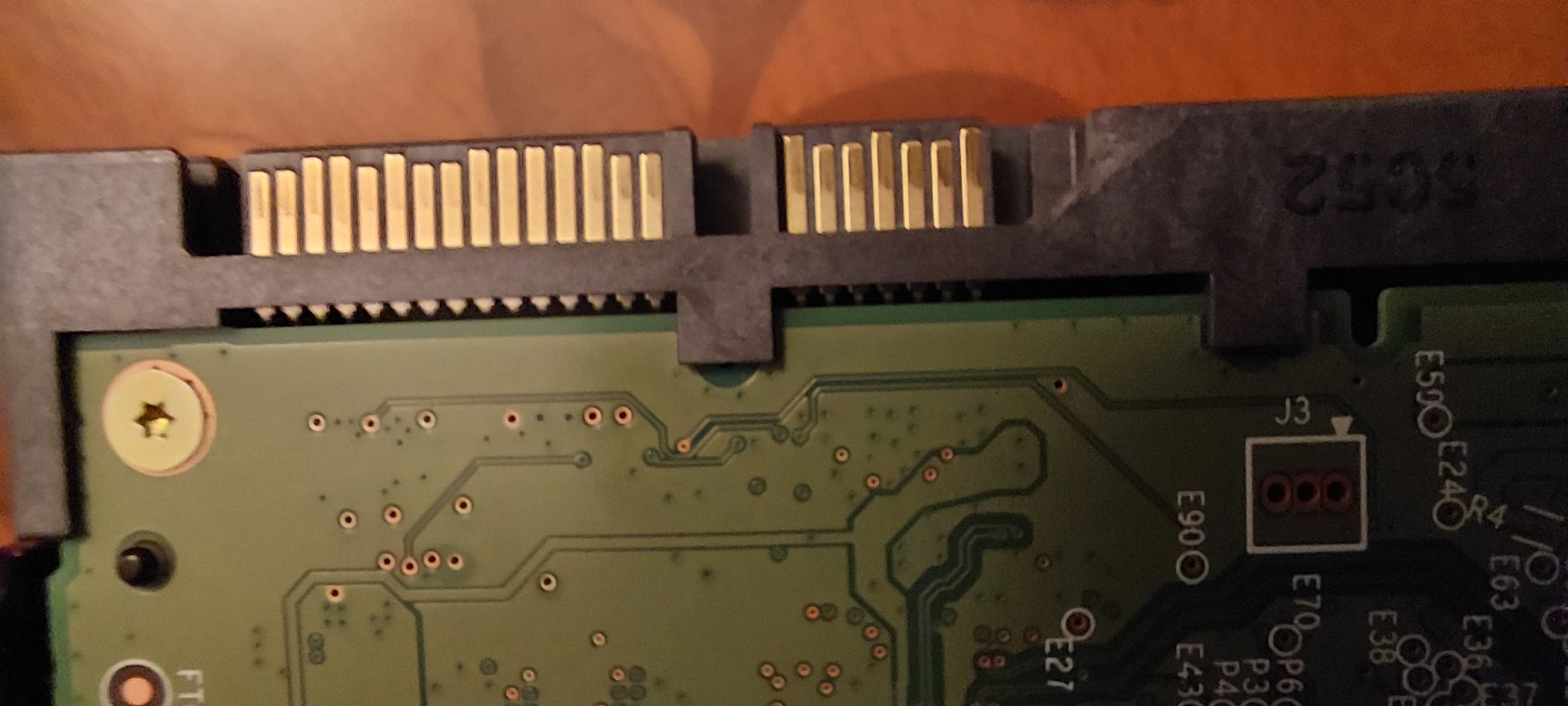
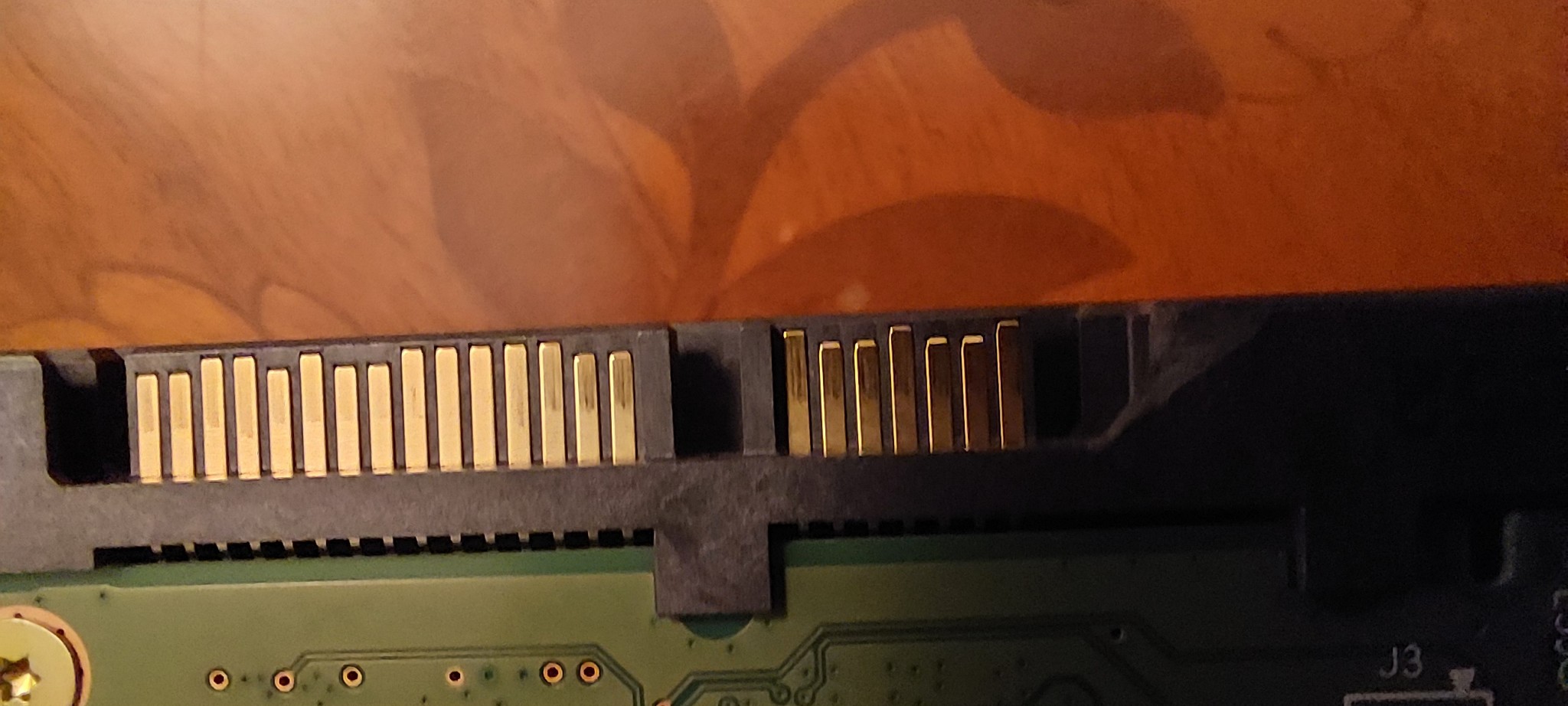
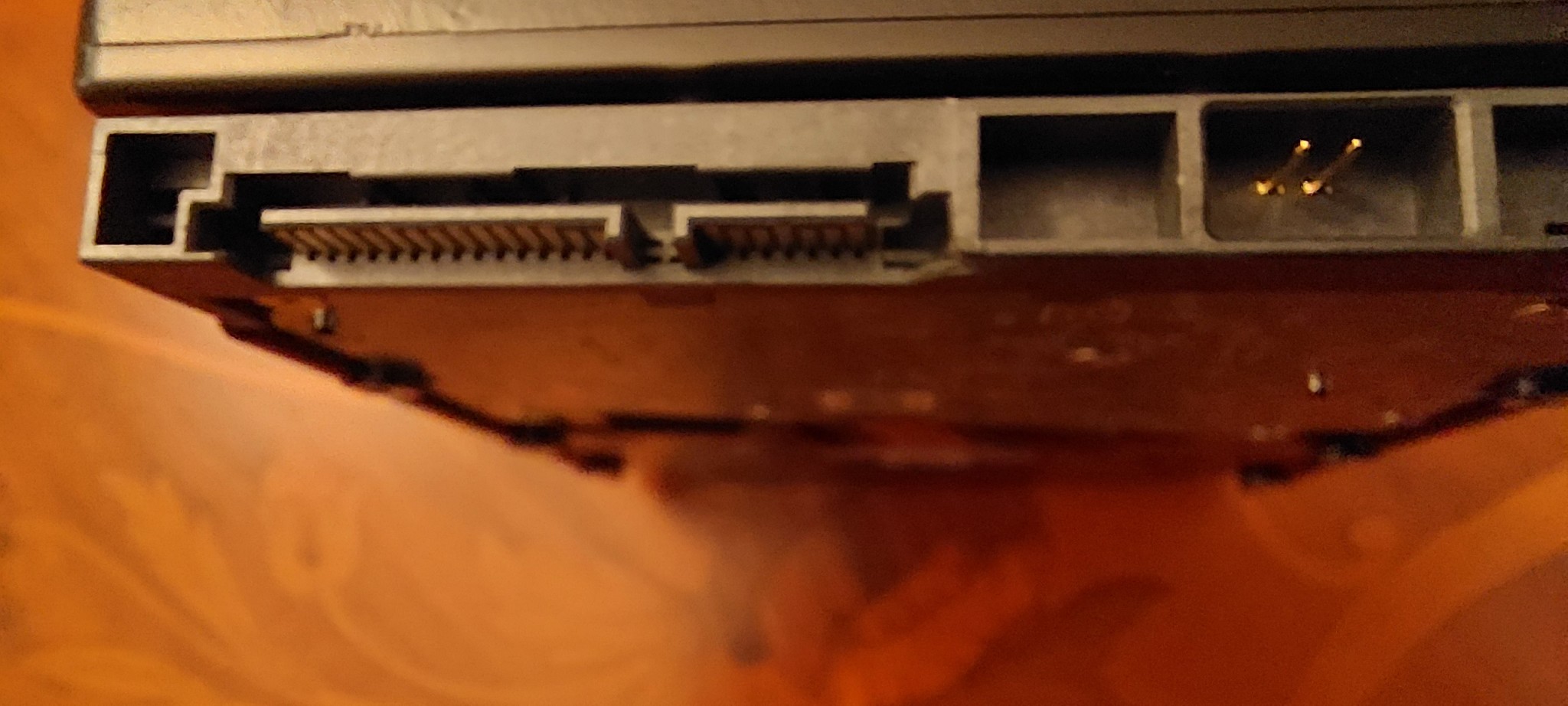
I took it out, but did find I had chipped part of casing near the terminals, because there was a small piece of loose plastic from the drive. The terminals did not look damaged.


I put it back, but still DSM would not recognise it.


I took it out and put it into a ORICO 2 bay dock, but Windows would not see it.


What a waste of good money and dreading telling the wife.


PC: Dell Inspiron 16 5640 (Windows 11 Home), Dell Inspiron 7591 2n1 (Windows 11 Pro), HP ProBook 470G1 (Windows 10 Pro), Intel NUC7I5BNH (Zorin)
Net: Grandstream 1 x GWN7062 Router, 1 x GWN7665 Access Point
Storage: Synology DS216play NAS, 2 x 6TB
Media: 3 x Amazon FireTV. Echo, Dot, Spot
TV: 2 x Samsung H6400 55" LED TV, Panasonic TH-P50G10Z 50" Plasma TV
Mobile: Samsung Galaxy A52 5G
Wearable: Gear S3 Frontier


Shop now for Lenovo laptops and other devices (affiliate link).
networkn
Networkn
33022 posts

Uber Geek
+1 received by user: 15610

ID Verified
Trusted
Lifetime subscriber

  #3499557 2-Jun-2026 17:01
Send private message quote this post

I love Synology devices, but I'd have to say, the way they represent drive failures/raid degradation is pretty horrible. As an experienced IT person, I had a similar single drive failure recently and the UX of getting back to healthy and understanding the UI wasn't ideal in my opinion. 


I am thankful I have a clear and technical understanding of this, and I could absolutely see someone misunderstanding the situation and making it worse. As someone mentioned, Synology do somewhat make up for this, with better than average tolerance for those issues.


I am a huge fan of HPE and their Smart Array Controllers (though recently I had a failure where the bays the drives were being reported in were in fact absolutely incorrect till a reboot, which nearly caused the wrong drive to be removed and 'replaced). 


networkn
Networkn
33022 posts

Uber Geek
+1 received by user: 15610

ID Verified
Trusted
Lifetime subscriber

  #3499558 2-Jun-2026 17:02
Send private message quote this post

alisam:


I believe I have just ruined a brand new 8GB WD Red NAS drive in 30 seconds.


I put the new disk in Drive 1. As I replace drives so infrequently, I found it hard to slide the drive evenly into the slot.


The DS216 Play has 2 drive slots, one on top of each other.


After inserting the disk, DSM did not recognise it (PS I had checked that the DS216PLAY would take a maximum disk of 8TB)


I took it out, but did find I had chipped part of casing near the terminals, because there was a small piece of loose plastic from the drive. The terminals did not look damaged.


I put it back, but still DSM would not recognise it.


I took it out and put it into a ORICO 2 bay dock, but Windows would not see it.


What a waste of good money and dreading telling the wife.


Don't panic yet, lets get a photo up in decent resolution of the business end of the drive and see what the damage is. If you haven't damaged the pins, you are likely absolutely fine. I am guessing you are slightly misaligned on the connector.


If you are in Auckland, and are willing to bring the NAS, and drive to me, I can take a look in person, gratis. Don't do anything else until you've either done that, or put up photos and waited to hear back from others here as to the next action. 


alisam

916 posts

Ultimate Geek
+1 received by user: 89


  #3499568 2-Jun-2026 18:00
Send private message quote this post

networkn:


alisam:


I believe I have just ruined a brand new 8GB WD Red NAS drive in 30 seconds.


I put the new disk in Drive 1. As I replace drives so infrequently, I found it hard to slide the drive evenly into the slot.


The DS216 Play has 2 drive slots, one on top of each other.


After inserting the disk, DSM did not recognise it (PS I had checked that the DS216PLAY would take a maximum disk of 8TB)


I took it out, but did find I had chipped part of casing near the terminals, because there was a small piece of loose plastic from the drive. The terminals did not look damaged.


I put it back, but still DSM would not recognise it.


I took it out and put it into a ORICO 2 bay dock, but Windows would not see it.


What a waste of good money and dreading telling the wife.


Don't panic yet, lets get a photo up in decent resolution of the business end of the drive and see what the damage is. If you haven't damaged the pins, you are likely absolutely fine. I am guessing you are slightly misaligned on the connector.


If you are in Auckland, and are willing to bring the NAS, and drive to me, I can take a look in person, gratis. Don't do anything else until you've either done that, or put up photos and waited to hear back from others here as to the next action. 


Have a look at the photos first (thank you).


1.


2.


3.


4.


PC: Dell Inspiron 16 5640 (Windows 11 Home), Dell Inspiron 7591 2n1 (Windows 11 Pro), HP ProBook 470G1 (Windows 10 Pro), Intel NUC7I5BNH (Zorin)
Net: Grandstream 1 x GWN7062 Router, 1 x GWN7665 Access Point
Storage: Synology DS216play NAS, 2 x 6TB
Media: 3 x Amazon FireTV. Echo, Dot, Spot
TV: 2 x Samsung H6400 55" LED TV, Panasonic TH-P50G10Z 50" Plasma TV
Mobile: Samsung Galaxy A52 5G
Wearable: Gear S3 Frontier


networkn
Networkn
33022 posts

Uber Geek
+1 received by user: 15610

ID Verified
Trusted
Lifetime subscriber

  #3499571 2-Jun-2026 18:17
Send private message quote this post

Ok, I can't see damage to the pins, and the majority of the mechanism that guides your drive into the right place is intact, so in theory, lined up *correctly*, you'd be all set, though a fraction less securely. 


I am thinking the reason your drive wasn't recognised by windows is the format of the drive or the partition structure, if one even existed. It's more likely entirely unformatted and has no partitions, so Windows doesn't 'know' about it yet. 


Good news is you likely have a decent outcome still possible. 


I have risotto on the stove, I'll pop back in a little while to provide more guidance, I wanted to give you some reassurance early. I'd hate for your wife to have fed you into a woodchipper feet first thinking all was lost :) 


1 | 2 | 3 | 4
View this topic in a long page with up to 500 replies per page Create new topic


Geekzone Live »

Try automatic live updates from Geekzone directly in your browser, without refreshing the page, with Geekzone Live now.


Are you subscribed to our RSS feed? You can download the latest headlines and summaries from our stories directly to your computer or smartphone by using a feed reader.