Geekzone: technology news, blogs, forums
Guest
Welcome Guest.
You haven't logged in yet. If you don't have an account you can register now.


alisam

916 posts

Ultimate Geek
+1 received by user: 89


#324807 28-May-2026 18:51
Send private message quote this post

I have a Synology DS216Play on a table in the garage. I moved the table and the power board pulled ALL my devices off the table (router and all). I cannot believe I was so stupid.


The DS216Play has 2 drives. I have 2 x 6TB drives.


Drive 1 is no longer recognised by DSM.


I have tried moving the Drive 2 disk into Drive 1, but it doesn't seem to like it. So, after putting things back, I see:
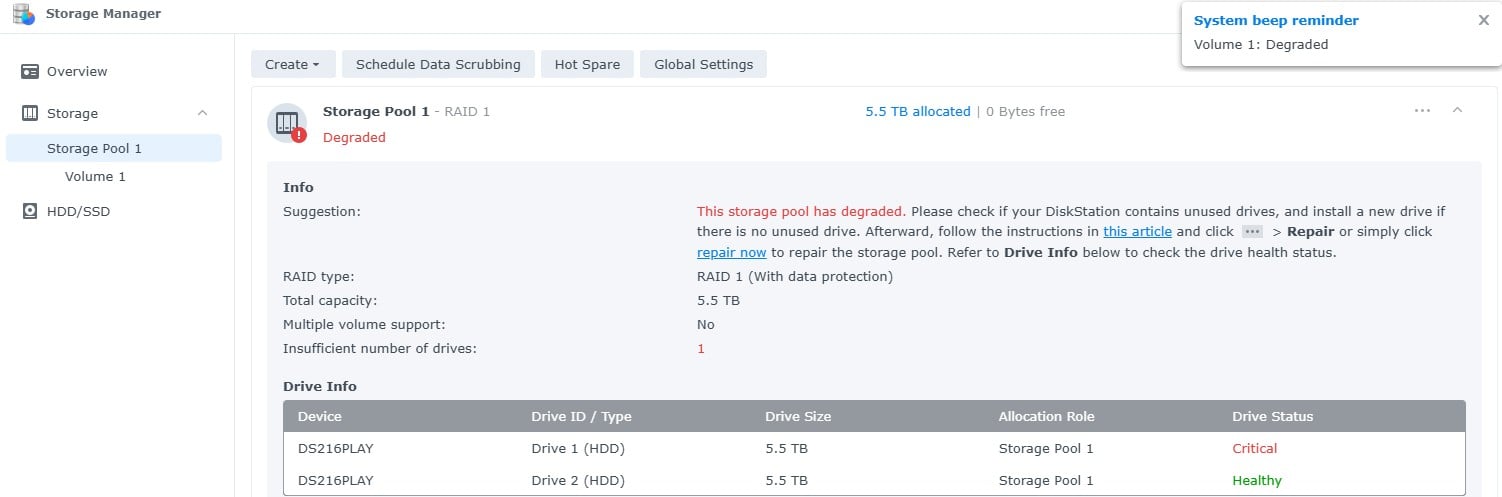


I don't know what to do next. I cannot repair Drive 1 as it is non-existent in DSM


Ideally, just to get me up and running, I would like the 'Healthy' Drive 2 disk to be available, so I can make decision of whether I can get away with a 4TB drive (I understand, the good Drive 2 6TB drive would become a 4TB drive).


P.S. 6TB NAS drives, are very, very scarce. In fact, drives, in my opinion, are very expensive at the moment.


PC: Dell Inspiron 16 5640 (Windows 11 Home), Dell Inspiron 7591 2n1 (Windows 11 Pro), HP ProBook 470G1 (Windows 10 Pro), Intel NUC7I5BNH (Zorin)
Net: Grandstream 1 x GWN7062 Router, 1 x GWN7665 Access Point
Storage: Synology DS216play NAS, 2 x 6TB
Media: 3 x Amazon FireTV. Echo, Dot, Spot
TV: 2 x Samsung H6400 55" LED TV, Panasonic TH-P50G10Z 50" Plasma TV
Mobile: Samsung Galaxy A52 5G
Wearable: Gear S3 Frontier


View this topic in a long page with up to 500 replies per page Create new topic
 1 | 2 | 3 | 4
huckster
895 posts

Ultimate Geek
+1 received by user: 468

ID Verified
Lifetime subscriber

  #3496293 28-May-2026 19:29
Send private message quote this post

You will need a drive of equal or larger size to recreate the array or backup the existing and create a new 4Tb array.


I would go and get an new 6+Tb drive as soon as possible.


Jase2985
13773 posts

Uber Geek
+1 received by user: 6254

ID Verified
Lifetime subscriber

  #3496311 28-May-2026 19:56
Send private message quote this post

You need the same size drive or larger. To get you going again. 


As for the cost....how much do you value your data? is it worth the cost of a new drive?


Tinkerisk
4915 posts

Uber Geek
+1 received by user: 3834


  #3496361 29-May-2026 06:43
Send private message quote this post

By the Power of Grayskull, I bet there's no backup. 😉


  • Qui nihil scit, omnia credere debet. - He who knows nothing must believe everything.
  • Firewalls do NOT stop dragons. Really not!
  • I avoid Big Tech. They try hard to dictate technology and „culture“ across borders.
  • In effect we have everything to hide from someone, and no idea who „someone“ is.


cshwone
1101 posts

Uber Geek
+1 received by user: 854


  #3496362 29-May-2026 06:50
Send private message quote this post

Tinkerisk:


By the Power of Grayskull, I bet there's no backup. 😉


Drive 2 will have all the data which will then repopulate Drive 1 when it is replaced at the same size or larger


Tinkerisk
4915 posts

Uber Geek
+1 received by user: 3834


  #3496363 29-May-2026 06:54
Send private message quote this post

cshwone:


Tinkerisk:


By the Power of Grayskull, I bet there's no backup. 😉


Drive 2 will have all the data which will then repopulate Drive 1 when it is replaced at the same size or larger


That’s exactly what I’m saying: no backup. Drive 2 comes under heavy strain during the resilvering process, and if it fails while that’s happening, everything is gone. That happens more often than you might think. RAID is NOT a backup; it merely saves time during recovery—assuming everything goes smoothly. But why am I even wasting my breath? 🙂


  • Qui nihil scit, omnia credere debet. - He who knows nothing must believe everything.
  • Firewalls do NOT stop dragons. Really not!
  • I avoid Big Tech. They try hard to dictate technology and „culture“ across borders.
  • In effect we have everything to hide from someone, and no idea who „someone“ is.

alisam

916 posts

Ultimate Geek
+1 received by user: 89


  #3496364 29-May-2026 06:56
Send private message quote this post

Tinkerisk:


By the Power of Grayskull, I bet there's no backup. 😉


Not true (just not all on a single backup disk. I even have some duplicated in OneDrive and Google Drive).


PC: Dell Inspiron 16 5640 (Windows 11 Home), Dell Inspiron 7591 2n1 (Windows 11 Pro), HP ProBook 470G1 (Windows 10 Pro), Intel NUC7I5BNH (Zorin)
Net: Grandstream 1 x GWN7062 Router, 1 x GWN7665 Access Point
Storage: Synology DS216play NAS, 2 x 6TB
Media: 3 x Amazon FireTV. Echo, Dot, Spot
TV: 2 x Samsung H6400 55" LED TV, Panasonic TH-P50G10Z 50" Plasma TV
Mobile: Samsung Galaxy A52 5G
Wearable: Gear S3 Frontier


Stream your favourite shows now on Apple TV (affiliate link).
Tinkerisk
4915 posts

Uber Geek
+1 received by user: 3834


  #3496365 29-May-2026 07:00
Send private message quote this post

Alright, two more sync drives. Still no backup—oh well.


Simply ask yourself the following question: Which file—and from which drive—would you restore if you had caught a virus? The version from Drive 1? From Drive 2? The one from OneDrive? Or the one from Google Drive? You would find that they are all identical—that is, all infected with the virus. As I said, none of these constitute a true backup.


If you are restoring/resilvering your data, I strongly advise you *not* to access the NAS for any other purpose during the process; instead, just leave it strictly alone. Furthermore, as a precautionary measure, disable all synchronization tasks to ensure that no data is incorrectly synchronized during this time!


  • Qui nihil scit, omnia credere debet. - He who knows nothing must believe everything.
  • Firewalls do NOT stop dragons. Really not!
  • I avoid Big Tech. They try hard to dictate technology and „culture“ across borders.
  • In effect we have everything to hide from someone, and no idea who „someone“ is.

nitro
785 posts

Ultimate Geek
+1 received by user: 346


  #3496366 29-May-2026 07:28
Send private message quote this post

alisam:


Drive 1 is no longer recognised by DSM.


I have tried moving the Drive 2 disk into Drive 1, but it doesn't seem to like it. 


I don't know what to do next. I cannot repair Drive 1 as it is non-existent in DSM


Ideally, just to get me up and running, I would like the 'Healthy' Drive 2 disk to be available, so I can make decision of whether I can get away with a 4TB drive (I understand, the good Drive 2 6TB drive would become a 4TB drive).


P.S. 6TB NAS drives, are very, very scarce. In fact, drives, in my opinion, are very expensive at the moment.


this is part of normal NAS operation. drives are guaranteed to fail - just a matter of when (or you replace them with higher capacity ones to meet your needs).


you cannot move drives to different slots! because you have the HDDs setup as RAID 1, just replace the dead one with a new one of the same or larger capacity. it will do the rest for you. also, as hinted already... do this now - before the other drive runs into trouble. rebuilding the array will take hours. hope and pray the other drive does not falter in that period.


freitasm
BDFL - Memuneh
80949 posts

Uber Geek
+1 received by user: 41715

Administrator
ID Verified
Trusted
Geekzone
Lifetime subscriber

  #3496372 29-May-2026 08:41
Send private message quote this post

A lot of replies and I agree with the strongest words here.


RAID is not a backup. Online synchronisation is not a backup.


Swap the failed drive with same size or larger, let the Storage Manager know to use it, sit back and relax. Depending on how much storage is in use, it can be a few days before it's done. Do not interrupt the process.


Other things to consider:


  • Do not use SMR drives on NAS, it will bring down write speeds. Even though they might be cheaper per MB.
  • Try to get a drive that is at least the same speed, or it will slow down the existing setup.
  • If you originally bought both drives at the same time, consider replacing the second drive soon, because it's statistically possible it will fail soon too. 


Referral links: Quic Broadband (free setup code: R587125ERQ6VE) | Samsung | AliExpress | Wise | Sharesies 


Support Geekzone by subscribing (browse ads-free), or making a one-off or recurring donation through PressPatron.


dafman
4094 posts

Uber Geek
+1 received by user: 2697

Trusted
Subscriber

  #3496378 29-May-2026 09:05
Send private message quote this post

My 2x 8TB NAS drives are 6 years old. This thread prompted me to check replacement cost. Over $1k. Yikes!


Tinkerisk
4915 posts

Uber Geek
+1 received by user: 3834


  #3496396 29-May-2026 09:45
Send private message quote this post

2-bay NAS units only make sense if at least one additional NAS (or external HDD) serves as a backup. Therefore, I recommend a 4-bay NAS at a minimum. While this, too, requires a backup, it is—thanks to at least one third parity drive—capable of correcting a data error, whereas a 2-bay NAS can merely detect one.


The fourth HDD slot can be used either for storage expansion, as a separate drive (e.g., data storage for a VM), or for faster internal data copying.


My main NAS has 4 data and 2 parity drives and can survive 2 failed HDDs at the same time with no data loss. My backup NAS has 3 data and 1 parity drive and can survive 1 failed HDD with no data loss. The third low power backup NAS at a trusted remote location has only 1 huge data drive and is lost when the HDD failed (therefore it is closely monitored by S.M.A.R.T). The latter is just in case, the whole house is burning down.


All three NAS have a time controlled, versioned backup strategy, so that a virus can’t spread to all systems in a short time. None of them is syncing. To handle this, I have a separate (fourth) Nextcloud server for the office and Streetfighter clients; it synchronizes exclusively the collaborational work but backs up its entire dataset to the main NAS (and the underlying backup cascade).


  • Qui nihil scit, omnia credere debet. - He who knows nothing must believe everything.
  • Firewalls do NOT stop dragons. Really not!
  • I avoid Big Tech. They try hard to dictate technology and „culture“ across borders.
  • In effect we have everything to hide from someone, and no idea who „someone“ is.


Want to support Geekzone and browse the site without the ads? Subscribe to Geekzone now (monthly, annual and lifetime options).
lxsw20
3730 posts

Uber Geek
+1 received by user: 2218

Subscriber

  #3496401 29-May-2026 10:43
Send private message quote this post

alisam:


I have tried moving the Drive 2 disk into Drive 1, but it doesn't seem to like it. So, after putting things back, I see:


You're very lucky Synology RAID is quite forgiving, this is a good way to lose your data completely. 


alisam

916 posts

Ultimate Geek
+1 received by user: 89


  #3496403 29-May-2026 11:10
Send private message quote this post

dafman:


My 2x 8TB NAS drives are 6 years old. This thread prompted me to check replacement cost. Over $1k. Yikes!


I'll buy a 1 x 8TB drive as 6TB seem to be out of stock at most places. Some online retailers may have one, but I don't like dealing with NZ retailers I have never heard of.


(To pay for it, my wife says I have to sell my only kidney.)


PC: Dell Inspiron 16 5640 (Windows 11 Home), Dell Inspiron 7591 2n1 (Windows 11 Pro), HP ProBook 470G1 (Windows 10 Pro), Intel NUC7I5BNH (Zorin)
Net: Grandstream 1 x GWN7062 Router, 1 x GWN7665 Access Point
Storage: Synology DS216play NAS, 2 x 6TB
Media: 3 x Amazon FireTV. Echo, Dot, Spot
TV: 2 x Samsung H6400 55" LED TV, Panasonic TH-P50G10Z 50" Plasma TV
Mobile: Samsung Galaxy A52 5G
Wearable: Gear S3 Frontier


Tinkerisk
4915 posts

Uber Geek
+1 received by user: 3834


  #3496404 29-May-2026 11:13
Send private message quote this post

alisam:


dafman:


My 2x 8TB NAS drives are 6 years old. This thread prompted me to check replacement cost. Over $1k. Yikes!


I'll buy a 1 x 8TB drive as 6TB seem to be out of stock at most places. Some online retailers may have one, but I don't like dealing with NZ retailers I have never heard of.


(To pay for it, my wife says I have to sell my only kidney.)


And the second kidney or her’s is for replacing the other HDD soon. And then the backup drive next. 🙂😉😎


  • Qui nihil scit, omnia credere debet. - He who knows nothing must believe everything.
  • Firewalls do NOT stop dragons. Really not!
  • I avoid Big Tech. They try hard to dictate technology and „culture“ across borders.
  • In effect we have everything to hide from someone, and no idea who „someone“ is.

SepticSceptic
2272 posts

Uber Geek
+1 received by user: 796

Trusted

  #3496623 29-May-2026 22:38
Send private message quote this post

For backups,  I always consider how I would recover data if house was struck by lightning, flooding, fire, etc.


Valued data, such as photos and documents are in multiple places.


Hosted entertainment media, maybe 1 other places. I'm not going to be unduly hindered by its loss.


 1 | 2 | 3 | 4
View this topic in a long page with up to 500 replies per page Create new topic


Geekzone Live »

Try automatic live updates from Geekzone directly in your browser, without refreshing the page, with Geekzone Live now.


Are you subscribed to our RSS feed? You can download the latest headlines and summaries from our stories directly to your computer or smartphone by using a feed reader.
