|
|
|
Alpha s/w on a productive system?
There's no reason (except for tests in a related environment) to use anything else for a productive system earlier than (bold): pre-Alpha → Alpha → Beta → Release Candidate → Release.
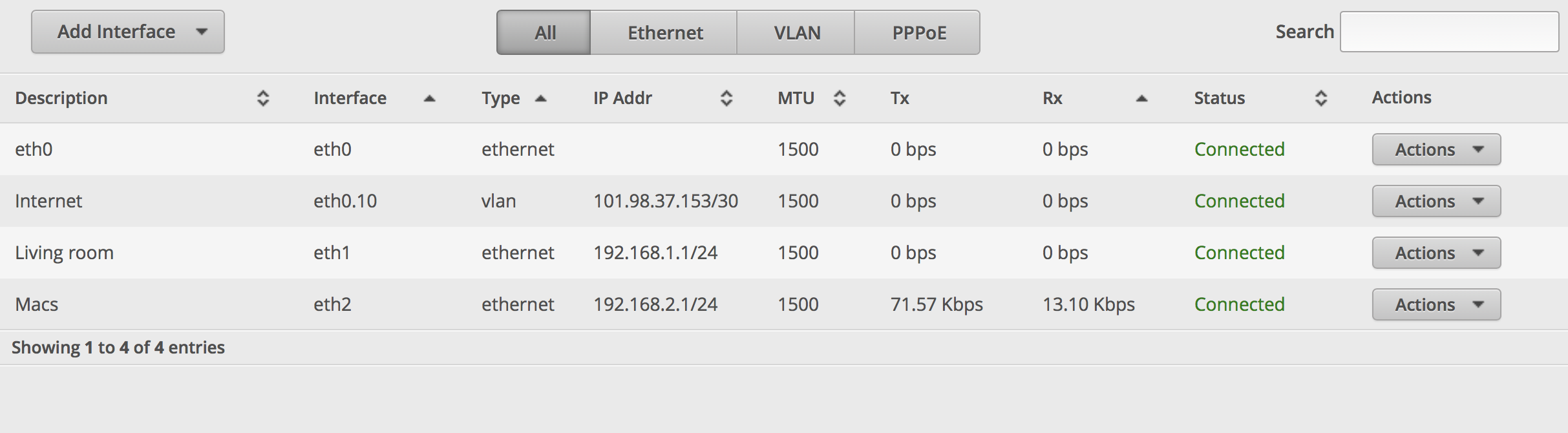
After upgraded to the latest firmware, V1.10.3, I tried to connect through both eth1 and eth2 ports (Fibre comes into eth0). It works through eth1 but not eth2. Configuration is as the pic below.

Yes, I did change my IP address accordingly when switching to different subnet. What could be the problem? Thanks
@GeekRay Have you got a DHCP server listening on the 192.168.2.1/24 range?
Michael Murphy | https://murfy.nz
Referral Links: Quic Broadband (use R122101E7CV7Q for free setup)
Are you happy with what you get from Geekzone? Please consider supporting us by subscribing.
Opinions are my own and not the views of my employer.
Bang on, Michael. I changed the IP range for 2nd subnet without updating associated DHCP sever.
Thanks for the advice and it's working now.
By the way, is that possible for Plex client app to access Plex serve on different subnet? I did a bit research online but couldn't find much info (not a common case I reckon)
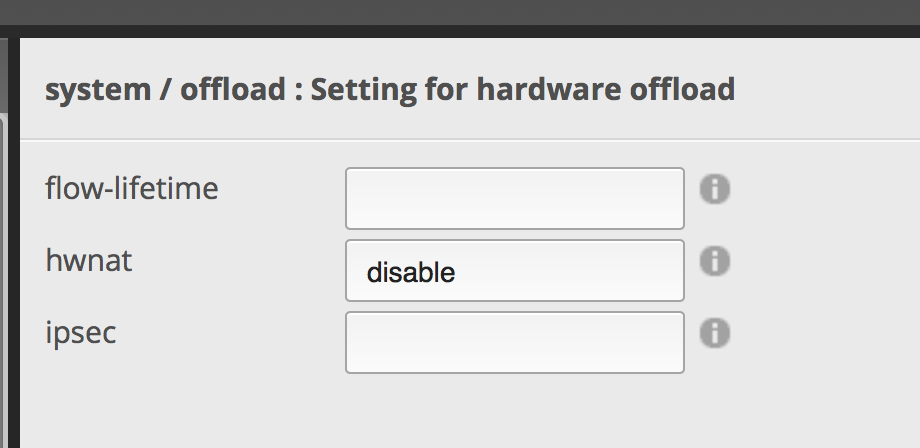
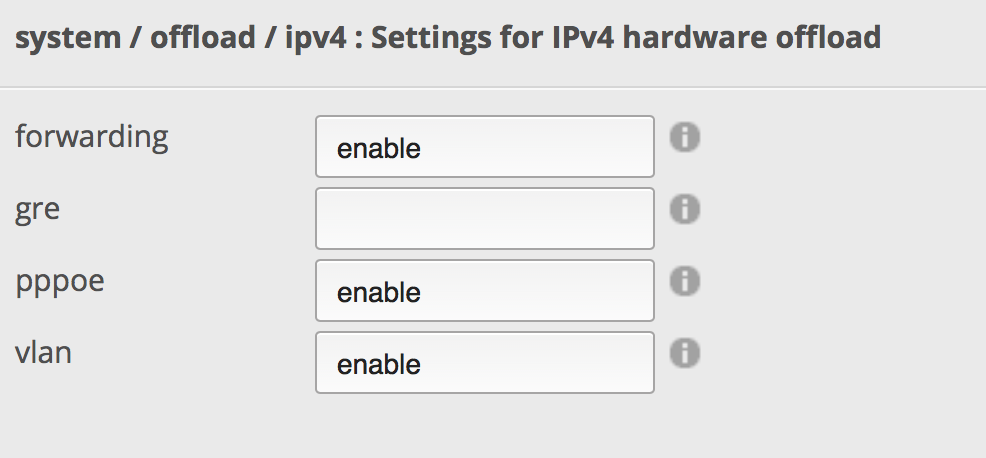
Also, regarding hardware offloading, I have three "enabled" under ipv4 but it says "disabled" under "system". Does it mean there is something I need to do there?
System level:

IPv4

Thanks heaps.
@GeekRay For Plex it "just works" - it'll detect your Plex server as nearby assuming it is not firewalled off. It is not wise to use the 2nd port of the Edgerouter to extend your network unless if you were wanting to create a guest network or something.
For the likes of hardware offloading it is best to do it in the CLI - "show ubnt offload" to get a proper answer. Don't set it in both places as this is often a double-up caused by Ubiquiti using the same software across all their routers.
Michael Murphy | https://murfy.nz
Referral Links: Quic Broadband (use R122101E7CV7Q for free setup)
Are you happy with what you get from Geekzone? Please consider supporting us by subscribing.
Opinions are my own and not the views of my employer.
EdgeMAX EdgeRouter software hotfix version v1.10.4 has been released! [ New ] Options 19 hours ago
New firmware release 1.10.4 is available here:
!!! IMPORTANT NOTICE for ER-12 users !!!
ER-12 supports only 1.10.4 and 2.0.0-alpha.1 firmwares.
Do not downgrade ER-12 to any older firmware as this will brick ER-12 for good. Firmware compatibility check for ER-12 will be added in upcoming 1.10.5 and 2.0.0-alpha.2 firmwares
Note: The ER-X/ER-X-SFP/EP-R6 has more limited storage, and in some cases, an upgrade may fail due to not enough space. If this happens, remove the old backup image first (using "delete system image" command, see here for more details) before doing an upgrade.
More details can be found in the release notes below. Please give it a try if you are interested in the new features/changes to help us test them so that we can get the release out sooner! Thanks very much!
[Release Notes v1.10.4]
Changelog
Changes since v1.10.3
New features:
Enhancements and bug fixes:
Updated software components:
Known issues:
New firmware release 1.10.5 is available here:
Note: The ER-X/ER-X-SFP/EP-R6 has more limited storage, and in some cases, an upgrade may fail due to not enough space. If this happens, remove the old backup image first (using "delete system image" command, see here for more details) before doing an upgrade.
More details can be found in the release notes below. Please give it a try if you are interested in the new features/changes to help us test them so that we can get the release out sooner! Thanks very much!
[Release Notes v1.10.5]
Changelog
Changes since v1.10.3
New features:
Enhancements and bug fixes:
Updated software components:
Known issues:
So I seem to be making progress.
I can now receive IPv6 address on my devices (windows and linux)
I can't ping v6 on the internet, i.e. ping -6 google.com fails. but it does resolve the ipv6 address
I'm on 2degrees and looking at the fritz!box it showed a /48 was allocated so trying with that...
set interfaces ethernet eth0 vif 10 pppoe 0 ipv6 enable
edit interfaces ethernet eth0 vif 10 pppoe 0 dhcpv6-pd pd 1
set prefix-length /48
set interface eth2 host-address ::1
set interface eth2 prefix-id :2
set interface eth2 service slaac
set ipv6 address autoconf
top
commit
set protocols static interface-route6 ::/0 next-hop-interface pppoe0
commit
save
edit firewall ipv6-name WAN6_IN
set default-action drop
set rule 10 action accept
set rule 10 description "allow established"
set rule 10 protocol all
set rule 10 state established enable
set rule 10 state related enable
set rule 20 action drop
set rule 20 description "drop invalid packets"
set rule 20 protocol all
set rule 20 state invalid enable
set rule 30 action accept
set rule 30 description "allow ICMPv6"
set rule 30 protocol icmpv6
top
edit firewall ipv6-name WAN6_LOCAL
set default-action drop
set rule 10 action accept
set rule 10 description "allow established"
set rule 10 protocol all
set rule 10 state established enable
set rule 10 state related enable
set rule 20 action drop
set rule 20 description "drop invalid packets"
set rule 20 protocol all
set rule 20 state invalid enable
set rule 30 action accept
set rule 30 description "allow ICMPv6"
set rule 30 protocol icmpv6
set rule 40 action accept
set rule 40 description "allow DHCPv6 client/server"
set rule 40 destination port 546
set rule 40 source port 547
set rule 40 protocol udp
top
set interfaces ethernet eth0 vif 10 pppoe 0 firewall in ipv6-name WAN6_IN
set interfaces ethernet eth0 vif 10 pppoe 0 firewall local ipv6-name WAN6_LOCAL
commit
save
exit
reboot now
CPU: AMD 5900x | RAM: GSKILL Trident Z Neo RGB F4-3600C16D-32GTZNC-32-GB | MB: Asus X570-E | GFX: EVGA FTW3 Ultra RTX 3080Ti| Monitor: LG 27GL850-B 2560x1440
Quic: https://account.quic.nz/refer/473833 R473833EQKIBX
Here is my configuration snippit for IPv6 on 2degrees (working) - setting "prefix-only" is important on 2degrees also. This configuration is literally taken from my OP.
# show interfaces ethernet eth0 vif 10 pppoe 0 dhcpv6-pd
pd 0 {
interface eth1 {
host-address ::1
no-dns
prefix-id :1
service slaac
}
prefix-length /56
}
prefix-only
rapid-commit enable
[edit]
# show firewall ipv6-name WAN6_IN
default-action drop
rule 10 {
action accept
description "allow established"
protocol all
state {
established enable
related enable
}
}
rule 20 {
action drop
description "drop invalid packets"
protocol all
state {
invalid enable
}
}
rule 30 {
action accept
description "allow ICMPv6"
protocol icmpv6
}
[edit]
# show firewall ipv6-name WAN6_IN
default-action drop
rule 10 {
action accept
description "allow established"
protocol all
state {
established enable
related enable
}
}
rule 20 {
action drop
description "drop invalid packets"
protocol all
state {
invalid enable
}
}
rule 30 {
action accept
description "allow ICMPv6"
protocol icmpv6
}
[edit]
# show firewall ipv6-name WAN6_LOCAL
default-action drop
rule 10 {
action accept
description "allow established"
protocol all
state {
established enable
related enable
}
}
rule 20 {
action drop
description "drop invalid packets"
protocol all
state {
invalid enable
}
}
rule 30 {
action accept
description "allow ICMPv6"
protocol icmpv6
}
rule 40 {
action accept
description "allow DHCPv6 client/server"
destination {
port 546
}
protocol udp
source {
port 547
}
}
[edit]
Michael Murphy | https://murfy.nz
Referral Links: Quic Broadband (use R122101E7CV7Q for free setup)
Are you happy with what you get from Geekzone? Please consider supporting us by subscribing.
Opinions are my own and not the views of my employer.
I have the exact same settings about but it doesn't work for me, is there anything else I need to do?
I've updated my config to align to your output, but still having issues.
So when I have prefix-length /48 all my devices are given IPv6 addresses but can't reach the outside world. I cant even ping6 google.com from the edgerouter lite.
If I have prefix-length /56 I can ping6 google.com from the edgerouter lite but devices are not provided with a ipv6 address at all.
can you please share the output from or ssh the file to your local device to share it...
[code]cat /config/config.boot[/code[
Of course remove your passwords from user account at the bottom and pppoe password and user-id
The prefix-only for example isn't in OP so I'm wondering if there is other config you've made along the way without noticing?
Also if I run show firewall ipv6-name WAN6_LOCAL or WAN6_IN from the normal command line (not within configure)
the below line is included in the input...
Inactive - Not applied to any interfaces, zones or for content-inspection.
if I try and run the below again i get the warning it's already configured...
set interfaces ethernet eth0 vif 10 pppoe 0 firewall in ipv6-name WAN6_IN
set interfaces ethernet eth0 vif 10 pppoe 0 firewall local ipv6-name WAN6_LOCAL
CPU: AMD 5900x | RAM: GSKILL Trident Z Neo RGB F4-3600C16D-32GTZNC-32-GB | MB: Asus X570-E | GFX: EVGA FTW3 Ultra RTX 3080Ti| Monitor: LG 27GL850-B 2560x1440
Quic: https://account.quic.nz/refer/473833 R473833EQKIBX
@BlackHand @mentalinc Here you go - this is very heavily sanitized but I've left the configuration there for my internet connection / firewall / IPv6 settings. Afraid my configuration is far too big (and sensitive) to fully post and you likely don't need to know about my site to site VPN's etc :) - https://files.murfy.nz/config.boot.sanitized.txt
This configuration gives me the following (tested on a Chromebook - same goes for Windows / Linux and any other device on the network):
Sidenote - the no-dns is not needed. I've got that as I run my own resolver on this network. You may want to leave that one out.
Michael Murphy | https://murfy.nz
Referral Links: Quic Broadband (use R122101E7CV7Q for free setup)
Are you happy with what you get from Geekzone? Please consider supporting us by subscribing.
Opinions are my own and not the views of my employer.
I also found I had MSS clamping enabled;
This is not needed on 2degrees UFB if you're using a MTU of 1500 on the PPPoE side and a MTU of 1508 on the underlying interface like I have on my configuration. Not sure why I had this enabled in the first place as it would have been limiting things for me so thanks @mentalinc for getting me to dump my configuration and look through it!
Michael Murphy | https://murfy.nz
Referral Links: Quic Broadband (use R122101E7CV7Q for free setup)
Are you happy with what you get from Geekzone? Please consider supporting us by subscribing.
Opinions are my own and not the views of my employer.
What's the benefit/use of ip { enable-proxy-arp }, I couldn't find a proper answer on the ubiquiti forums?
|
|
|