Geekzone: technology news, blogs, forums
Guest
Welcome Guest.
You haven't logged in yet. If you don't have an account you can register now.


View this topic in a long page with up to 500 replies per page Create new topic
1 | ... | 22 | 23 | 24 | 25 | 26 | 27 | 28 | 29 | 30 | 31 | 32 | ... | 57
GeekGuy
597 posts

Ultimate Geek
+1 received by user: 83


  #2152459 30-Dec-2018 23:18
Send private message

I get an error message with "set service nat rule 5 inside-address address.


Tried the next one after that ... and no joy.


I am able to watch kayosports on the PC but no luck in casting it to CC Ultra.


BlackHand:


GeekGuy:


Great tutorial, I just need to block Google DNS now so I can get a Chromecast Ultra up and running.


Can someone give an old man tips in laymans terms how to go about it or point me in the right direction ?


Have a look at this ... https://community.ubnt.com/t5/EdgeRouter/Blocking-Google-s-Public-DNS-servers/td-p/1256887


michaelmurfy

meow
13581 posts

Uber Geek
+1 received by user: 10914

Moderator
ID Verified
Trusted
Lifetime subscriber

  #2152470 31-Dec-2018 00:18
Send private message

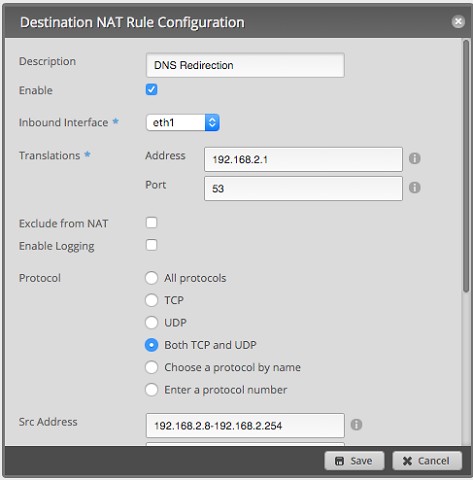
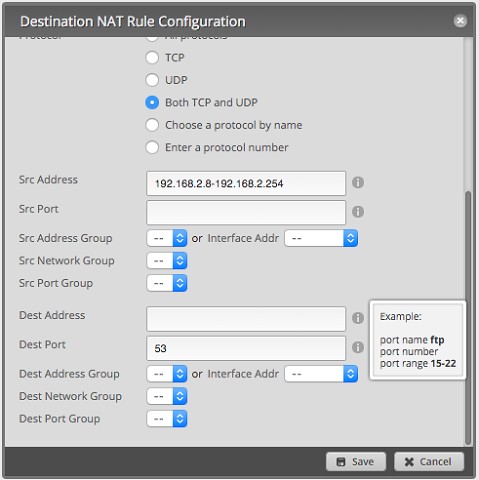
Don't block Google DNS - just create a DNAT rule...


I've also created a firewall rule to pass traffic through the router (important for Chromecasts etc) that you'll need to use if you have a Chromecast. Replace with your IP range excluding the Edgerouter - go to Firewall / NAT --> NAT and add a new Destination NAT rule (changed since not everyone understands the SSH shell):


Doing this will redirect DNS back to your routers internal DNS resolver. Change as you see fit.


Michael Murphy | https://murfy.nz
Referral Links: Quic Broadband (use R122101E7CV7Q for free setup)

Are you happy with what you get from Geekzone? Please consider supporting us by subscribing.
Opinions are my own and not the views of my employer.


mrgsm021
1538 posts

Uber Geek
+1 received by user: 310

ID Verified
Trusted

  #2155467 6-Jan-2019 21:50
Send private message

@michaelmurfy, now that i have ERX setup on UFB with eth1 as my main LAN following your guide, how do i go about setting up a separate LAN in a different IP address range (i gave eth1 192.168.1.1/24 with dhcp enabled) using a different interface on the ERX?


Would I use the WAN+2LAN setup wizard or simply un-tick "Only use one LAN" under WAN+2LAN2 wizard and configure eth2 to eth4 as the separate LAN?


Can i use 192.168.2.1/24 range also with dhcp enabled?


TIA for any help.


michaelmurfy

meow
13581 posts

Uber Geek
+1 received by user: 10914

Moderator
ID Verified
Trusted
Lifetime subscriber

  #2155471 6-Jan-2019 21:59
Send private message

Not in switch mode IIRC - I have not tried as have had no need. I think if you disable the switch interface you'll lose offloading between ports (so limited at around 400Mbit and a CPU hit).


Look into using VLAN's instead. May be better depending on your use.


Michael Murphy | https://murfy.nz
Referral Links: Quic Broadband (use R122101E7CV7Q for free setup)

Are you happy with what you get from Geekzone? Please consider supporting us by subscribing.
Opinions are my own and not the views of my employer.


mrgsm021
1538 posts

Uber Geek
+1 received by user: 310

ID Verified
Trusted

  #2155476 6-Jan-2019 22:29
Send private message

michaelmurfy:

Not in switch mode IIRC - I have not tried as have had no need. I think if you disable the switch interface you'll lose offloading between ports (so limited at around 400Mbit and a CPU hit).


Look into using VLAN's instead. May be better depending on your use.


I see, thank you, maybe I'll have a play with the WAN+2LAN2 wizard and see how I go as I am not familiar with setting up VLANs

I only have 100/50 UFB so may not be so much of an issue with speed limited at 400Mb/s and not running anything CPU intensive with most devices at home on WiFi (smartphones & tablets) running off three Orbi units in AP mode as well as two PCs and three TVs on Ethernet.

I wanted to set up a separate network for tenants in the granny flat part of our new house that we are moving to soon.

Azzura
609 posts

Ultimate Geek
+1 received by user: 224

ID Verified

  #2155563 7-Jan-2019 09:25
Send private message

mrgsm021 is this what you're looking for? It worked for me....


https://community.ubnt.com/t5/EdgeRouter/Basic-Config-for-Dual-Wan-Dual-Lan-via-GUI/td-p/1032987


Dru -


"This is for load balance wizard for 2 wan and 2 lan or more than 2 lan(load balanced)


you may have to update your firmware my router is the edgerouter pro v1.9.0


1: Go to the wizard then click on load balance here you can change the lan ip for eg eth2 i set it to 192.168.10.1 but the wan0 and wan1 remain the same.


2. Go to Dashboard click on actions on the eth port eg.i chose eth3 and manual ip type the ip you want eg. 192.168.11.1/24 save.


3. Go to service add dhcp service eg dhcp Name: lan3    subnet :192.168.11.0/24   Range start:192.168.11.3    Range Stop: 192.168.11.254  Router:192.168.11.1  Dns1:192.168.11.1  Dns2: 8.8.8.8 and save.


4: Go to service dns select add listen interface eth3 save.


5. Go to config tree , interface, ethernet, select eth3 ,click on firewall then click on  in ,now  type balance in the modify section now click on preview to save.


if you want more lan ports follow these instructions from 2 to 5  select eth4 change ip eg 192.168.12.1  and thats it."


Want to support Geekzone and browse the site without the ads? Subscribe to Geekzone now (monthly, annual and lifetime options).
mrgsm021
1538 posts

Uber Geek
+1 received by user: 310

ID Verified
Trusted

  #2155926 7-Jan-2019 17:29
Send private message

Azzura:

mrgsm021 is this what you're looking for? It worked for me....


https://community.ubnt.com/t5/EdgeRouter/Basic-Config-for-Dual-Wan-Dual-Lan-via-GUI/td-p/1032987


Dru -


"This is for load balance wizard for 2 wan and 2 lan or more than 2 lan(load balanced)


you may have to update your firmware my router is the edgerouter pro v1.9.0


1: Go to the wizard then click on load balance here you can change the lan ip for eg eth2 i set it to 192.168.10.1 but the wan0 and wan1 remain the same.


2. Go to Dashboard click on actions on the eth port eg.i chose eth3 and manual ip type the ip you want eg. 192.168.11.1/24 save.


3. Go to service add dhcp service eg dhcp Name: lan3    subnet :192.168.11.0/24   Range start:192.168.11.3    Range Stop: 192.168.11.254  Router:192.168.11.1  Dns1:192.168.11.1  Dns2: 8.8.8.8 and save.


4: Go to service dns select add listen interface eth3 save.


5. Go to config tree , interface, ethernet, select eth3 ,click on firewall then click on  in ,now  type balance in the modify section now click on preview to save.


if you want more lan ports follow these instructions from 2 to 5  select eth4 change ip eg 192.168.12.1  and thats it."


Thanks Azzura.

I only have one UFB circuit from the ONT into eth0 (WAN) and want to split that single connection into two separate LAN on two interfaces.

The instruction you provided above appears to be for two internet connections plugged into the same Edgerouter and therefore not what I am looking for sorry.

Azzura
609 posts

Ultimate Geek
+1 received by user: 224

ID Verified

  #2155961 7-Jan-2019 19:34
Send private message

I think it can be modified for one connection. By skipping to step 2 ...perhaps?
Or.... all I did was disabled one of my internet connections. And everything goes through the one enabled internet connection.


mrgsm021
1538 posts

Uber Geek
+1 received by user: 310

ID Verified
Trusted

  #2156532 8-Jan-2019 17:04
Send private message

Azzura:


I think it can be modified for one connection. By skipping to step 2 ...perhaps?
Or.... all I did was disabled one of my internet connections. And everything goes through the one enabled internet connection.


Thanks again, will have a play with the wizard when I have a bit of time to take the connection offline. 


dfnt
1553 posts

Uber Geek
+1 received by user: 1036

Trusted
Lifetime subscriber

  #2157231 9-Jan-2019 19:41
Send private message

Version 2 has been released now https://community.ubnt.com/t5/EdgeRouter/EdgeMAX-EdgeRouter-software-version-v2-0-0-has-been-released/m-p/2622433#M235165


Somewhat surprising as there were still some issues with beta 3 for a few people


Taubin
592 posts

Ultimate Geek
+1 received by user: 243

ID Verified
Subscriber

  #2157246 9-Jan-2019 20:47
Send private message

Just to absolutely emphasize this from the forums


> And no support for this for IPv6?
Nope, right now no support for IPv6


Link to the quote from the admin answering angry people:


https://community.ubnt.com/t5/EdgeRouter/EdgeMAX-EdgeRouter-software-version-v2-0-0-has-been-released/m-p/2624146/highlight/true#M235358


Again, there is NO SUPPORT FOR IPV6 on this build. Just so people are aware and don't update and then wonder why their IPV6 is broken.


ZL2TOY/ZL1DMP


Shop on-line at New World now for your groceries (affiliate link).
dfnt
1553 posts

Uber Geek
+1 received by user: 1036

Trusted
Lifetime subscriber

  #2157263 9-Jan-2019 21:43
Send private message

ipv6 is working fine for me on 2degrees


only seems to be affecting people with certain ipv6 configuration, but still concerning they released this to the general public


sbiddle
30853 posts

Uber Geek
+1 received by user: 9996

Retired Mod
Trusted
Biddle Corp
Lifetime subscriber

  #2157266 9-Jan-2019 21:50
Send private message

Every UBNT software release has historically been a beta test! They've had some pretty major issues in official releases over the years.


dfnt
1553 posts

Uber Geek
+1 received by user: 1036

Trusted
Lifetime subscriber

  #2157271 9-Jan-2019 22:10
Send private message

guess they're adopting microsoft's model of having users do QA for them


Kiwifruta
1425 posts

Uber Geek
+1 received by user: 337

ID Verified

  #2157277 9-Jan-2019 22:20
Send private message

sbiddle:


Every UBNT software release has historically been a beta test! They've had some pretty major issues in official releases over the years.


I was running OpenWrt on an old TP-Link, then 'upgraded' to ER-L3. 


Why do people rave about these? Is it because Ubiquiti routers come out of the box with more tweakable software than most consumer routers and they are fairly cheap?


Documentation relies on 2011 Vyatta docs and some forum posts, so is sorely lacking. If the documentation existed I'd be more enthused.


1 | ... | 22 | 23 | 24 | 25 | 26 | 27 | 28 | 29 | 30 | 31 | 32 | ... | 57
View this topic in a long page with up to 500 replies per page Create new topic


Geekzone Live »

Try automatic live updates from Geekzone directly in your browser, without refreshing the page, with Geekzone Live now.


Are you subscribed to our RSS feed? You can download the latest headlines and summaries from our stories directly to your computer or smartphone by using a feed reader.