Geekzone: technology news, blogs, forums
Guest
Welcome Guest.
You haven't logged in yet. If you don't have an account you can register now.


View this topic in a long page with up to 500 replies per page Create new topic
1 | 2 | 3 
unrlx

46 posts

Geek
+1 received by user: 2


  #2333707 10-Oct-2019 09:56
Send private message

Hi guys,

So I got from user ishmael on here for a good price and just set it up.


I've been experiencing a drop in speed the last few days, it was literally 30 mbps even on the ethernet.


I just set up Google Wifi 3 pack and its running at over 80 mbps now which is awesome. Going to see how Gigantic does when it comes on the 14th for me.


unrlx

46 posts

Geek
+1 received by user: 2


  #2337267 15-Oct-2019 11:59
Send private message

Thought I would continue here.

Setup 3 mesh points with the primary connecting directly to the orcon router. Each puck separated by 1 wall each.

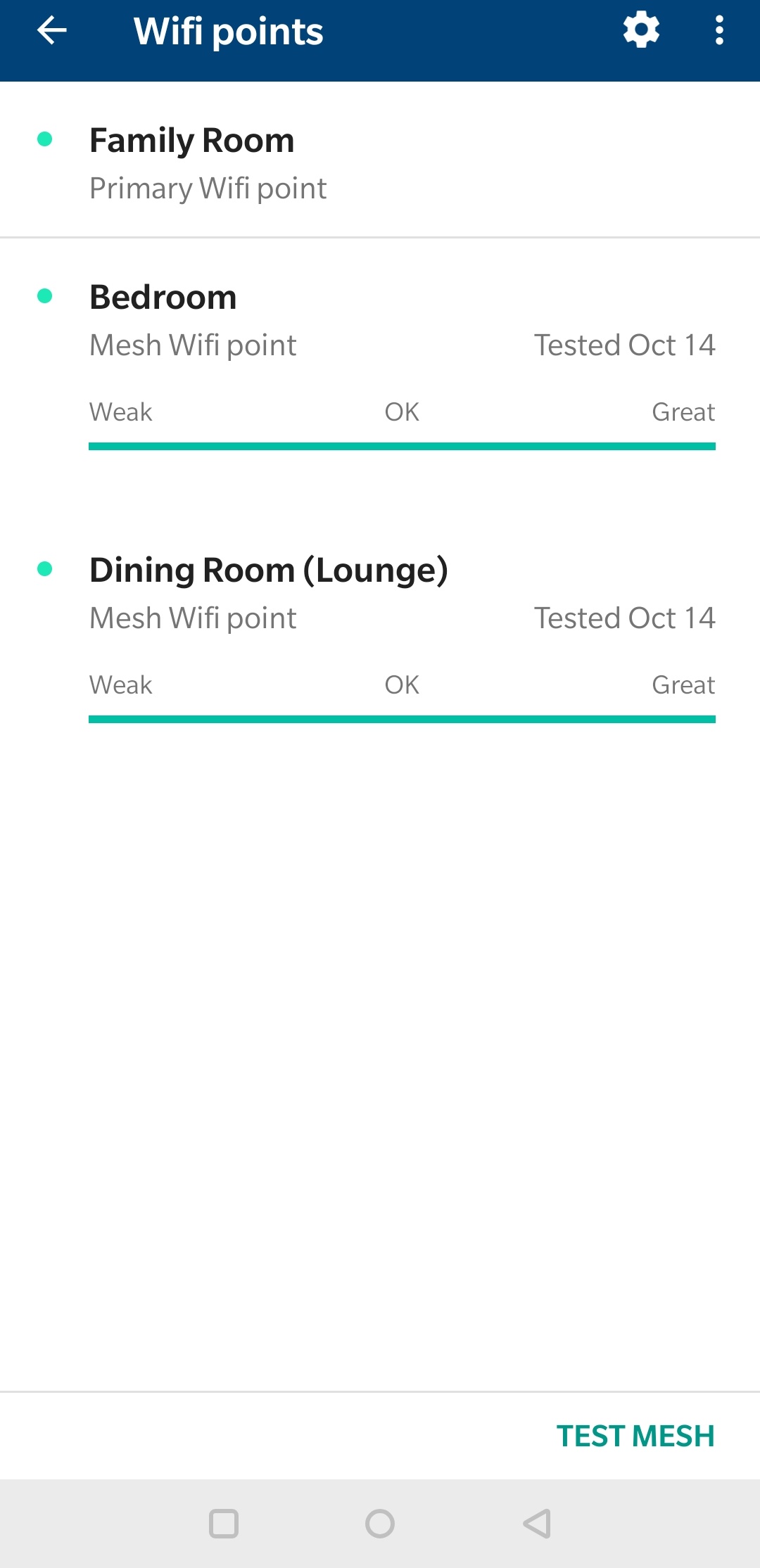
Checked speeds and points on network. Speeds on the mesh giving me 600+ dl and 400+ upload which is expected.When I'm standing right next to the primary puck and do a linetest, it gives me well over 200+ dl. When I try sites like linetest.nz or speedtest, it gives me 50-70 dl and 100+ upload when I'm closer to the third puck in my room.

I rang both orcon and Google wifi support, orcon couldn't answer much about gwifi and gwifi support suggested that I look at the speed showing on the gwifi app.

So my question here is which one do I rely on?

Jase2985
13742 posts

Uber Geek
+1 received by user: 6226

ID Verified
Lifetime subscriber

  #2337497 15-Oct-2019 16:12
Send private message

what are the link speeds of the mesh points? the software should show this  do they have good enough signal to talk back to the main unit?


are you using the speedtest windows 10 app? if not its worth trying


deadlyllama
1283 posts

Uber Geek
+1 received by user: 476

Trusted

  #2337553 15-Oct-2019 17:25
Send private message

Remember that mesh uses the same radio to talk to your laptop and the central puck. Just like with a wifi repeater. So speeds can drop off significantly. If the signal has to hop from central to satellite 1 to satellite 2 to your laptop speeds will be poor.

Put the satellite pucks where there is good signal from the central one if at all possible. The "I don't know how Google wifi works" way of doing this is to turn the satellite pucks off and measure signal strength in potential puck locations using your laptop.

Jase2985
13742 posts

Uber Geek
+1 received by user: 6226

ID Verified
Lifetime subscriber

  #2337703 15-Oct-2019 20:45
Send private message

deadlyllama: Remember that mesh uses the same radio to talk to your laptop and the central puck. Just like with a wifi repeater. So speeds can drop off significantly. If the signal has to hop from central to satellite 1 to satellite 2 to your laptop speeds will be poor.

Put the satellite pucks where there is good signal from the central one if at all possible. The "I don't know how Google wifi works" way of doing this is to turn the satellite pucks off and measure signal strength in potential puck locations using your laptop.


the first paragraph is not quiet correct, they will usually have a 3rd radio in them, 2.4, and 5ghz for your normal wifi networks and a 2nd 5ghz radio for the backhaul.


the biggest issue is where you place the satellites as they need to have decent signal stregnth to provide a fast connection back to the main unit.


unrlx

46 posts

Geek
+1 received by user: 2


  #2337715 15-Oct-2019 20:57
Send private message

They are showing a great signal between the pucks.


Want to support Geekzone and browse the site without the ads? Subscribe to Geekzone now (monthly, annual and lifetime options).
everettpsycho
668 posts

Ultimate Geek
+1 received by user: 270


  #2337717 15-Oct-2019 21:01
Send private message

The backhaul radio depends on your units. Only the more expensive units have a second 5ghz radio for the backhaul, the more budget options share the 5ghz radio between devices and backhaul. I think Google lacks a dedicated radio so shares it's 5ghz signal. I'd give your old power line adapters a whirl and see if using that as the backhaul helps at all. No guarantee it will but it could help you pinpoint what's causing your issues, if it's bad sorting the furthest puck in this way might get you a decent body on the WiFi. Some information on wired backhaul here:

https://support.google.com/wifi/answer/7215624?hl=en

unrlx

46 posts

Geek
+1 received by user: 2


  #2337719 15-Oct-2019 21:05
Send private message

The weird thing is a 1080p 15 min video clip now takes less than a min to dl. Which really confuses me. Downloading actual files are quick but speedtest results showing me its like the speed before I changed to gigabit.

1 | 2 | 3 
View this topic in a long page with up to 500 replies per page Create new topic


Geekzone Live »

Try automatic live updates from Geekzone directly in your browser, without refreshing the page, with Geekzone Live now.


Are you subscribed to our RSS feed? You can download the latest headlines and summaries from our stories directly to your computer or smartphone by using a feed reader.