Geekzone: technology news, blogs, forums
Guest
Welcome Guest.
You haven't logged in yet. If you don't have an account you can register now.


View this topic in a long page with up to 500 replies per page Create new topic
1 | 2 | 3 | 4
networkn
Networkn
33023 posts

Uber Geek
+1 received by user: 15610

ID Verified
Trusted
Lifetime subscriber

  #3499576 2-Jun-2026 18:35
Send private message quote this post

In 30 years, I've never seen a chunk of plastic come off a new drive like that, esp one brand new (very very old drives in hot areas might have some plastic brittleness). I'd almost be tempted to try your luck with a warranty claim. In my view you'd need quite a considerable amount of inappopriate force to break off a piece like that. 


I am obviously not privy to your installation mechanics, but I am assuming you didn't throw it from the other side of the house like you were trying out for the NZ Olympics Track and Field team, then that little force should not have broken that bit off like that? 


The connectors will have a matching sized recieving connector, and it should be fairly obvious as it gets inserted if it's in, as the drive would line up identically to the other one and there would be a clear 'acceptance' sound/feel. 


The screws on the side could help guide you too. I am unsure on your specific model, but if the screws could be partially inserted so the drive could move back and forward, that would almost certainly assure connector link up.


Jase2985
13772 posts

Uber Geek
+1 received by user: 6254

ID Verified
Lifetime subscriber

  #3499577 2-Jun-2026 18:40
Send private message quote this post

try to get it working in windows. You will need to go into run>diskmgmt.msc and see if the drive appears there as unformatted, if it does format it as NTFS for windows and let it do its thing. Once done copy 3-500 GB of stuff to it just to confirm its working, as drives like to die early in their life.


Then put it gently back into the synology and try and get it to rebuild the raid using it.


alisam

916 posts

Ultimate Geek
+1 received by user: 89


  #3499583 2-Jun-2026 18:59
Send private message quote this post

Jase2985:


try to get it working in windows. You will need to go into run>diskmgmt.msc and see if the drive appears there as unformatted, if it does format it as NTFS for windows and let it do its thing. Once done copy 3-500 GB of stuff to it just to confirm its working, as drives like to die early in their life.


Then put it gently back into the synology and try and get it to rebuild the raid using it.


I have tried diskmgmt.msc and the drive will not appear.


PC: Dell Inspiron 16 5640 (Windows 11 Home), Dell Inspiron 7591 2n1 (Windows 11 Pro), HP ProBook 470G1 (Windows 10 Pro), Intel NUC7I5BNH (Zorin)
Net: Grandstream 1 x GWN7062 Router, 1 x GWN7665 Access Point
Storage: Synology DS216play NAS, 2 x 6TB
Media: 3 x Amazon FireTV. Echo, Dot, Spot
TV: 2 x Samsung H6400 55" LED TV, Panasonic TH-P50G10Z 50" Plasma TV
Mobile: Samsung Galaxy A52 5G
Wearable: Gear S3 Frontier


freitasm
BDFL - Memuneh
80944 posts

Uber Geek
+1 received by user: 41699

Administrator
ID Verified
Trusted
Geekzone
Lifetime subscriber

  #3499585 2-Jun-2026 19:03
Send private message quote this post

Does the drive spin up when plugged to Windows?


Some drives won't power up from external adapters, especially some WD shucked models. Search for 3.3v problem.


Referral links: Quic Broadband (free setup code: R587125ERQ6VE) | Samsung | AliExpress | Wise | Sharesies 


Support Geekzone by subscribing (browse ads-free), or making a one-off or recurring donation through PressPatron.


Jase2985
13772 posts

Uber Geek
+1 received by user: 6254

ID Verified
Lifetime subscriber

  #3499586 2-Jun-2026 19:06
Send private message quote this post

tried using internal SATA cables over an enclosure?


alisam

916 posts

Ultimate Geek
+1 received by user: 89


  #3499587 2-Jun-2026 19:07
Send private message quote this post

networkn:


In 30 years, I've never seen a chunk of plastic come off a new drive like that, esp one brand new (very very old drives in hot areas might have some plastic brittleness). I'd almost be tempted to try your luck with a warranty claim. In my view you'd need quite a considerable amount of inappopriate force to break off a piece like that. 


I am obviously not privy to your installation mechanics, but I am assuming you didn't throw it from the other side of the house like you were trying out for the NZ Olympics Track and Field team, then that little force should not have broken that bit off like that? 


The connectors will have a matching sized recieving connector, and it should be fairly obvious as it gets inserted if it's in, as the drive would line up identically to the other one and there would be a clear 'acceptance' sound/feel. 


The screws on the side could help guide you too. I am unsure on your specific model, but if the screws could be partially inserted so the drive could move back and forward, that would almost certainly assure connector link up.


I try my best to fit any drive without force. But, I must have been 'off'.


I have tried to make sure the top drive is the same distance into the drive bay as the bottom drive (within reason).


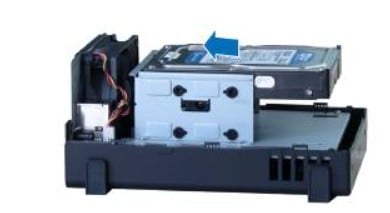
The top and bottom guide rails are quite short. Too short in my opinion, you can see from the photo below.


The screws are not in (at present)


PC: Dell Inspiron 16 5640 (Windows 11 Home), Dell Inspiron 7591 2n1 (Windows 11 Pro), HP ProBook 470G1 (Windows 10 Pro), Intel NUC7I5BNH (Zorin)
Net: Grandstream 1 x GWN7062 Router, 1 x GWN7665 Access Point
Storage: Synology DS216play NAS, 2 x 6TB
Media: 3 x Amazon FireTV. Echo, Dot, Spot
TV: 2 x Samsung H6400 55" LED TV, Panasonic TH-P50G10Z 50" Plasma TV
Mobile: Samsung Galaxy A52 5G
Wearable: Gear S3 Frontier


Support Geekzone with one-off or recurring donations Donate via PressPatron.
alisam

916 posts

Ultimate Geek
+1 received by user: 89


  #3499589 2-Jun-2026 19:09
Send private message quote this post

freitasm:


Does the drive spin up when plugged to Windows?


Some drives won't power up from external adapters, especially some WD shucked models. Search for 3.3v problem.


No. I can put in an NTFS 3TB Drive and I can hear that spin up.


PC: Dell Inspiron 16 5640 (Windows 11 Home), Dell Inspiron 7591 2n1 (Windows 11 Pro), HP ProBook 470G1 (Windows 10 Pro), Intel NUC7I5BNH (Zorin)
Net: Grandstream 1 x GWN7062 Router, 1 x GWN7665 Access Point
Storage: Synology DS216play NAS, 2 x 6TB
Media: 3 x Amazon FireTV. Echo, Dot, Spot
TV: 2 x Samsung H6400 55" LED TV, Panasonic TH-P50G10Z 50" Plasma TV
Mobile: Samsung Galaxy A52 5G
Wearable: Gear S3 Frontier


freitasm
BDFL - Memuneh
80944 posts

Uber Geek
+1 received by user: 41699

Administrator
ID Verified
Trusted
Geekzone
Lifetime subscriber

  #3499590 2-Jun-2026 19:11
Send private message quote this post

So this drive is not spinning up then? It sounds like the problem I mentioned. But it should work on the NAS.


Referral links: Quic Broadband (free setup code: R587125ERQ6VE) | Samsung | AliExpress | Wise | Sharesies 


Support Geekzone by subscribing (browse ads-free), or making a one-off or recurring donation through PressPatron.


alisam

916 posts

Ultimate Geek
+1 received by user: 89


  #3499591 2-Jun-2026 19:11
Send private message quote this post

Jase2985:


tried using internal SATA cables over an enclosure?


Sorry, I don't know what that means. All I have are laptops and a 2 bay ORICO dock.


PC: Dell Inspiron 16 5640 (Windows 11 Home), Dell Inspiron 7591 2n1 (Windows 11 Pro), HP ProBook 470G1 (Windows 10 Pro), Intel NUC7I5BNH (Zorin)
Net: Grandstream 1 x GWN7062 Router, 1 x GWN7665 Access Point
Storage: Synology DS216play NAS, 2 x 6TB
Media: 3 x Amazon FireTV. Echo, Dot, Spot
TV: 2 x Samsung H6400 55" LED TV, Panasonic TH-P50G10Z 50" Plasma TV
Mobile: Samsung Galaxy A52 5G
Wearable: Gear S3 Frontier


alisam

916 posts

Ultimate Geek
+1 received by user: 89


  #3499592 2-Jun-2026 19:12
Send private message quote this post

freitasm:


So this drive is not spinning up then?


Correct.


PC: Dell Inspiron 16 5640 (Windows 11 Home), Dell Inspiron 7591 2n1 (Windows 11 Pro), HP ProBook 470G1 (Windows 10 Pro), Intel NUC7I5BNH (Zorin)
Net: Grandstream 1 x GWN7062 Router, 1 x GWN7665 Access Point
Storage: Synology DS216play NAS, 2 x 6TB
Media: 3 x Amazon FireTV. Echo, Dot, Spot
TV: 2 x Samsung H6400 55" LED TV, Panasonic TH-P50G10Z 50" Plasma TV
Mobile: Samsung Galaxy A52 5G
Wearable: Gear S3 Frontier


freitasm
BDFL - Memuneh
80944 posts

Uber Geek
+1 received by user: 41699

Administrator
ID Verified
Trusted
Geekzone
Lifetime subscriber

  #3499595 2-Jun-2026 19:23
Send private message quote this post

It may not work on an external adapter then. As I mentioned above, WD shucked drives may show this.


Was this drive new or shucked?


Referral links: Quic Broadband (free setup code: R587125ERQ6VE) | Samsung | AliExpress | Wise | Sharesies 


Support Geekzone by subscribing (browse ads-free), or making a one-off or recurring donation through PressPatron.


Shop on-line at New World now for your groceries (affiliate link).
alisam

916 posts

Ultimate Geek
+1 received by user: 89


  #3499596 2-Jun-2026 19:27
Send private message quote this post

freitasm:


It may not work on an external adapter then. As I mentioned above, WD shucked drives may show this.


Was this drive new or shucked?


New, from pbtech (31/05/2026)


Buy the WD Red Plus 8TB 3.5" NAS Internal HDD SATA3 - 256MB Cache - CMR -... ( WD80EFPX ) online - PBTech.co.nz


PC: Dell Inspiron 16 5640 (Windows 11 Home), Dell Inspiron 7591 2n1 (Windows 11 Pro), HP ProBook 470G1 (Windows 10 Pro), Intel NUC7I5BNH (Zorin)
Net: Grandstream 1 x GWN7062 Router, 1 x GWN7665 Access Point
Storage: Synology DS216play NAS, 2 x 6TB
Media: 3 x Amazon FireTV. Echo, Dot, Spot
TV: 2 x Samsung H6400 55" LED TV, Panasonic TH-P50G10Z 50" Plasma TV
Mobile: Samsung Galaxy A52 5G
Wearable: Gear S3 Frontier


alisam

916 posts

Ultimate Geek
+1 received by user: 89


  #3499597 2-Jun-2026 19:31
Send private message quote this post

Just in case anyone asks or wants me to find out more...


The dock is an ORICO 6629.


As far as I can ascertain it handles (maximum) 8TB drives


PC: Dell Inspiron 16 5640 (Windows 11 Home), Dell Inspiron 7591 2n1 (Windows 11 Pro), HP ProBook 470G1 (Windows 10 Pro), Intel NUC7I5BNH (Zorin)
Net: Grandstream 1 x GWN7062 Router, 1 x GWN7665 Access Point
Storage: Synology DS216play NAS, 2 x 6TB
Media: 3 x Amazon FireTV. Echo, Dot, Spot
TV: 2 x Samsung H6400 55" LED TV, Panasonic TH-P50G10Z 50" Plasma TV
Mobile: Samsung Galaxy A52 5G
Wearable: Gear S3 Frontier


mentalinc
3403 posts

Uber Geek
+1 received by user: 1035

Trusted

  #3499598 2-Jun-2026 19:37
Send private message quote this post

At this point I'd suggest you wait for the risotto to be done, and take the kind offer for some support from the community here to try and get the NAS back to life.


I'd also consider the first 'failed' drive may also not be as dead as suspected. Tthe internal connector on the NAS may be faulty/damage from the rapid impact to the ground.


CPU: AMD 5900x | RAM: GSKILL Trident Z Neo RGB F4-3600C16D-32GTZNC-32-GB | MB:  Asus X570-E | GFX: EVGA FTW3 Ultra RTX 3080Ti| Monitor: LG 27GL850-B 2560x1440


Quic: https://account.quic.nz/refer/473833 R473833EQKIBX 


fe31nz
1303 posts

Uber Geek
+1 received by user: 430


  #3499678 2-Jun-2026 23:14
Send private message quote this post

alisam:


Just in case anyone asks or wants me to find out more...


The dock is an ORICO 6629.


As far as I can ascertain it handles (maximum) 8TB drives


I have never had a dock that listed a maximum drive size actually be limited to that drive size.  As newer, bigger drives came along, they worked just fine in all my docks.  The advertising of a maximum drive size is normally just the biggest drive available at the time the specifications were put together.  The SATA interface will handle all SATA drives, regardless of size.


1 | 2 | 3 | 4
View this topic in a long page with up to 500 replies per page Create new topic


Geekzone Live »

Try automatic live updates from Geekzone directly in your browser, without refreshing the page, with Geekzone Live now.


Are you subscribed to our RSS feed? You can download the latest headlines and summaries from our stories directly to your computer or smartphone by using a feed reader.