Geekzone: technology news, blogs, forums
Guest
Welcome Guest.
You haven't logged in yet. If you don't have an account you can register now.


View this topic in a long page with up to 500 replies per page Create new topic
1 | 2 | 3 | 4 
alisam

916 posts

Ultimate Geek
+1 received by user: 89


  #3499749 3-Jun-2026 08:59
Send private message quote this post

fe31nz:


alisam:


Just in case anyone asks or wants me to find out more...


The dock is an ORICO 6629.


As far as I can ascertain it handles (maximum) 8TB drives


I have never had a dock that listed a maximum drive size actually be limited to that drive size.  As newer, bigger drives came along, they worked just fine in all my docks.  The advertising of a maximum drive size is normally just the biggest drive available at the time the specifications were put together.  The SATA interface will handle all SATA drives, regardless of size.


Good to know.


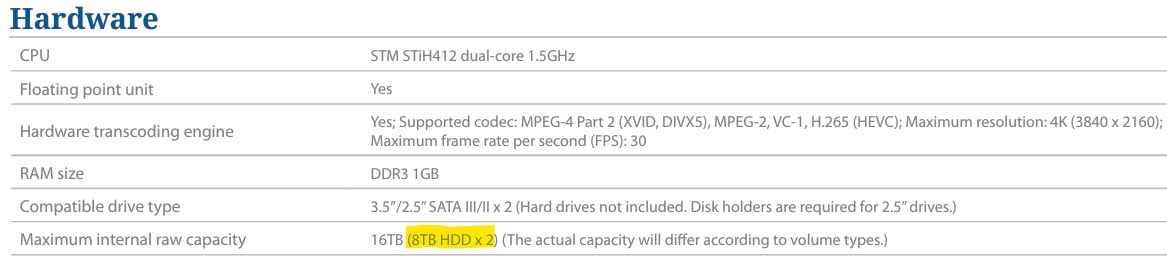
I checked on-line about the ORICO, because at one stage I had a sinking feeling that the NAS would not take 8TB Drives.


I felt relief when it said it could:


PC: Dell Inspiron 16 5640 (Windows 11 Home), Dell Inspiron 7591 2n1 (Windows 11 Pro), HP ProBook 470G1 (Windows 10 Pro), Intel NUC7I5BNH (Zorin)
Net: Grandstream 1 x GWN7062 Router, 1 x GWN7665 Access Point
Storage: Synology DS216play NAS, 2 x 6TB
Media: 3 x Amazon FireTV. Echo, Dot, Spot
TV: 2 x Samsung H6400 55" LED TV, Panasonic TH-P50G10Z 50" Plasma TV
Mobile: Samsung Galaxy A52 5G
Wearable: Gear S3 Frontier


networkn
Networkn
33023 posts

Uber Geek
+1 received by user: 15610

ID Verified
Trusted
Lifetime subscriber

  #3500040 3-Jun-2026 22:23
Send private message quote this post

So what is the current status? Where are you based? 


I have concerns about the drive not powering up, that seems strange. Did that get resolved? 


If it were me, I'd figure out how to get the drive back into it's slot properly in the NAS and then see if the unit will power up. If that worked, I would imagine a rebuild (assuming you haven't done something bad to the remaining drive/data structures) would be pretty straight forward. 


If you want some help, let me know, I am wanting to make sure you don't lose this data, though I want to be clear, I am not promising any outcome other than to take a look and try and get you sorted. 


alisam

916 posts

Ultimate Geek
+1 received by user: 89


  #3500075 4-Jun-2026 07:18
Send private message quote this post

networkn:


So what is the current status? Where are you based? 


I have concerns about the drive not powering up, that seems strange. Did that get resolved? 


If it were me, I'd figure out how to get the drive back into it's slot properly in the NAS and then see if the unit will power up. If that worked, I would imagine a rebuild (assuming you haven't done something bad to the remaining drive/data structures) would be pretty straight forward. 


If you want some help, let me know, I am wanting to make sure you don't lose this data, though I want to be clear, I am not promising any outcome other than to take a look and try and get you sorted. 


Thanks. The issue is not resolved.


I haven't tried anything for a couple of days, just in case another member had a suggestion.


Today, I screwed in the good 6TB drive in Bay 2. The NAS booted OK with just the one drive.


After a Shutdown, I put the new 8TB drive into Bay 1 and screwed it in.


The NAS booted, but will not recognise the 8TB drive.


I found the plastic piece of the casing which broke off. It is so tiny, but close to a pin.


I would like to take you up on your offer and will DM you.


PC: Dell Inspiron 16 5640 (Windows 11 Home), Dell Inspiron 7591 2n1 (Windows 11 Pro), HP ProBook 470G1 (Windows 10 Pro), Intel NUC7I5BNH (Zorin)
Net: Grandstream 1 x GWN7062 Router, 1 x GWN7665 Access Point
Storage: Synology DS216play NAS, 2 x 6TB
Media: 3 x Amazon FireTV. Echo, Dot, Spot
TV: 2 x Samsung H6400 55" LED TV, Panasonic TH-P50G10Z 50" Plasma TV
Mobile: Samsung Galaxy A52 5G
Wearable: Gear S3 Frontier


Tinkerisk
4909 posts

Uber Geek
+1 received by user: 3827


  #3500078 4-Jun-2026 07:33
Send private message quote this post

alisam:


I found the plastic piece of the casing which broke off. It is so tiny, but close to a pin.


The part can be reattached using cyanoacrylate (also known as Superglue), applied carefully to the fracture site with a pin. Naturally, care must be taken not to insulate any pins in the process.


  • Qui nihil scit, omnia credere debet. - He who knows nothing must believe everything.
  • Firewalls do NOT stop dragons. Really not!
  • I avoid Big Tech. They try hard to dictate technology and „culture“ across borders.
  • In effect we have everything to hide from someone, and no idea who „someone“ is.

1 | 2 | 3 | 4 
View this topic in a long page with up to 500 replies per page Create new topic


Geekzone Live »

Try automatic live updates from Geekzone directly in your browser, without refreshing the page, with Geekzone Live now.


Are you subscribed to our RSS feed? You can download the latest headlines and summaries from our stories directly to your computer or smartphone by using a feed reader.