Geekzone: technology news, blogs, forums
Guest
Welcome Guest.
You haven't logged in yet. If you don't have an account you can register now.


View this topic in a long page with up to 500 replies per page Create new topic
1 | 2 | 3 | 4 | 5 | 6 | 7 | 8 | 9 | 10 | 11 | 12 | ... | 57
michaelmurfy

meow
13580 posts

Uber Geek
+1 received by user: 10912

Moderator
ID Verified
Trusted
Lifetime subscriber

  #1778144 8-May-2017 22:04
Send private message

@RossT off the top of my head you'll essentially set up a PPPoE connection on the Edgerouter without VLAN tagging.

@andrewpaul You'll be doing a double-nat (which is something you don't want to do). For Vodafone TV somebody else has already posted a quick how-to Here to get it working on the Edgerouter. As for the landline you may be able to connect the HG659 via the WAN port to your network switch and configure internet access on it (bare in mind also - you don't want to connect anything after the HG659 since you'll double-nat yourself again). Vodafone is a tricky one since you're forced to use their router if you want a landline, if you ditch the landline it makes things a truckload easier.


Michael Murphy | https://murfy.nz
Referral Links: Quic Broadband (use R122101E7CV7Q for free setup)

Are you happy with what you get from Geekzone? Please consider supporting us by subscribing.
Opinions are my own and not the views of my employer.


Mushdaba
21 posts

Geek


  #1778661 9-May-2017 18:38
Send private message

I need someone to help me please, I'm at my wits end.


I've got an EdgeRouter X and I followed the guide here but no joy. I gave it to a couple of guys at work to see if maybe the unit was faulty. One was on My Republic and one was on Vodafone and they both reported amazing throughput. I brought it home and tried again - nothing. Reset, tried every config under the sun - nothing. Rung Spark and they told me the generic settings that you can get off the website. Rang back and asked if there was maybe some issue with my fibre connection, after some umming and ahhing, no, we think it's fine. I'd been having an ongoing issue with the DNS dropping randomly but apparently that's not a fibre issue according to them, probably related to the router.


I'm out of ideas. If it works on other ISP's then why won't it work on my Spark fibre connection?


Firmware version is the most current (1.9.1) and as I said, I've tried literally everything I can think of. I've tried the settings on here, a mixture of settings, my own settings, no settings, you name it - nothing. And yet when I plug back into the Spark HG659b I get internet. So unbelievably frustrating.


Help me Obi Wan, you're my only hope.


djotter
38 posts

Geek
+1 received by user: 4

Trusted

  #1778702 9-May-2017 19:53
Send private message

Can you reset your router to factory, then follow the guide from this thread then save and share your config file with us. Maybe start a new thread to keep on topic.


Mushdaba
21 posts

Geek


  #1778747 9-May-2017 20:40
Send private message

Sorry, config file? Is this what you mean:


Click to see full size


djotter
38 posts

Geek
+1 received by user: 4

Trusted

  #1778758 9-May-2017 20:57
Send private message

Open system in the bottom left.


Download backup config file.


Inside the .tar is a config.boot file. This shows all your settings and will help us understand.


Mushdaba
21 posts

Geek


  #1778815 9-May-2017 22:04
Send private message

Hopefully this is what you're after:


firewall {
    all-ping enable
    broadcast-ping disable
    ipv6-receive-redirects disable
    ipv6-src-route disable
    ip-src-route disable
    log-martians enable
    name WAN_IN {
        default-action drop
        description "WAN to internal"
        rule 10 {
            action accept
            description "Allow established/related"
            state {
                established enable
                related enable
            }
        }
        rule 20 {
            action drop
            description "Drop invalid state"
            state {
                invalid enable
            }
        }
    }
    name WAN_LOCAL {
        default-action drop
        description "WAN to router"
        rule 10 {
            action accept
            description "Allow established/related"
            state {
                established enable
                related enable
            }
        }
        rule 20 {
            action drop
            description "Drop invalid state"
            state {
                invalid enable
            }
        }
    }
    options {
        mss-clamp {
            mss 1412
        }
    }
    receive-redirects disable
    send-redirects enable
    source-validation disable
    syn-cookies enable
}
interfaces {
    ethernet eth0 {
        duplex auto
        speed auto
        vif 10 {
            description "Internet (PPPoE)"
            mtu 1492
            pppoe 0 {
                default-route auto
                firewall {
                    in {
                        name WAN_IN
                    }
                    local {
                        name WAN_LOCAL
                    }
                }
                mtu 1492
                name-server auto
                password password
                user-id user@spark.co.nz
            }
        }
    }
    ethernet eth1 {
        description Local
        duplex auto
        speed auto
    }
    ethernet eth2 {
        description Local
        duplex auto
        speed auto
    }
    ethernet eth3 {
        description Local
        duplex auto
        speed auto
    }
    ethernet eth4 {
        description Local
        duplex auto
        speed auto
    }
    loopback lo {
    }
    switch switch0 {
        address 192.168.1.1/24
        description Local
        mtu 1500
        switch-port {
            interface eth1 {
            }
            interface eth2 {
            }
            interface eth3 {
            }
            interface eth4 {
            }
            vlan-aware disable
        }
    }
}
service {
    dhcp-server {
        disabled false
        hostfile-update disable
        shared-network-name LAN {
            authoritative enable
            subnet 192.168.1.0/24 {
                default-router 192.168.1.1
                dns-server 192.168.1.1
                lease 86400
                start 192.168.1.38 {
                    stop 192.168.1.243
                }
            }
        }
        use-dnsmasq disable
    }
    dns {
        forwarding {
            cache-size 150
            listen-on switch0
        }
    }
    gui {
        http-port 80
        https-port 443
        older-ciphers enable
    }
    nat {
        rule 5010 {
            description "masquerade for WAN"
            log disable
            outbound-interface eth0.10
            protocol all
            type masquerade
        }
    }
    ssh {
        port 22
        protocol-version v2


Shop now on Samsung phones, tablets, TVs and more (affiliate link).
djotter
38 posts

Geek
+1 received by user: 4

Trusted

  #1778948 10-May-2017 10:07
Send private message

Yes, this is the right file.


Have you read thorugh this thread? Seems similar to yours.


http://www.geekzone.co.nz/forums.asp?topicid=191757


Perhaps USS @michaelmurfy can see a missing link :)

Mushdaba
21 posts

Geek


  #1778961 10-May-2017 10:32
Send private message

It looks similar. Be interested to see if it's my stupidity that's causing the issue here or something more systemic.


phillw
60 posts

Master Geek


  #1784455 18-May-2017 20:04
Send private message

Hi all


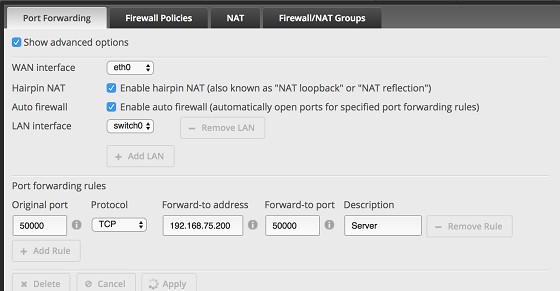
I've finished setting up my EdgeRouter PoE5 using this guide and it worked brilliantly. One thing I want to do now is a port forward for a particular application for a server on my network.


I've tried using Firewall / NAT > Port Forwarding window but for some reason the auto firewall just isn't working. I'm on Bigpipe and my ONT is connected to eth0. I selected switch0 as my LAN interface as I assume this would cover any devices on eth2, 3 or 4. I also tried using just eth2 (which my server is directly connected to) but no luck.


Can anyone suggest where I might have gone wrong?


michaelmurfy

meow
13580 posts

Uber Geek
+1 received by user: 10912

Moderator
ID Verified
Trusted
Lifetime subscriber

  #1784465 18-May-2017 20:25
Send private message

@phillw BigPipe use CG-NAT by default which doesn't give your router a publically-routable IP address. Have you got a static IP through them? Your configuration looks right however it is dependant on your interface too. I noticed you've got eth0 as your WAN interface - if you're on UFB and have a PPPoE connection your interface will have to be your PPPoE interface (pppoe0).


@Mushdaba sorry, just saw your message. Could you please open the terminal on your Edgerouter and run this?


configure
delete service use-dnsmasq disable
set service use-dnsmasq enable
set service dns forwarding name-server 122.56.237.1
set service dns forwarding name-server 210.55.111.1
commit
save


Let me know how you get on.


Michael Murphy | https://murfy.nz
Referral Links: Quic Broadband (use R122101E7CV7Q for free setup)

Are you happy with what you get from Geekzone? Please consider supporting us by subscribing.
Opinions are my own and not the views of my employer.


Mushdaba
21 posts

Geek


  #1786364 23-May-2017 08:37
Send private message

It's all good, thanks for your help.


In the end I changed from Spark to 2 Degrees and it worked first time. Seems it wasn't me or the EdgeRouter after all.


Shop now for Lenovo laptops and other devices (affiliate link).
BlackHand
135 posts

Master Geek
+1 received by user: 19


  #1790880 29-May-2017 08:15
Send private message

I just noticed this, since I've enabled IPv6 my resolv.conf file has 1000's of search bigpipe.co.nz entries in it, does anyone have the same issue or is my router setup messed up some how?
Running v1.9.1.1 firmware.


michaelmurfy

meow
13580 posts

Uber Geek
+1 received by user: 10912

Moderator
ID Verified
Trusted
Lifetime subscriber

  #1791481 30-May-2017 07:47
Send private message

BlackHand:


I just noticed this, since I've enabled IPv6 my resolv.conf file has 1000's of search bigpipe.co.nz entries in it, does anyone have the same issue or is my router setup messed up some how?
Running v1.9.1.1 firmware.


Not me:


mmurphy@charmander:~$ cat /etc/resolv.conf
#line generated by /opt/vyatta/sbin/vyatta_update_resolv.pl
domain local
nameserver 192.168.2.4
nameserver 203.96.123.1 #nameserver written by /opt/vyatta/sbin/vyatta_update_resolv.pl
nameserver 203.96.123.2 #nameserver written by /opt/vyatta/sbin/vyatta_update_resolv.pl


Michael Murphy | https://murfy.nz
Referral Links: Quic Broadband (use R122101E7CV7Q for free setup)

Are you happy with what you get from Geekzone? Please consider supporting us by subscribing.
Opinions are my own and not the views of my employer.


Taubin
592 posts

Ultimate Geek
+1 received by user: 243

ID Verified
Subscriber

  #1791762 30-May-2017 14:24
Send private message

BlackHand:


I just noticed this, since I've enabled IPv6 my resolv.conf file has 1000's of search bigpipe.co.nz entries in it, does anyone have the same issue or is my router setup messed up some how?
Running v1.9.1.1 firmware.


Same here:


Welcome to EdgeOS!


Last login: Tue May 30 14:16:02 2017
Taubin@erl:~$ cat /etc/resolv.conf
search bigpipe.co.nz.
nameserver 2403:9800:c041:1000::a
nameserver 2403:9800:c041:1000::b
#line generated by /opt/vyatta/sbin/vyatta_update_resolv.pl
domain local.lan
nameserver 203.96.123.1 # nameserver added by pppoe0
nameserver 203.96.123.2 # nameserver added by pppoe0


ZL2TOY/ZL1DMP


michaelmurfy

meow
13580 posts

Uber Geek
+1 received by user: 10912

Moderator
ID Verified
Trusted
Lifetime subscriber

  #1791887 30-May-2017 17:44
Send private message

Not sure how you're getting that. I've taken a look on the 2 routers I have and can't see that at all.


Michael Murphy | https://murfy.nz
Referral Links: Quic Broadband (use R122101E7CV7Q for free setup)

Are you happy with what you get from Geekzone? Please consider supporting us by subscribing.
Opinions are my own and not the views of my employer.


1 | 2 | 3 | 4 | 5 | 6 | 7 | 8 | 9 | 10 | 11 | 12 | ... | 57
View this topic in a long page with up to 500 replies per page Create new topic


Geekzone Live »

Try automatic live updates from Geekzone directly in your browser, without refreshing the page, with Geekzone Live now.


Are you subscribed to our RSS feed? You can download the latest headlines and summaries from our stories directly to your computer or smartphone by using a feed reader.