Geekzone: technology news, blogs, forums
Guest
Welcome Guest.
You haven't logged in yet. If you don't have an account you can register now.


lyonrouge

1993 posts

Uber Geek
+1 received by user: 20

Trusted
Lifetime subscriber

#100280 7-Apr-2012 10:11
Send private message

I have a Windows Home Server 2011 as a VM in Hyper-V. On the same virtual switch I have a Win 7 VM. The two can see one another and can see machines on the physical network, however, machines on the physical network have sporadic visibility of WHS. I tried different switch arrangements and noticed that connection was stable for the first minute of so after the adapter was connected. So I'm wondering if promiscuous mode is needed on the adapter to let traffic through, and if so, how would I enable it? Perhaps I need a different adapter that automatically allows it?


Create new topic
freitasm
BDFL - Memuneh
80647 posts

Uber Geek
+1 received by user: 41030

Administrator
ID Verified
Trusted
Geekzone
Lifetime subscriber

  #606340 7-Apr-2012 10:25
Send private message

Are you running a software firewall other than the Windows Firewall?


Referral links: Quic Broadband (free setup code: R587125ERQ6VE) | Samsung | AliExpress | Wise | Sharesies 


Support Geekzone by subscribing (browse ads-free), or making a one-off or recurring donation through PressPatron.


lyonrouge

1993 posts

Uber Geek
+1 received by user: 20

Trusted
Lifetime subscriber

  #606588 8-Apr-2012 09:17
Send private message

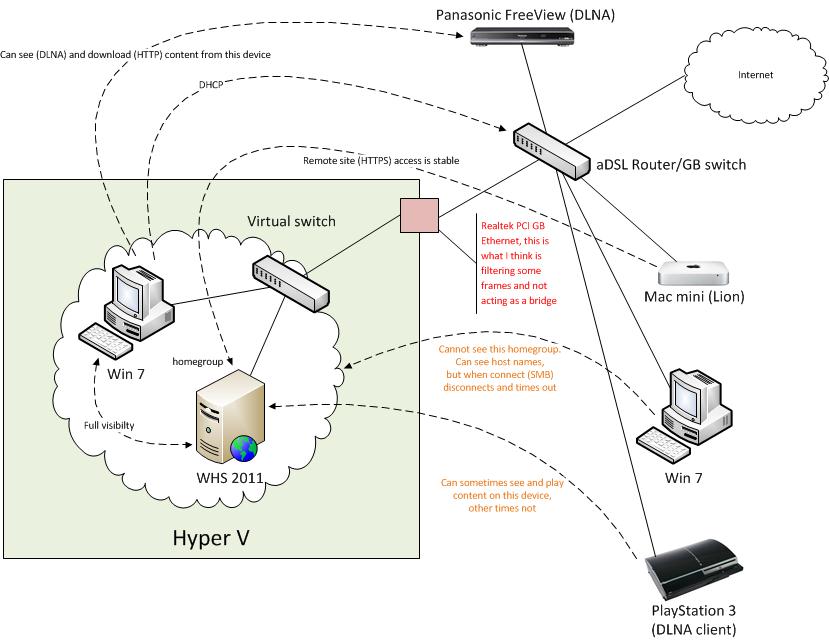
Only firewall is the out-of-the-box ones that come with WHS 2011 and Win 7, here is a diagram to put the NIC question in context. (Edit: added details of protocols that work)


DrStrangelove
368 posts

Ultimate Geek
+1 received by user: 1


  #606650 8-Apr-2012 13:14
Send private message

Good man, excellent diag.

I wouldn't have thought promiscuous mode would help.

The card is listen for it's MAC address and dropping anything that it doesn't know about.
So... if it's set to promiscuous mode (doubt if you can, but who knows what drivers one can find these days) it'll only be reading all packets with no knowledge what to do with them, when it gets them. Promiscuous mode is generally used for LAN/WAN analysers and applications building network awareness.

I'm guessing traffic problems may be found at the network layer.

Guessing you're happy that you have IP UDP multicast traffic all configured OK along with any IP unicast traffic.

I have Hyper-V support (at some level) on my NAS, but never played with it. Mentions x64 and Windows server 2008 R2  to much for my liking.  Wink


lyonrouge

1993 posts

Uber Geek
+1 received by user: 20

Trusted
Lifetime subscriber

  #606731 8-Apr-2012 16:35
Send private message

My theory was based on previous software bridge solutions in Windows, where I've bridged two switches using two Ethernet adapters in a single machine. For this to work, the adapters have to be forced into promiscuous mode using the following commands (first lists adapter numbers, second sets mode for each adapter)

netsh bridge show adapter
netsh bridge set adapter forcecompatmode=enable

However: as you surmised, this was not what was needed, the answer was, use Hyper-V "Legacy Network Adapter" in the VMs. When I first installed WHS it did not have the drivers for the default Hypr-V Gigabit adapter, so I used legacy and it was all working. Then I installed the Gigabit adapter, which worked as the existing connection was established to download the drivers, however, I didn't correlate the connectivity issues to the adapter change over. I've changed WHS and Win 7 to "Legacy" and so far everything is working again.

Create new topic


Geekzone Live »

Try automatic live updates from Geekzone directly in your browser, without refreshing the page, with Geekzone Live now.


Are you subscribed to our RSS feed? You can download the latest headlines and summaries from our stories directly to your computer or smartphone by using a feed reader.