Geekzone: technology news, blogs, forums
Guest
Welcome Guest.
You haven't logged in yet. If you don't have an account you can register now.


ushare

483 posts

Ultimate Geek
+1 received by user: 7
Inactive user


#116116 18-Apr-2013 19:20
Send private message

Hi

Sorry i didnt know where to post this :(

My connection (all wired)
PC > router < NAS

My problem:
Every time i turnon the computer i get a message saying "could not reconnect to network drive". I have done a lot a research but cant find a solution. The nas is a synonlogy 212j. If i double click on the drive, it goes straight into the nas. I have tried setting IP to static, that didnt help. I have also tried changing settings in settings.msc as well as a few other things. Nothing seems to be working. What should i do?

Help!!

Sorry if i posted in the wrong section.

Create new topic
farcus
1626 posts

Uber Geek
+1 received by user: 437


  #801841 18-Apr-2013 19:27
Send private message

might help if you said what OS you are using.


ushare

483 posts

Ultimate Geek
+1 received by user: 7
Inactive user


  #801842 18-Apr-2013 19:31
Send private message

Windows 7 ultimate - sorry i am new to the networking side of things

Technofreak
6657 posts

Uber Geek
+1 received by user: 3477

Trusted

  #801849 18-Apr-2013 19:44
Send private message

I get this message from  time to time but the stuff on the NAS drive is still accessible once the conputer has boited up. I think that perhaps the NAS hasn't responded in a certain time frame hence the message.

From what you posted it seems you can still see the drive and access it, it so I wouldn't worry too much about it.


Sony Xperia XA2 running Sailfish OS. https://sailfishos.org The true independent open source mobile OS 
Samsung Galaxy Tab S6
Dell Inspiron 14z i5


blakamin
4431 posts

Uber Geek
+1 received by user: 1306
Inactive user


  #801850 18-Apr-2013 19:47
Send private message

I get the same issue with my win 7 machine accessing an external drive on another laptop over the network.
The moment I open it in windows explorer it's all good though.

ushare

483 posts

Ultimate Geek
+1 received by user: 7
Inactive user


  #801928 18-Apr-2013 22:05
Send private message

ok, i guess i will just keep using it like this..

So i have another thing to worry about now :(

I own a Synology 212J nas. Just set it up with JBOD 2x 3tb HDDs. Transferring movies from pc to the nas over a cat5e ethernet cable as i have said in the OP.

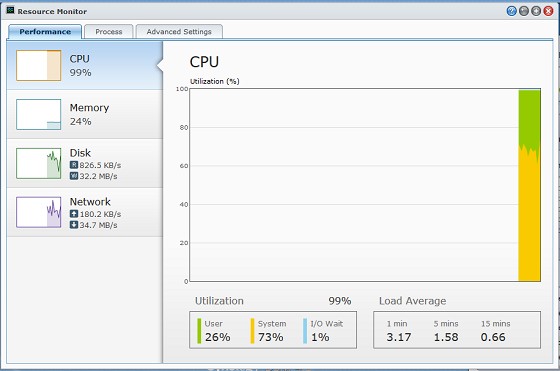
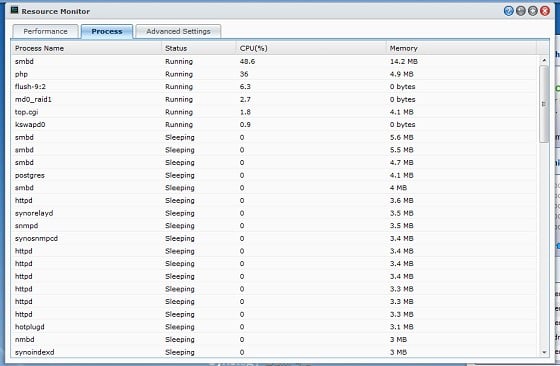
The CPU is being used fully. Its nearing 100% and stays around 95%. I am getting worried. The process that is using about 80% of the cpu is smbd.

I am new to NAS and networking so i dont really know what this means. When i am not transferring, it stays pretty high too.

Devices connected to NAS:
- PC (wired)
- Laptop (wireless)
- Smartphone (wireless - astro file manager)

What should i do? What is wrong? :(

Oriphix
523 posts

Ultimate Geek
+1 received by user: 32


  #801940 18-Apr-2013 22:20

Don't worry about the network drive I get that as well when you double click it, it should work.

Is the drive at 100% when transferring files or when its idle?

You can look at the process from Task Manager and see whats eating the CPU. Silly question but you do have a anti-virus software?

HP


Shop now for HP laptops and other devices (affiliate link).
ushare

483 posts

Ultimate Geek
+1 received by user: 7
Inactive user


  #801949 18-Apr-2013 22:34
Send private message

Hi

Thanks for your reply. I m not running any anti virus software.

I am talking about the nas cpu being at 100% while transferring and its at about 50% at idle.

"Smbd" is the process that is using up 80% of the cpu..

Please help :(

ushare

483 posts

Ultimate Geek
+1 received by user: 7
Inactive user


  #802035 19-Apr-2013 07:06
Send private message

this is during a file transfer:


This much cpu usage just for a filetransfer just doesnt seem normal to me :(

What do you think is wrong?

freitasm
BDFL - Memuneh
80653 posts

Uber Geek
+1 received by user: 41045

Administrator
ID Verified
Trusted
Geekzone
Lifetime subscriber

  #802040 19-Apr-2013 07:51
Send private message

I wouldn't worry about CPU utilisation on a NAS.


Referral links: Quic Broadband (free setup code: R587125ERQ6VE) | Samsung | AliExpress | Wise | Sharesies 


Support Geekzone by subscribing (browse ads-free), or making a one-off or recurring donation through PressPatron.


wellygary
8810 posts

Uber Geek
+1 received by user: 5287


  #802052 19-Apr-2013 08:43
Send private message

ushare: Hi

Thanks for your reply. I m not running any anti virus software.

I am talking about the nas cpu being at 100% while transferring and its at about 50% at idle.

"Smbd" is the process that is using up 80% of the cpu..

Please help :(


smbd is the smb daemon,  given you are connected via a windows boz and are writing files to it, I would expect it to take a bit of a pounding :)

Create new topic


Geekzone Live »

Try automatic live updates from Geekzone directly in your browser, without refreshing the page, with Geekzone Live now.


Are you subscribed to our RSS feed? You can download the latest headlines and summaries from our stories directly to your computer or smartphone by using a feed reader.