Geekzone: technology news, blogs, forums
Guest
Welcome Guest.
You haven't logged in yet. If you don't have an account you can register now.


Spixe

5 posts

Wannabe Geek
Inactive user


#12316 11-Mar-2007 00:52
Send private message

I've been trying to connect my Desktop to my Laptop via Bluetooth, and with mild success.  On my Desktop, I'm using the MS stack (in xp2), and on my Vaio laptop I'm using widcom (kingston dongle).  Having only used BT on my desktop before to sync my nokia to my comp with no problems, I felt fairly confident I could do this.  I found a guide at http://www.conniq.com/Windows-networking/Bluetooth_PAN_xp-setup_02.htm  that I followed, and by the end of the guide, viola, it was up.  Both comps could see each other in My Network Places > Microsoft Windows Network > Workgroup.  The shared folders where there as well.  Then I got ahead of myself and started fiddling with the bt network ip address's, trying to get ICS working.  Really, I don't care about ICS that much, I just thought it would have been cool.  By the time I did all, and having thus gave up, the bt network was no longer working.  I took out the bt, uninstalled the drivers, etc, and then started again from step one, expecting it to work, be able to see each other, and be satisfied.  Well, having following the guide I posted above, and other guide's I've seen around, the two comps are in fact connected but cannot see each other in the network.

Now when I go my network place >>> Workgroup, it just has the name of its own computer on it.  For example, when it worked the first time, I could see PC1 and PC2 under workgroup.  Now, PC1 onlys ee's PC1, and PC2 only see's PC2.  The funny thing is, when I click my bluetooth icon on PC1, join a personal network, it will search and detect PC2, and I click connect, and it says connection successful.  The bluetooth network connection is up at 1.0Mbps, with strong signal.  Same with PC2, since it uses Widcom, under LAN or High-Speed Internet, it says the bluetooth network is connected, shared.  Both have ip address that start with 169.254.*.* (the last 2 vary slightly), and no problems are detected on any computer.  But I can't see my shared files! 

What did I do wrong???  Someone please help me.  I was so looking forward to being able to sync these 2 computers together for school.  Thanks a ton for any advice.


Create new topic
Spixe

5 posts

Wannabe Geek
Inactive user


  #63657 13-Mar-2007 23:52
Send private message

bump > please, someone, anyone?  :::looks around into the emptiness:::


freitasm
BDFL - Memuneh
80646 posts

Uber Geek
+1 received by user: 41029

Administrator
ID Verified
Trusted
Geekzone
Lifetime subscriber

#63662 14-Mar-2007 03:42
Send private message

Tried asking to the source of the original guide you followed?

Seriously though, PAN and ICS are incompatible. You should use Bridge if you have PAN enabled. Did the other guide not tell you that?


Referral links: Quic Broadband (free setup code: R587125ERQ6VE) | Samsung | AliExpress | Wise | Sharesies 


Support Geekzone by subscribing (browse ads-free), or making a one-off or recurring donation through PressPatron.


Spixe

5 posts

Wannabe Geek
Inactive user


  #63664 14-Mar-2007 03:49
Send private message

Correct, the other site did not mention that.  Also the other site didn't have forums.  And then after doing more searching on bluetooth, I found out geekzone was the best place to go for bluetooth info, and here I am.  I looked through the guides, but couldn't find anything that was PC to PC.  I saw someone mention that there was a guide for PC to Laptop (same thing i know), but I couldn't find it, call me blind.  Can you point me to it?  I'll use your guide instead. 

Btw, how would I go about starting from scratch?  Just uninstall all bluetooth drivers on both systems?  Possible for widcomm, but what about built in ms drivers?  Thanx for your help on this, really appreciated.


Spixe

5 posts

Wannabe Geek
Inactive user


  #63767 15-Mar-2007 02:41
Send private message

bumb - sorry, just sorta anxious to get this working.  Also i'm very interested in checking out your guide if I could find it.

freitasm
BDFL - Memuneh
80646 posts

Uber Geek
+1 received by user: 41029

Administrator
ID Verified
Trusted
Geekzone
Lifetime subscriber

  #63768 15-Mar-2007 02:52
Send private message

You have limited options here. The Windows XP SP2 can only be a client in a PAN. So you can not use ICS, and you must use Bridge.

Also it can not be a server in neither a PAN or LAP so you must use PAN, which means Bridge. And you must Bridge on the PC running the Widcomm stack.

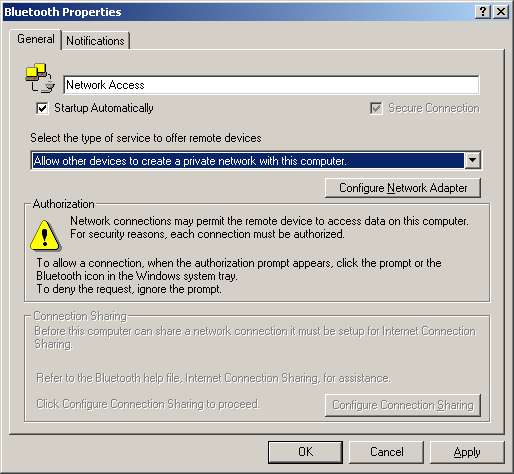
So I'd recheck the PC with Widcomm stack to make sure it's configured like this:


Check the guide you are referring to in first place and make sure your configuration on the server is like this screenshot.


Referral links: Quic Broadband (free setup code: R587125ERQ6VE) | Samsung | AliExpress | Wise | Sharesies 


Support Geekzone by subscribing (browse ads-free), or making a one-off or recurring donation through PressPatron.


Spixe

5 posts

Wannabe Geek
Inactive user


  #63831 15-Mar-2007 16:33
Send private message

The guide I'm refering to does tell me I need to make sure i set it so other devices can set up a personal network, but it mentions nothing about briding.  In fact I don't even know what that means.  Is there a guide you can point me to, I would gladly follow it instead.  I don't care about ICS, I simply need to be able to share files.

Create new topic


Geekzone Live »

Try automatic live updates from Geekzone directly in your browser, without refreshing the page, with Geekzone Live now.


Are you subscribed to our RSS feed? You can download the latest headlines and summaries from our stories directly to your computer or smartphone by using a feed reader.