Geekzone: technology news, blogs, forums
Guest
Welcome Guest.
You haven't logged in yet. If you don't have an account you can register now.


lee2121

9 posts

Wannabe Geek


#126903 23-Jul-2013 15:00
Send private message

Hi, 

I'm trying to research upgrading my default Vodafone router to try and gain some extra speed. This is the router I currently have http://www.vodafone.co.nz/broadband-wireless-router/ 

Does anyone have any experience with updating their Vodafone router to a new one? Which router could give a boost in speed? I'm currently getting around 7.5 Mbps 

Thanks 

Create new topic
Inphinity
2780 posts

Uber Geek
+1 received by user: 1184


  #864326 23-Jul-2013 15:17
Send private message

Presumably you're on ADSL2/2+, not ADSL, right? It's impossible to guarantee any particular router would give you a speed increase, as it primarily comes down to the state of your line etc. Recommendations will depend partly on your budget and features. In general, Asus, Cisco, DrayTek, Netgear are good, imo. I was using an Asus DSL-N55U as my ADSL modem until I got VDSL, and it was great, and gave good speeds, but doesn't offer 802.11ac support.


lee2121

9 posts

Wannabe Geek


  #864333 23-Jul-2013 15:22
Send private message

Yup, using ADSL2+ router.. current one I'm using is 802.11 b/g/n.. My budget would depend on the gains, happy to pay more for better gains but as you said it depends on my service etc.

johnr
19282 posts

Uber Geek
+1 received by user: 2526
Inactive user


  #864335 23-Jul-2013 15:23
Send private message

I think you will be throwing $$$ away


linw
2893 posts

Uber Geek
+1 received by user: 1205


  #864354 23-Jul-2013 15:45
Send private message

First, determine whether you have a problem.

If you have a problem, fix that.

The fix is highly unlikely to involve a modem/router swap.

Inphinity
2780 posts

Uber Geek
+1 received by user: 1184


  #864372 23-Jul-2013 15:52
Send private message

lee2121: Yup, using ADSL2+ router.. current one I'm using is 802.11 b/g/n.. My budget would depend on the gains, happy to pay more for better gains but as you said it depends on my service etc.


You're not going to make significant gains regardless, unless the current modem is faulty (which would usually result in no connection, rather than a slower one, but still). You may get a few hundred kbps, even a couple mbps, if you were going from a very poor modem to a very good one, but from what I've seen of the Vodafone ones, they're pretty decent to start with, at least as far as line speeds go. Maybe you're quite far from the exchange/cabinet, or there's an issue on your line - if one is not already installed, a master splitter may help more than a new modem would, for example.

lee2121

9 posts

Wannabe Geek


  #864374 23-Jul-2013 15:54
Send private message

Thanks for the advice guys.. guess I'll stick with this one until faster internet is available in my area. 

Cheers. 


Shop now at Mighty Ape (affiliate link).
johnr
19282 posts

Uber Geek
+1 received by user: 2526
Inactive user


  #864402 23-Jul-2013 16:16
Send private message

Approx where is this area?

lee2121

9 posts

Wannabe Geek


  #864407 23-Jul-2013 16:18
Send private message

Sumner, Christchurch 

johnr
19282 posts

Uber Geek
+1 received by user: 2526
Inactive user


  #864422 23-Jul-2013 16:26
Send private message

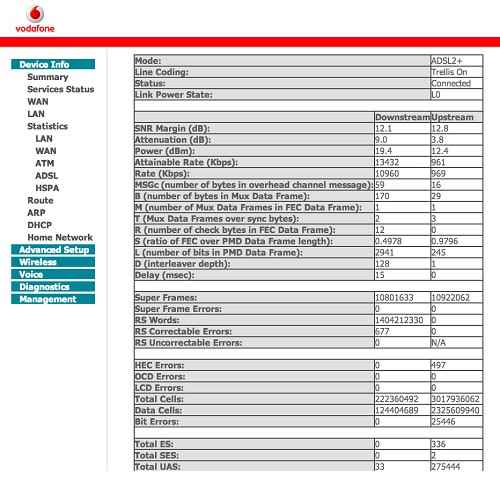
What are the modem line stats showing?

lee2121

9 posts

Wannabe Geek


  #864443 23-Jul-2013 16:37
Send private message

How do I find that? I logged in the advanced section for 192.168.1.1 but couldn't see any modem line information.

lucky015
746 posts

Ultimate Geek
+1 received by user: 182

ID Verified
Trusted

  #864454 23-Jul-2013 16:43
Send private message

lee2121: How do I find that? I logged in the advanced section for 192.168.1.1 but couldn't see any modem line information.


Device info -> Statistics -> ADSL


Shop now on Samsung phones, tablets, TVs and more (affiliate link).
lee2121

9 posts

Wannabe Geek


  #864455 23-Jul-2013 16:46
Send private message

Thanks :)


Create new topic


Geekzone Live »

Try automatic live updates from Geekzone directly in your browser, without refreshing the page, with Geekzone Live now.


Are you subscribed to our RSS feed? You can download the latest headlines and summaries from our stories directly to your computer or smartphone by using a feed reader.