Geekzone: technology news, blogs, forums
Guest
Welcome Guest.
You haven't logged in yet. If you don't have an account you can register now.


tig5

6 posts

Wannabe Geek


#136473 28-Nov-2013 14:32
Send private message

Hey guys,

I've been having persistent problems with my internet connection/speed. My internet will connect (usually without issue) wirelessly but pages will crash/stop loading and videos will quickly stop streaming. If I disconnect then reconnect my internet connection it will usually fix the problem for 1-2 minutes before it happens again. Sometimes the "limited connectivity" icon will appear but not always. Occasionally, after multiple attempts at connecting/disconnecting I will be able to sustain a decent internet connection for 30 minutes or so.

I've downloaded a few tools like Complete Internet Repair, done the usual modem reboots etc without success.

I'm wondering if it is a problem with my ISP.

Latest Ookla test results were: Ping 36ms, Download 1.66Mbps, Upload 0.58Mbps on my PC.
On my phone the results were: Ping 84ms, Download 1.14Mbps, Upload 0.75Mbps.

Does this suggest I just have a really ****** ISP?

Windows 7
HP Notebook with Core i5, 4GB RAM
Using Woosh
Browsers: Firefox, Chrome (both have same problems)
Phone is an HTC MyTouch 4G
I'm in Wellington, New Zealand.

Any help would be much appreciated.

Create new topic
johnr
19282 posts

Uber Geek
+1 received by user: 2526
Inactive user


  #942285 28-Nov-2013 14:33
Send private message

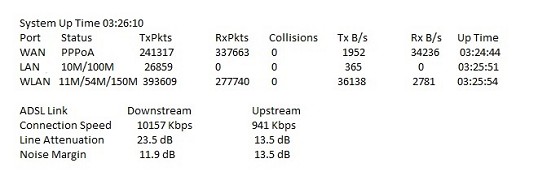
Where are you located in Wellington apporx? Please post xDSL modem line stats

John

ps scan your PC with malwarebytes <- not speed related


tig5

6 posts

Wannabe Geek


  #942407 28-Nov-2013 17:18
Send private message

Thanks for the reply John. I did a Malwarebytes quick scan and removed 4 threats. I'm in Hataitai, just down from the Mt Vic lookout. Are these the stats you mean?                                    


RunningMan
9184 posts

Uber Geek
+1 received by user: 4834


  #942411 28-Nov-2013 17:33
Send private message

Need adsl sync rate, attenuation and noise margin. Your looking in almost the right place.

Also make sure you use a network cable to your modem and not wifi to do testing.


tig5

6 posts

Wannabe Geek


  #942421 28-Nov-2013 17:40
Send private message

That box seems to have the attenuation and noise, where do I find sync rate?

DravidDavid
1907 posts

Uber Geek
+1 received by user: 305


  #942422 28-Nov-2013 17:40
Send private message

Hi there,

That is along the lines John was looking for, but not exactly. There are other statistics we need in order to give you a better diagnosis.

You are looking for something like "Line Attenuation" "Upstream/Downstream" "ADSL MODE" "Margin" or "Noise Margin". Look for those. Your ISP is very VERY rarly ever the issue. It is more likely to be an internal house wiring issue, such as an old jack-point. Perhaps your cat has had fun with the wiring under your house.

- Try another modem, or your modem at someone else's house
- Try another jack-point
- Disconnect all devices from other jacks and try modem again without a filter (see next suggestion)
- Try another cable from modem to jack (such as a standard telephone cable)
- Use the cable listed above and plug directly in to other jacks.
- Check all other jacks with phones to ensure they all have filters.

Check what kind of service your particular address is capable of here: http://www.chorus.co.nz/network-upgrade-map

Cheers! :)

RunningMan
9184 posts

Uber Geek
+1 received by user: 4834


  #942440 28-Nov-2013 18:27
Send private message

That image didn't seem to be showing previously, but the basic line stats look fine.

Are you connected to your modem via WiFi or a network cable?


Shop now for Lenovo laptops and other devices (affiliate link).
johnr
19282 posts

Uber Geek
+1 received by user: 2526
Inactive user


  #942443 28-Nov-2013 18:39
Send private message

You really need to do some basic fault checking for your side,

tig5

6 posts

Wannabe Geek


  #944120 2-Dec-2013 14:03
Send private message

Ok, thanks for the tips. I'll do some poking around and see what happens. I'm on a WIFI connection.


Cheers

RunningMan
9184 posts

Uber Geek
+1 received by user: 4834


  #944155 2-Dec-2013 14:39
Send private message

Never try to do troubleshooting over WiFi - there are too many variables that affect it.

Plug your computer in to your modem / router with a network cable instead, and let us know how that goes.

Create new topic


Geekzone Live »

Try automatic live updates from Geekzone directly in your browser, without refreshing the page, with Geekzone Live now.


Are you subscribed to our RSS feed? You can download the latest headlines and summaries from our stories directly to your computer or smartphone by using a feed reader.