Geekzone: technology news, blogs, forums
Guest
Welcome Guest.
You haven't logged in yet. If you don't have an account you can register now.


gumdigger

429 posts

Ultimate Geek
+1 received by user: 3


#139337 5-Feb-2014 14:40
Send private message

Hi

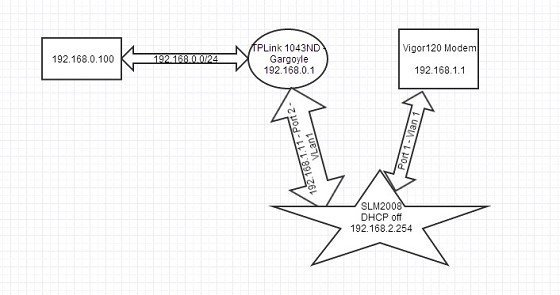
Here's a snapshot of my LAN, how can i put a static route so i access the switch webui from 192.168.0.0/24, i presume the route will be on the TPlink router?
please advise.

Thanks.


Create new topic
hashbrown
463 posts

Ultimate Geek
+1 received by user: 131


  #980714 5-Feb-2014 14:53
Send private message

Assuming it's a typo and your switches IP is 192.168.1.254, you need a route on the switch to 192.168.0.0/24 via the TP-Links interface in 192.168.1.0/24 (192.168.1.11 if I'm reading your diagram correctly)


Ragnor
8279 posts

Uber Geek
+1 received by user: 585

Trusted

  #980784 5-Feb-2014 15:42
Send private message

Q: What's the point of having the Cisco switch between the Draytek and TP Link? Are you using the Cisco for something other than switch (shaping etc)?  

You would be much better off with:

Draytek (PPPoA to PPPoE bridge/passthrough enabled) >> TP Link (PPPoE WAN setup) >> >> Cisco Switch

Cabling
Draytek LAN to TP Link WAN
TP Link LAN to Cisco LAN
Cisco LAN to rest of network/devices

http://www.draytek.net.nz/draytek/support/passthrough/


gumdigger

429 posts

Ultimate Geek
+1 received by user: 3


  #981026 5-Feb-2014 22:13
Send private message

Ragnor: Q: What's the point of having the Cisco switch between the Draytek and TP Link? Are you using the Cisco for something other than switch (shaping etc)?  

You would be much better off with:

Draytek (PPPoA to PPPoE bridge/passthrough enabled) >> TP Link (PPPoE WAN setup) >> >> Cisco Switch

Cabling
Draytek LAN to TP Link WAN
TP Link LAN to Cisco LAN
Cisco LAN to rest of network/devices

http://www.draytek.net.nz/draytek/support/passthrough/


Network Monitoring. Will be using the mirror function.


MadEngineer
4591 posts

Uber Geek
+1 received by user: 2570

Trusted

  #981055 5-Feb-2014 22:57
Send private message

you need a router with an ip address in the same subnet as the switch device (or add a suitable ip address to the interface of a router that can hop it). you then add a route in the router that serves the pc


You're not on Atlantis anymore, Duncan Idaho.

webwat
2036 posts

Uber Geek
+1 received by user: 145

Trusted

  #982241 8-Feb-2014 12:37
Send private message

Cant you just change the IP address to match rest of the LAN subnet?


Time to find a new industry!


MadEngineer
4591 posts

Uber Geek
+1 received by user: 2570

Trusted

  #982299 8-Feb-2014 14:59
Send private message

A local IP address doesn't get routed out a wan port.


You're not on Atlantis anymore, Duncan Idaho.

Create new topic


Geekzone Live »

Try automatic live updates from Geekzone directly in your browser, without refreshing the page, with Geekzone Live now.


Are you subscribed to our RSS feed? You can download the latest headlines and summaries from our stories directly to your computer or smartphone by using a feed reader.
