Geekzone: technology news, blogs, forums
Guest
Welcome Guest.
You haven't logged in yet. If you don't have an account you can register now.


dcamposs

10 posts

Wannabe Geek


#1550 15-May-2004 17:52
Send private message

Is it possible to see/move/open/close/copy/paste files and/or folders from the DESKTOP or the LAPTOP computer once you have established a NETWORK ACCESS SERVICE with Bluetooth?.


I have Windows XP, and I would like to be able to see my Desktops' files and folders, so that I can copy some of them to my Laptop and viceversa. Is this possible?


I imagine it is possible, but I do not know how to share the files, directories or folders with my Laptop.


I know there is the Bluetooth's File Transfer Service, which I have already used. But I would like to see if something like in the normal wired networks also exists in Bluetooth.


Please Need Help

Create new topic
freitasm
BDFL - Memuneh
80646 posts

Uber Geek
+1 received by user: 41030

Administrator
ID Verified
Trusted
Geekzone
Lifetime subscriber

#5753 15-May-2004 22:53
Send private message

If you configure the devices to use PAN instead of LAP you should be able to use all network features, including file sharing. Right-click a folder and select Sharing. On the client computer Open File Explorer and using Tools | Map you can attach to the shared folder.


Referral links: Quic Broadband (free setup code: R587125ERQ6VE) | Samsung | AliExpress | Wise | Sharesies 


Support Geekzone by subscribing (browse ads-free), or making a one-off or recurring donation through PressPatron.


dcamposs

10 posts

Wannabe Geek


#5836 19-May-2004 03:49
Send private message

How can I configure my devices to use PAN instead of LAP?

Also, what does PAN and LAP stands for ?


Thanks to M.Freitas for his help on previous question.

dcamposs

10 posts

Wannabe Geek


#5837 19-May-2004 06:54
Send private message

I already configure my PAN (Personal Area Network), instead of Local Area Network.


I went through the following steps:

(I have Windows XP)


1.- IN THE DESKTOP:

1.1.- Open "My Network Connections"

1.2.- Click on the left side under "Create a New Connection"

1.3.- Followed all the steps

1.4.- Opened the Windows Explorer

1.5.- Choose the folders I want to share, then right click, properties, sharing

1.6.- Select the option: "Share this folder on the network"


2.- IN THE LAPTOP

2.1.- Follow same steps as in the Desktop


Restart both computers.

However I have not been able to see the DESKTOP FILES in my LAPTOP, what else should I do?


freitasm
BDFL - Memuneh
80646 posts

Uber Geek
+1 received by user: 41030

Administrator
ID Verified
Trusted
Geekzone
Lifetime subscriber

#5838 19-May-2004 07:21
Send private message

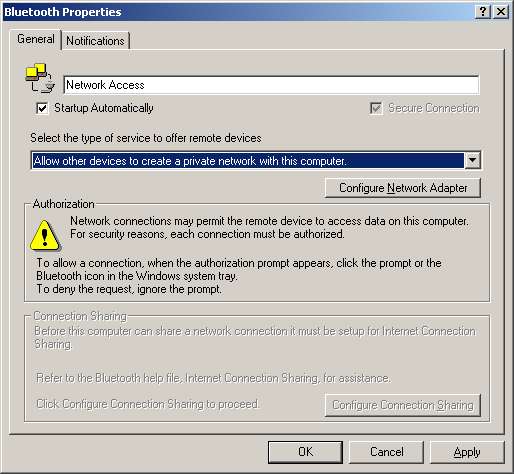
When you're using PAN you have to set the Widcomm software for that in this way:


Is that what you have? In this case you won't need to create a new connection. There'll be a virtual ethernet adapter called Bluetooth Network, created by the installer.

To connect, from your client computer open My Bluetooth Places, find the other device and find the LAN Access service there. Double-click it and you'll see the connection being established. Are these the steps you followed?


Referral links: Quic Broadband (free setup code: R587125ERQ6VE) | Samsung | AliExpress | Wise | Sharesies 


Support Geekzone by subscribing (browse ads-free), or making a one-off or recurring donation through PressPatron.


dcamposs

10 posts

Wannabe Geek


#5842 19-May-2004 10:56
Send private message

MAURICIO,


I have Windoxs XP, and seems that the menu differ a lot with the one you have. Where can I find the WINDOW/SCREEN you pasted here but in the Windows XP that I have?.
Also, do I have to do what you describe here in the SERVER SIDE (DESKTOP) or in the CLIENT SIDE (LAPTOP) or in BOTH?.


For your info I have the following software:


DESKTOP:

Generic Computer

Windows XP

Cable Internet Connection 100 Mbps

Widcomm Bluetooth Software 1.2.2.9


LAPTOP:

IBM Thinkpad A31 2652P5U

Windows XP

IOGEAR Bluetooth Software 1.2.2.16


Thank you in advance for your help,

freitasm
BDFL - Memuneh
80646 posts

Uber Geek
+1 received by user: 41030

Administrator
ID Verified
Trusted
Geekzone
Lifetime subscriber

#5843 19-May-2004 11:08
Send private message

The dialog on the screenshot is from the Bluetooth configuration. Right-click the Bluetooth icon on the system tray, select Advanced Configuration and change to the Local Services tab.

The connection is from your client computer, the one that will connect to the main computer.


Referral links: Quic Broadband (free setup code: R587125ERQ6VE) | Samsung | AliExpress | Wise | Sharesies 


Support Geekzone by subscribing (browse ads-free), or making a one-off or recurring donation through PressPatron.


Create new topic


Geekzone Live »

Try automatic live updates from Geekzone directly in your browser, without refreshing the page, with Geekzone Live now.


Are you subscribed to our RSS feed? You can download the latest headlines and summaries from our stories directly to your computer or smartphone by using a feed reader.