Geekzone: technology news, blogs, forums
Guest
Welcome Guest.
You haven't logged in yet. If you don't have an account you can register now.


foxray

6 posts

Wannabe Geek


#155988 15-Nov-2014 19:21
Send private message

Hello All,

New smartphone a Motorola Moto G2 cannot see the home Wifi Network, it can see the neighbours ones but not ours ISP is Vodafone router is a Netcom 4834

Any sugestions as to why I now have a "stealth" network? as far as the new phone is concerned.

Cheers

Create new topic
linw
2893 posts

Uber Geek
+1 received by user: 1205


  #1176438 15-Nov-2014 20:18
Send private message

It would help if you mentioned that your wifi was visible to other devices else the obvious response would be to check that the router was told to broadcast the SSID.

Also check what channel it is on. Ch 13 doesn't show on some devices e.g. US ones.


foxray

6 posts

Wannabe Geek


  #1176440 15-Nov-2014 20:23
Send private message

Router is visible to all devices in the home, it is only the new Moto G2's that cannot see the home WiFi network, I do not know how I can see what channel the router is broadcasting on

Cheers

garbonzai
317 posts

Ultimate Geek
+1 received by user: 51


  #1176443 15-Nov-2014 20:30
Send private message

I don't know anything about your router or the other devices connected to it, but moto g2 (2014) is 2.4ghz only, not dual 2.4/5ghz.

So if your router is set to 5ghz for wifi the Moto G2 will not see it, change it to 2.4ghz.


garbonzai
317 posts

Ultimate Geek
+1 received by user: 51


  #1176446 15-Nov-2014 20:38
Send private message

garbonzai: I don't know anything about your router or the other devices connected to it, but moto g2 (2014) is 2.4ghz only, not dual 2.4/5ghz.

So if your router is set to 5ghz for wifi the Moto G2 will not see it, change it to 2.4ghz.


5ghz also known as  802.11ac, if so change it to 802.11 b/g/n


foxray

6 posts

Wannabe Geek


  #1176450 15-Nov-2014 20:49
Send private message

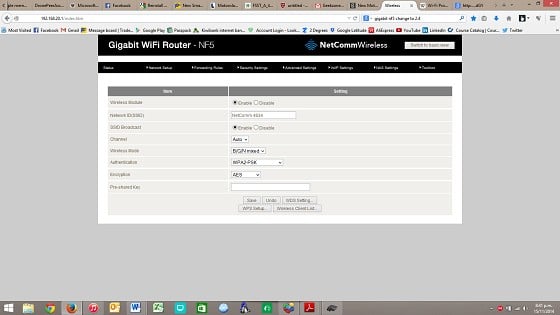
This is what I have, is there another set of setting I should be looking at?


garbonzai
317 posts

Ultimate Geek
+1 received by user: 51


  #1176458 15-Nov-2014 21:11
Send private message

Can't see anything mate, use "snipping toll" to clip in closer, not a print screen.


Move to New Zealand's best fibre broadband service (affiliate link). Free setup code: R587125ERQ6VE. Note that to use Quic Broadband you must be comfortable with configuring your own router.
foxray

6 posts

Wannabe Geek


  #1176460 15-Nov-2014 21:18
Send private message

Sorry about that, uploaded wrong image, good news (you will think Geez why didn't he do that before) manually entered SSID and password, initially it told me router was "not in range" but after 5 minutes or so decided it was in range and Hey, lets connect to it.

Thanks for the patients all.

Cheers

benokobi
936 posts

Ultimate Geek
+1 received by user: 127

ID Verified

  #1176467 15-Nov-2014 21:30
Send private message

garbonzai:
garbonzai: I don't know anything about your router or the other devices connected to it, but moto g2 (2014) is 2.4ghz only, not dual 2.4/5ghz.

So if your router is set to 5ghz for wifi the Moto G2 will not see it, change it to 2.4ghz.


5ghz also known as  802.11ac, if so change it to 802.11 b/g/n


5ghz can be other than ac.

michaelmurfy
meow
13579 posts

Uber Geek
+1 received by user: 10910

Moderator
ID Verified
Trusted
Lifetime subscriber

  #1176468 15-Nov-2014 21:35
Send private message

Also with imported phones make sure they're set to the NZ WiFi frequencies, you can do this by going into the "advanced settings" page of the WiFi networks screen and selecting NZ as the region. If you don't then it'll likely not "see" your router if your router decides to broadcast on a frequency other than the amercian standard ones.


Michael Murphy | https://murfy.nz
Referral Links: Quic Broadband (use R122101E7CV7Q for free setup)

Are you happy with what you get from Geekzone? Please consider supporting us by subscribing.
Opinions are my own and not the views of my employer.


muttley68
63 posts

Master Geek
+1 received by user: 7


  #1177360 17-Nov-2014 14:15
Send private message

Looking at the screenshot (I can just make out the settings when zoomed in) it looks like the router is set for 2.4GHz b/g/n with Auto selection of channels. This could have been the problem if it had auto selected a channel not supported by the Moto g2 (as others had mentioned, the G2 may only support US approved channels, which doesn't include ch13 that we're approved to use).
The G2 may have suddenly 'seen' the SSID if the router had changed channels to one it can detect, and chances are, if it auto selects a 'bad' channel again, you'll lose the G2 wifi again.
Download android program 'Wifi Analyzer' for the G2 and use it to select the least congested channel (1, 6, or 11) and lock the router to that channel.


garvani
1873 posts

Uber Geek
+1 received by user: 83

Trusted

  #1177361 17-Nov-2014 14:17
Send private message

Change it from auto, by default vodafone routers will choose 13.


Shop now for Lenovo laptops and other devices (affiliate link).
raytaylor
4076 posts

Uber Geek
+1 received by user: 1296

Trusted

  #1177543 17-Nov-2014 19:51
Send private message

To clear up what others have said.
In the USA, channel 13 is owned by a private company - it was sold by the FCC before wifi became a standard.
They are only allowed channels 1-12
In New Zealand, we have channels 1-13 under a general user license (see rsm.govt.nz website for the license specifics)

So any device that is designed for world compatibility or to be allowed for sale in the USA will usually not work on channel 13 unless it has a regional setting that can tell the wifi chip to work on 1-13 instead of 1-12.

Any router that has the channel set to auto will scan for other wifi networks and use the channel with the least amount of noise - usually channel 13.
Hence why some devices can pick it up and others cant.


Ray Taylor

There is no place like localhost

Spreadsheet for Comparing Electricity Plans Here


Create new topic


Geekzone Live »

Try automatic live updates from Geekzone directly in your browser, without refreshing the page, with Geekzone Live now.


Are you subscribed to our RSS feed? You can download the latest headlines and summaries from our stories directly to your computer or smartphone by using a feed reader.