Geekzone: technology news, blogs, forums
Guest
Welcome Guest.
You haven't logged in yet. If you don't have an account you can register now.


frudrew

143 posts

Master Geek
+1 received by user: 7


#160490 8-Jan-2015 14:00
Send private message

Hey guys,

Been trying to chromecast Netflix and Hulu but keeps getting geoblocked.
Have tried everything, changed everything etc.

Have realised that it's most probably the telecom pace router causing all the problems.

Can anyone recommend a good modem router?

I use airport extreme for wifi.

Thanks in advance

:)

Create new topic
wasabi2k
2102 posts

Uber Geek
+1 received by user: 860


  #1210541 8-Jan-2015 14:03
Send private message

If you want to get your Chromecast working you need to:

1. Block/Redirect 8.8.8.8 and/or 8.8.4.4
2. Configure your Chromecast with a Geo-Unblocking DNS Server like Getflix - you will need to assign this via DHCP

How to do this varies depending on your router - getting a new one will not automatically fix this. What have you tried?


michaelmurfy
meow
13579 posts

Uber Geek
+1 received by user: 10910

Moderator
ID Verified
Trusted
Lifetime subscriber

  #1210542 8-Jan-2015 14:03
Send private message

Right here: Clicky

Maybe I should give you a little bit of a break - what kind of connection do you have (UFB, VDSL, ADSL?) My personal goto is a Mikrotik 951G-2HnD which retails for around $100 but is a very powerful router, doesn't have an easy interface however so is a little bit of a learning curve. I might write a blog-post on how to set one of these up from scratch for NZ ISP's w/ Netflix unblocking on all devices in mind.


Michael Murphy | https://murfy.nz
Referral Links: Quic Broadband (use R122101E7CV7Q for free setup)

Are you happy with what you get from Geekzone? Please consider supporting us by subscribing.
Opinions are my own and not the views of my employer.


frudrew

143 posts

Master Geek
+1 received by user: 7


  #1210553 8-Jan-2015 14:14
Send private message

Hi there,

Thanks for the reply.

I'm with unotelly, everything works on PC, Mac, phone but the Chromecast.
Have sent I've 30 emails to them but we can't seem to get to the bottom of it.

Have blocked those paths.
The pings are timing out. Everything seems to be done...but can't fool the Chromecast unfortunately.


macuser
2120 posts

Uber Geek
+1 received by user: 506


  #1210559 8-Jan-2015 14:26
Send private message

frudrew: Hi there,

Thanks for the reply.

I'm with unotelly, everything works on PC, Mac, phone but the Chromecast.
Have sent I've 30 emails to them but we can't seem to get to the bottom of it.

Have blocked those paths.
The pings are timing out. Everything seems to be done...but can't fool the Chromecast unfortunately.


Have you redirected 8.8.8.8 to 192.168.1.254? Then set the DNS of router to the ones provided by Unotelly?

You need to do this... but change the DNS address to ones provided by Unotelly

https://support.unlocator.com/customer/portal/articles/1501508-how-to-set-up-technicolor-router-for-chromecast

frudrew

143 posts

Master Geek
+1 received by user: 7


  #1210572 8-Jan-2015 14:34
Send private message

Yes,

I tried changing the DNS server but it stuffed everything up and Chromecast couldn't pick up the wifi...although all my other devices could.
The router I'm using is pace v5542 Gateway...which from other threads has proven a real problem.
I've followed every step from Unotelly.
Everything seems to go except the Chromecast.

frudrew

143 posts

Master Geek
+1 received by user: 7


  #1210606 8-Jan-2015 14:58
Send private message

That would be great!

I have normal adsl connection with the pace v5542 Gateway


Support Geekzone with one-off or recurring donations Donate via PressPatron.
macuser
2120 posts

Uber Geek
+1 received by user: 506


  #1211081 9-Jan-2015 12:54
Send private message

frudrew: That would be great!

I have normal adsl connection with the pace v5542 Gateway


Hi do you want to access your router web utility and download a 'backup' of the configuration?  Try opening it in notepad, it should open.  

Do you see a bunch of categories that look like '[ efm.ini ]' '[ upgrade.ini ]' '[ xdsl.ini ]' etc?


frudrew

143 posts

Master Geek
+1 received by user: 7


  #1211212 9-Jan-2015 15:30
Send private message

macuser:
frudrew: That would be great!

I have normal adsl connection with the pace v5542 Gateway


Hi do you want to access your router web utility and download a 'backup' of the configuration?  Try opening it in notepad, it should open.  

Do you see a bunch of categories that look like '[ efm.ini ]' '[ upgrade.ini ]' '[ xdsl.ini ]' etc?


Like these settings?


Internet access configuration


This page enables you to configure your main internet connection parameters and a 3G backup access.


Connection mode


Physical Link


xDSL


Ethernet


Connection protocol for ADSL :


PPPoA


PPPoE


Connection protocol for VDSL :     PPPoE


Connection protocol for Ethernet :     PPPoE


Main internet access


ADSL parameters


ADSL Mode :


ADSL mode/VDSL mode


ADSL-Auto/AutoDetect modulation


G992.5 (ADSL2+ 24M/1M)


G992.3 (ADSL2 12M/3.5M)


T1.413 (ADSL 8M/1M)


G992.1 (ADSL G.DMT 8M/1M)


VDSL


WARNING : changing ADSL Mode will automatically reboot the gateway


VPI / VCI:


/


Encapsulation


LLC


VCMUX


Max. MTU


PPP Parameters


PPP Login :


PPP Password:


PPP On Demand Timeout:


Enable


Disable


PPP Holdoff Timeouts:


EoA / IPoA parameters


Obtain DNS address automatically


Use the following DNS address:


DNS server


3G Parameters


3G parameters


Spyware
3818 posts

Uber Geek
+1 received by user: 1366

Lifetime subscriber

  #1211227 9-Jan-2015 15:49
Send private message

No.


Spark Max Fibre using Mikrotik CCR1009-8G-1S-1S+, CRS125-24G-1S, Unifi UAP, U6-Pro, UAP-AC-M-Pro, Apple TV 4K (2022), Apple TV 4K (2017), iPad Air 1st gen, iPad Air 4th gen, iPhone 13, SkyNZ3151 (the white box). If it doesn't move then it's data cabled.


macuser
2120 posts

Uber Geek
+1 received by user: 506


  #1211232 9-Jan-2015 15:57
Send private message

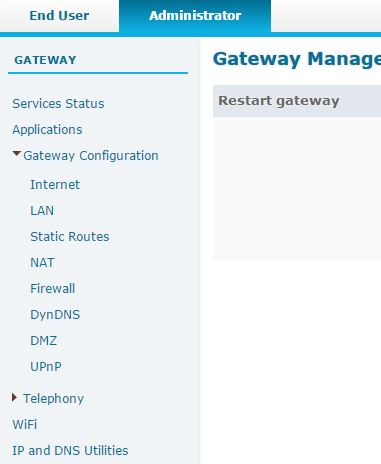
Check under 'Administrator - > Management'

frudrew

143 posts

Master Geek
+1 received by user: 7


  #1211276 9-Jan-2015 16:48
Send private message

macuser: Check under 'Administrator - > Management'


This is the admin page, which one should I check?

Create new topic


Geekzone Live »

Try automatic live updates from Geekzone directly in your browser, without refreshing the page, with Geekzone Live now.


Are you subscribed to our RSS feed? You can download the latest headlines and summaries from our stories directly to your computer or smartphone by using a feed reader.