I have a Manhattan Headset w/ Bluetooth and a HP Laptop with Bluetooth. I have them sinked and "supposedly" working together but I can't get any sound to go to the headset. I can't seem to get my laptop to reckonize it as a headset. I am hoping to simply listen to music/video wirelessly from my laptop. I can't seem to find my way around Vista as I could XP. Anyone got any suggestions, hopefully this is an easy fix... Thanks
I dont think it is vista, I have an asus (built in bluetooth) and pantronics bt stereo headset, works fine, however previously I had a compaq v6000 series running vista on the plantronics headset and found it quite difficult to set up. If the laptop is detecting the headset it is a matter of going into the control panel and redirecting the audio output to bluetooth, it took me serveral attempts and diffenent configurations to get it to work, I found that after changing a setting it wouldnt take affect till a reboot. I think the difficulty was with the HP as the asus was very straight forward and setup was almost instant
w8n2return: I have a Manhattan Headset w/ Bluetooth and a HP Laptop with Bluetooth. I have them sinked and "supposedly" working together but I can't get any sound to go to the headset. I can't seem to get my laptop to reckonize it as a headset. I am hoping to simply listen to music/video wirelessly from my laptop. I can't seem to find my way around Vista as I could XP. Anyone got any suggestions, hopefully this is an easy fix... Thanks
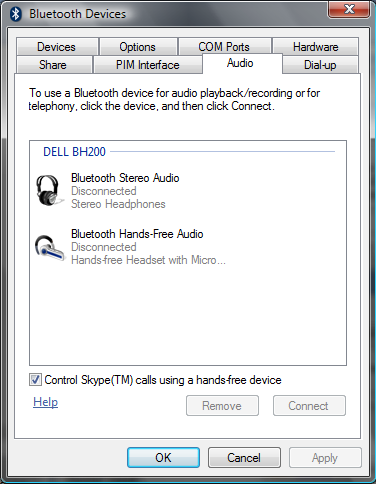
What does your Bluetooth Device Manager show ? I have Dell Bluetooth Headset and My Bluetooth Device Manager shows me like this,
So, when I have my headset switched on, it detects it and I can connect to it and listen to audio.
Have you installed proper drivers for your headset ?
It would be worth checking out what does your Bluetooth Manager shows
Are you subscribed to our RSS feed? You can download the latest headlines and summaries from our stories directly
to your computer or smartphone by using a feed reader.





 Trusted