Geekzone: technology news, blogs, forums
Guest
Welcome Guest.
You haven't logged in yet. If you don't have an account you can register now.


Mrpopup

3 posts

Wannabe Geek


#171179 9-Apr-2015 09:54
Send private message

Hi,
Has anyone got a Netgear D6300 Router to operate with Spark UFB/Fibre?
If so I would appreciate some tips or configuration details please as I am having no success.
Thank you.

Create new topic
Jase2985
13730 posts

Uber Geek
+1 received by user: 6202

ID Verified
Lifetime subscriber


shermanp
357 posts

Ultimate Geek
+1 received by user: 36

Trusted

  #1279525 9-Apr-2015 10:47
Send private message

The D6300 appears to be an ADSL gateway. Does it have a WAN port? Or can one of the LAN ports be turned into one?

From what I could find about the device, the D6300 doesn't support VLAN tagging, which is generally required for connecting to fibre.


In short, I don't like your chances...

Inphinity
2780 posts

Uber Geek
+1 received by user: 1184


  #1279528 9-Apr-2015 10:51
Send private message

I don't think the D6300 supports VLAN tagging on the Ethernet WAN interface. It's primarily an ADSL2-oriented device. You could probably bridge it to the Spark-supplied device, though, if you really want to.


Mrpopup

3 posts

Wannabe Geek


#1279587 9-Apr-2015 12:58
Send private message

Thanks for the responses.
The user manual says it will support Fibre and there is a VLAN10 setting (=10).
The suggestion of using  the D6300 as an access point only is cool.
Cheers
ps - different web sites show different usercodes/passwords for Spark/Telecom fibre access!

Inphinity
2780 posts

Uber Geek
+1 received by user: 1184


  #1279595 9-Apr-2015 13:16
Send private message

Mrpopup: Thanks for the responses.
The user manual says it will support Fibre and there is a VLAN10 setting (=10).
The suggestion of using  the D6300 as an access point only is cool.
Cheers
ps - different web sites show different usercodes/passwords for Spark/Telecom fibre access!


Does it say where the VLAN option is configured? I Couldn't see it in the UI.

Jase2985
13730 posts

Uber Geek
+1 received by user: 6202

ID Verified
Lifetime subscriber

  #1279661 9-Apr-2015 14:21
Send private message

Mrpopup: ps - different web sites show different usercodes/passwords for Spark/Telecom fibre access!


did you try the actual spark site? which has the correct and most relevant information?

but really it doesnt matter what it is just as long as its something :)

its just easier to use the one they tell you to


Shop now on AliExpress (affiliate link).
webwat
2036 posts

Uber Geek
+1 received by user: 145

Trusted

  #1279682 9-Apr-2015 14:48
Send private message

Apparently it has:


  • "Five (5) 10/100/1000 (1 WAN and 4 LAN) Gigabit Ethernet ports with auto-sensing technology"
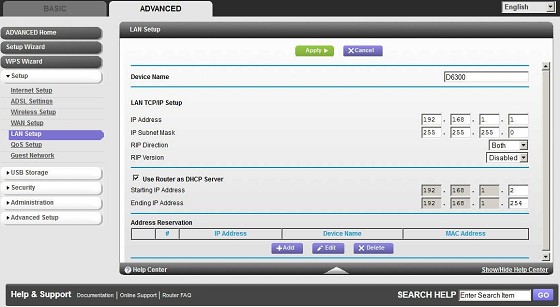
But I would be surprised if VLAs are easy to setup. If its going to be used as a router then WAN is the connection going to the fibre ONT. Otherwise only connect a LAN port to the main router and just use this one as an access point, turn off the setting for DHCP server, then change the Netgear's LAN IP address to 192.168.1.254. You will then get kicked off the Netgear setting page, so enter its new 192.168.1.254 address in your browser's address bar to get back in, and check all your wireless and security settings.


Time to find a new industry!


Mrpopup

3 posts

Wannabe Geek


  #1280161 10-Apr-2015 08:28
Send private message

Thanks to all who responded.
I have managed to get the D6300 operating with Spark Fibre and it runs like a cut cat (most of the time!). 
Speed tests deliver highly variable results however swinging between 25/30 (download/upload) to 95/50!
I will upload the D6300 configuration details asap.
Cheers.

russelljsmith
23 posts

Geek


  #1285334 16-Apr-2015 09:14
Send private message


Hi,

I have the same router so keen to hear how you managed to get it working as I expect to get Fibre around October this year. The D6300 is sold as NBN/UFB ready but I've found it super hard to find any info on how to actually set it up.

Regarding your speed which Spark package are you on by the way, Fibre 30 or Fibre 100, these should top-out at about 30Mbps or 100Mbps download speeds respectively? BTW Spark host a speedtest that might be more accurate than just going to speedtest.net

Russ


iamsammajor
379 posts

Ultimate Geek
+1 received by user: 27

Lifetime subscriber

  #1529905 11-Apr-2016 10:13
Send private message

👏👏👏👏👏👏👏
Hey Michael could you please upload the setting plzzzzzzzzzzzzzzzzzzzzzz
I want to get my D6300 works as well with spark

firefuze
510 posts

Ultimate Geek
+1 received by user: 85


  #1529938 11-Apr-2016 10:27
Send private message

iamsammajor: 👏👏👏👏👏👏👏
Hey Michael could you please upload the setting plzzzzzzzzzzzzzzzzzzzzzz
I want to get my D6300 works as well with spark


Michael didn't say he had the settings for you.. believe you are after @Mrpopup


but from some quick research, I don't think the D6300 supports VLAN tagging? (unless there are different variations of this router) The below is from the Netgear website:

D6300 FAQ's


Does the D6300 support IGMP snooping, MLD snooping and VLAN?


No.


http://kb.netgear.com/app/answers/detail/a_id/21604/~/d6300-faqs 


You can simply use the Spark supplied router to do the VLAN tagging and use your D6300 as an access point. Very quick and easy setup.


Shop now for Lenovo laptops and other devices (affiliate link).
iamsammajor
379 posts

Ultimate Geek
+1 received by user: 27

Lifetime subscriber

  #1529948 11-Apr-2016 10:36
Send private message

firefuze:

iamsammajor: 👏👏👏👏👏👏👏
Hey Michael could you please upload the setting plzzzzzzzzzzzzzzzzzzzzzz
I want to get my D6300 works as well with spark


Michael didn't say he had the settings for you.. believe you are after @Mrpopup


but from some quick research, I don't think the D6300 supports VLAN tagging? (unless there are different variations of this router) The below is from the Netgear website:

D6300 FAQ's


Does the D6300 support IGMP snooping, MLD snooping and VLAN?


No.


http://kb.netgear.com/app/answers/detail/a_id/21604/~/d6300-faqs 


You can simply use the Spark supplied router to do the VLAN tagging and use your D6300 as an access point. Very quick and easy setup.


Ueah I saw that as well , I have a netgear wndr 3700 with dd-wrt seems have the clan tagging , but still no luck with d6300 , I don't want to just use the router as bridging, I want to get rid of the spark router


Create new topic


Geekzone Live »

Try automatic live updates from Geekzone directly in your browser, without refreshing the page, with Geekzone Live now.


Are you subscribed to our RSS feed? You can download the latest headlines and summaries from our stories directly to your computer or smartphone by using a feed reader.