Geekzone: technology news, blogs, forums
Guest
Welcome Guest.
You haven't logged in yet. If you don't have an account you can register now.


Kerry54321

39 posts

Geek
+1 received by user: 15


#205248 5-Nov-2016 04:56
Send private message

Hi,


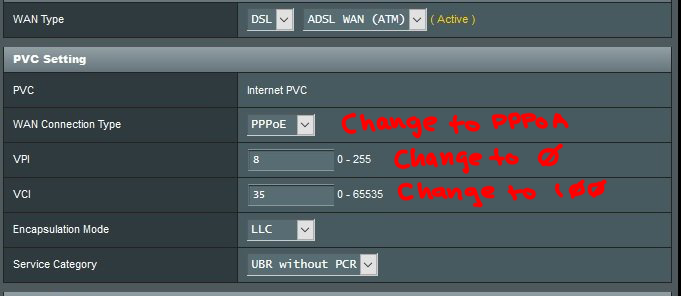
have decided to upgrade from Vodafone Station to an DSL-AC68U, however the AC68U cannot seem to connect to DSL (I'm rural, no fibre or VDSL here) The DSL light will blink a few times, then go out, then blink again, etc...


I plugged in the manual settings from Voda's help page, and got my username/password from Vodafone just to be sure, so that should be ok, they won't help you connect 3rd party modems tho. When I plug the old Voda station back in it works fine.


Anything wrong with these settings?


Thanks in advance.


View this topic in a long page with up to 500 replies per page Create new topic
 1 | 2
DjShadow
4222 posts

Uber Geek
+1 received by user: 1322

ID Verified
Trusted
Subscriber

  #1664091 5-Nov-2016 04:59
Send private message

Little hard to read, but is the WAN connection type set to PPPoA ?


Kerry54321

39 posts

Geek
+1 received by user: 15


Spyware
3818 posts

Uber Geek
+1 received by user: 1366

Lifetime subscriber

  #1664100 5-Nov-2016 06:49
Send private message

 Country code IE applies to Ireland.


Spark Max Fibre using Mikrotik CCR1009-8G-1S-1S+, CRS125-24G-1S, Unifi UAP, U6-Pro, UAP-AC-M-Pro, Apple TV 4K (2022), Apple TV 4K (2017), iPad Air 1st gen, iPad Air 4th gen, iPhone 13, SkyNZ3151 (the white box). If it doesn't move then it's data cabled.


Kerry54321

39 posts

Geek
+1 received by user: 15


  #1664105 5-Nov-2016 07:42
Send private message

Great spotting thanks, that should help, but it hasn't  :(


Still the same deal, flashing dsl light, then dark, then flashing again. It reports 'ensure cable is connected to dsl port' between each cycle, even though it knows the cable is there. If the cable is not connected, the dsl light dos not flash at all.


http://help.vodafone.co.nz/app/answers/detail/a_id/5239/~/what-are-my-vodafone-standard-broadband-settings%3F


SATTV
1670 posts

Uber Geek
+1 received by user: 657

ID Verified

  #1664120 5-Nov-2016 08:38
Send private message

your username should be username@vodafone.net.nz


Vodafone will tell you you dont need the @vodafone.net.nz but you do.


If .net.nz does not work try .co.nz


I have not set up a DSL modem for vodafone in a wee while so can remember which one is which.


John


I know enough to be dangerous


Gilco2
1556 posts

Uber Geek
+1 received by user: 134


  #1664122 5-Nov-2016 08:40
Send private message

Kerry54321:


Great spotting thanks, that should help, but it hasn't  :(


Still the same deal, flashing dsl light, then dark, then flashing again. It reports 'ensure cable is connected to dsl port' between each cycle, even though it knows the cable is there. If the cable is not connected, the dsl light dos not flash at all.


http://help.vodafone.co.nz/app/answers/detail/a_id/5239/~/what-are-my-vodafone-standard-broadband-settings%3F


your encapsulation needs to be vc mux .   On mine I just let the wizard set up automatically and it worked. Then just checked later that all okay. Have given up on mine as disconnects from internet every few days and has to be restarted.  Fritzbox and old Netgear D4000 rock solid connection


HTPC Intel Pentium G3258 cpu, Gigabyte H97n-wifi motherboard, , 8GB DDR3 ram, onboard  graphics. Hauppuage HVR 5500 tuner,  Silverstone LC16M case, Windows 10 pro 64 bit using Nextpvr and Kodi


Shop on-line at New World now for your groceries (affiliate link).
sbiddle
30853 posts

Uber Geek
+1 received by user: 9996

Retired Mod
Trusted
Biddle Corp
Lifetime subscriber

  #1664128 5-Nov-2016 08:56
Send private message

If your modem isn't syncing then it's nothing to do with your password or authentication.


What is your normal sync rate? If you have a particularly poor line it could simply be that the Asus doesn't like this and therefore won't sync.


Kerry54321

39 posts

Geek
+1 received by user: 15


  #1664134 5-Nov-2016 09:35
Send private message

First thing I did was set vc mux as gilco suggested.


The username in the Vodafone Station is that same as the one I am putting into the AC68U, it does NOT have @vodafone.co.nz after it but I have just tried this and others with no success.


As SATTV said they tell you just to use the first part (before the @) but the Voda page I linked contradicts this advice. I have put it back to just the first part of my username for now.


One of the bad things about the Vodafone station is the lack of info it provides, it does not report on things like sync rate unfortunately. The connection isn't bad tho, I usually get better the 7Mbits down on ookla, and it connects at 13MBits.


I can't even get old router I used to use connected at this point, just the Voda Station..


michaelmurfy
meow
13579 posts

Uber Geek
+1 received by user: 10910

Moderator
ID Verified
Trusted
Lifetime subscriber

  #1664166 5-Nov-2016 11:23
Send private message

Assuming the user/pass is correct this is all you're needing to do:


Michael Murphy | https://murfy.nz
Referral Links: Quic Broadband (use R122101E7CV7Q for free setup)

Are you happy with what you get from Geekzone? Please consider supporting us by subscribing.
Opinions are my own and not the views of my employer.


dan

dan
1134 posts

Uber Geek
+1 received by user: 105

Lifetime subscriber

  #1664171 5-Nov-2016 11:35
Send private message

vodafone adsl has to be username@vodafone.co.nz as they dont use port based authentication


i setup asus routers on VF DSL connections quite often here are the settings:


Transfer mode: ADSL WAN (ATM)


PVC unit Internet


Enable - YES


PPPoA VC-Mux


PPP Authentication AUTO


VPI 0


VCI 100


Service category UBR


PCR 0


IP Version IPv4


Encapsulation Mode  PPPoA VC-Mux


default route YES


Get wan IP automatically - YES


Kerry54321

39 posts

Geek
+1 received by user: 15


  #1664172 5-Nov-2016 11:36
Send private message

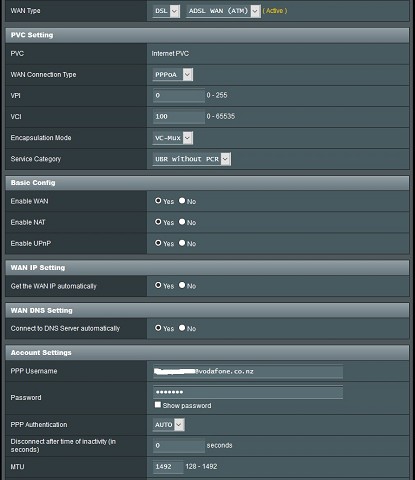
Thanks Michael, have already done all that, no joy so far. I just managed to connect an old telecom technicolour modem, and it worked fine.


Dan, see settings below. Still no luck, when I plug the dsl cable in, the dsl light will start blinking, it then proceeds to tell me to connect the cable.... I usually wait about 5 minutes before giving up and plugging the old modem back in.


HP


Shop now for HP laptops and other devices (affiliate link).
michaelmurfy
meow
13579 posts

Uber Geek
+1 received by user: 10910

Moderator
ID Verified
Trusted
Lifetime subscriber

  #1664187 5-Nov-2016 12:42
Send private message

Hmm I have another thought and that would be you're on a Conklin connection causing it to not sync as some routers have issues with Conklins.


Mind flicking me your address by a DM? I can check this out.


Michael Murphy | https://murfy.nz
Referral Links: Quic Broadband (use R122101E7CV7Q for free setup)

Are you happy with what you get from Geekzone? Please consider supporting us by subscribing.
Opinions are my own and not the views of my employer.


dan

dan
1134 posts

Uber Geek
+1 received by user: 105

Lifetime subscriber

  #1664264 5-Nov-2016 14:25
Send private message

Kerry54321:


Thanks Michael, have already done all that, no joy so far. I just managed to connect an old telecom technicolour modem, and it worked fine.


Dan, see settings below. Still no luck, when I plug the dsl cable in, the dsl light will start blinking, it then proceeds to tell me to connect the cable.... I usually wait about 5 minutes before giving up and plugging the old modem back in.


odd about the message, is it running the latest firmware? if not i suggest updating it, then factory reset, try again from scratch.


Kerry54321

39 posts

Geek
+1 received by user: 15


  #1664289 5-Nov-2016 15:59
Send private message

I have just installed the latest firmware, and performed a factory reset. The auto connect feature did not work, so I went manual again and input all the settings as above.


Still no joy, it is exactly the same and will not initialize the DSL connection.


I had the same issue last weekend with the AC56U, and 'upgraded' to the AC68U to see if that helped. So far, the extra $90.00 on top of the initial $278.00 purchase has proved fruitless...


The Vodafone Station and the old Telecom technicolour connect just fine....


yitz
2238 posts

Uber Geek
+1 received by user: 594


  #1664294 5-Nov-2016 16:21
Send private message

Can you show us your System Log | DSL Log page?


Should look something like this:


 1 | 2
View this topic in a long page with up to 500 replies per page Create new topic


Geekzone Live »

Try automatic live updates from Geekzone directly in your browser, without refreshing the page, with Geekzone Live now.


Are you subscribed to our RSS feed? You can download the latest headlines and summaries from our stories directly to your computer or smartphone by using a feed reader.