Geekzone: technology news, blogs, forums
Guest
Welcome Guest.
You haven't logged in yet. If you don't have an account you can register now.


webup

547 posts

Ultimate Geek
+1 received by user: 17


#235954 11-May-2018 10:11
Send private message

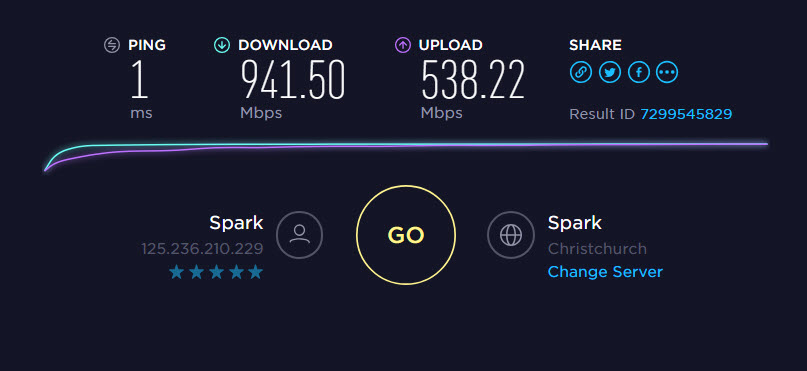
Guys I have had Chorus and enable here during the week testing the line after upgrading to FibreMax (1gb fibre)
My desktop via ethernet was still only getting 100Mbps down after the upgrade.


They have tested with their laptop and cable and get 950 down.


Ive now booted into safemode with network and can get the full speed but when not in safe mode i drop back to 100Mbps


Tried disabling Kaspersky no change


Any other suggestions how i find what is limiting the speed?


Filter this topic showing only the reply marked as answer Create new topic
antoniosk
2382 posts

Uber Geek
+1 received by user: 742

ID Verified
Trusted
Lifetime subscriber

  #2013876 11-May-2018 10:34
Send private message

ummm... if youre getting 100mbps down the odds are you gett 100mbps up as well.... meaning your ethernet port is the culprit.


New drivers, new computer, new modem etc... the ONT does gig ports, the ISP supplied 'kit' does gig ports... so all thats left is whatever is downstream... which is your kit


________


Antoniosk


mdf

mdf
3566 posts

Uber Geek
+1 received by user: 1519

Trusted

  #2013878 11-May-2018 10:37
Send private message

If it's doing full gig in safe mode, it's not going to be the hardware and seems unlikely it would be the drivers. Will be some kind of network setting.


What speed does the computer think it's connecting to your network? If windows, right click on the ethernet connection icon in the tray > open network and sharing centre > then click on the connections: ethernet link.


MikeB4
MikeB4
18775 posts

Uber Geek
+1 received by user: 12765

ID Verified
Trusted
Subscriber

  #2013881 11-May-2018 10:40
Send private message

Do you have a Wifi router and wifi Nic in your desktop?  if so disconnect the ethernet and see what speed you get over wifi


Here is a crazy notion, lets give peace a chance.


dt

dt
1152 posts

Uber Geek
+1 received by user: 371
Inactive user


  #2013906 11-May-2018 11:22
Send private message

check the duplex setting on your network card properties if its set to 100, switch it to auto, if its on auto already try setting it to 1 gig full duplex 


webup

547 posts

Ultimate Geek
+1 received by user: 17


  #2014809 12-May-2018 16:35
Send private message

Thanks for replies i found the culprit


It was a Lenovo preinstalled app called Killer Network Manager


I found that and opened its settings and ISP was set at 400 down etc so once i changed it the difference was immediate.


RunningMan
9184 posts

Uber Geek
+1 received by user: 4833


  #2014810 12-May-2018 16:42
Send private message

Aptly named.


Shop now on Samsung phones, tablets, TVs and more (affiliate link).
Batman
Mad Scientist
30012 posts

Uber Geek
+1 received by user: 6217

Trusted
Lifetime subscriber

  #2014862 12-May-2018 18:11
Send private message

RunningMan:

Aptly named.


Rotflmao

hio77
'That VDSL Cat'
13036 posts

Uber Geek
+1 received by user: 3896

ID Verified
Trusted
Lizard Networks
Subscriber

  #2014892 12-May-2018 19:04
Send private message

RunningMan:

Aptly named.


Lol.
@op glad this was resolved, techs should have never come out for such an issue though :/


#include <std_disclaimer>


Any comments made are personal opinion and do not reflect directly on the position my current or past employers may have. 


Filter this topic showing only the reply marked as answer Create new topic


Geekzone Live »

Try automatic live updates from Geekzone directly in your browser, without refreshing the page, with Geekzone Live now.


Are you subscribed to our RSS feed? You can download the latest headlines and summaries from our stories directly to your computer or smartphone by using a feed reader.
