Geekzone: technology news, blogs, forums
Guest
Welcome Guest.
You haven't logged in yet. If you don't have an account you can register now.


SearchingAround

36 posts

Geek
+1 received by user: 1
Inactive user


#242197 15-Oct-2018 20:56
Send private message

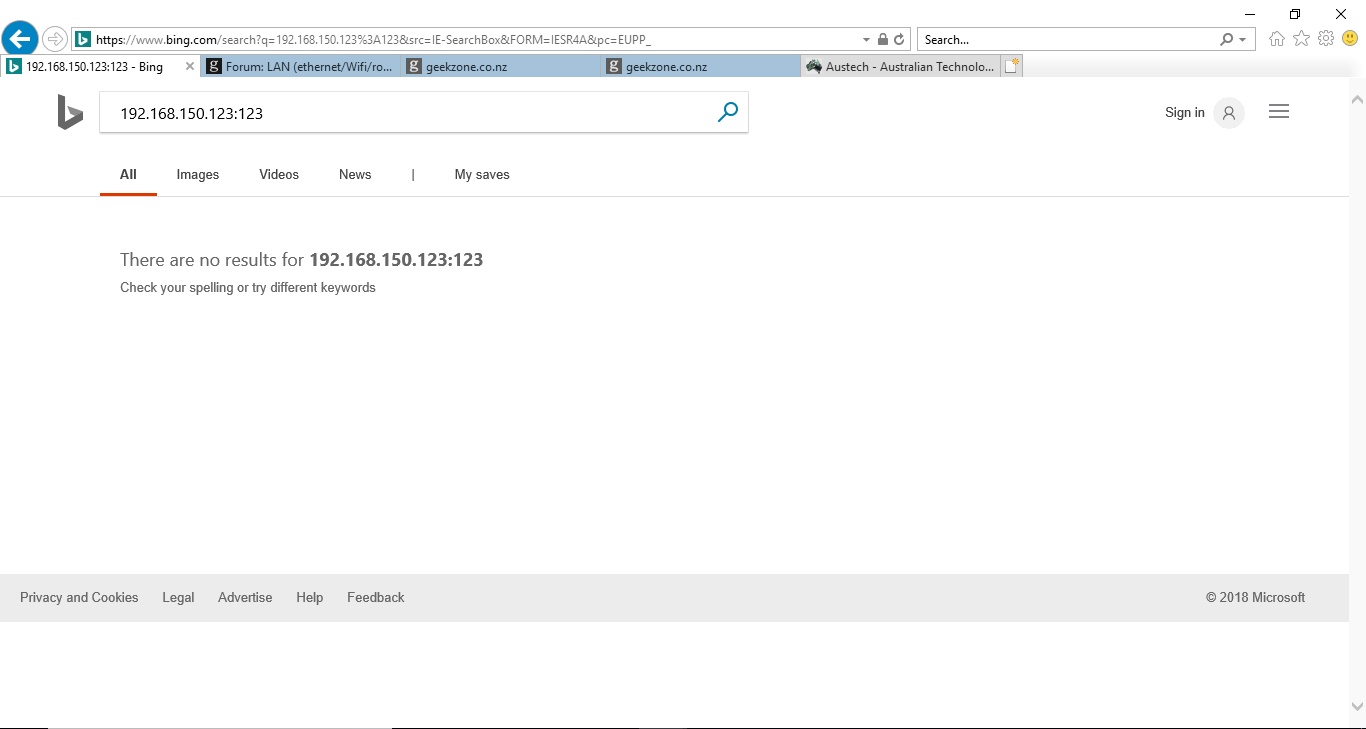
I installed some WiFi security cameras in my place, and only the IE browser can access the web config pages of the cameras. I hardly use Windows OS, while use Linux OS a lot. I do have a PC installed with Windows 10 and I have used it to access the web config pages of these cameras through IE browser. However recently I can't access the web config pages of any of these cameras through the IE browser on this Windows 10 PC, it may be due to I updated the Windows 10 a while ago, and the IE browser is version 11 at the moment. To access the web config page of the cameras, enter something like 192.168.123.123:123 in the browser, but it returns as shown in the attached screen shot. I try to adjust the IE browser setup, but it doesn't work, and the problem is still the same. I turn off the firewall also, but the problem is still the same.


Does anyone have a solution for the problem?


View this topic in a long page with up to 500 replies per page Create new topic
 1 | 2
yitz
2277 posts

Uber Geek
+1 received by user: 608


  #2108486 15-Oct-2018 21:00
Send private message

Put a '/' at the end of the URL.


Actually it might be a 'http://' at the start.


rscole86
5002 posts

Uber Geek
+1 received by user: 467

Moderator
Trusted
Lifetime subscriber

  #2108488 15-Oct-2018 21:04
Send private message

It might help to know what your cameras are. Do you get this problem for all of them or just the one?
Can you ping the camera?

SearchingAround

36 posts

Geek
+1 received by user: 1
Inactive user


  #2108526 15-Oct-2018 21:23
Send private message

1) with http:// the problem is still the same


2) yes for all the WiFi cameras, yes can ping the IP. moreover the captured images can't be sent to the FTP server, all these mean the WiFi cameras work well, just can't access to their web config pages now through the IE browser of the updated Windows 10


timmmay
20923 posts

Uber Geek
+1 received by user: 5395

Trusted
Lifetime subscriber

  #2108531 15-Oct-2018 21:30
Send private message

Try using the Chrome or Firefox browsers.


SearchingAround

36 posts

Geek
+1 received by user: 1
Inactive user


  #2108535 15-Oct-2018 21:34
Send private message

the other browsers don't work at all for the WiFi cameras, while i use these browsers almost everyday on my Linux PC.


michaelmurfy
meow
13664 posts

Uber Geek
+1 received by user: 11069

Moderator
ID Verified
Trusted
Lifetime subscriber

  #2108538 15-Oct-2018 21:53
Send private message

If you're using Linux then do yourself a favour and set up Motion or Zoneminder. Plenty of guides out there on the internet.


Michael Murphy | https://murfy.nz
Referral Links: Quic Broadband (use R122101E7CV7Q for free setup)

Are you happy with what you get from Geekzone? Please consider supporting us by subscribing.
Opinions are my own and not the views of my employer.


Shop on-line at New World now for your groceries (affiliate link).
chevrolux
4962 posts

Uber Geek
+1 received by user: 2638
Inactive user


  #2108540 15-Oct-2018 21:59
Send private message

That page looks like you have just search for "192.168.150.123:123"


Type in specifically "http://192.168.150.123:123"


Would also be helpful to know camera make as each manufacturer tends to stick to a "standard".


I use an extension in Chrome called IE Tab that emulates an old Internet Explorer window - very helpful for devices with rubbish old web interfaces in them like many of the Hikvision IP cameras for example.


SearchingAround

36 posts

Geek
+1 received by user: 1
Inactive user


  #2108541 15-Oct-2018 22:00
Send private message

the WiFi security cameras don't support Chrome or Firefox browsers, even less likely support other unpopular browsers under open source OS environment. this is an easy understanding commercial concept for developing commercial products.


sampler
468 posts

Ultimate Geek
+1 received by user: 126

ID Verified
Trusted
Lifetime subscriber

  #2108592 16-Oct-2018 07:00
Send private message

chevrolux:


That page looks like you have just search for "192.168.150.123:123"


As per Chevrolux... the SS does look like bing search results ....


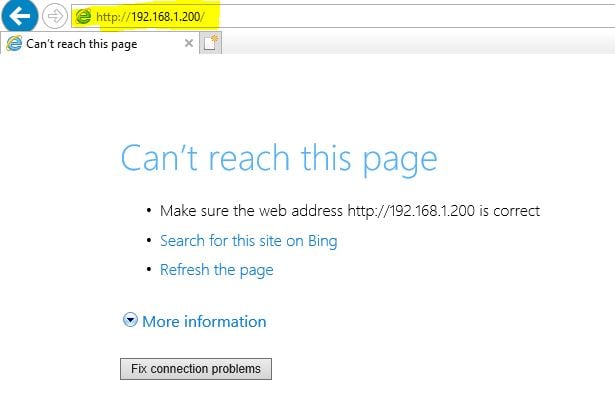
if your browser was directed at the device and failed you should get something like this (note the highlighted section is where you should be typing the ip address and port to access the camera)


chevrolux
4962 posts

Uber Geek
+1 received by user: 2638
Inactive user


  #2108594 16-Oct-2018 07:12
Send private message

SearchingAround:

the WiFi security cameras don't support Chrome or Firefox browsers, even less likely support other unpopular browsers under open source OS environment. this is an easy understanding commercial concept for developing commercial products.


What?! That makes no sense.

Just tell us what brand the cameras are and we can help more. They type of browser really shouldn't matter much at all, apart from what rubbish old plugins need to be supported.
There is also the chance the camera runs its interface on https with an old TLS version that modern browsers don't support - it can look like a page load error but when you look in to the error it is the cipher that is the problem.

SearchingAround

36 posts

Geek
+1 received by user: 1
Inactive user


  #2108602 16-Oct-2018 07:26
Send private message

you're correct, the modern browsers are less supported to the wifi cameras, while the old ones do, e.g. the IE browser. i think i can figure this out at IE browser, as this is the oldest and used to be popular browser i have in one of my PC. thanks for the opinion.


HP


Shop now for HP laptops and other devices (affiliate link).
rscole86
5002 posts

Uber Geek
+1 received by user: 467

Moderator
Trusted
Lifetime subscriber

  #2108607 16-Oct-2018 08:00
Send private message

IME any browser should work to get you as far as the login in page, however it won't work past there.
As an alternative to IE have you tried the pale moon browser?

If you are not getting a log in page on any browser I would suggest that the browsers are not the problem. Again, if you let us know the make and model of the camera we could help you more.

SearchingAround

36 posts

Geek
+1 received by user: 1
Inactive user


  #2108610 16-Oct-2018 08:14
Send private message

i will figure this out on IE by configure some settings. thanks for the advice.


nathan
5695 posts

Uber Geek
+1 received by user: 1630
Inactive user


  #2108628 16-Oct-2018 08:52
Send private message

Does it need IE because of ActiveX plugin?


can you ping the camera?


can you try IE on another PC to see if it works?


can you try resetting IE - Internet Options, Advanced, Reset


SearchingAround

36 posts

Geek
+1 received by user: 1
Inactive user


  #2108630 16-Oct-2018 08:58
Send private message

all the cameras work well, ping no problem, and can set captured screenshots to my FTP server. for the IE issue, i can figure it out, just leave this to me alone. thanks for your advice, much appreciated.


just leave all these to me, thanks !


 1 | 2
View this topic in a long page with up to 500 replies per page Create new topic


Geekzone Live »

Try automatic live updates from Geekzone directly in your browser, without refreshing the page, with Geekzone Live now.


Are you subscribed to our RSS feed? You can download the latest headlines and summaries from our stories directly to your computer or smartphone by using a feed reader.