Geekzone: technology news, blogs, forums
Guest
Welcome Guest.
You haven't logged in yet. If you don't have an account you can register now.


spacedog

496 posts

Ultimate Geek
+1 received by user: 62


#243025 24-Nov-2018 10:59
Send private message

Well, this one is pretty strange...


Upgraded from VDSL to fibre.  No changes made to my Win10 computer at all as far as it's NIC configuration.


On VDSL I was getting 29mbps upstream from my computer.  After switching to fiber I've actually been downgraded to a fixed 100/20 connection, but I ONLY get 13-15mbps upstream.  My downstream comes in at 105mbps.


Here's the real head scratcher.....when I test from my iphone which uses 802.11ac, I get exactly the full 20mbps.  I've tested this repeatedly for the last day and it is 100% repeatable.  iPhone gets 20mbps and Windows desktop and laptop gets 13-15mbps on ethernet.


Create new topic
freitasm
BDFL - Memuneh
80653 posts

Uber Geek
+1 received by user: 41045

Administrator
ID Verified
Trusted
Geekzone
Lifetime subscriber

  #2133155 24-Nov-2018 11:18
Send private message

Are you getting 13 - 15 Mbps or MB/s?


In any case, discounting overheads 13 - 15 Mbps is about right on a 20 Mbps link.


Referral links: Quic Broadband (free setup code: R587125ERQ6VE) | Samsung | AliExpress | Wise | Sharesies 


Support Geekzone by subscribing (browse ads-free), or making a one-off or recurring donation through PressPatron.


spacedog

496 posts

Ultimate Geek
+1 received by user: 62


  #2133162 24-Nov-2018 11:26
Send private message

13-15 megabits per second


I know about overhead, but the problem is my iPhone and AppleTV are getting the full 20mbps.  So it seems like a tuning / tweaking issue with ethernet.  Either in windows or at the router level.


And again, the strange thing is the VDSL connections was syncing at 30mbps and I was getting 29mpbs on the same devices.  Something is definitely different here with the change to fibre.


cyril7
9075 posts

Uber Geek
+1 received by user: 2499

ID Verified
Trusted
Subscriber

  #2133211 24-Nov-2018 12:44
Send private message

Have you tried another client ie. the Win10 client, also even though testing via WiFi is not recommend can you try speed testing from an Android or iOS device.

Cyril


spacedog

496 posts

Ultimate Geek
+1 received by user: 62


  #2133214 24-Nov-2018 13:05
Send private message

cyril7: Have you tried another client ie. the Win10 client, also even though testing via WiFi is not recommend can you try speed testing from an Android or iOS device.

Cyril


Yeah, I've tried two different win10 clients.  My desktop and my lenovo laptop.  Both seem to cap out at 15mbps.  As I noted in my OP, I *did* test with my iPhone and it gets a rock solid 20mbps everytime  - hence my reason for wondering what is wrong and why computers are not performing as well.  Also, my AppleTV gets 20mbps when connected by gigabit ethernet to an 802.11ac wifi bridge....


Suckerpunch
125 posts

Master Geek
+1 received by user: 25


  #2133220 24-Nov-2018 13:23
Send private message

Try the speedtest Win10 app rather than their website.


cyril7
9075 posts

Uber Geek
+1 received by user: 2499

ID Verified
Trusted
Subscriber

  #2133264 24-Nov-2018 13:30
Send private message

I suggest its very likely your Win10 drivers, my main desktop at home, if I boot it on Win10 I get the exact same issue, if I boot if on Linux Mint (Ubuntu) its 105/21, my sons Macbook pro same asm Linux, all our Android and iPhones also 20up solid.


Cyril


Shop now for Dyson appliances (affiliate link).
cyril7
9075 posts

Uber Geek
+1 received by user: 2499

ID Verified
Trusted
Subscriber

  #2133269 24-Nov-2018 13:55
Send private message

Thinking about this a little more, and the fact that VDSL did not have such a limit (something I also noted) I wonder if its the Win10 TCP Stack/Drivers and the way they interact with the pacing imposed by the UFB policer to limit to 20Mb/s


Cyril


spacedog

496 posts

Ultimate Geek
+1 received by user: 62


  #2133436 24-Nov-2018 16:33
Send private message

cyril7:


Thinking about this a little more, and the fact that VDSL did not have such a limit (something I also noted) I wonder if its the Win10 TCP Stack/Drivers and the way they interact with the pacing imposed by the UFB policer to limit to 20Mb/s


Cyril


Yeah I figure it is either some tuning that I have to do on the router side for ethernet or my windows 10 needs some kind of tuning...it's just so damn weird


yitz
2239 posts

Uber Geek
+1 received by user: 594


  #2133449 24-Nov-2018 17:26
Send private message


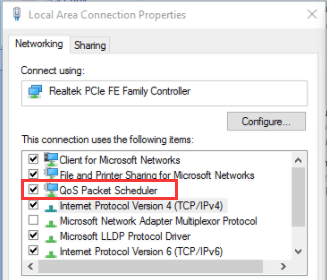
Give unchecking the QoS packet scheduler a go.


What's the modem/router and ISP?

spacedog

496 posts

Ultimate Geek
+1 received by user: 62


  #2133681 25-Nov-2018 08:55
Send private message

yitz:  Give unchecking the QoS packet scheduler a go. What's the modem/router and ISP?


Tried disabling the QoS scheduler and it didn't seem to have an effect.


I'm using 2Degrees and I'm running DD-WRT on a 3 month old Asus RT-AC3200 - so pretty fresh hardware that has plenty of CPU and power to do the job.


Again, my hardware has not changed at all since going from VDSL to Fibre. 


Literally, the only thing I did once the fibre went live was pulled the ethernet cable from the WAN port going into the VDSL modem and plugged it into the ethernet port on the ONT and then changed the VLAN id/tagging to 10 on the PPPOE/WAN adapter. 


And on the VDSL the my windows laptop and desktop systems got upload speeds around 28-29mbps while my VDSL was syncing at 30mbps...so it's not like the ethernet ports were maxing out for some reason.


Create new topic


Geekzone Live »

Try automatic live updates from Geekzone directly in your browser, without refreshing the page, with Geekzone Live now.


Are you subscribed to our RSS feed? You can download the latest headlines and summaries from our stories directly to your computer or smartphone by using a feed reader.