Geekzone: technology news, blogs, forums
Guest
Welcome Guest.
You haven't logged in yet. If you don't have an account you can register now.


xsiv

5 posts

Wannabe Geek


#243485 13-Dec-2018 18:43
Send private message

Hey all thanks for chiming in 


My new router keeps disconnecting every 10 seconds. The internet works for 30 sec then stops, connects then stops over an over.


Router - ASUS RT-AC68U AC1900 on a slingshot connection. This is my second attempt with this model. I have tried the router at 2 different houses with sling shot connections. i have also returned the router an got a replacement to find the same issue.


I have Spoke to my isp an they say they cant see Any wan disconnection wan side. Using wifi or Ethernet i get the same problem. 


Router im using : https://www.pbtech.co.nz/product/NETAS4068/ASUS-RT-AC68U-Gigabit-WiFi-Router-Dual-Band-Tri-St


The settings im using are from pb tech: https://www.pbtech.co.nz/ASUSISPSettings   Fibre / UFB Configuration for ASUS RT-AC5300/RT-AC88U/RT-AC3200/RT-AC87U/RT-AC68U/RT-AC58U/RT-AX88U (Spark / 2degrees / Slingshot)


I have set up the lan wan etc. i have checked with my isp and my pppoe user name an password is right.  


WAN - manual setting u have put in PPPOE username and password, MTU 1492 MRT 1492 


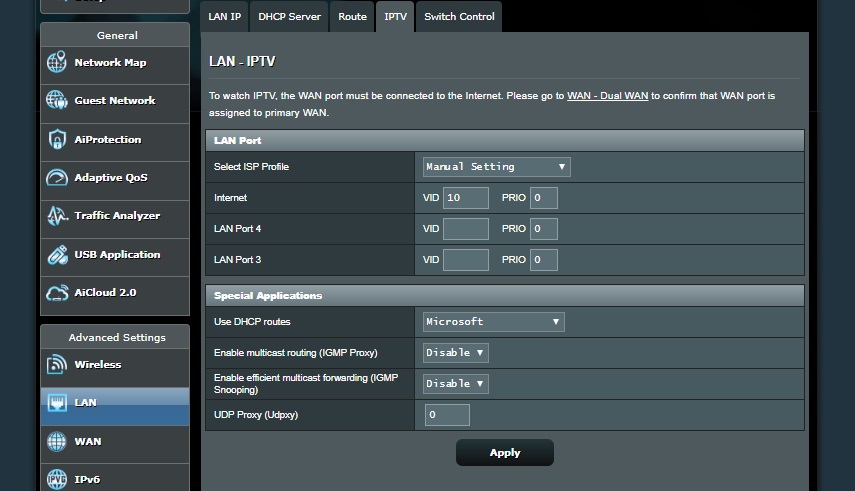
LAN - IPTV to 10 , 0 


I have Updated the firmware to version RT-AC68U_3.0.0.4_384_32799  


Any thoughts would be helpful, Thanks :)



Create new topic
xsiv

5 posts

Wannabe Geek


  #2144985 13-Dec-2018 18:47
Send private message

settings below


Spyware
3818 posts

Uber Geek
+1 received by user: 1366

Lifetime subscriber

  #2144986 13-Dec-2018 18:53
Send private message

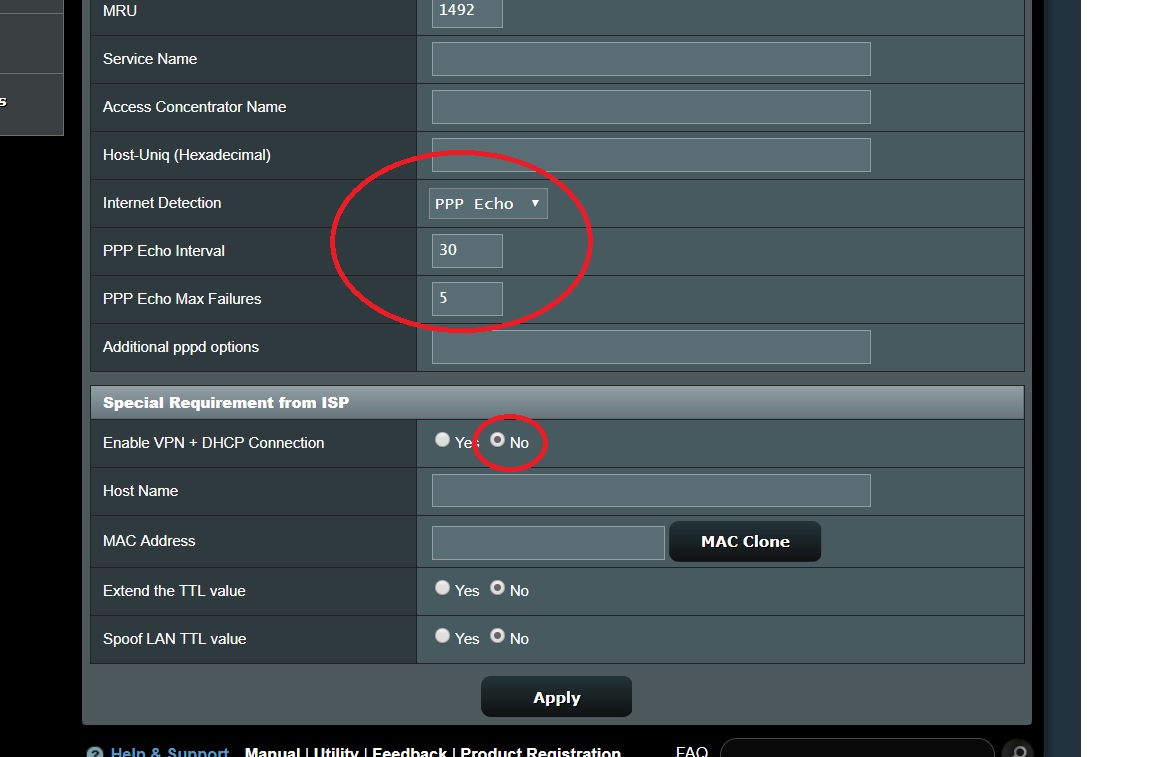
Enable VPN + DHCP Connection - NO.


xsiv

5 posts

Wannabe Geek


  #2145023 13-Dec-2018 19:09
Send private message

Thanks for chiming in. worked a treat. i fully missed that. I dont need a vpn etc. setting was on from default. up an running :)


xsiv

5 posts

Wannabe Geek


  #2145039 13-Dec-2018 19:33
Send private message

I changed the PPP ecco to the same as my old router an turned off - Enable VPN + DHCP Connection - omg cant believe i over looked this default setting 


Thank u 


Create new topic


Geekzone Live »

Try automatic live updates from Geekzone directly in your browser, without refreshing the page, with Geekzone Live now.


Are you subscribed to our RSS feed? You can download the latest headlines and summaries from our stories directly to your computer or smartphone by using a feed reader.