Geekzone: technology news, blogs, forums
Guest
Welcome Guest.
You haven't logged in yet. If you don't have an account you can register now.


turtlepower

5 posts

Wannabe Geek


#248967 17-Apr-2019 21:25
Send private message

I used to have a 2degrees router with an Orbi connected to it.

I was able to get a fairly consistent 100Mbps and 20Mbps when using the 2degrees router connected to the ONT and Orbi as a wireless mesh AP.

Since yesterday when I gave my parents my 2degrees router and use my Orbi to connect straight to my ONT - the speed test results fell to around 50Mbps.

Is this possible or just that the fibre network on my street is congested?

View this topic in a long page with up to 500 replies per page Create new topic
 1 | 2
Aredwood
3885 posts

Uber Geek
+1 received by user: 1749


  #2220227 17-Apr-2019 21:31

Guessing that you are testing over Wifi. If so then the problem is almost certainly just to do with the Orbi router. As the 2degrees router is working just fine.

And please don't start multiple threads for the same problem.


turtlepower

5 posts

Wannabe Geek


  #2220230 17-Apr-2019 21:34
Send private message

Sorry, deleted the other thread.

Any reason why the Orbi can’t handle the connection?

Does the ONT handle the connection or is it handled by the router?

djtOtago
1181 posts

Uber Geek
+1 received by user: 605


  #2220232 17-Apr-2019 21:45
Send private message

The router has to handle the PPPoE Authentication and encapsulation of the data between you and the internet.  This can be CPU intensive. It appears the Orib's CPU my not be up to the task for high speed data.


allan
2073 posts

Uber Geek
+1 received by user: 899

ID Verified
Lifetime subscriber

  #2220258 17-Apr-2019 22:47
Send private message

I have an Orbi running as a router on a Spark 100/20 fibre connection quite happily. Orbi is a actually reporting connecting at 103/21.

Jase2985
13730 posts

Uber Geek
+1 received by user: 6202

ID Verified
Lifetime subscriber

  #2220285 18-Apr-2019 06:01
Send private message

something in your setup is not right


cyril7
9073 posts

Uber Geek
+1 received by user: 2499

ID Verified
Trusted
Subscriber

  #2220294 18-Apr-2019 06:45
Send private message

What device are you connecting with to do speed tests, and I presume via wireless not wired?, this is very likely to be the issue.


Can you test via the LAN port on the router.


Also are you testing at the router itself, or at a sub unit.


Cyril


HP


Shop now for HP laptops and other devices (affiliate link).
Loismustdye
942 posts

Ultimate Geek
+1 received by user: 256

Trusted

  #2220310 18-Apr-2019 07:40
Send private message

Replaced my spark modem for fibre with the orbi the other night, once it was up and running my test speeds are 100/20 (or just over) all over my house. Not much help but is there a setting or similar set incorrectly as in our similar situation it has improved somewhat with the orbi.

sbiddle
30853 posts

Uber Geek
+1 received by user: 9996

Retired Mod
Trusted
Biddle Corp
Lifetime subscriber

  #2220312 18-Apr-2019 07:45
Send private message

Remember you're also using a mesh WiFi solution - regardless of how companies market these home WiFi solutions they're fundamentally using a solution that would never be used in a business or corporate environment due to the inherent problems such a solution will always have.


I actually do not recommend any mesh based solutions, but that's just me.


michaelmurfy
meow
13579 posts

Uber Geek
+1 received by user: 10910

Moderator
ID Verified
Trusted
Lifetime subscriber

  #2220313 18-Apr-2019 07:50
Send private message

Please stop creating other threads on the subject. You can post questions here regarding your router.


Michael Murphy | https://murfy.nz
Referral Links: Quic Broadband (use R122101E7CV7Q for free setup)

Are you happy with what you get from Geekzone? Please consider supporting us by subscribing.
Opinions are my own and not the views of my employer.


turtlepower

5 posts

Wannabe Geek


  #2220323 18-Apr-2019 08:38
Send private message

I did a router restart and now nothing connects at all.

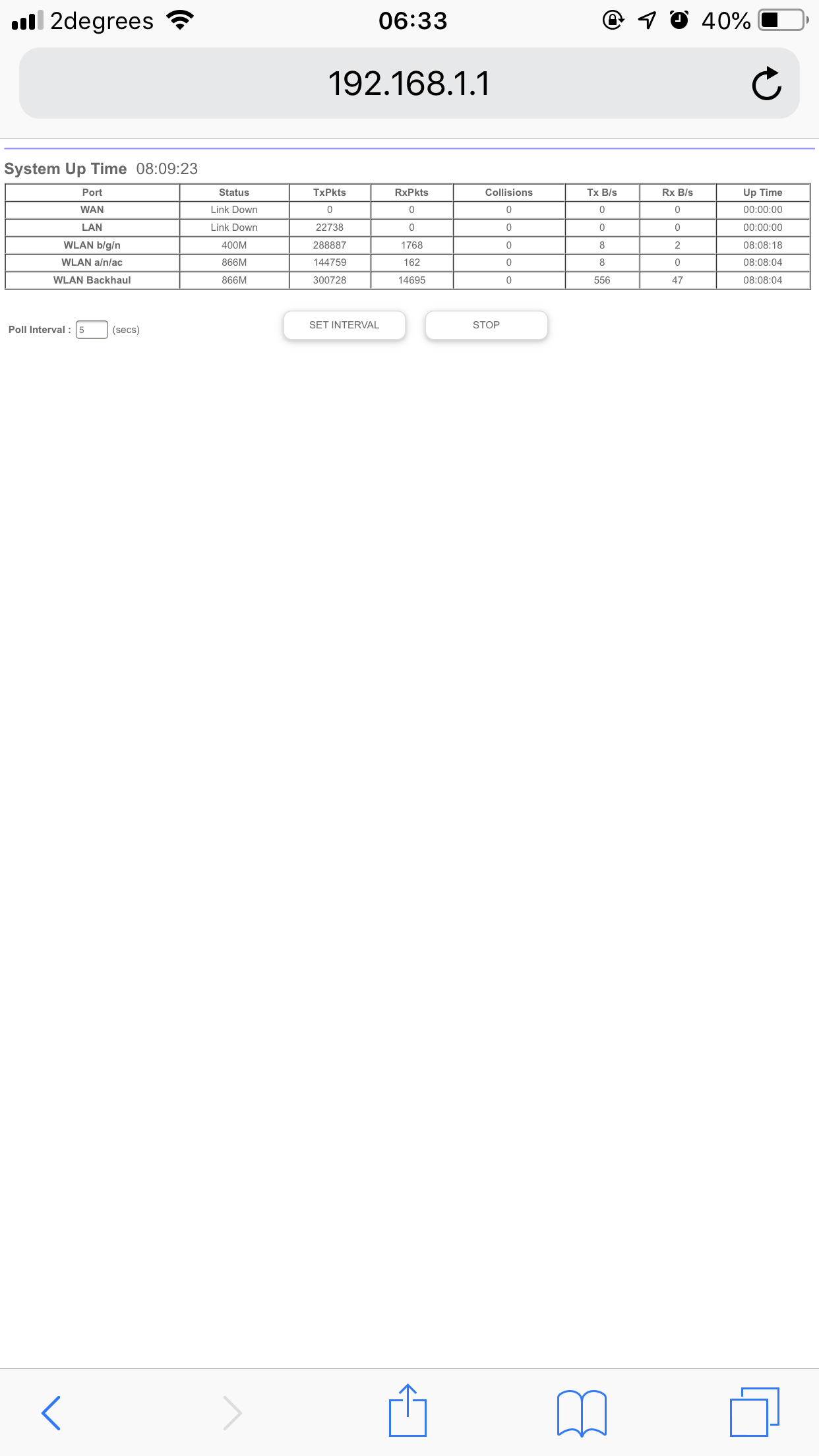
Can someone confirm if my router even has a connection?


michaelmurfy
meow
13579 posts

Uber Geek
+1 received by user: 10910

Moderator
ID Verified
Trusted
Lifetime subscriber

  #2220386 18-Apr-2019 09:23
Send private message

"Link down" meaning check your Ethernet...


Michael Murphy | https://murfy.nz
Referral Links: Quic Broadband (use R122101E7CV7Q for free setup)

Are you happy with what you get from Geekzone? Please consider supporting us by subscribing.
Opinions are my own and not the views of my employer.


HP


Shop now for HP laptops and other devices (affiliate link).
turtlepower

5 posts

Wannabe Geek


  #2220452 18-Apr-2019 10:08
Send private message

michaelmurfy:


"Link down" meaning check your Ethernet...


That's weird as I've tried 2 different network cables. 


The ONT even has a consistent orange light. 


allan
2073 posts

Uber Geek
+1 received by user: 899

ID Verified
Lifetime subscriber

  #2221094 19-Apr-2019 12:22
Send private message

Not sure how you are running your speed tests, but Orbi has an inbuilt check for connection speed under "Advanced/Setup/QOS Setup/Test Speed". What does that say you are connecting at?


Aredwood
3885 posts

Uber Geek
+1 received by user: 1749


  #2221264 19-Apr-2019 19:34

turtlepower:

michaelmurfy:


"Link down" meaning check your Ethernet...


That's weird as I've tried 2 different network cables. 


The ONT even has a consistent orange light. 


Have you entered the correct PPPOE username and password? As some ISPs use port based authentication (meaning that any username/ password will work). But with 2degrees, you need the correct username and password.

Username format is turtlepower@snap.net.nz Assuming that your 2degrees username is the same as your Geekzone username.

Link down, might be referring to PPPOE link down, rather than only the Ethernet between the ONT and your router.


turtlepower

5 posts

Wannabe Geek


  #2221285 19-Apr-2019 20:26
Send private message

This is strange.

I managed to source another brand new 2degrees router and after plugging it all in, it all appears to work fine now.

The strange part is that the router doesn’t require me to enter my Snap details and the login is something else completely unrelated.

Internet works fine though.

 1 | 2
View this topic in a long page with up to 500 replies per page Create new topic


Geekzone Live »

Try automatic live updates from Geekzone directly in your browser, without refreshing the page, with Geekzone Live now.


Are you subscribed to our RSS feed? You can download the latest headlines and summaries from our stories directly to your computer or smartphone by using a feed reader.