Geekzone: technology news, blogs, forums
Guest
Welcome Guest.
You haven't logged in yet. If you don't have an account you can register now.


RandBNZ

8 posts

Wannabe Geek
+1 received by user: 1


#268470 21-Mar-2020 10:04
Send private message

Hi all. In our new house we have the normal style Comms panel in the garage. I have had Stuff fibre installed with eh standard wireless router/modem.
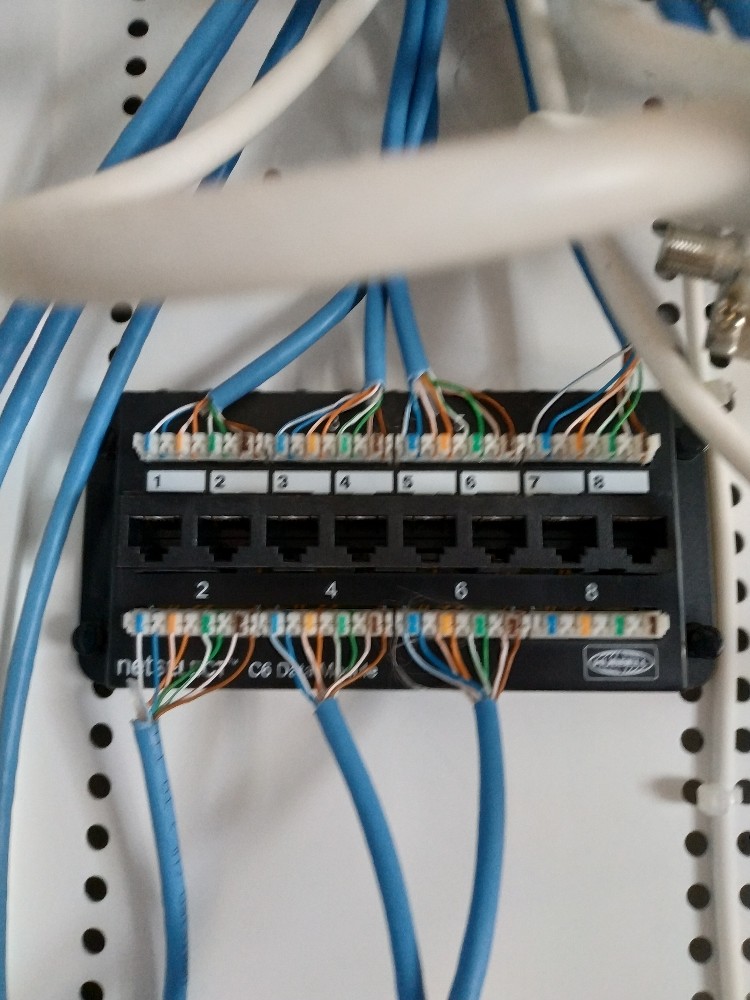
I want to connect my Sky box and PS4 to the LAN but I have no idea how to connect the router to the LAN panel. Hoping someone can give me a few pointers.
https://cdn.geekzone.co.nz/imagessubs/0be0b2ba20f091bb910b6cd77ba23c51.jpg


Create new topic
RunningMan
9186 posts

Uber Geek
+1 received by user: 4840


  #2442715 21-Mar-2020 10:10
Send private message

It looks like the panel has only been half installed, and the various outlets punched together to distribute phone.


Get the installer back to do the job properly.


cyril7
9075 posts

Uber Geek
+1 received by user: 2499

ID Verified
Trusted
Subscriber

  #2442720 21-Mar-2020 10:17
Send private message

Hi those are very poor terminations so I would not get that guy back again, not sure what runningman is referring to the outlets appear to be setup for data, how many outlets in each room, is there a room where two appear together.

Cyril

cyril7
9075 posts

Uber Geek
+1 received by user: 2499

ID Verified
Trusted
Subscriber

  #2442721 21-Mar-2020 10:21
Send private message

Also can you give us a slightly wider pic that shows what happens with to those two cables heading to the right.


Cyril


RandBNZ

8 posts

Wannabe Geek
+1 received by user: 1


  #2442723 21-Mar-2020 10:25
Send private message

Hi, the 2 on the right go no where, just blanks and not connected to anything

RunningMan
9186 posts

Uber Geek
+1 received by user: 4840


  #2442724 21-Mar-2020 10:28
Send private message

A closer pic of where the blue cables are punched into would help too.


RandBNZ

8 posts

Wannabe Geek
+1 received by user: 1


  #2442739 21-Mar-2020 11:12
Send private message


Rooms all have 1 outlet. There is no cable going from the white Chorus box to the black top box.


Want to support Geekzone and browse the site without the ads? Subscribe to Geekzone now (monthly, annual and lifetime options).
cyril7
9075 posts

Uber Geek
+1 received by user: 2499

ID Verified
Trusted
Subscriber

  #2442749 21-Mar-2020 11:27
Send private message

Hi, so those terminations are pretty rough, but will probably work, the green pair of the third on top row looks like its not punched down. I personally would have someone redo them, not the guy that did them orginally.


Anyway, as each room only has one outlet, you will need to either leave your router in the cabinet, which I suspect will give you poor wifi in the rest of the house and use patch leads to connect the yellow lan ports of the router to various rooms. In the room where your TV/Sky/PS4 is you can get a small switch to then allow you to connect all of them.


Other alternative is to place your router in the lounge with the TV, then connect Sky/PS4 direct to that, if you want to deliver internet to other rooms then you will need to either split the cable with a pair of these and put the WAN connection from the ONT to the router in the lounge on one leg and return the LAN to a small switch in the garage hub to distribute to other rooms, however this will limit speeds to 100/100 so if you have ordered a 950/450 plan you wont be able to utilise it.


The other option is to get a couple of managed switches (around $50ea) and transport vlan10 to the lounge to your router and the LAN back to the garage hub on the native vlan, this will give you Gig speeds, although traffic going to other rooms will share that Gig.


Cyril


Edit: By the way where are you


My guess is currently you only want your Lounge setup to go, so just plug the cable from the ONT into one of the black part panel outlets going to the lounge and plug your router in there


migrif
80 posts

Master Geek
+1 received by user: 25

ID Verified
Subscriber

  #2442750 21-Mar-2020 11:29
Send private message

Hi,


You should be able to use a short network cable (Cat5e or Cat6), to go from the yellow ports on your Asus router. Then connect the cable to the black patch panel at the top.


If you don't know which patch goes to a certain part of the house. I'd suggest connecting the device to a patch point around the house. Then back in the patch panel, connect the network cable from the router (yellow ports), to the patch points up the top. When the router sees another device on the other end of the cable, another light should come on (normally with a number written above it), on the router. 


Hope this helps 


Broadcast Engineer working in Auckland, New Zealand


RunningMan
9186 posts

Uber Geek
+1 received by user: 4840


  #2442766 21-Mar-2020 11:43
Send private message

Ah, now I see, thought it was a phone module. @cyril7 sums it up well.


RandBNZ

8 posts

Wannabe Geek
+1 received by user: 1


  #2443274 21-Mar-2020 18:17
Send private message

Thanks all, got the PS4 set up and running 247mbs instead of 25. Just need to buy a few more Cat cables to do the other rooms.


Thanks for the help!


cyril7
9075 posts

Uber Geek
+1 received by user: 2499

ID Verified
Trusted
Subscriber

  #2443289 21-Mar-2020 18:37
Send private message

Fantastic, glad we helped


Cyril


Create new topic


Geekzone Live »

Try automatic live updates from Geekzone directly in your browser, without refreshing the page, with Geekzone Live now.


Are you subscribed to our RSS feed? You can download the latest headlines and summaries from our stories directly to your computer or smartphone by using a feed reader.