Geekzone: technology news, blogs, forums
Guest
Welcome Guest.
You haven't logged in yet. If you don't have an account you can register now.


davidknz

41 posts

Geek
+1 received by user: 4


#269665 31-Mar-2020 20:42
Send private message

I have a Windows7 home network, with a venerable Fritzbox 7490 router.


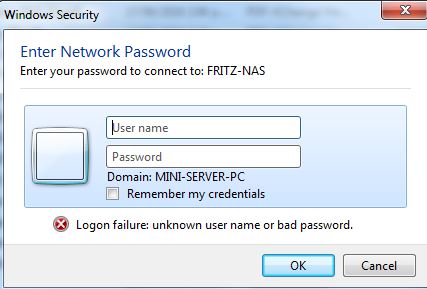
I had to reload W7, and it now requires a user name and password to access


the 7490. Previously it did'nt require a network password; just had direct access


like all the other PCs on the net.


NOOB question: how do I remove the user name/password requirement


TIA  David K in AUckland


DavidKNZ

Filter this topic showing only the reply marked as answer View this topic in a long page with up to 500 replies per page Create new topic
 1 | 2
freitasm
BDFL - Memuneh
80646 posts

Uber Geek
+1 received by user: 41029

Administrator
ID Verified
Trusted
Geekzone
Lifetime subscriber

  #2451822 31-Mar-2020 20:46
Send private message

Are you trying to access the 7490? Do you have a screenshot? The 7490 only asks for password.


Or are you trying to access the Windows 7 box from another PC?


Referral links: Quic Broadband (free setup code: R587125ERQ6VE) | Samsung | AliExpress | Wise | Sharesies 


Support Geekzone by subscribing (browse ads-free), or making a one-off or recurring donation through PressPatron.


RunningMan
9184 posts

Uber Geek
+1 received by user: 4833


  #2451823 31-Mar-2020 20:49
Send private message

Are you talking about the wifi password?


davidknz

41 posts

Geek
+1 received by user: 4


  #2451824 31-Mar-2020 20:49
Send private message

Access from another PC as per screenshot :-)


DavidKNZ


freitasm
BDFL - Memuneh
80646 posts

Uber Geek
+1 received by user: 41029

Administrator
ID Verified
Trusted
Geekzone
Lifetime subscriber

  #2451827 31-Mar-2020 20:51
Send private message

Sorry, there's no screenshot.


Referral links: Quic Broadband (free setup code: R587125ERQ6VE) | Samsung | AliExpress | Wise | Sharesies 


Support Geekzone by subscribing (browse ads-free), or making a one-off or recurring donation through PressPatron.


davidknz

41 posts

Geek
+1 received by user: 4


  #2451828 31-Mar-2020 20:52
Send private message

I can work around it by plugging the FritzNAS / USB into another PC,


but it would be handy to be able to load stuff on directly...


DavidKNZ

freitasm
BDFL - Memuneh
80646 posts

Uber Geek
+1 received by user: 41029

Administrator
ID Verified
Trusted
Geekzone
Lifetime subscriber

  #2451832 31-Mar-2020 20:55
Send private message

Ah, you want to access files stored on a USB-attached device connected to the 7490?


Referral links: Quic Broadband (free setup code: R587125ERQ6VE) | Samsung | AliExpress | Wise | Sharesies 


Support Geekzone by subscribing (browse ads-free), or making a one-off or recurring donation through PressPatron.


Move to New Zealand's best fibre broadband service (affiliate link). Free setup code: R587125ERQ6VE. Note that to use Quic Broadband you must be comfortable with configuring your own router.
kenkeniff
628 posts

Ultimate Geek
+1 received by user: 88


  #2451834 31-Mar-2020 20:58
Send private message
davidknz

41 posts

Geek
+1 received by user: 4


  #2451835 31-Mar-2020 20:59
Send private message

sorry - beginner here


DavidKNZ

davidknz

41 posts

Geek
+1 received by user: 4


  #2451839 31-Mar-2020 21:03
Send private message

kenkeniff:


"Turn Off Password Protected Sharing" on Windows 7


Hi Keniff - already turned off PPS / W7


DavidKNZ

davidknz

41 posts

Geek
+1 received by user: 4


  #2451843 31-Mar-2020 21:05
Send private message

freitasm: Ah, you want to access files stored on a USB-attached device connected to the 7490?


yes - just access the files with WinDoze explorer, as with other disks on the network


( using a WorkGroup, rather than homegroup )


DavidKNZ

kenkeniff
628 posts

Ultimate Geek
+1 received by user: 88


  #2451846 31-Mar-2020 21:07
Send private message

davidknz:


kenkeniff:


"Turn Off Password Protected Sharing" on Windows 7


Hi Keniff - already turned off PPS / W7


Then try logging in with the username: Guest


Want to support Geekzone and browse the site without the ads? Subscribe to Geekzone now (monthly, annual and lifetime options).
michaelmurfy
meow
13579 posts

Uber Geek
+1 received by user: 10910

Moderator
ID Verified
Trusted
Lifetime subscriber

  #2451859 31-Mar-2020 21:42
Send private message

Also note Windows 7 is fully unsupported - https://support.microsoft.com/en-us/help/4057281/windows-7-support-ended-on-january-14-2020


This means you won't get security patches making your Windows 7 PC more vulnerable to malware. This could also spread onto your other computers in the way Wannacry did.


From memory, you can still actually upgrade from Windows 7 to Windows 10 for free and from what I've seen it is as simple as using the Media Creation Tool and hitting "Upgrade this PC now" - your Windows 7 key basically turns into a Windows 10 digital entitlement key and you're away. This is backed up from several websites when doing a quick Google search however somebody else may want to confirm this as personally I have not tried this.


Michael Murphy | https://murfy.nz
Referral Links: Quic Broadband (use R122101E7CV7Q for free setup)

Are you happy with what you get from Geekzone? Please consider supporting us by subscribing.
Opinions are my own and not the views of my employer.


hio77
'That VDSL Cat'
13036 posts

Uber Geek
+1 received by user: 3896

ID Verified
Trusted
Lizard Networks
Subscriber

  #2451860 31-Mar-2020 21:43
Send private message

I would highly suspect you did previously enter a login but you also clicked save password so never had to think about it past that...


#include <std_disclaimer>


Any comments made are personal opinion and do not reflect directly on the position my current or past employers may have. 


davidknz

41 posts

Geek
+1 received by user: 4


  #2451870 31-Mar-2020 22:15
Send private message

michaelmurfy:


Also note Windows 7 is fully unsupported - https://support.microsoft.com/en-us/help/4057281/windows-7-support-ended-on-january-14-2020


This means you won't get security patches making your Windows 7 PC more vulnerable to malware. This could also spread onto your other computers in the way Wannacry did.


From memory, you can still actually upgrade from Windows 7 to Windows 10 for free and from what I've seen it is as simple as using the Media Creation Tool and hitting "Upgrade this PC now" - your Windows 7 key basically turns into a Windows 10 digital entitlement key and you're away. This is backed up from several websites when doing a quick Google search however somebody else may want to confirm this as personally I have not tried this.


Thanks for the suggestion, but I'm well retired, wrinkled beyond repair, and just


looking to cruise thru to the great system reset in the sky :-)


Besides I didn't appreciate MSs attempts to hoodwink us W7 dudes to 10,


so I remain last with the latest :-)


DavidKNZ

davidknz

41 posts

Geek
+1 received by user: 4


  #2451874 31-Mar-2020 22:22
Send private message

hio77: I would highly suspect you did previously enter a login but you also clicked save password so never had to think about it past that...


Possible :-)  But there are 8 PCs on the net, and I would have had to save the passwords on all of them.


Cant recall doing this, but age has its hazards :-)


When I relaoded W7, all PCs came up as present and visible; only the 7490 required User Name/Sword


DavidKNZ

 1 | 2
Filter this topic showing only the reply marked as answer View this topic in a long page with up to 500 replies per page Create new topic


Geekzone Live »

Try automatic live updates from Geekzone directly in your browser, without refreshing the page, with Geekzone Live now.


Are you subscribed to our RSS feed? You can download the latest headlines and summaries from our stories directly to your computer or smartphone by using a feed reader.