Geekzone: technology news, blogs, forums
Guest
Welcome Guest.
You haven't logged in yet. If you don't have an account you can register now.


pomiejon

16 posts

Geek
+1 received by user: 1


#273335 17-Aug-2020 13:31
Send private message

Can anyone please help with the configuration settings for a TP-LINK Archer C60 for 2degrees Fibre?


I have configured it and have internet access however some sites are not loading at all or only partially.  E.G:


- rnz.co.nz - loads 100% fine.
- nzherald.co.nz - does not load at all (just times out)
- facebook.com - images and videos don't load, text loads fine.


Below are the settings I have changed.  Everything else is default.  Neither IPv6 nor Wireless are enabled.


Filter this topic showing only the reply marked as answer View this topic in a long page with up to 500 replies per page Create new topic
 1 | 2
freitasm
BDFL - Memuneh
80646 posts

Uber Geek
+1 received by user: 41027

Administrator
ID Verified
Trusted
Geekzone
Lifetime subscriber

  #2542864 17-Aug-2020 13:46
Send private message

Does it have IPv6 enabled? IF yes, what happens if you disable it?


Referral links: Quic Broadband (free setup code: R587125ERQ6VE) | Samsung | AliExpress | Wise | Sharesies 


Support Geekzone by subscribing (browse ads-free), or making a one-off or recurring donation through PressPatron.


pomiejon

16 posts

Geek
+1 received by user: 1


  #2542873 17-Aug-2020 14:00
Send private message

Hi there.  Thank you for your reply.  IPv6 was disabled.  If I enable it and re-boot the router, the behaviour remains the same.


:-(


OmniouS
434 posts

Ultimate Geek
+1 received by user: 46

Trusted
Lifetime subscriber

  #2542894 17-Aug-2020 14:14
Send private message

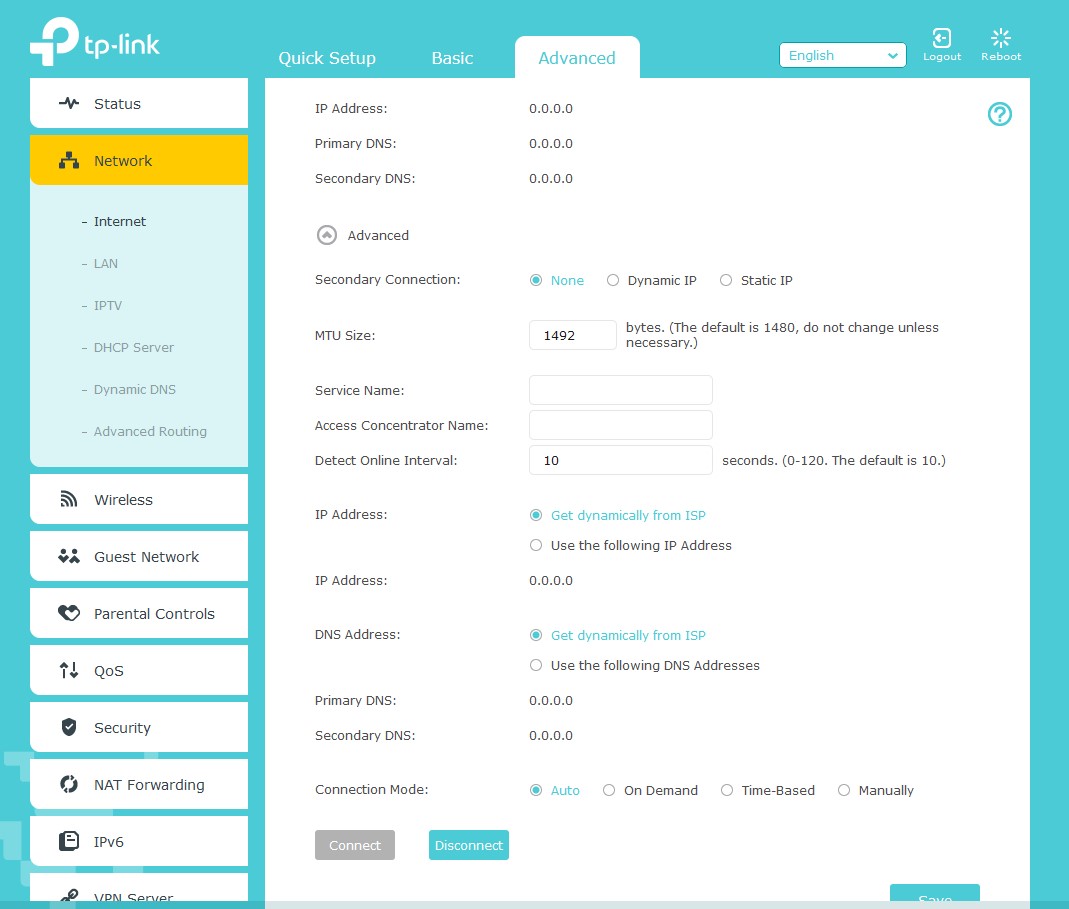
Can you click the arrow beside 'Advanced' on the first page? I'm interested in the MTU setting and whatever else is there


pomiejon

16 posts

Geek
+1 received by user: 1


  #2542918 17-Aug-2020 14:32
Send private message

Hi OmniouS, thank you.  Here you go. 


freitasm
BDFL - Memuneh
80646 posts

Uber Geek
+1 received by user: 41027

Administrator
ID Verified
Trusted
Geekzone
Lifetime subscriber

  #2542925 17-Aug-2020 14:43
Send private message

Try using 1500 MTU for 2degrees.


Referral links: Quic Broadband (free setup code: R587125ERQ6VE) | Samsung | AliExpress | Wise | Sharesies 


Support Geekzone by subscribing (browse ads-free), or making a one-off or recurring donation through PressPatron.


pomiejon

16 posts

Geek
+1 received by user: 1


  #2542928 17-Aug-2020 14:47
Send private message

Hi there freitasm, If I try to use 1500 for MTU I get the error message "This number should be between 576 and 1492."


Shop now on Samsung phones, tablets, TVs and more (affiliate link).
sbiddle
30853 posts

Uber Geek
+1 received by user: 9996

Retired Mod
Trusted
Biddle Corp
Lifetime subscriber

  #2542972 17-Aug-2020 15:53
Send private message

TP-Link routers only support a maximum of 1492 for MTU.


pomiejon

16 posts

Geek
+1 received by user: 1


  #2543264 17-Aug-2020 22:11
Send private message

I have tried everything I can think of and still no joy.  Any suggestions would be gratefully appreciated.


liquidcore
187 posts

Master Geek
+1 received by user: 71

ID Verified

  #2543265 17-Aug-2020 22:16
Send private message

I'm assuming this happens all on devices on the network? Have you tried a different router?

DjShadow
4222 posts

Uber Geek
+1 received by user: 1322

ID Verified
Trusted
Subscriber

  #2543267 17-Aug-2020 22:23
Send private message

Can you compare your settings to this PBTech guide: https://www.pbtech.co.nz/TPLinkISPSettings


pomiejon

16 posts

Geek
+1 received by user: 1


  #2543268 17-Aug-2020 22:24
Send private message

Hi liquidcore.  Correct - All devices.  I don't have another Router to hand, but will see if I can dig one out to try. 


Most disastrous of all - Netflix is also not working!!! :-(


Move to New Zealand's best fibre broadband service (affiliate link). Free setup code: R587125ERQ6VE. Note that to use Quic Broadband you must be comfortable with configuring your own router.
pomiejon

16 posts

Geek
+1 received by user: 1


  #2543269 17-Aug-2020 22:25
Send private message

Hi DjShadow - Yes, this is where I sourced the settings. 


DjShadow
4222 posts

Uber Geek
+1 received by user: 1322

ID Verified
Trusted
Subscriber

  #2543272 17-Aug-2020 22:32
Send private message

Can you try clearing your browser cache, also open a command prompt and run "ipconfig /flushdns" and see if that makes a difference?


michaelmurfy
meow
13579 posts

Uber Geek
+1 received by user: 10910

Moderator
ID Verified
Trusted
Lifetime subscriber

  #2543285 17-Aug-2020 23:19
Send private message

This does sound like a MTU issue to me.


I seriously recommend giving 2degrees a bell and getting one of their Fritz!Box routers. These routers are very good and also work "out of the box" correctly. I think they'll charge $15 for delivery for a lease router which beats the headaches you're having with the TP-Link router you've got.


You'll also likely get better performance out of the Fritz!Box too. If you're out of contract, ask about resigning onto one of their Gigabit deals: https://www.2degreesmobile.co.nz/broadband/


Michael Murphy | https://murfy.nz
Referral Links: Quic Broadband (use R122101E7CV7Q for free setup)

Are you happy with what you get from Geekzone? Please consider supporting us by subscribing.
Opinions are my own and not the views of my employer.


pomiejon

16 posts

Geek
+1 received by user: 1


  #2543391 18-Aug-2020 08:47
Send private message

Hi DjShadow.  Thank you.  No joy after clearing the cache and executing a flushdns command unfortunately.


 1 | 2
Filter this topic showing only the reply marked as answer View this topic in a long page with up to 500 replies per page Create new topic


Geekzone Live »

Try automatic live updates from Geekzone directly in your browser, without refreshing the page, with Geekzone Live now.


Are you subscribed to our RSS feed? You can download the latest headlines and summaries from our stories directly to your computer or smartphone by using a feed reader.