Geekzone: technology news, blogs, forums
Guest
Welcome Guest.
You haven't logged in yet. If you don't have an account you can register now.


farmer1981

6 posts

Wannabe Geek


#279606 27-Oct-2020 08:58
Send private message

Hi All,


This is my first post so hopefully someone can help. I have used DNS jumper on and off for a few years now. Recently I have had issues with streaming content, on any platform. I had hoped changing my DNS settings might improve it a little, and have used DNS Jumper for this.


However, whenever I use it, and run the 'Fastest DNS' check, the 'Result 2' is almost always massively slower than 'Result 1' which is not something I have ever had before. What could this mean?


Here is a screenshot to illustrate what I mean.
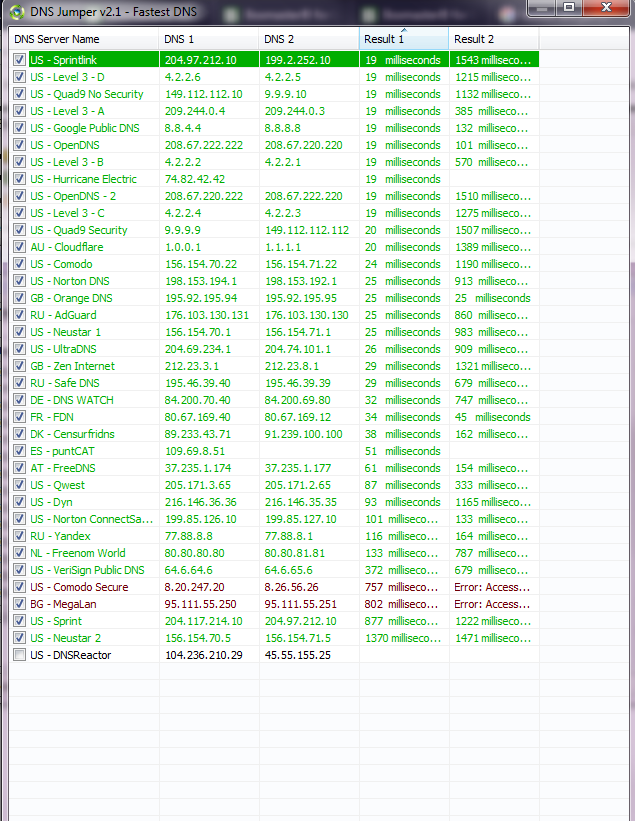


I'm sure there is a clue in this, I just don't know what!


Any advice would be great.


Thanks.



Create new topic
trig42
5901 posts

Uber Geek
+1 received by user: 2114

ID Verified

  #2592268 27-Oct-2020 09:07
Send private message

Why aren't you using your ISPs DNS?


farmer1981

6 posts

Wannabe Geek


  #2592269 27-Oct-2020 09:12
Send private message

I was, but I was getting speed issues as mentioned, so trying other DNS settings, in the past it has always helped. However never had this issue with DNS jumper where the second result is so different to the first. I am just trying to understand what would cause this discrepancy between the two results.


freitasm
BDFL - Memuneh
80944 posts

Uber Geek
+1 received by user: 41699

Administrator
ID Verified
Trusted
Geekzone
Lifetime subscriber

  #2592270 27-Oct-2020 09:15
Send private message

Unless you have specific requirements, such as policy filtering (which uses something like OpenDNS, Cloudflare Gateway, etc) then you should really use your ISP DNS. Those will point to in-network caches when available.


Also, are you in New Zealand?


Referral links: Quic Broadband (free setup code: R587125ERQ6VE) | Samsung | AliExpress | Wise | Sharesies 


Support Geekzone by subscribing (browse ads-free), or making a one-off or recurring donation through PressPatron.


cyril7
9075 posts

Uber Geek
+1 received by user: 2499

ID Verified
Trusted
Subscriber

  #2592272 27-Oct-2020 09:19
Send private message

Looks to me like a bug in the app.

Considering most usual content is cached in cdnsin nz I don't understand what this app will achieve.

Cyril

farmer1981

6 posts

Wannabe Geek


  #2592273 27-Oct-2020 09:20
Send private message

Thanks for that, but in the past switching to a different DNS has noticeably improved my internet speed. We are in a rural area, no fibre available, so our internet is generally on the slow side anyway, so anything that helps is useful.


What I am really looking for an answer as to why the two results on the response time are so different, apologies if that wasn't clear in the question.


farmer1981

6 posts

Wannabe Geek


  #2592274 27-Oct-2020 09:21
Send private message

Also, sorry no not NZ, I'm in the UK...


Stream your favourite shows now on Apple TV (affiliate link).
freitasm
BDFL - Memuneh
80944 posts

Uber Geek
+1 received by user: 41699

Administrator
ID Verified
Trusted
Geekzone
Lifetime subscriber

  #2592276 27-Oct-2020 09:23
Send private message

You could try another software to test those servers - check GRC DNS test.


Referral links: Quic Broadband (free setup code: R587125ERQ6VE) | Samsung | AliExpress | Wise | Sharesies 


Support Geekzone by subscribing (browse ads-free), or making a one-off or recurring donation through PressPatron.


cyril7
9075 posts

Uber Geek
+1 received by user: 2499

ID Verified
Trusted
Subscriber

  #2592277 27-Oct-2020 09:24
Send private message

Hi as said looks like a bug.

I fail to understand how using any alternative dns will help a slow dsl connection.

Cyril

farmer1981

6 posts

Wannabe Geek


  #2592278 27-Oct-2020 09:24
Send private message

The reason for my using the app is I often find third party DNS servers give me a faster service than my own ISP's, the app is just an easy way to check for faster servers and set them without doing it manually.


I don't think it's a bug, as I've used the same one for a while, it's not changed, and never had this issue before.


freitasm
BDFL - Memuneh
80944 posts

Uber Geek
+1 received by user: 41699

Administrator
ID Verified
Trusted
Geekzone
Lifetime subscriber

  #2592282 27-Oct-2020 09:27
Send private message

DNS results are usually cached on your router and your own PC for some time (the TTL). DNS testers will get the results uncached so not really a real-life scenario. 


If you don't want to use your ISP DNS (which in general points to closer or in-network CDN nodes/caches) then I'd just settle on one service - Cloudflare or Google. Other open services are generally not fast enough and I'd worry about security too.  


Referral links: Quic Broadband (free setup code: R587125ERQ6VE) | Samsung | AliExpress | Wise | Sharesies 


Support Geekzone by subscribing (browse ads-free), or making a one-off or recurring donation through PressPatron.


hio77
'That VDSL Cat'
13044 posts

Uber Geek
+1 received by user: 3901

ID Verified
Trusted
Lizard Networks
Subscriber

  #2592286 27-Oct-2020 09:32
Send private message

There are some cdn providers that will actually be worse without rsp dns.

The majority use smarter routing options so it doesn't matter that much.
I would bet any speed increase you gain is a placebo.


#include <std_disclaimer>


Any comments made are personal opinion and do not reflect directly on the position my current or past employers may have. 


Shop now for Dell laptops and other devices (affiliate link).
farmer1981

6 posts

Wannabe Geek


  #2592306 27-Oct-2020 10:08
Send private message

I agree, it could well be a placebo. However, that is really not what I am interested in understanding.


The question was not about the merits of using the DNS jumper software at all. I am just curious as to why the sudden discrepancy in the two results. I have used it on and off for years, and never experienced such different results between 1 and 2 on the DNS test.


I do appreciate the various advice on whether it is worth using or not, but I am really trying to understand what would cause that to happen, as it does everytime now. That was all. Just hoped someone with experience of DNS jumper might have an idea.


Much appreciated all.


freitasm
BDFL - Memuneh
80944 posts

Uber Geek
+1 received by user: 41699

Administrator
ID Verified
Trusted
Geekzone
Lifetime subscriber

  #2592312 27-Oct-2020 10:12
Send private message

As I said, try testing with other tools to compare results - the GRC DNS test should be a good start.


Referral links: Quic Broadband (free setup code: R587125ERQ6VE) | Samsung | AliExpress | Wise | Sharesies 


Support Geekzone by subscribing (browse ads-free), or making a one-off or recurring donation through PressPatron.


Hammerer
2480 posts

Uber Geek
+1 received by user: 802

Lifetime subscriber

  #2592466 27-Oct-2020 15:55
Send private message

I agree with using GRC's DNS Benchmark if you really want to find the best DNS server for you.


This article is about using GRC DNS Benchmark, Google Namebench (no updates since 2011) and DNS Jumper:


https://www.techsupportalert.com/content/how-find-best-dns-server.htm


Edit: Sorry, I also meant to add that I've used DNS Jumper for many years and it has always been better at switching your DNS server settings than at finding the best servers. DNS Benchmark gives you a lot more information because changing from your ISP's DNS servers shouldn't rely on DNS Jumper's limited test.


Create new topic


Geekzone Live »

Try automatic live updates from Geekzone directly in your browser, without refreshing the page, with Geekzone Live now.


Are you subscribed to our RSS feed? You can download the latest headlines and summaries from our stories directly to your computer or smartphone by using a feed reader.
