Geekzone: technology news, blogs, forums
Guest
Welcome Guest.
You haven't logged in yet. If you don't have an account you can register now.


Gordy7

gordy7
2001 posts

Uber Geek
+1 received by user: 505

ID Verified
Lifetime subscriber

#282688 6-Mar-2021 11:04
Send private message

A new found friend thinks I know something about computers and networks. 😃


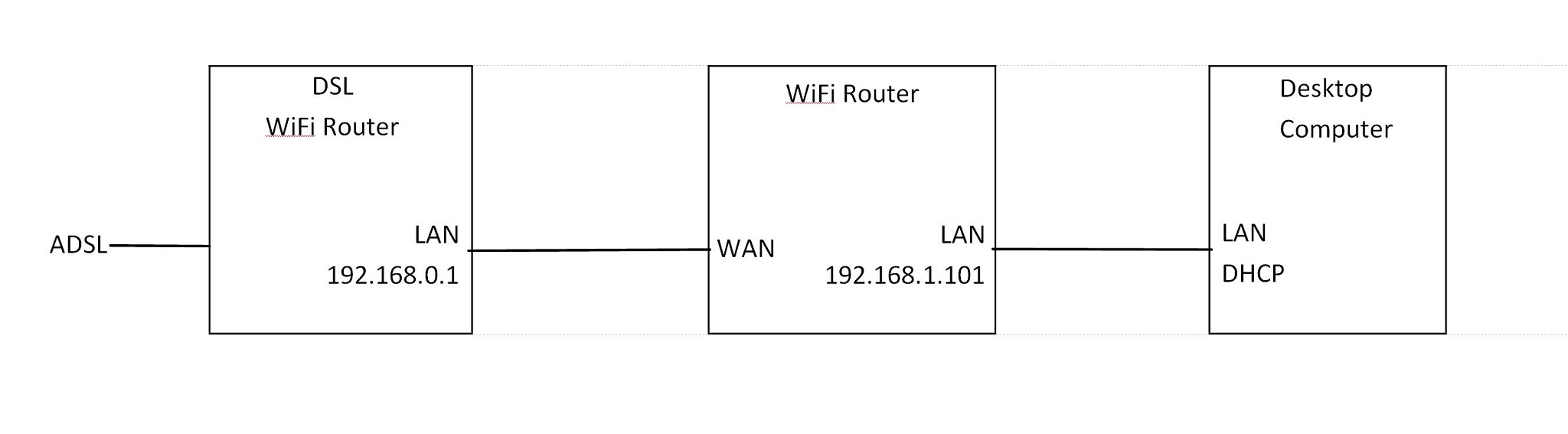
A recent power cut required a re-powering of an intermediate WiFi router to restore the network hooking up two subnets.


I didn't want to spend much time analysing the setup that had been created by someone else, especially as I could see heaps of devices running on WiFi.


I have only ever worked on home networks with a single subnet so I didn't know how to web browse from one subnet to another subnet where the ADSL router was. Luckily I had a long LAN cable with me and so I connected directly from the desktop computer to the ADSL router to check it out.


Is it possible to web browse to a device on a different subnet?


In hindsight I could possibly have used command line tools such as ping, ipconfig /all and tracert.


Here is a rough diagram of the setup:


Gordy


My first ever AM radio network connection was with a 1MHz AM crystal(OA91) radio receiver.


Create new topic
decibel
335 posts

Ultimate Geek
+1 received by user: 224


  #2668930 6-Mar-2021 12:39
Send private message

Try plugging the cable from the DSL router into a spare LAN port (instead of the WAN port)  on the WIFI router in the middle (and turn off the DHCP server in it)


Then you should have everyone on the 192.168.0.1 / subnet.


Gordy7

gordy7
2001 posts

Uber Geek
+1 received by user: 505

ID Verified
Lifetime subscriber

  #2668967 6-Mar-2021 13:43
Send private message

decibel:


Try plugging the cable from the DSL router into a spare LAN port (instead of the WAN port)  on the WIFI router in the middle (and turn off the DHCP server in it)


Then you should have everyone on the 192.168.0.1 / subnet.


I did try that at one stage, but then I lost some of the devices on the network.


I don't know why the system was originally set up with 2 subnets.


If I made the change to a single subnet, it would take a while to check through the various laptops, tablets, phones, security cameras and streaming TVs this guy has.


Gordy


My first ever AM radio network connection was with a 1MHz AM crystal(OA91) radio receiver.


richms
29109 posts

Uber Geek
+1 received by user: 10225

Trusted
Lifetime subscriber

  #2669027 6-Mar-2021 14:36
Send private message

Leave it alone if they wont purchase proper gear for the job IMO.


But anything on the second router will be natted by it, so should be able to see the web UI and anything on the first routers network because of that.


Richard rich.ms


Gordy7

gordy7
2001 posts

Uber Geek
+1 received by user: 505

ID Verified
Lifetime subscriber

  #2669105 6-Mar-2021 17:43
Send private message

richms:


Leave it alone if they wont purchase proper gear for the job IMO.


That is my thinking. The whole system is pretty old.


The desktop computer is running Vista !!. Kept crashing too... Removed a thick wad of dust from fans and vents.


Computer is stable now.


Gordy


My first ever AM radio network connection was with a 1MHz AM crystal(OA91) radio receiver.


snnet
1413 posts

Uber Geek
+1 received by user: 556


  #2669107 6-Mar-2021 17:52
Send private message

I've noticed some of the Netgear stuff that has the ability to just be a wifi AP will automatically be on a new subnet when it sets itself up off a person's phone (using their app) very similar to your diagram - 


192.168.1.x for router, and wifi and all clients on 10.0.0.x --- but can browse to and from subnets from either end. I haven't changed it because I didn't particularly want to go back if things stopped working and they seem happy enough for what it does


snnet
1413 posts

Uber Geek
+1 received by user: 556


  #2669108 6-Mar-2021 17:52
Send private message

I've noticed some of the Netgear stuff that has the ability to just be a wifi AP will automatically be on a new subnet when it sets itself up off a person's phone (using their app) very similar to your diagram - 


192.168.1.x for router, and wifi and all clients on 10.0.0.x --- but can browse to and from subnets from either end. I haven't changed it because I didn't particularly want to go back if things stopped working and they seem happy enough for what it does


Support Geekzone with one-off or recurring donations Donate via PressPatron.
snnet
1413 posts

Uber Geek
+1 received by user: 556


  #2669109 6-Mar-2021 17:52
Send private message

I've noticed some of the Netgear stuff that has the ability to just be a wifi AP will automatically be on a new subnet when it sets itself up off a person's phone (using their app) very similar to your diagram - 


192.168.1.x for router, and wifi and all clients on 10.0.0.x --- but can browse to and from subnets from either end. I haven't changed it because I didn't particularly want to go back if things stopped working and they seem happy enough for what it does


Gordy7

gordy7
2001 posts

Uber Geek
+1 received by user: 505

ID Verified
Lifetime subscriber

  #2669138 6-Mar-2021 18:32
Send private message

I don't know the history of the system and why it is configured the way it is.


I have not done a survey of what devices are connected and whether WiFi to the modem or to the WiFi router.


Some of the LAN cables are pretty dodgy... cable sleeves are not clamped in the RJ45 connectors.


The desktop computer boot up takes 2 to 3 minutes before the network connection is established.


My notes I have made are pretty skimpy.... Just fix any problem requested and get out!


Gordy


My first ever AM radio network connection was with a 1MHz AM crystal(OA91) radio receiver.


snnet
1413 posts

Uber Geek
+1 received by user: 556


  #2669142 6-Mar-2021 18:46
Send private message

Gordy7:


I don't know the history of the system and why it is configured the way it is.


I have not done a survey of what devices are connected and whether WiFi to the modem or to the WiFi router.


Some of the LAN cables are pretty dodgy... cable sleeves are not clamped in the RJ45 connectors.


The desktop computer boot up takes 2 to 3 minutes before the network connection is established.


My notes I have made are pretty skimpy.... Just fix any problem requested and get out!


Haha, I was reconfiguring a construction company's data rack last week and I said to the guy who referred me for the job "who the heck did these terminations? the wires are way too long before they go into the crimps!" turned out it was him about 10 years prior


Spyware
3818 posts

Uber Geek
+1 received by user: 1366

Lifetime subscriber

  #2669153 6-Mar-2021 20:15
Send private message

So he used to be an electrician??


Spark Max Fibre using Mikrotik CCR1009-8G-1S-1S+, CRS125-24G-1S, Unifi UAP, U6-Pro, UAP-AC-M-Pro, Apple TV 4K (2022), Apple TV 4K (2017), iPad Air 1st gen, iPad Air 4th gen, iPhone 13, SkyNZ3151 (the white box). If it doesn't move then it's data cabled.


snnet
1413 posts

Uber Geek
+1 received by user: 556


  #2669155 6-Mar-2021 20:16
Send private message

Spyware:


So he used to be an electrician??


Still is, as am I - I just don't do a crap job with data because it's part of my scope. Don't tar us all with that brush :P 


Create new topic


Geekzone Live »

Try automatic live updates from Geekzone directly in your browser, without refreshing the page, with Geekzone Live now.


Are you subscribed to our RSS feed? You can download the latest headlines and summaries from our stories directly to your computer or smartphone by using a feed reader.
