Geekzone: technology news, blogs, forums
Guest
Welcome Guest.
You haven't logged in yet. If you don't have an account you can register now.


Earbanean

1110 posts

Uber Geek
+1 received by user: 377


#289287 25-Aug-2021 21:44
Send private message

My 100 Mbps Voyager connection has just started maxing out.  It doesn't seem to be any hosts that I can see.  How do I trouble shoot this on the Edgerouter Lite?:


Create new topic
Earbanean

1110 posts

Uber Geek
+1 received by user: 377


  #2766744 25-Aug-2021 21:58
Send private message

Turned on Traffic Analysis and found the host, a Win 7 PC and seemed to be the XBox App.  Can that run as an App on Windows?


Mehrts
1112 posts

Uber Geek
+1 received by user: 984

Trusted

  #2766764 25-Aug-2021 22:56
Send private message

Windows 7 PC with internet access?! That's brave, since support was dropped back in Jan last year.


You can upgrade to Windows 10/11 with that same product key which activated your Windows 7, and Windows 10 is surprisingly good on older hardware, just upgrade any HDDs to SSDs and it'll fly.


Unsure about the xbox app. Never used it, but most likely.


freitasm
BDFL - Memuneh
80646 posts

Uber Geek
+1 received by user: 41025

Administrator
ID Verified
Trusted
Geekzone
Lifetime subscriber

  #2766782 26-Aug-2021 06:46
Send private message

And you already scanned it for malware?


Referral links: Quic Broadband (free setup code: R587125ERQ6VE) | Samsung | AliExpress | Wise | Sharesies 


Support Geekzone by subscribing (browse ads-free), or making a one-off or recurring donation through PressPatron.



xpd

xpd
Geek of Coastguard
14115 posts

Uber Geek
+1 received by user: 4574

Retired Mod
ID Verified
Trusted
Lifetime subscriber

  #2766802 26-Aug-2021 08:12
Send private message

Sounds like someones downloading a game/app on that PC, thats all. 


XPD / Gavin


LinkTree


Earbanean

1110 posts

Uber Geek
+1 received by user: 377


  #2766838 26-Aug-2021 08:55
Send private message

Yep, I tracked it down through the Traffic Analysis to be a PC of our tenants.  Looked like downloading a game onto a PC.  So I used the WAP to limit the bandwidth for the WLAN (SSID) they are on.  That did the trick for getting us bandwidth back.  However, I'll maybe need a better method of QoS or similar, so they aren't throttled when we aren't using the bandwidth.  Probably through the ERL, rather than via the WAP.  This is the first time with an issue in over a year though.


Interesting that the host using using the bandwidth was on their VLAN with a 192.168.3.x IP address, but as you can see from the ERL Dashboard screenshot, the usage wasn't showing against that VLAN's interface.  So I initially thought it was a host on 192.168.1.x


xpd

xpd
Geek of Coastguard
14115 posts

Uber Geek
+1 received by user: 4574

Retired Mod
ID Verified
Trusted
Lifetime subscriber

  #2766865 26-Aug-2021 09:44
Send private message

Tenant ? Sure you arent breaching any T&C's ? ;)


If youve got people using the connection you have no real control over, I'd be upping to a gig plan, and limiting them to 100. Then plenty of bandwidth for them, and plenty for you, problem solved :D


XPD / Gavin


LinkTree


Shop now at Mighty Ape (affiliate link).
Earbanean

1110 posts

Uber Geek
+1 received by user: 377


  #2766978 26-Aug-2021 13:00
Send private message

Yeah T&Cs and plan etc are all good. 


What I'm most interested about here, is given the host was in VLAN 20 (192.168.3.x), why the high bandwidth didn't show against the VLAN interface in the Dashboard?  In the screen shot in the OP, you can see it just showed against the eth0 and eth1 interfaces but not the eth1.20 interface. I thought any Edgerouter people might be able to shed some light on that.


Lias
5655 posts

Uber Geek
+1 received by user: 3978

ID Verified
Trusted
Lifetime subscriber

  #2767014 26-Aug-2021 14:06
Send private message

Is the traffic actually coming over the vlan? That looks like it's coming as untagged traffic?


I'm a geek, a gamer, a dad, a Quic user, and an IT Professional. I have a full rack home lab, size 15 feet, an epic beard and Asperger's. I'm a bit of a Cypherpunk, who believes information wants to be free and the Net interprets censorship as damage and routes around it. If you use my Quic signup you can also use the code R570394EKGIZ8 for free setup. Opinions are my own and not the views of my employer.


Earbanean

1110 posts

Uber Geek
+1 received by user: 377


  #2767020 26-Aug-2021 14:22
Send private message

Lias:


Is the traffic actually coming over the vlan? That looks like it's coming as untagged traffic?


Everything on the guest SSID on the WAP is tagged as VLAN 20 and goes in 192.168.3.x.  That seems to be working OK, as the host in question had a 192.16.3.x address.  It showed up in the Traffic Analysis screen with that.  Also, when I set this up a year ago, I tested the firewall rules by connecting a laptop to the SSID and trying to ping 192.168.1.x.  That all worked OK.  


RunningMan
9184 posts

Uber Geek
+1 received by user: 4833


  #2767025 26-Aug-2021 14:26
Send private message

Probably because the traffic is showing on the base interface. The VLAN 10 and PPPoE interfaces are also showing no traffic, but presumably they are actually also sitting about 110/2.5 Mb/s


Lorenceo
904 posts

Ultimate Geek
+1 received by user: 336

Trusted

  #2767028 26-Aug-2021 14:29
Send private message

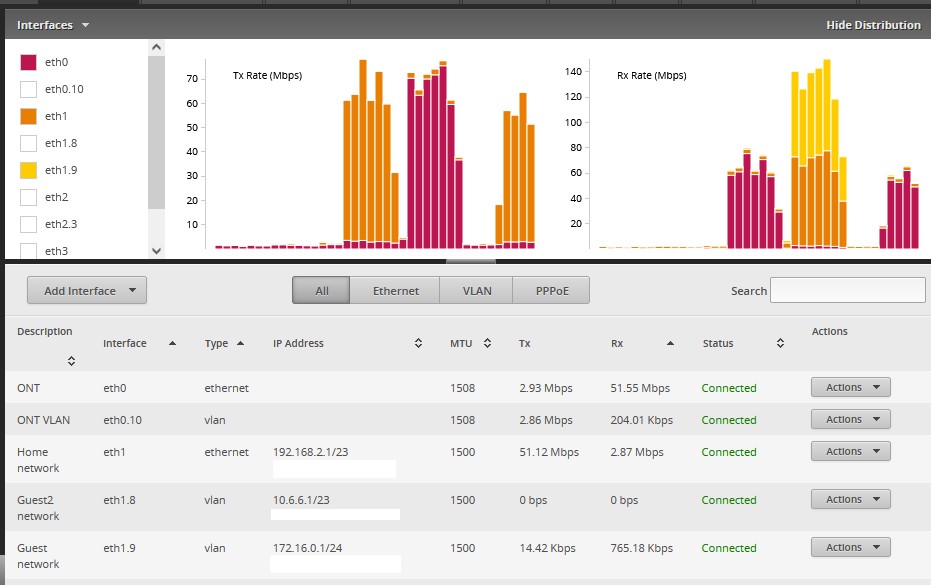
Re: Traffic not appearing on the expected VLAN, this happens on my Edgerouter as well. Download traffic on a VLAN (eth1.9) shows up as being sent to eth1. Upload traffic from said VLAN shows up as received on both eth1 and eth1.9:


Might be a bug? /shrug


Create new topic


Geekzone Live »

Try automatic live updates from Geekzone directly in your browser, without refreshing the page, with Geekzone Live now.


Are you subscribed to our RSS feed? You can download the latest headlines and summaries from our stories directly to your computer or smartphone by using a feed reader.