Geekzone: technology news, blogs, forums
Guest
Welcome Guest.
You haven't logged in yet. If you don't have an account you can register now.


sud0

283 posts

Ultimate Geek
+1 received by user: 117

ID Verified
Lifetime subscriber

#289343 31-Aug-2021 11:02
Send private message

Hello guys!


I've recently acquired an UDM-PRO with 1x Unifi AP AC PRO and Unifi 8 Port Gigabit Desktop POE switch. They work great! The UDM-PRO dashboard is great!


However, when I enable DHCPv6 on my network and start browsing the internet on IPV6, things start getting slow. Other users in my household complaint about internet performance. When I disable IPV6, everything goes back to normal.


Was wondering if I need to do anything specific? As this is the first time I'm using IPV6?


Thanks!
Lucas


Lucas


lpossamai.me


Filter this topic showing only the reply marked as answer View this topic in a long page with up to 500 replies per page Create new topic
 1 | 2
michaelmurfy
meow
13580 posts

Uber Geek
+1 received by user: 10910

Moderator
ID Verified
Trusted
Lifetime subscriber

  #2769266 31-Aug-2021 11:12
Send private message

You're likely hitting the IPv6 bug with some providers (if you don't have prefix-only set in your configuration then it maxes out the CPU of Ubiquiti routers unless if the following conditions are set)

How you essentially do it for Vocus-based providers:


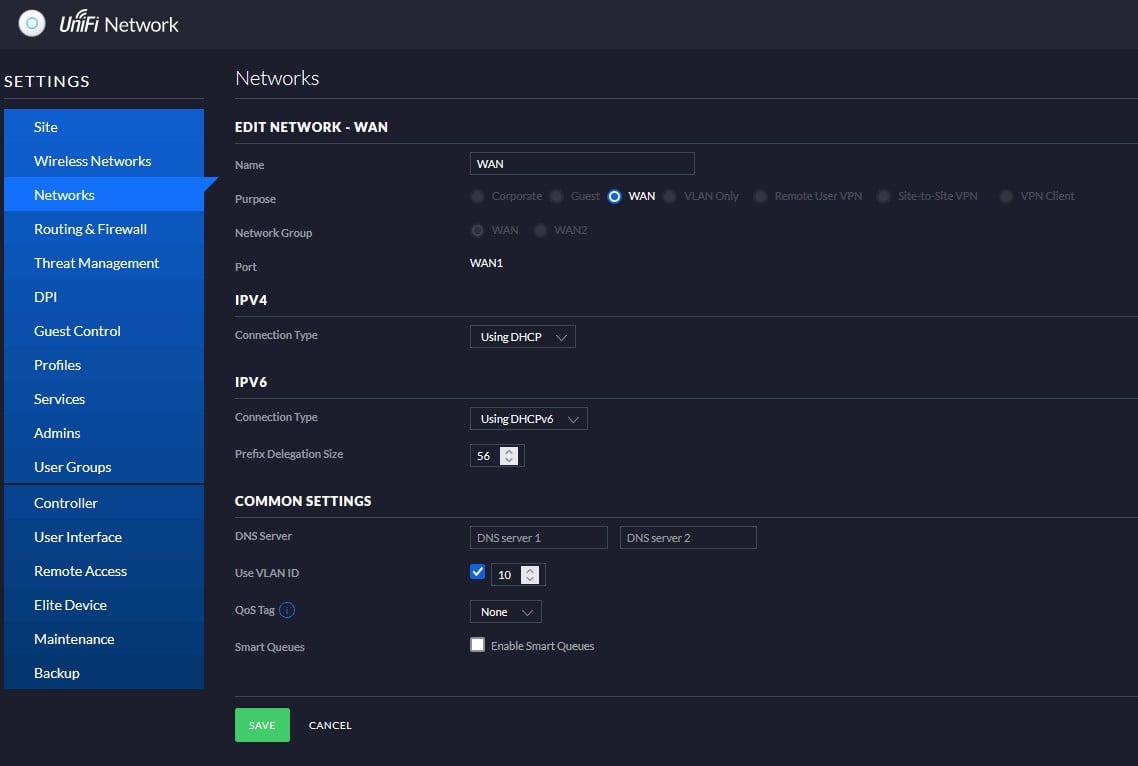
1) Ensure you're using IPoE (DHCP over VLAN 10):


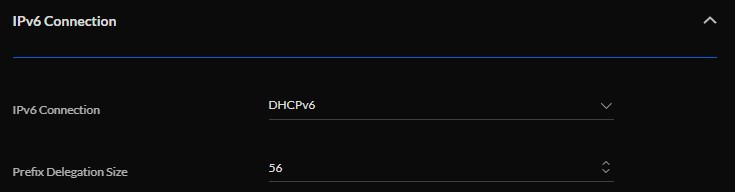
2) Under your LAN settings - enable IPv6 as so:


Leave the DNS servers blank. Also note this is using the old settings as I personally prefer it.


Michael Murphy | https://murfy.nz
Referral Links: Quic Broadband (use R122101E7CV7Q for free setup)

Are you happy with what you get from Geekzone? Please consider supporting us by subscribing.
Opinions are my own and not the views of my employer.


sud0

283 posts

Ultimate Geek
+1 received by user: 117

ID Verified
Lifetime subscriber

  #2769286 31-Aug-2021 11:39
Send private message

Thanks @michaelmurfy. I've made the modifications and have re-activated the IPv6 on my network. Will wait a couple of hours/days to test it and get back to you here. 


Cheers!
Lucas


Lucas


lpossamai.me


sud0

283 posts

Ultimate Geek
+1 received by user: 117

ID Verified
Lifetime subscriber

  #2769481 31-Aug-2021 18:46
Send private message

Hmm.... It's happening again. It's hard to explain, but sometimes when watching a video, scrolling instagram or facebook, watching Netflix... the video will stop for a couple of seconds. It's almost like I turned off the internet and turned it back again after a couple of seconds.


It's also important to notice that this is happening not only via WIFI, but via RJ45 too.


And it all goes back to normal if I turn off IPv6 in my network.


The config looks like the following:


WAN:


LAN Network:


Any tips would be much appreciated!


Lucas


lpossamai.me


dt

dt
1152 posts

Uber Geek
+1 received by user: 371
Inactive user


  #2769497 31-Aug-2021 19:30
Send private message

one thing I absolutely loath with the dream machine is its lack of logging 


Your config is exactly the same as mine, but no problems here [Orcon] 


Take it youre running the current version of firmware on both router and switch? 


sud0

283 posts

Ultimate Geek
+1 received by user: 117

ID Verified
Lifetime subscriber

  #2769501 31-Aug-2021 19:33
Send private message

dt:


one thing I absolutely loath with the dream machine is its lack of logging 


Your config is exactly the same as mine, but no problems here [Orcon] 


Take it youre running the current version of firmware on both router and switch? 


Interesting! Yes, I also have Orcon here and yes, everything is up-to-date.


Lucas


lpossamai.me


michaelmurfy
meow
13580 posts

Uber Geek
+1 received by user: 10910

Moderator
ID Verified
Trusted
Lifetime subscriber

  #2769506 31-Aug-2021 19:41
Send private message

The logging is there, but you’ve got to first SSH into the dream machine then jump into the UniFi Docker container and tail the logs from there.

You haven’t got IPS/DPS enabled either?


Michael Murphy | https://murfy.nz
Referral Links: Quic Broadband (use R122101E7CV7Q for free setup)

Are you happy with what you get from Geekzone? Please consider supporting us by subscribing.
Opinions are my own and not the views of my employer.


HP


Shop now for HP laptops and other devices (affiliate link).
sud0

283 posts

Ultimate Geek
+1 received by user: 117

ID Verified
Lifetime subscriber

  #2769513 31-Aug-2021 19:56
Send private message

michaelmurfy: The logging is there, but you’ve got to first SSH into the dream machine then jump into the UniFi Docker container and tail the logs from there.

You haven’t got IPS/DPS enabled either?


I have Internet Threat Management and Network scanners enabled, but have disabled them just a couple of minutes ago to test if that's the issue.... let's see. I've also downloaded the log file from the dashboard, and it's showing me the following:


[2021-08-31T19:37:59,321] <webapi-583> WARN  sanitize - Invalid key exists in Setting payload, key=activity
[2021-08-31T19:37:59,321] <webapi-583> WARN  sanitize - Invalid key exists in Setting payload, key=utm_token
[2021-08-31T19:37:59,321] <webapi-583> WARN  sanitize - Invalid key exists in Setting payload, key=last_alert_id
[2021-08-31T19:37:59,321] <webapi-583> WARN  sanitize - Invalid key exists in Setting payload, key=last_nmap_id


[2021-08-25T11:05:44,707] <ips-alert-caching> WARN  ips    - Error in ips
java.net.SocketTimeoutException: Read timed out
    at java.net.SocketInputStream.socketRead0(Native Method) ~[?:1.8.0_292]
    at java.net.SocketInputStream.socketRead(SocketInputStream.java:116) ~[?:1.8.0_292]
    at java.net.SocketInputStream.read(SocketInputStream.java:171) ~[?:1.8.0_292]
    at java.net.SocketInputStream.read(SocketInputStream.java:141) ~[?:1.8.0_292]
    at sun.security.ssl.SSLSocketInputRecord.read(SSLSocketInputRecord.java:457) ~[?:1.8.0_292]
    at sun.security.ssl.SSLSocketInputRecord.bytesInCompletePacket(SSLSocketInputRecord.java:68) ~[?:1.8.0_292]
    at sun.security.ssl.SSLSocketImpl.readApplicationRecord(SSLSocketImpl.java:1332) ~[?:1.8.0_292]
    at sun.security.ssl.SSLSocketImpl.access$300(SSLSocketImpl.java:73) ~[?:1.8.0_292]
    at sun.security.ssl.SSLSocketImpl$AppInputStream.read(SSLSocketImpl.java:948) ~[?:1.8.0_292]
    at java.io.BufferedInputStream.fill(BufferedInputStream.java:246) ~[?:1.8.0_292]
    at java.io.BufferedInputStream.read(BufferedInputStream.java:265) ~[?:1.8.0_292]
    at org.apache.commons.httpclient.HttpParser.readRawLine(HttpParser.java:78) ~[commons-httpclient-3.1-atlassian-2.jar:?]
    at org.apache.commons.httpclient.HttpParser.readLine(HttpParser.java:106) ~[commons-httpclient-3.1-atlassian-2.jar:?]
    at org.apache.commons.httpclient.HttpConnection.readLine(HttpConnection.java:1118) ~[commons-httpclient-3.1-atlassian-2.jar:?]
    at org.apache.commons.httpclient.HttpMethodBase.readStatusLine(HttpMethodBase.java:1974) ~[commons-httpclient-3.1-atlassian-2.jar:?]
    at org.apache.commons.httpclient.HttpMethodBase.readResponse(HttpMethodBase.java:1736) ~[commons-httpclient-3.1-atlassian-2.jar:?]
    at org.apache.commons.httpclient.HttpMethodBase.execute(HttpMethodBase.java:1099) ~[commons-httpclient-3.1-atlassian-2.jar:?]
    at org.apache.commons.httpclient.HttpMethodDirector.executeWithRetry(HttpMethodDirector.java:398) ~[commons-httpclient-3.1-atlassian-2.jar:?]
    at org.apache.commons.httpclient.HttpMethodDirector.executeMethod(HttpMethodDirector.java:171) ~[commons-httpclient-3.1-atlassian-2.jar:?]
    at org.apache.commons.httpclient.HttpClient.executeMethod(HttpClient.java:397) ~[commons-httpclient-3.1-atlassian-2.jar:?]
    at org.apache.commons.httpclient.HttpClient.executeMethod(HttpClient.java:323) ~[commons-httpclient-3.1-atlassian-2.jar:?]
    at com.ubnt.net.C.super.B.O0OO.Ò00000(Unknown Source) ~[ace.jar:?]
    at com.ubnt.service.ips.Object.o00000(Unknown Source) [ace.jar:?]
    at com.ubnt.service.ips.Object.Õ00000(Unknown Source) [ace.jar:?]
    at com.ubnt.service.ips.Object.Ô00000(Unknown Source) [ace.jar:?]
    at com.ubnt.service.system.AA$19.run(Unknown Source) [ace.jar:?]
    at com.ubnt.ace.C$_OOo.run(Unknown Source) [ace.jar:?]
    at java.util.concurrent.Executors$RunnableAdapter.call(Executors.java:511) [?:1.8.0_292]
    at java.util.concurrent.FutureTask.runAndReset(FutureTask.java:308) [?:1.8.0_292]
    at java.util.concurrent.ScheduledThreadPoolExecutor$ScheduledFutureTask.access$301(ScheduledThreadPoolExecutor.java:180) [?:1.8.0_292]
    at java.util.concurrent.ScheduledThreadPoolExecutor$ScheduledFutureTask.run(ScheduledThreadPoolExecutor.java:294) [?:1.8.0_292]
    at java.util.concurrent.ThreadPoolExecutor.runWorker(ThreadPoolExecutor.java:1149) [?:1.8.0_292]
    at java.util.concurrent.ThreadPoolExecutor$Worker.run(ThreadPoolExecutor.java:624) [?:1.8.0_292]
    at java.lang.Thread.run(Thread.java:748) [?:1.8.0_292]


Lucas


lpossamai.me


dt

dt
1152 posts

Uber Geek
+1 received by user: 371
Inactive user


  #2770488 2-Sep-2021 11:09
Send private message

come to think of it.. I have to reboot my USW pro switch every once and a while to get ipv6 working again for some strange reason.. [just noticed my ipv6 badge gone from geekzone] rebooting the udm nor renewing ip's work for me.. have to reboot the switch..  different to your issue but maybe do some digging on your switch if you figured out your issue already?


I got this kit to play around with but will be moving back to my old setup after the alert levels have changed, to much fluffing around with ubiquiti 


sud0

283 posts

Ultimate Geek
+1 received by user: 117

ID Verified
Lifetime subscriber

  #2770579 2-Sep-2021 13:49
Send private message

dt:


come to think of it.. I have to reboot my USW pro switch every once and a while to get ipv6 working again for some strange reason.. [just noticed my ipv6 badge gone from geekzone] rebooting the udm nor renewing ip's work for me.. have to reboot the switch..  different to your issue but maybe do some digging on your switch if you figured out your issue already?


I got this kit to play around with but will be moving back to my old setup after the alert levels have changed, to much fluffing around with ubiquiti 


Thanks for your suggestion, but I don't think it applies to me, because I'm facing the issue from both my PC (using the switch) and mobile phone (AC-Pro directly connected to UDM-PRO).


I have, however, rebooted everything and will see how it goes. At the moment I still face the issue a couple times a day.


Lucas


lpossamai.me


sud0

283 posts

Ultimate Geek
+1 received by user: 117

ID Verified
Lifetime subscriber

  #2771113 3-Sep-2021 11:22
Send private message

Update:


The issue is still happening, even with the IDS disabled. Disabling IPv6 fixes it. :(


Lucas


lpossamai.me


sud0

283 posts

Ultimate Geek
+1 received by user: 117

ID Verified
Lifetime subscriber

  #2771584 3-Sep-2021 17:19
Send private message

So, I disabled earlier this afternoon the DPS feature and everything broke. I had no internet. I thought I was to blame but then I saw this. LOL


Update: looks like it's doing much much better now with DPS disabled. Interesting! I'll try to re-enable the Threat management feature and see how it goes. Will update you guys here during the weekend.


Lucas


lpossamai.me


Shop now for Dyson appliances (affiliate link).
corksta
2405 posts

Uber Geek
+1 received by user: 382

Trusted
Subscriber

  #2772004 4-Sep-2021 11:23
Send private message

@michaelmurfy what’s this IPv6 bug you’ve mentioned above? Is there anything that can be done? With my AmpliFi HD system on Slingshot, my normal wired speeds are about 930/520. Turning on IPv6 I get about 270/210. Wireless speeds drop significantly as well. Turning it off it goes back to normal. 


No biggie, just not sure why or how enabling IPV6 causes such a huge drop. 


2024 Mac mini M4 | 2025 iPad Air 13" M3 (Blue) | 2025 iPad Air 11" M3 (Starlight) | iPhone 15 Pro Max (Natural Titanium) | HomePod (Space Grey) | 10x HomePod mini (Space Grey, White, Yellow, Blue, Orange) | 4x Apple TV 4K | Apple Watch Ultra 2


michaelmurfy
meow
13580 posts

Uber Geek
+1 received by user: 10910

Moderator
ID Verified
Trusted
Lifetime subscriber

  #2772069 4-Sep-2021 15:09
Send private message

The IPv6 bug is caused on Ubiquiti devices where an ISP uses a specific IPv6 configuration that causes the Dream Machine / USG to go 100% CPU. It has existed forever, and has never been fixed. I believe there is a block of configuration you can add into the configuration.json file.


See here for the USG bug: https://community.ui.com/questions/High-load-on-USG-after-enabling-IPv6/964b80ce-325a-4cfa-b25a-cbecd4afcfaf


I'm not sure about the Dream Machine but seems to be the same bug once again.


Michael Murphy | https://murfy.nz
Referral Links: Quic Broadband (use R122101E7CV7Q for free setup)

Are you happy with what you get from Geekzone? Please consider supporting us by subscribing.
Opinions are my own and not the views of my employer.


sud0

283 posts

Ultimate Geek
+1 received by user: 117

ID Verified
Lifetime subscriber

  #2772223 4-Sep-2021 20:41
Send private message

michaelmurfy:


The IPv6 bug is caused on Ubiquiti devices where an ISP uses a specific IPv6 configuration that causes the Dream Machine / USG to go 100% CPU.


Hmm... my UDM-PRO CPU utilization is fine.... around 20%. I'm still testing the internet with DPS and Threat management disabled... 


Lucas


lpossamai.me


sud0

283 posts

Ultimate Geek
+1 received by user: 117

ID Verified
Lifetime subscriber

  #2774377 8-Sep-2021 12:14
Send private message

Update: Looks like disabling DPI and the Threat management (IPS) feature fixed the issue... interesting!


I have enabled IDS and will test that in the next few days.


Lucas


lpossamai.me


 1 | 2
Filter this topic showing only the reply marked as answer View this topic in a long page with up to 500 replies per page Create new topic


Geekzone Live »

Try automatic live updates from Geekzone directly in your browser, without refreshing the page, with Geekzone Live now.


Are you subscribed to our RSS feed? You can download the latest headlines and summaries from our stories directly to your computer or smartphone by using a feed reader.