Geekzone: technology news, blogs, forums
Guest
Welcome Guest.
You haven't logged in yet. If you don't have an account you can register now.


sud0

283 posts

Ultimate Geek
+1 received by user: 117

ID Verified
Lifetime subscriber

#289958 12-Oct-2021 09:06
Send private message

Hi Unify gurus,


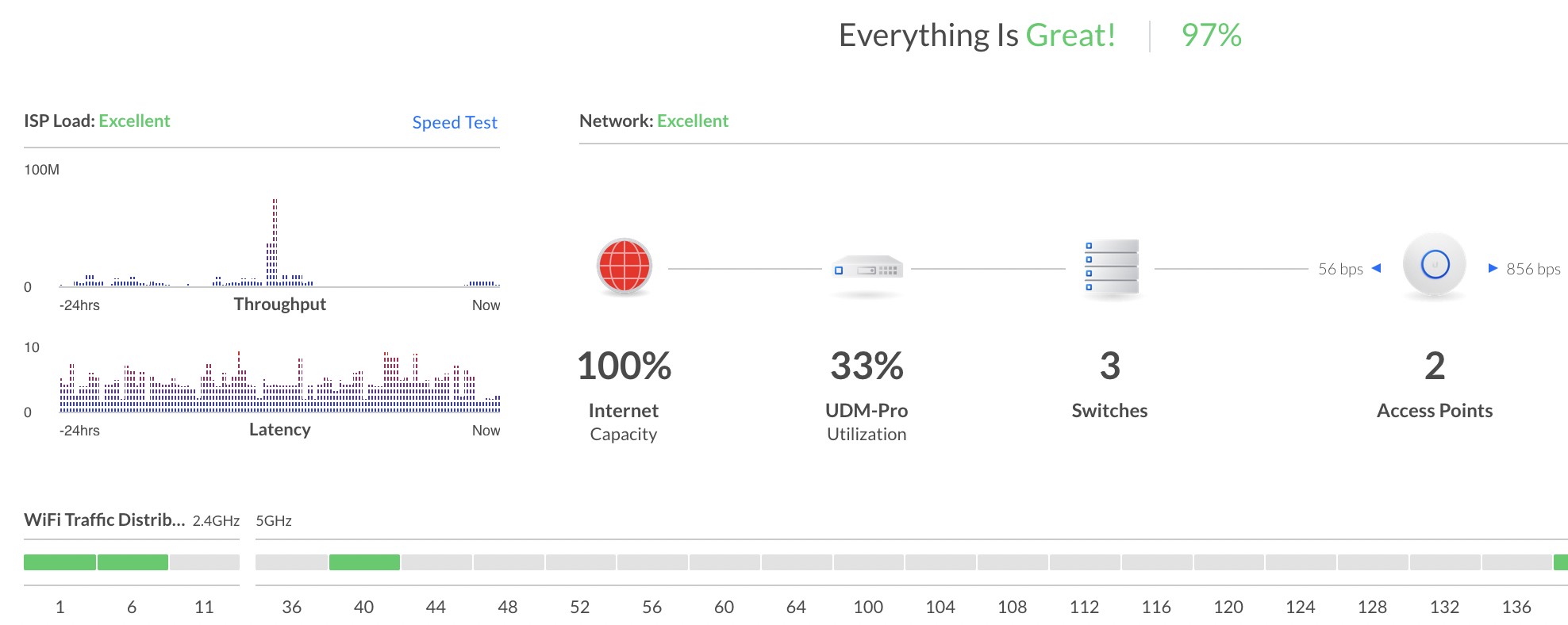
I was in a video conference and the call dropped a couple of times. After I left the call, I checked my UDM-PRO and I saw that the internet had 100% utilization. But I can't see any device in my network using that much internet. So this could be coming from outside.


How can I check this on UDM-PRO? How can I further troubleshoot it?


Cheers!
Lucas


Lucas


lpossamai.me


Create new topic
RunningMan
9193 posts

Uber Geek
+1 received by user: 4845


  #2793627 12-Oct-2021 09:26
Send private message

UDM doing constant speedtests?


Jiriteach
1139 posts

Uber Geek
+1 received by user: 373

ID Verified
Trusted
Lifetime subscriber

  #2793691 12-Oct-2021 09:54
Send private message

BTW - I wouldnt trust that dashboard and could be due to speedtests. Thats also the older dashboard - new UI presents utilisation differently but been lots of bugs in its actual reporting.


-- opinions expressed by me are solely my own. ie - personal


sud0

283 posts

Ultimate Geek
+1 received by user: 117

ID Verified
Lifetime subscriber

  #2793990 12-Oct-2021 14:12
Send private message

Right... okay... yes, it could be the speedtest for sure. Thanks for the tip!


Lucas


lpossamai.me


Mehrts
1112 posts

Uber Geek
+1 received by user: 984

Trusted

  #2794001 12-Oct-2021 14:19
Send private message

Have you set your ISP up/download throughput correctly in the controller? If doing speedtests via the controller, it can also use this to set those figures.


That's how it knows what percentage of throughput to display. Given your low throughput on the graph next to the gauge, I'd say it's not set correctly.


But like many other Unifi stats, I wouldn't rely on them too much


RunningMan
9193 posts

Uber Geek
+1 received by user: 4845


  #2794026 12-Oct-2021 15:10
Send private message

I'd hate think how much speedtest traffic those routers generate.


sud0

283 posts

Ultimate Geek
+1 received by user: 117

ID Verified
Lifetime subscriber

  #2794098 12-Oct-2021 16:58
Send private message

Mehrts:


Have you set your ISP up/download throughput correctly in the controller? If doing speedtests via the controller, it can also use this to set those figures.


That's how it knows what percentage of throughput to display. Given your low throughput on the graph next to the gauge, I'd say it's not set correctly.


But like many other Unifi stats, I wouldn't rely on them too much


Yes, I did run the speedtest a couple of times in the past... I wish I could have a better visibility on the utilization of my internet. Maybe I can get that only via SNMP.


Lucas


lpossamai.me


Shop now for Dell laptops and other devices (affiliate link).
Jiriteach
1139 posts

Uber Geek
+1 received by user: 373

ID Verified
Trusted
Lifetime subscriber

  #2794100 12-Oct-2021 17:08
Send private message

sud0:


Mehrts:


Have you set your ISP up/download throughput correctly in the controller? If doing speedtests via the controller, it can also use this to set those figures.


That's how it knows what percentage of throughput to display. Given your low throughput on the graph next to the gauge, I'd say it's not set correctly.


But like many other Unifi stats, I wouldn't rely on them too much


Yes, I did run the speedtest a couple of times in the past... I wish I could have a better visibility on the utilization of my internet. Maybe I can get that only via SNMP.


Unfortunately not through SNMP which is incredibly annoying. The UDM's dont support SNMP so cannot graph much at all. 
You'll have to use something like - https://unpoller.com/.


-- opinions expressed by me are solely my own. ie - personal


Create new topic


Geekzone Live »

Try automatic live updates from Geekzone directly in your browser, without refreshing the page, with Geekzone Live now.


Are you subscribed to our RSS feed? You can download the latest headlines and summaries from our stories directly to your computer or smartphone by using a feed reader.
