Geekzone: technology news, blogs, forums
Guest
Welcome Guest.
You haven't logged in yet. If you don't have an account you can register now.


mrgsm021

1538 posts

Uber Geek
+1 received by user: 310

ID Verified
Trusted

#293000 19-Dec-2021 20:09
Send private message

Hi guys,

Contemplating on upgrading my current WiFi 5 mesh setup to WiFi 6.

Just wondering if i should be looking at a tri-band setup with 2.4/5/6Ghz combo or is 6Ghz yet to be made available in NZ for WiFi use, in which case I should just look at 2.4/5/5Ghz combo instead?

TIA


Create new topic
mentalinc
3384 posts

Uber Geek
+1 received by user: 1023

Trusted

  #2835649 19-Dec-2021 21:43
Send private message

What devices do you have that will be able to use the updated wifi?


CPU: AMD 5900x | RAM: GSKILL Trident Z Neo RGB F4-3600C16D-32GTZNC-32-GB | MB:  Asus X570-E | GFX: EVGA FTW3 Ultra RTX 3080Ti| Monitor: LG 27GL850-B 2560x1440


Quic: https://account.quic.nz/refer/473833 R473833EQKIBX 


kyhwana2
2572 posts

Uber Geek
+1 received by user: 233


  #2835652 19-Dec-2021 21:48
Send private message

the wifi 6e 6ghz band isn't licensed for wifi use in NZ yet, the RSM are still looking at. (So it's illegal to use any 6ghz wifi kit in NZ)


https://www.rsm.govt.nz/projects-and-auctions/current-projects/planning-for-wlan-use-in-the-6-ghz-band/


mrgsm021

1538 posts

Uber Geek
+1 received by user: 310

ID Verified
Trusted

  #2835753 20-Dec-2021 07:58
Send private message

mentalinc:


What devices do you have that will be able to use the updated wifi?


Currently have a personal S20U and work issued N10, I think both are dual band ax only


More about future proofing than anything


mrgsm021

1538 posts

Uber Geek
+1 received by user: 310

ID Verified
Trusted

  #2835754 20-Dec-2021 08:00
Send private message

kyhwana2:


the wifi 6e 6ghz band isn't licensed for wifi use in NZ yet, the RSM are still looking at. (So it's illegal to use any 6ghz wifi kit in NZ)


https://www.rsm.govt.nz/projects-and-auctions/current-projects/planning-for-wlan-use-in-the-6-ghz-band/


I see, thanks good to know, which would explain why a search in PB Tech, all the tri band mesh systems are 2.4/5/5Ghz only.


Jase2985
13730 posts

Uber Geek
+1 received by user: 6202

ID Verified
Lifetime subscriber

  #2835758 20-Dec-2021 08:05
Send private message

dont bother wasting money on "future proofing".


when the current wifi becomes slow, upgrade it. if things aren't fast enough over wifi, cable them*.


* i appreciate you cant cable a phone but what could you possibly be doing where 500/400 (2x2:2 wifi) isn't enough.


MaxineN
Max
2049 posts

Uber Geek
+1 received by user: 1662

ID Verified
Trusted
Subscriber

  #2835759 20-Dec-2021 08:06
Send private message

I'll be frank. As someone who owns an AX router. They're only really for bragging rights. I'd honestly get a mesh system(if you REALLY want to upgrade, I imagine your current AC setup is fine) that can give you better range. I imagine that you're already hitting the limits of AC in terms of raw throughput but do you need more raw throughput or do you need more range?


Short answer. Do you really need to upgrade? Are you really going to try and use a gigabit down on whatever AX mesh you decide to pick up in day to day use?


Ramblings from a mysterious lady who's into tech. Warning I may often create zingers.


Stream your favourite shows now on Apple TV (affiliate link).
MaxineN
Max
2049 posts

Uber Geek
+1 received by user: 1662

ID Verified
Trusted
Subscriber

  #2835764 20-Dec-2021 08:18
Send private message

Jase2985:


* i appreciate you cant cable a phone but what could you possibly be doing where 500/400 (2x2:2 wifi) isn't enough.


That's just quitter talk. You could totally do a USB-C to ethernet dongle and hard wire a phone 🤣


Ramblings from a mysterious lady who's into tech. Warning I may often create zingers.


mrgsm021

1538 posts

Uber Geek
+1 received by user: 310

ID Verified
Trusted

  #2835767 20-Dec-2021 08:28
Send private message

MaxineN:


I'll be frank. As someone who owns an AX router. They're only really for bragging rights. I'd honestly get a mesh system(if you REALLY want to upgrade, I imagine your current AC setup is fine) that can give you better range. I imagine that you're already hitting the limits of AC in terms of raw throughput but do you need more raw throughput or do you need more range?


Short answer. Do you really need to upgrade? Are you really going to try and use a gigabit down on whatever AX mesh you decide to pick up in day to day use?


My current ac mesh set up (which is a few years old) had been running fine but lately I am noticing wifi dropouts, handover/roaming between satellite units is not seamless anymore hence the reason for the upgrade.


MaxineN
Max
2049 posts

Uber Geek
+1 received by user: 1662

ID Verified
Trusted
Subscriber

  #2835770 20-Dec-2021 08:35
Send private message

mrgsm021:


MaxineN:


I'll be frank. As someone who owns an AX router. They're only really for bragging rights. I'd honestly get a mesh system(if you REALLY want to upgrade, I imagine your current AC setup is fine) that can give you better range. I imagine that you're already hitting the limits of AC in terms of raw throughput but do you need more raw throughput or do you need more range?


Short answer. Do you really need to upgrade? Are you really going to try and use a gigabit down on whatever AX mesh you decide to pick up in day to day use?


My current ac mesh set up (which is a few years old) had been running fine but lately I am noticing wifi dropouts, handover/roaming between satellite units is not seamless anymore hence the reason for the upgrade.


How many mesh units are you running? Budget?
The Deco X60s would be a great choice.


Ramblings from a mysterious lady who's into tech. Warning I may often create zingers.


alsta
278 posts

Ultimate Geek
+1 received by user: 28


  #2835880 20-Dec-2021 10:50
Send private message

Do the Deco X60s trump a Netger AC3000 Orbi setup? 


Twitter : @twocolddogs

mrgsm021

1538 posts

Uber Geek
+1 received by user: 310

ID Verified
Trusted

  #2835924 20-Dec-2021 12:04
Send private message

MaxineN:


How many mesh units are you running? Budget?
The Deco X60s would be a great choice.


Currently running 3 units on Orbi RBK23 (AC2200) so would need to look at a 3-unit AX set up, budget is no more than $1k


You read my mind, was looking at the X60s on TM someone was flicking off a 3 unit X60 for $540 but unfortunately I missed out on it


Also saw another listing (which has since expired) for used 3-unit Orbi RBK750 (AX4200) for $500 but couldn't get my hands on it due to pick up only from Tauranga and I am in Auckland.


I will just continue to look out on TM, not in a real hurry to upgrade ATM.


Shop now on Samsung phones, tablets, TVs and more (affiliate link).
alsta
278 posts

Ultimate Geek
+1 received by user: 28


  #2854630 21-Jan-2022 13:35
Send private message

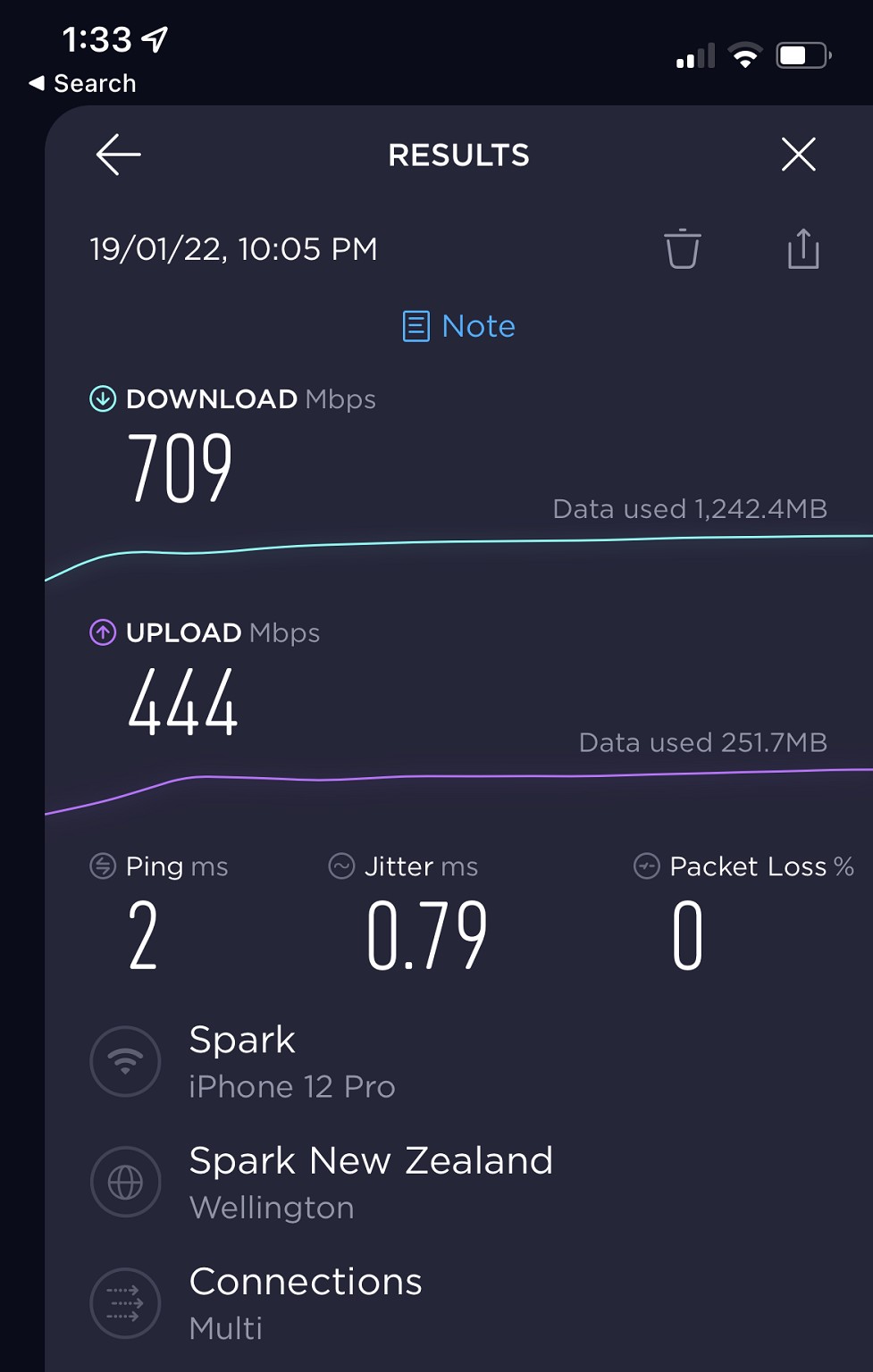
Picked up a tp-link X55 Deco 3 pack this week to replace an ageing AC3000 Orbi setup


Like night and day.....highly recommended.


This was wifi speed beside one of the satellites (ethernet backhaul)


Setup was super easy, plugs straight into the ONT


Twitter : @twocolddogs

redfiat
57 posts

Master Geek
+1 received by user: 1


  #2890121 22-Mar-2022 14:41
Send private message

It would be helpful if the govts rsm website gave an indication on how long it is going to take them to make a decision around 6ghz/wifi 6E.


Anyone have clues as to roughly when it will be approved?


Create new topic


Geekzone Live »

Try automatic live updates from Geekzone directly in your browser, without refreshing the page, with Geekzone Live now.


Are you subscribed to our RSS feed? You can download the latest headlines and summaries from our stories directly to your computer or smartphone by using a feed reader.