Geekzone: technology news, blogs, forums
Guest
Welcome Guest.
You haven't logged in yet. If you don't have an account you can register now.


robjg63

4161 posts

Uber Geek
+1 received by user: 1426

Subscriber

#293332 14-Jan-2022 08:50
Send private message

So our router is suffering from 'strangeness'. Mostly because its an HG659 and has had too many devices connected at various times and they don't seem to manage that very well.


So I am looking for some newer tech that will happily handle many devices coming and going from the premises.


We have a 2 story house and a wireless printer that is a PITA unless its running on a wired ethernet connection (ie wont wake up on wifi but does wake on LAN (WOL) just fine).


The TP-Link Deco M4 and E4 systems look quite appealing.


Has anyone got either of these systems and can it hook straight into the UFB ONT?


I see the word 'Router' often used with these systems, but they then frequently show them plugged into a 'modem'. I am finding it quite difficult to find out if they are they capable of handling the network authentication with UFB ok or if they need a seperate 'router'?


Hope this makes sense.


Nothing is impossible for the man who doesn't have to do it himself - A. H. Weiler


Filter this topic showing only the reply marked as answer View this topic in a long page with up to 500 replies per page Create new topic
 1 | 2 | 3
trig42
5889 posts

Uber Geek
+1 received by user: 2094

ID Verified

  #2850412 14-Jan-2022 08:59
Send private message

I know the M4 does - set one up for a friend late last year.


They are on Spark UFB, and once we had set the VLAN to 10, it worked perfectly. Took about 10 minutes to setup, they're stoked with it.


They got it as their UFB install had the fibre coming into a room at the far end of the house, when they were mostly using devices at the other end, and the supplied router WiFi was not good enough at that end of the house. A pair of the M4s fixed it, and all is good now.


shk292
2916 posts

Uber Geek
+1 received by user: 2040

Lifetime subscriber

  #2850416 14-Jan-2022 09:11
Send private message

I've been running a 3-node setup of Deco M5s for a few years and they work just fine, with one connected to the ONT and the others via ethernet cables and switches


Max throughput to the WAN seems to be about 500Mbps so you're not going to get the full capacity out of a Gbps internet connection but that's only an academic problem


MikeAqua
8024 posts

Uber Geek
+1 received by user: 3817


  #2850429 14-Jan-2022 09:28
Send private message

shk292:


I've been running a 3-node setup of Deco M5s for a few years and they work just fine, with one connected to the ONT and the others via ethernet cables and switches


Max throughput to the WAN seems to be about 500Mbps so you're not going to get the full capacity out of a Gbps internet connection but that's only an academic problem


Would you mind explaining how you set that up?


I have some Decom M9+ units.  I've tried but can't get one to function as the modem.


We have the HG659 too, which I would like to ditch.


Mike


robjg63

4161 posts

Uber Geek
+1 received by user: 1426

Subscriber

  #2850536 14-Jan-2022 09:58
Send private message

Thanks folks, that's what I needed to know.


Didn't want to go and buy a mesh setup like that to find I then also need a new router to plug into the ONT. (and I cant use the original router as that is the main problem).


Nothing is impossible for the man who doesn't have to do it himself - A. H. Weiler


robjg63

4161 posts

Uber Geek
+1 received by user: 1426

Subscriber

  #2850673 14-Jan-2022 12:21
Send private message

The TP-link site is a vacuum on how to set these things up as the primary router.


EDIT: Confession. Just found this thread https://www.geekzone.co.nz/forums.asp?forumid=66&topicid=280367


While it doesnt specify how you set the first unit up as the router - it does certainly indicate that you can.


Nothing is impossible for the man who doesn't have to do it himself - A. H. Weiler


tchart
2396 posts

Uber Geek
+1 received by user: 577

ID Verified
Trusted

  #2850702 14-Jan-2022 13:11
Send private message

robjg63:


The TP-link site is a vacuum on how to set these things up as the primary router.


EDIT: Confession. Just found this thread https://www.geekzone.co.nz/forums.asp?forumid=66&topicid=280367


While it doesnt specify how you set the first unit up as the router - it does certainly indicate that you can.


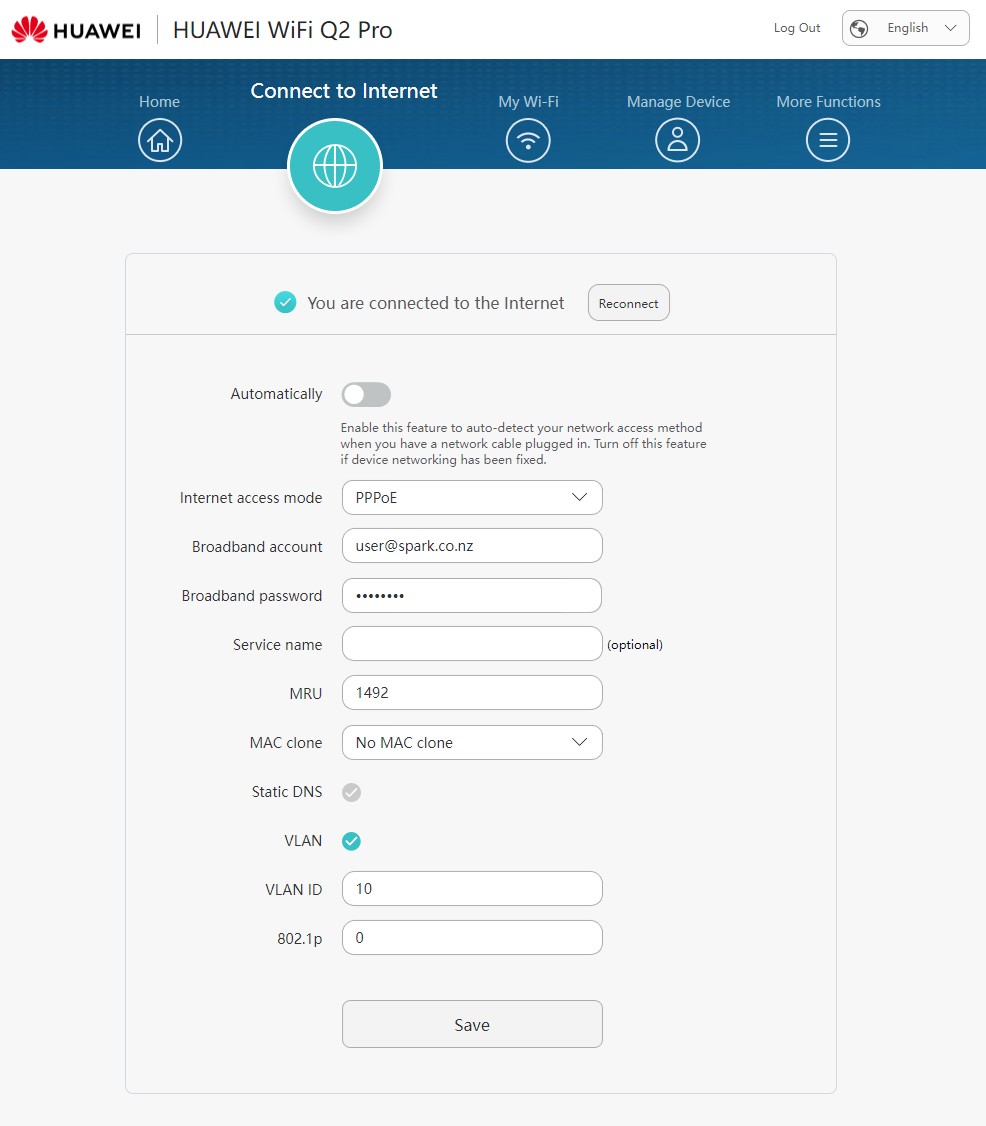
Not sure where you would set it up on TP-link but for my Huawei ones it was a simple as setting the VLAN tagging;


Shop now for Dell laptops and other devices (affiliate link).
robjg63

4161 posts

Uber Geek
+1 received by user: 1426

Subscriber

  #2850715 14-Jan-2022 13:24
Send private message

Thanks for that.


I am (still) on Bigpipe UFB - so VLAN 10 isn't an issue for me (though it could be if/when I change).


I finally found some info on the TP-Link site that indicates how you would get the first unit connected as the router to the UFB connection (step 11):


https://www.tp-link.com/us/support/faq/1592/


Looks quite straight forward.


I like to find out as much as I can online before I go and buy and make an idiot out of myself.


Nothing is impossible for the man who doesn't have to do it himself - A. H. Weiler


shk292
2916 posts

Uber Geek
+1 received by user: 2040

Lifetime subscriber

  #2850717 14-Jan-2022 13:28
Send private message

MikeAqua:


Would you mind explaining how you set that up?


I have some Decom M9+ units.  I've tried but can't get one to function as the modem.


We have the HG659 too, which I would like to ditch.


Just using the app, under Advanced settings.  I'm with Slingshot so I selected "Dynamic IP" under IPv4 and IPv6.  Then under IPTV/VLAN select "New Zealand UFB" under ISP profile, which will enable VLAN ID 10.  And "Operation Mode" - Wireless Router.  That's about it I think.  I think you can set these on initial set-up, and I know you can also change them from the app once the system is running (I have changed to/from router and AP modes a few times).


You can connect either of the Deco ethernet ports to the ONT WAN port, and use the deco's other port for LAN connection


Hope that helps


shrub
790 posts

Ultimate Geek
+1 received by user: 272

ID Verified

  #2850719 14-Jan-2022 13:28
Send private message

yes you can. I have set this up at a friend's house. in advanced setting via the app there is vlan tagging etc. Once the 1st device is setup the rest are easy as to setup.

MikeAqua
8024 posts

Uber Geek
+1 received by user: 3817


  #2850890 14-Jan-2022 15:45
Send private message

shk292:


I'm with Slingshot so I selected "Dynamic IP" under IPv4 and IPv6.  Then under IPTV/VLAN select "New Zealand UFB" under ISP profile, which will enable VLAN ID 10.  And "Operation Mode" - Wireless Router.  That's about it I think. 


Thank you.  Do you think I would need the same IPv4 and IPv6 setting for Spark UFB?


I found this,  but it doesn't cover off the IPv* options.


Mike


Spyware
3818 posts

Uber Geek
+1 received by user: 1366

Lifetime subscriber

  #2850928 14-Jan-2022 16:44
Send private message

MikeAqua:


shk292:


I'm with Slingshot so I selected "Dynamic IP" under IPv4 and IPv6.  Then under IPTV/VLAN select "New Zealand UFB" under ISP profile, which will enable VLAN ID 10.  And "Operation Mode" - Wireless Router.  That's about it I think. 


Thank you.  Do you think I would need the same IPv4 and IPv6 setting for Spark UFB?


I found this,  but it doesn't cover off the IPv* options.


Spark don't offer IPv6 and IPv4 uses PPPoE rather than DHCP/Dynamic/IPoE.


Spark Max Fibre using Mikrotik CCR1009-8G-1S-1S+, CRS125-24G-1S, Unifi UAP, U6-Pro, UAP-AC-M-Pro, Apple TV 4K (2022), Apple TV 4K (2017), iPad Air 1st gen, iPad Air 4th gen, iPhone 13, SkyNZ3151 (the white box). If it doesn't move then it's data cabled.


Move to New Zealand's best fibre broadband service (affiliate link). Free setup code: R587125ERQ6VE. Note that to use Quic Broadband you must be comfortable with configuring your own router.
shk292
2916 posts

Uber Geek
+1 received by user: 2040

Lifetime subscriber

  #2851099 15-Jan-2022 11:06
Send private message

Spyware:


Spark don't offer IPv6 and IPv4 uses PPPoE rather than DHCP/Dynamic/IPoE.


There is an option for PPPoE under IPv4 and you can de-select IPv6 in the app, so it should work OK with these settings


halper86
555 posts

Ultimate Geek
+1 received by user: 156

ID Verified

  #2851109 15-Jan-2022 12:09
Send private message

I set up a pair of X20's direct to ONT at my old lady's house over a year ago, she has been having no problems.


@shk292 mentioned that the M5's don't have gigabit, however if you were to buy a pair (or more) of the X20's, I can assure you that these do gigabit.


robjg63

4161 posts

Uber Geek
+1 received by user: 1426

Subscriber

  #2851127 15-Jan-2022 13:38
Send private message

halper86:


I set up a pair of X20's direct to ONT at my old lady's house over a year ago, she has been having no problems.


@shk292 mentioned that the M5's don't have gigabit, however if you were to buy a pair (or more) of the X20's, I can assure you that these do gigabit.


The TP-Link M5s have Gigabit ethernet ports - so do the M4s.


The E4 has 10/100 ports.


Nothing is impossible for the man who doesn't have to do it himself - A. H. Weiler


shk292
2916 posts

Uber Geek
+1 received by user: 2040

Lifetime subscriber

  #2851143 15-Jan-2022 14:15
Send private message

Yes, the M5s definitely have gigabit ethernet ports, but they seem to limit WAN throughput to around 500Mbps.  If I connect the ISP-supplied router to the ONT I can get the full gigabit but I prefer to have the M5 in router mode in order to be able to use the other features such as AV and family controls.


 1 | 2 | 3
Filter this topic showing only the reply marked as answer View this topic in a long page with up to 500 replies per page Create new topic


Geekzone Live »

Try automatic live updates from Geekzone directly in your browser, without refreshing the page, with Geekzone Live now.


Are you subscribed to our RSS feed? You can download the latest headlines and summaries from our stories directly to your computer or smartphone by using a feed reader.