Geekzone: technology news, blogs, forums
Guest
Welcome Guest.
You haven't logged in yet. If you don't have an account you can register now.


uppynz

51 posts

Master Geek
+1 received by user: 2


#293498 26-Jan-2022 13:55
Send private message

Hi all,


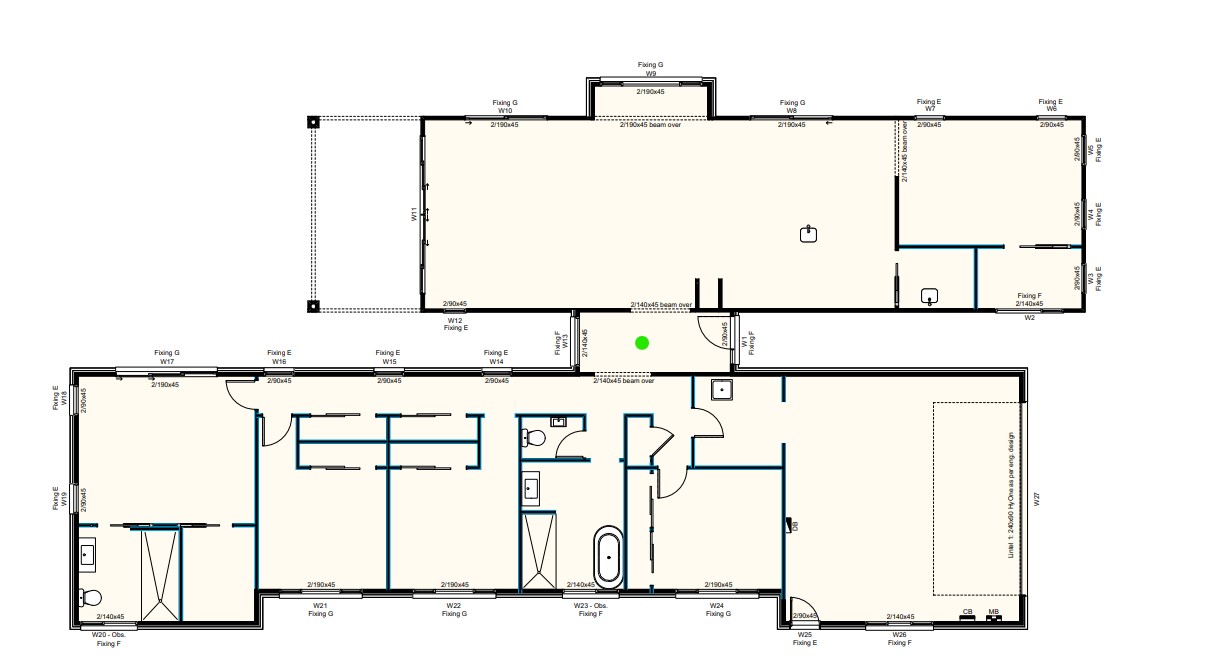
We're about to kick off a new build and I'm just after a bit of advice on where and how many wifi AP's we should have. I've done a bit of my own research but it seems to come down to trial and error once you've moved in approach. I'm just wanting to make sure we get it right as best we can/future proof a little bit if I need to move anything. That said, based on the attached floor plan, its a 280sqM house, standard GIB internal walls. Would you think that one WIFI AP would be suitable in the centre of the house as indicated on the plan? I'm not keen to have them in bedrooms and apparently hallways aren't very good? Looking to use the unifi gear, but recommendations on AP would be great to ensure good coverage across the house. 


I've read numerous posts here and think I have the CAT cabling plan/network cabinet sorted. 


thanks


View this topic in a long page with up to 500 replies per page Create new topic
 1 | 2
Jiriteach
1139 posts

Uber Geek
+1 received by user: 373

ID Verified
Trusted
Lifetime subscriber

  #2856651 26-Jan-2022 14:03
Send private message

If you plan on using Ubiquiti gear and especially so the Unfi range of products - I used Ubiquiti Design Centre - https://design.ui.com/ for our new place.
Once you have logged in, you can create a project and add in the relevant details of the house. Upload the plan and then start placing AP's.


Range will be affected by several factors including 2.4 vs 5ghz etc. The design centre can visualise this for you depending on your requirements.


-- opinions expressed by me are solely my own. ie - personal


timmmay
20858 posts

Uber Geek
+1 received by user: 5350

Trusted
Lifetime subscriber

  #2856656 26-Jan-2022 14:10
Send private message

I would make sure you're future-proof to cater for foreseeable future technologies that might not have the same range, but be faster. To me that would mean putting in conduit and maybe cable for perhaps three APs, or making sure it wouldn't be too difficult to do in future. How many you actually need - someone here will have a much better idea than me.


cyril7
9075 posts

Uber Geek
+1 received by user: 2499

ID Verified
Trusted
Subscriber

  #2856679 26-Jan-2022 14:44
Send private message

Hi I agree with Jiritech, get the planning tool out to help placement. That said I would definitely go more than one AP I think you would be streching it with just one. Gut feeling is one in the hall in line with the wall between the two adjacent mid bedrooms, and another around the kitchen region (I assume that is a sink shown).


Dont forget that a single AP also limits throughput capacity to just that one AP, where as two has the potential of ..........two, as well as the obvious distribution of coverage.


Cyril


uppynz

51 posts

Master Geek
+1 received by user: 2


  #2856683 26-Jan-2022 14:51
Send private message

Thanks Cyril. That's a good point about throughput I totally glossed over that. I'll give the planning tool a crack and see how I get on. Presuming if I have more than one AP devices will skip from one to another seamlessly based on strongest signal?

cyril7
9075 posts

Uber Geek
+1 received by user: 2499

ID Verified
Trusted
Subscriber

  #2856684 26-Jan-2022 15:02
Send private message

Hi, roaming is always a bit hit and miss with 802.11 as its pretty much client led, ie no AP/controller directed control. However 802.11k and r do assist with speeding up roaming, r is supported on UniFi.


Cyril


cyril7
9075 posts

Uber Geek
+1 received by user: 2499

ID Verified
Trusted
Subscriber

  #2856687 26-Jan-2022 15:08
Send private message

Another point, in the past UniFi has been my go to for wireless, along with Mikrotik routing, but I have become increasingly annoyed in the current state of the UniFi controller and as such would encourage you to take a look at the Grandstream AP's.


I still pretty much exclusively use Mikrotik for routing, hard to beat.


Cyril


Shop on-line at New World now for your groceries (affiliate link).
wlgspotter
334 posts

Ultimate Geek
+1 received by user: 40

ID Verified
Lifetime subscriber

  #2856742 26-Jan-2022 16:40
Send private message

Hi @uppynz:


Just to add / supplement further points raised by @Jiriteach and @cyril7, which are no doubt very good points in itself.


With regards to capacity for WiFi, do remember capacity is not only on actual "throughput/bandwidth" that you can get/push through the AP's Wired side.  It is also about its airtime utilisation.  Each WiFi client, regardless of how much traffic it is using, will use a slice of airtime.  Think of an AP's WiFi radio as a pie - you then "literally" divide airtime into a 360 deg pie, each device having a slice of the pie.  The more devices, the less available airtime each device can have.  This will have an effect on overall throughput.  Having more than one AP somewhat helps with that.  This is important cos as houses gets more "connected", I reckon there would / could be more IoT devices around - think of devices like light bulbs, switches, down to things like smart refrigerators, heat pumps etc - each will use a slice of the airtime no matter how much bandwidth they require. I've not seen what the Unify Design Centre tool looks like and what it can do, but if available (as an option), check out and input the correct number of devices/clients that you anticipate to support for each location - maybe everyone if your family might have their phones with them while sitting in the lounge or even dining room - this could mean a higher coverage density might be required for those areas.  You're sometimes better off having more physical APs and reducing its radio Tx/Rx power than to have one (or less) AP transmitting at full power.


And if you're considering cyril7's suggestion of going down the Grandstream AP path, note that Grandstream have the GWN-7660 WiFi6 2x2 AP out since last year, and they've apparently just announced the GWN-7664 which is a more capable, 4x4, AP. Tthe 7664 could be an overkill for a typical home environment, but it is something you might like to consider (if your budget etc allows).  Not sure when the 7664 is available in NZ though as so far I've only seen it being made available oversea, but I've no doubt it will be here, probably soon too.


Just my 2 cents of thoughts.


Good luck  -and I would be keen to hear/see what you come up with when you start playing with the design tools etc.


Edit: Editorial / typo updates


richms
29098 posts

Uber Geek
+1 received by user: 10209

Trusted
Lifetime subscriber

  #2856762 26-Jan-2022 17:29
Send private message

When I have looked at the planning tools they have not adequately allowed for the massive losses you have going thru a wall at an angle vs straight thru them.


Place APs where any walls it goes thru are at as close to 90° as possible to where the devices will be, even if that means that it looks like less signal than when placed where it will go thru oblique to the wall.


Richard rich.ms

ben28
196 posts

Master Geek
+1 received by user: 89


  #2856888 26-Jan-2022 20:39
Send private message

Definitely one 1 in the lounge , 1 in or near the master bedroom , and allow for 1 per bedroom in the future. May be one in the garage as you never know you may set up a spin bike or similar in the future and want good connectivity for a TV or something ( or you may need it there for good connectivity if a spa pool goes near there ) . 


ben28


raytaylor
4076 posts

Uber Geek
+1 received by user: 1296

Trusted

  #2858149 29-Jan-2022 14:14
Send private message

uppynz:


Hi all,


We're about to kick off a new build and I'm just after a bit of advice on where and how many wifi AP's we should have.


No room should be more than two walls away from an AP with at least some of the room being one wall away from the AP. 
That means a laptop sitting on a desk on one side of the room in a straight transect line should be able to get to the AP through no more than one wall. 
However it is allowable that a laptop being used in bed on the other side of the room could be two walls away. 

For a 280sq/m house of your design, I'd probably go with an AP at each end of the hallway to give good coverage into the bedrooms, with another one in the lounge. Each AP can handle one or two streams but a total of 16 connected idle devices at once so you want to spread that limit out.  For 280sq/m then 3 APs sounds right - in my flat of 100m2 we have two APs but thats because 4 flatmates hit the max 16 devices on a single AP easily with laptops/phones/wireless lightbulbs etc. 


Ray Taylor

There is no place like localhost

Spreadsheet for Comparing Electricity Plans Here


phrozenpenguin
868 posts

Ultimate Geek
+1 received by user: 90


  #2858228 29-Jan-2022 20:42
Send private message

I agree that one won't be enough. We are in a 180m2 new build and have two Unifi AC-Lites; one wasn't enough for decent coverage of 5ghz.


@raytaylor what is the 16 device limit you are referring to?


Shop now for Dell laptops and other devices (affiliate link).
nztim
4012 posts

Uber Geek
+1 received by user: 2710

ID Verified
Trusted
TEAMnetwork
Subscriber

  #2858238 29-Jan-2022 21:21
Send private message

Use APS that sync with each other so they hand off correctly (aruba unifi etc), also neighbouring aps wont think each other are rogue


Any views expressed on these forums are my own and don't necessarily reflect those of my employer. 


Aaroona
3204 posts

Uber Geek
+1 received by user: 169


  #2858242 29-Jan-2022 21:33
Send private message

cyril7:


Another point, in the past UniFi has been my go to for wireless, along with Mikrotik routing, but I have become increasingly annoyed in the current state of the UniFi controller and as such would encourage you to take a look at the Grandstream AP's.


I still pretty much exclusively use Mikrotik for routing, hard to beat.


Cyril


is it just me or are the GrandStream's really good value for money? 


https://www.gowifi.co.nz/indoor-access-points/gwn7630.html


this seems almost too good to be true? I assume I would need to buy a power adapter for it though? so maybe thats where the cost will come in... can't see whether it says its included or not.


EDIT: Just saw the note here... I have colour shift enabled on my screen, so couldn't see it! 


"Please note: This device does not include a power supply, we recommend the Grandstream GSPoE or an 802.3af/at compliant POE switch."


RunningMan
9185 posts

Uber Geek
+1 received by user: 4836


  #2858257 29-Jan-2022 22:51
Send private message

Aaroona:


is it just me or are the GrandStream's really good value for money?


The GWN7660 is good too - wifi 6 - https://www.gowifi.co.nz/grandstreamnetworks/gwn7660.html


raytaylor
4076 posts

Uber Geek
+1 received by user: 1296

Trusted

  #2858259 29-Jan-2022 23:25
Send private message

phrozenpenguin:


I agree that one won't be enough. We are in a 180m2 new build and have two Unifi AC-Lites; one wasn't enough for decent coverage of 5ghz.


@raytaylor what is the 16 device limit you are referring to?


Most routers / APs have a limit setting on the number of stations that can be attached to it. For most, 16 is the default setting but its also a reasonably good limit for mostly idle devices as things start to get unreliable if you increase it. 


For more info see my previous explanations about csma collision collapse. That idle wireless lightbulb or printer isnt really idle and if you wireshark them, you will find a lot of packets for basic networking connectivity upkeep. 


Future wifi could go either of two ways.... 
60ghz is super fast and it was likely you would need an AP in every room as it doesnt go through walls. It hasnt taken off and now 6ghz wifi is possibly going to become a thing where the 1-wall rule still applies. It wont be as fast or reliable as 60ghz but it does allow wider channel widths which can increase speeds somewhat while still getting through walls and might be considered good enough. 


So we pre-wire houses for APs in the lounge/hallways but have extra cabling in place for an AP in each bedroom too.   


Ray Taylor

There is no place like localhost

Spreadsheet for Comparing Electricity Plans Here


 1 | 2
View this topic in a long page with up to 500 replies per page Create new topic


Geekzone Live »

Try automatic live updates from Geekzone directly in your browser, without refreshing the page, with Geekzone Live now.


Are you subscribed to our RSS feed? You can download the latest headlines and summaries from our stories directly to your computer or smartphone by using a feed reader.
