Geekzone: technology news, blogs, forums
Guest
Welcome Guest.
You haven't logged in yet. If you don't have an account you can register now.


Taubin

592 posts

Ultimate Geek
+1 received by user: 243

ID Verified
Subscriber

#293635 4-Feb-2022 08:18
Send private message

Can the Fritz! Box 7560 handle a gigabit connection? I was using a second-hand 7490 for a couple of years on my 2Degrees gigabit connection, however it crapped out last night. Luckily I had ordered a router from 2Degrees when I signed up with them, and swapped it over. Everything connected just fine, however my speeds have dropped considerably after the switch.


I was getting nearly my full gigabit down and at least 200 up, but after switching to the new router, I am getting ~300 down and less than 10 mb/s upload. I have rebooted everything including the ONT and tried on two wired computers (Win 11 and Ubuntu 20) both having the same results.
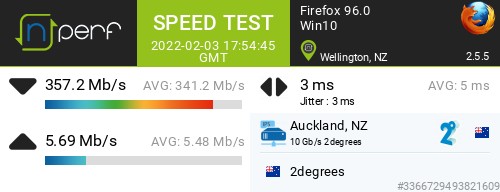


My wife and I both WFH now and do video conferencing often so the upload is important. Should I contact 2degrees for a replacement router? Or am I stuck having to buy a new one? If so any suggestions that don't break the bank would be greatly appreciated.


Cheers


ZL2TOY/ZL1DMP


Filter this topic showing only the reply marked as answer Create new topic
cyril7
9075 posts

Uber Geek
+1 received by user: 2499

ID Verified
Trusted
Subscriber

  #2861525 4-Feb-2022 08:24
Send private message

Hi I assume you are testing via a wired connection, but to answer your question, yes it is Gig capable


Cyril


Taubin

592 posts

Ultimate Geek
+1 received by user: 243

ID Verified
Subscriber

  #2861527 4-Feb-2022 08:26
Send private message

Yep both testing computers are wired, only change is the router itself.


ZL2TOY/ZL1DMP


ANglEAUT
altered-ego
2436 posts

Uber Geek
+1 received by user: 842

Trusted
Lifetime subscriber

  #2861536 4-Feb-2022 08:56
Send private message

The new router could have applied a new or default config. Contact 2Deg Cust Sup to re-apply your config?


Maybe ping SarahRykers to help investigate this.


Please keep this GZ community vibrant by contributing in a constructive & respectful manner.


Taubin

592 posts

Ultimate Geek
+1 received by user: 243

ID Verified
Subscriber

  #2861539 4-Feb-2022 09:01
Send private message

I'll shoot an email to 2degrees and see if that could be the case, cheers!


@SarahRykers Any suggestions? Cheers


ZL2TOY/ZL1DMP


liquidcore
187 posts

Master Geek
+1 received by user: 71

ID Verified

  #2861542 4-Feb-2022 09:03
Send private message

Have you tried factory resetting the 7560?


Taubin

592 posts

Ultimate Geek
+1 received by user: 243

ID Verified
Subscriber

  #2861545 4-Feb-2022 09:08
Send private message

I reset it first thing then set up the connection. It has been this way from the beginning. My samknows.one is showing the same so that's a third wired device showing the low speeds (the samknows device is behind the router, not in front).


ZL2TOY/ZL1DMP


Shop now for Lenovo laptops and other devices (affiliate link).
Taubin

592 posts

Ultimate Geek
+1 received by user: 243

ID Verified
Subscriber

  #2861546 4-Feb-2022 09:13
Send private message

Welp, I'm a moron. I just went back through everything to quadruple check it, and noticed the "connection settings" in the FritzBox had changed to 200Mbit/s down and 8Mbit/s up. I changed it to 1000 for both and it seems a lot better. I can't believe that's a setting and I didn't change it. It's at least better now 740 down and 131 up. Though not as high as it was, it's workable at least.


ZL2TOY/ZL1DMP


liquidcore
187 posts

Master Geek
+1 received by user: 71

ID Verified

  #2861550 4-Feb-2022 09:18
Send private message

Could always give 2d a call - think it'd be quite easy for them to give you a loaner 7590 (I think you'll just have to pay postage and handling).


michaelmurfy
meow
13579 posts

Uber Geek
+1 received by user: 10910

Moderator
ID Verified
Trusted
Lifetime subscriber

  #2861557 4-Feb-2022 09:32
Send private message

Have you followed through the sticky in the 2degrees subforum on this problem? https://www.geekzone.co.nz/forums.asp?forumid=85&topicid=239862


Michael Murphy | https://murfy.nz
Referral Links: Quic Broadband (use R122101E7CV7Q for free setup)

Are you happy with what you get from Geekzone? Please consider supporting us by subscribing.
Opinions are my own and not the views of my employer.


Taubin

592 posts

Ultimate Geek
+1 received by user: 243

ID Verified
Subscriber

  #2861559 4-Feb-2022 09:37
Send private message

Thanks Micheal I am a triple idiot this morning, I hadn't thought to see if there was a sticky for it on the 2degrees forum. Thank you!


There may need to be a change made on that sticky, the router won't allow me to put in a higher input than 1000 on the data throughput.


ZL2TOY/ZL1DMP


wlgspotter
334 posts

Ultimate Geek
+1 received by user: 40

ID Verified
Lifetime subscriber

  #2861599 4-Feb-2022 10:34
Send private message

Taubin:


There may need to be a change made on that sticky, the router won't allow me to put in a higher input than 1000 on the data throughput.


 I got caught out too thinking something wasn't right aboyt my 7490 as I can't input anything higher than 1000, but on a closer look I noticed the unit values are different...


If your 7560 is runinng the same/similar firmware as my 7490 (i.e. 7.29), note the unit of measurement shown on our devices vs the sticky has changed.  On my 7490 it also allowed max of 1000, however the unit of measurement shows Mbit/s as opposed to the sticky's unit of kbit/s.  So effectively 999999 kbit/s is equivalent to 1000 Mbits.


Shop now for Dyson appliances (affiliate link).
Taubin

592 posts

Ultimate Geek
+1 received by user: 243

ID Verified
Subscriber

  #2861602 4-Feb-2022 10:36
Send private message

Oh you're right, I didn't even notice that part. Man I need more coffee today or something. I'm usually a lot better at checking these things.


ZL2TOY/ZL1DMP


wlgspotter
334 posts

Ultimate Geek
+1 received by user: 40

ID Verified
Lifetime subscriber

  #2861653 4-Feb-2022 11:42
Send private message

Taubin:


Oh you're right, I didn't even notice that part. Man I need more coffee today or something. I'm usually a lot better at checking these things.


Heyy all good mate.  TBH when I first checked the sticky and tried inputting 999999 into mine and it wouldn't take it (that was months ago, maybe even a year ago now), I thought something strange about mine too but left it, and left mine at 1000. 


Now upon seeing your post I ONLY just noticed the measurement unit haha... So yeah maybe we both need coffees! :)


frankv
5705 posts

Uber Geek
+1 received by user: 3666

Lifetime subscriber

  #2861689 4-Feb-2022 12:25
Send private message

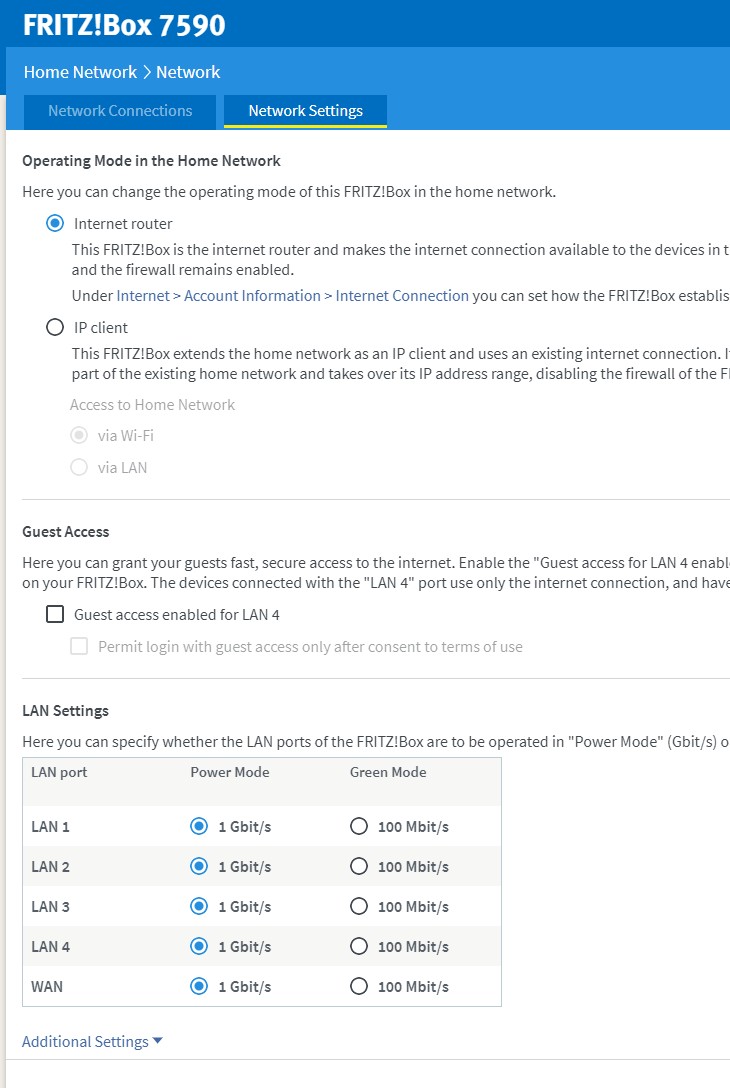
There's a "green" setting where it limits speed to 100. Presumably 100Mb/s uses less power than 1000.


But even if you set it to 1000, it still only shows 100. I presume/expect/hope it will automatically switch up to 1000 if needed.


Taubin

592 posts

Ultimate Geek
+1 received by user: 243

ID Verified
Subscriber

  #2861697 4-Feb-2022 12:28
Send private message

They are all set to 1Gbit/s


I believe most of the issue was from the upstream/downstream setting in Connection settings. It's definitely improved enough that I can deal with it. Much closer to what it was with the previous router. I hadn't noticed it had defaulted to a low connection.


ZL2TOY/ZL1DMP


Filter this topic showing only the reply marked as answer Create new topic


Geekzone Live »

Try automatic live updates from Geekzone directly in your browser, without refreshing the page, with Geekzone Live now.


Are you subscribed to our RSS feed? You can download the latest headlines and summaries from our stories directly to your computer or smartphone by using a feed reader.