Geekzone: technology news, blogs, forums
Guest
Welcome Guest.
You haven't logged in yet. If you don't have an account you can register now.


wazz

162 posts

Master Geek


#293644 4-Feb-2022 12:28
Send private message

Hi all,


I'll be moving into a relatively new build (2019) soon and wanted to get an idea of what equipment to get. It's a three storey house and has a relatively small enclosure on the bottom level with the ONT, patch panels and what looks like some alarm equipment.
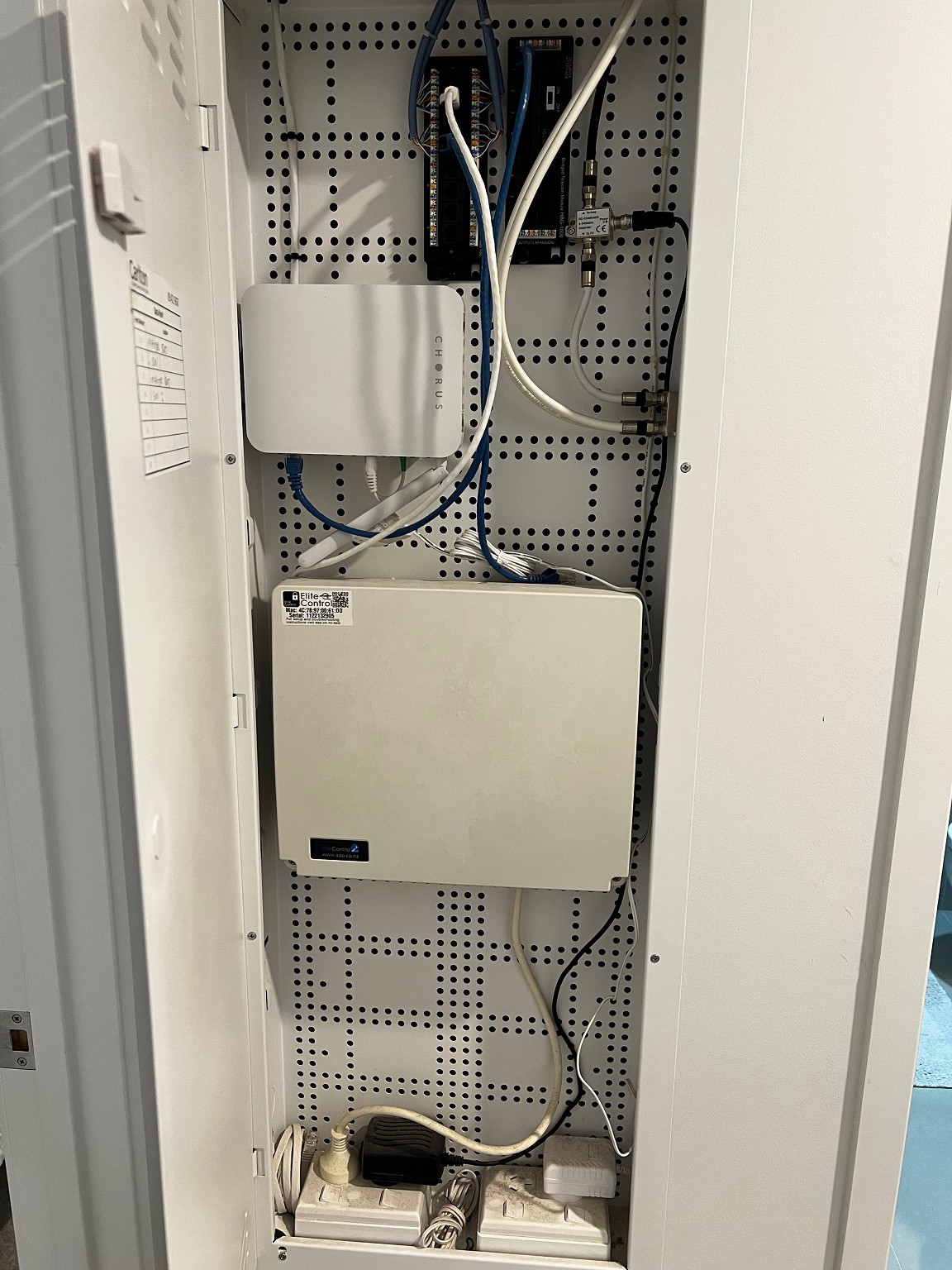
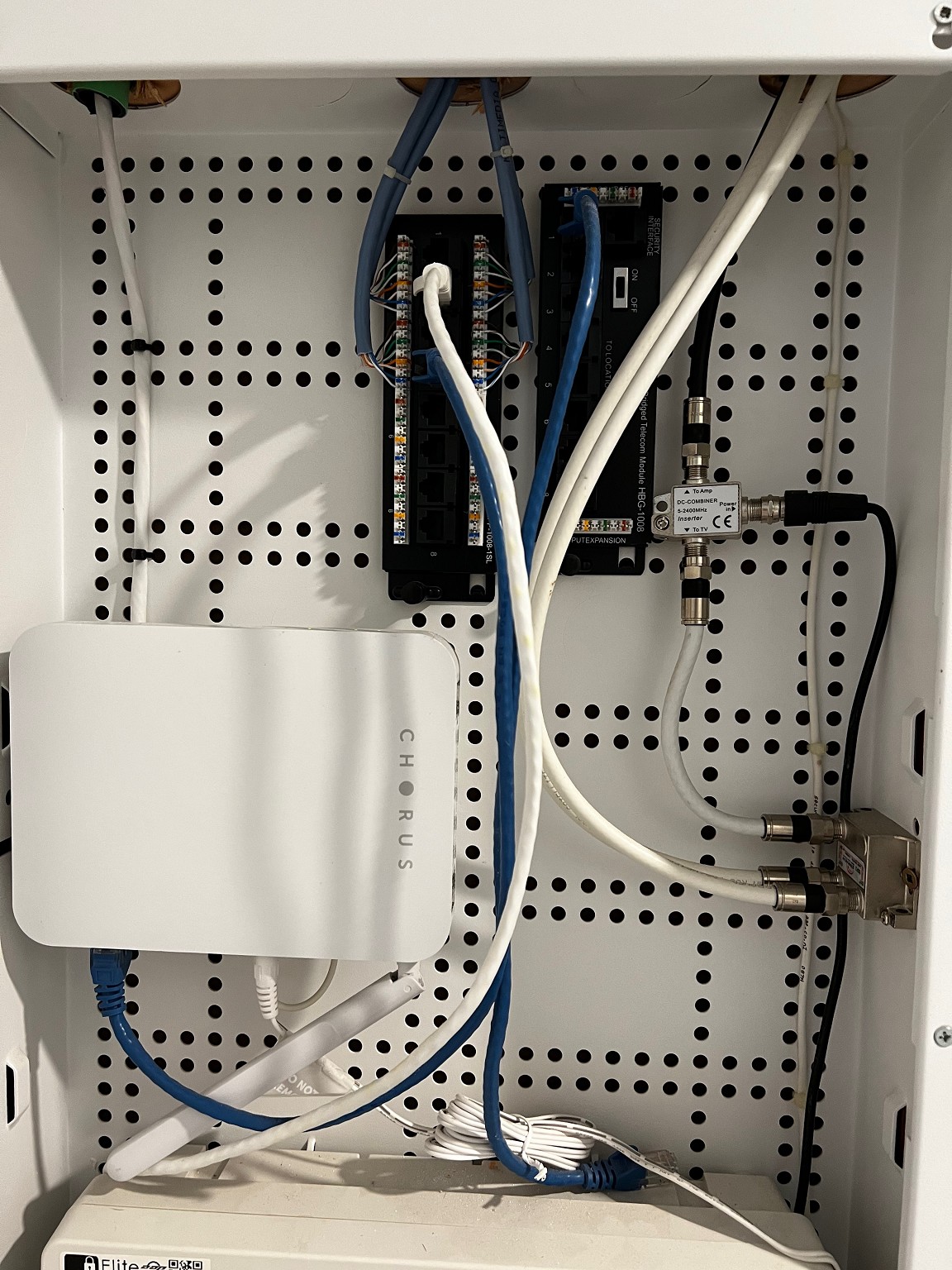


From what I can tell, each of the ports on the patch panel terminate in two RJ-45 jacks in each of the rooms of the house. I've never been in a house that has been wired up and always had relatively simple networking setups. Would anyone have any suggestions on equipment to use? I've already got a Unifi AP and an ASUS router I can reuse but I'm not worried if it all needs to be replaced.


Would a wired only router leading into the patch panel directly make sense? Would it then just be a matter of APs on each level and a switch where I'd want to wire in more than 1 device? Also given the year the house was built, is it likely to be wired up with CAT6?


Cheers


Create new topic
CYaBro
4708 posts

Uber Geek
+1 received by user: 1182

ID Verified
Trusted

  #2861727 4-Feb-2022 13:45
Send private message

How many RJ-45 jacks are there around the house?


I only see 4 cables terminated in your cabinet so that would mean only 4 jacks around the house are actually able to work.


Looks like the ONT has been patched to a jack in the house somewhere, I'm guessing that's where the router is, and that has been patched back to the network cabinet for the alarm panel I'm guessing. (The white ethernet cable)


The 2nd black module on the right doesn't appear to be doing anything...


Opinions are my own and not the views of my employer.


rogercruse
644 posts

Ultimate Geek
+1 received by user: 211

ID Verified
Lifetime subscriber

  #2861730 4-Feb-2022 13:50
Send private message

I discussed our additional electrical wiring and networking requirements with our house builder and the Laser electrician who installed the basic power infrastructure and the power blocks, etc. The LED lighting (24 volt DC) was out-of-scope for Laser as it was considered part of the home automation / HVAC system.


The additional wiring was for the POE external security cameras, an ethernet backbone (so that each Google Wifi Mesh device were connected, allowing me to ensure good wifi coverage), and a dedicated power (24 volt AC) for my video doorbell.    


The Laser electrician ensured that I had Cat6 cabling between the ONT (located in the garage) to the network hub (the hot water cupboard), further Cat6 cables radiating each room that had a small switch to cater for multiple wired devices.  The Laser electrician installed at least two ethernet ports in every room offering plenty of scope for further expansion.


As the bulk of the wiring was done before the dry wall was installed and at the same time as the other cabling work. I only wish I was spend a little more money installing a air cooled networking cabinet.


So discuss your requirements with your electrician. 


Good Luck.


SpartanVXL
1498 posts

Uber Geek
+1 received by user: 666


  #2861732 4-Feb-2022 13:52
Send private message

Yup, so ONT is wired to a room somewhere where the router would sit (blue cable on the left) and the security thing is the white cable coming back from the same room assuming two ports per location.

You can do the same but instead put a switch in that cabinet and plug everything on that board into the switch. You can then cable AP’s to which ever rooms have ports available.


cyril7
9073 posts

Uber Geek
+1 received by user: 2499

ID Verified
Trusted
Subscriber

  #2861796 4-Feb-2022 15:45
Send private message

Hi, so it looks like just two rooms are cabled (you say there are two outlets in two locations), so your router can go in one of those locations, one ethernet run takes the feed from the ONT to the WAN of the router, the other ethernet run can return the LAN to this box, from there you can distribute to the other room via a small switch fitted to this box.


Also note, the Alarm panel shows its fitted with an IP module, so you can get the monitoring app on you phone and control and monitor it. Thats the white patch lead, it will need to be plugged into the LAN to work


https://play.google.com/store/apps/details?id=nz.co.aap.m.elitecontrol


Cyril


wazz

162 posts

Master Geek


  #2861801 4-Feb-2022 16:10
Send private message

Yeah only having 4 ports wired to the patch panel threw me because I spotted dual RJ-45 jacks in 3 of the rooms and I assume there’s another in the final bedroom behind furniture. Is it possible there’s some kind of splitter between the patch panel and the jacks? Otherwise maybe it’s an RJ-11 jack that I mistook for an RJ-45. I’ve only had briefly looked through the house.

Currently I know they’ve just got a router sitting in the lounge and the rest of the ports are unused.

So for the equipment in the enclosure, would I need a router and switch, or just a router, or just a switch? I assume the ONT can’t function as a router but maybe I’m wrong?

Cheers for the answers so far.


huckster
886 posts

Ultimate Geek
+1 received by user: 460

ID Verified
Lifetime subscriber

  #2861805 4-Feb-2022 16:18
Send private message

ONT cannot be a switch or router.
If you do as above i.e. ONT thru to router (its WAN port) in other room and then another cable from router (any of its LAN ports) back to cabinet, this should then go into a switch.
The switch can then be hooked up to any other ports in the cabinet you want active.


I.e. a switch is what you would want.


Support Geekzone with one-off or recurring donations Donate via PressPatron.
cyril7
9073 posts

Uber Geek
+1 received by user: 2499

ID Verified
Trusted
Subscriber

  #2861812 4-Feb-2022 16:29
Send private message

So based on the fact you have a UniFi AP I suggest you put the router in the above comms cabinet and the AP out in the lounge, and add more APs to cover other parts of the house using the wiring. But all this depends on how many outlets and where.


Really need to know more re what outlets are where to advise further.


Cyril


wazz

162 posts

Master Geek


  #2861840 4-Feb-2022 17:38
Send private message

Alright sounds like I’ll need to have a closer look when we move in, thanks for the help.

Create new topic


Geekzone Live »

Try automatic live updates from Geekzone directly in your browser, without refreshing the page, with Geekzone Live now.


Are you subscribed to our RSS feed? You can download the latest headlines and summaries from our stories directly to your computer or smartphone by using a feed reader.