Geekzone: technology news, blogs, forums
Guest
Welcome Guest.
You haven't logged in yet. If you don't have an account you can register now.


mdf

mdf

3566 posts

Uber Geek
+1 received by user: 1519

Trusted

#293966 24-Feb-2022 20:12
Send private message

I have an intermittent issue with wifi. Historically absolutely fine, and 95%+ of the time now still no issues, however a couple of times a day a device will have "no internet" despite seemingly being connected to a strong wifi network. Other devices at the same time will have no trouble, and the majority of the time disconnecting and reconnecting to the network seems to fix the issue. But its a niggly problem and I'm sick of hearing the complaints; you'd think the greatest injustice in the history of the world is a youtube video buffering.


Network config is router --> POE switch --> 3x Cambium e400 WAPs.


I _suspect_ the issue is with the WAPs; I've entirely replaced the router (was Cambium R201, now Voyager Huawei DG8245V-10) and devices connected by ethernet to the switch don't seem to have any issues. Mix of devices affected, couple of Samsung Android mobile phones, a Windows PC and a Chromebook.


Because it is so intermittent, it's hard to track down any rhyme or reason as to what is causing it. A couple of times I thought I've had an "a ha!" moment and patted myself on the back for fixing the issue, only for the issue to crop up again the next day or so. 


The Cambium WAPs offer logging to a syslog server. Is that my next logical step? And if so, what is an easy way of getting started with this? I can spin up a Raspberry Pi but have had issues with too many writes to SD cards before with Hassio logging. I've found Loggly which has a Lite/Free tier and seems reputable but am unsure what exactly goes in a log file and whether I am setting myself up for hurt sending this type of info off to the cloud.


Any other suggestions or pointers?


Create new topic
michaelmurfy
meow
13579 posts

Uber Geek
+1 received by user: 10910

Moderator
ID Verified
Trusted
Lifetime subscriber

  #2874394 24-Feb-2022 21:41
Send private message

Does this device happen to be a Samsung device?

I personally found they are the worst at retaining a stable connection to WiFi. My partners S10+ then S21 Ultra would drop off for no reason, the access points would however still see the device as connected, but wouldn't pass traffic. I could never figure out why it was doing so as it happened on UniFi, Aruba and Cambium access points. I turned off MAC Address Randomization which helped somewhat but the best day was when she switched to an iPhone and have not had issues since.


Syslog may show a deauth reason (eg - deauth because of roaming) but really won't show much more than that.


Michael Murphy | https://murfy.nz
Referral Links: Quic Broadband (use R122101E7CV7Q for free setup)

Are you happy with what you get from Geekzone? Please consider supporting us by subscribing.
Opinions are my own and not the views of my employer.


mdf

mdf

3566 posts

Uber Geek
+1 received by user: 1519

Trusted

  #2874400 24-Feb-2022 21:55
Send private message

I should have just asked you direct 😃


Yes, a couple of Samsung phones and yes, noticed some (?) improvement with MAC address randomisation turned off. But there are several other devices too including Windows notebooks and Chrome, and the same phones were fine for the last couple of years. 


I'll need to do further digging.


nztim
4012 posts

Uber Geek
+1 received by user: 2710

ID Verified
Trusted
TEAMnetwork
Subscriber

  #2874408 24-Feb-2022 22:23
Send private message

Stupid Android MAC randomisation, this had me puzzled at a major government department for MONTHS


Any views expressed on these forums are my own and don't necessarily reflect those of my employer. 


fe31nz
1294 posts

Uber Geek
+1 received by user: 423


  #2874463 25-Feb-2022 02:04
Send private message

If you really need a syslog server, just about any Linux distro will have one builtin.  If you do not have any Linux boxes, just fire up a Windows PC, install VirtualBox and then install the Linux distro of your choice in a virtual machine.


The problem with Pi SD cards dying is also easy to fix - run a hard drive on a USB mount and boot from that.  I always have one or two old, retired hard drives that I use for that sort of thing, and I bought my Pi 4 a nice dual USB 3 mount so it could boot and also access other drives.  But there are lots of fairly cheap single USB 3 mounts available.


timmmay
20858 posts

Uber Geek
+1 received by user: 5350

Trusted
Lifetime subscriber

  #2874467 25-Feb-2022 06:24
Send private message

Do you notice the same problems on 2.4 and 5GHz? If so read this thread. In short - set your 5GHz channel manually to a number below 52.


mdf

mdf

3566 posts

Uber Geek
+1 received by user: 1519

Trusted

  #2875111 25-Feb-2022 20:05
Send private message

timmmay:


Do you notice the same problems on 2.4 and 5GHz? If so read this thread. In short - set your 5GHz channel manually to a number below 52.


I use band steering (which has historically always worked really well) so it's hard to be sure which network they're connected to when issues crop up. When things are working normally, they should usually be on 5GHz.


The channel change is about DFS or something else? I can turn off DFS channels generally; currently I've got APs on channel 36, 153 and 165 (results of auto scans). So one below and two above the DFS range. Is there something else I don't know about?


Shop on-line at New World now for your groceries (affiliate link).
nzkc
1634 posts

Uber Geek
+1 received by user: 1041


  #2875130 25-Feb-2022 21:16
Send private message

mdf:


I've found Loggly which has a Lite/Free tier and seems reputable but am unsure what exactly goes in a log file and whether I am setting myself up for hurt sending this type of info off to the cloud.


I think you'll be fine as long as you go with a reputable cloud hosted one. I use the SumoLogic free tier for some logs. Works for my needs. Others you might consider include PaperTrail, Datadog and Graylog (if you want to host it yourself)


mdf

mdf

3566 posts

Uber Geek
+1 received by user: 1519

Trusted

  #2875248 26-Feb-2022 12:00
Send private message

mdf:


timmmay:


Do you notice the same problems on 2.4 and 5GHz? If so read this thread. In short - set your 5GHz channel manually to a number below 52.


I use band steering (which has historically always worked really well) so it's hard to be sure which network they're connected to when issues crop up. When things are working normally, they should usually be on 5GHz.


The channel change is about DFS or something else? I can turn off DFS channels generally; currently I've got APs on channel 36, 153 and 165 (results of auto scans). So one below and two above the DFS range. Is there something else I don't know about?


You might be on to something here. There's been a lot more swearing calm and deliberate investigations. The AP on channel 165 could well be the one that is causing the issues. T' interweb seems to have other stories of Samsung devices not connecting to specific channels - not channel 165 specifically but the fact it is the last of the permitted range makes me suspicious.


I've manually changed it to channel 60 and that seems to have fixed the problem. There have however been false dawns before.


timmmay
20858 posts

Uber Geek
+1 received by user: 5350

Trusted
Lifetime subscriber

  #2875265 26-Feb-2022 12:43
Send private message

Above channel 52 the WAP might be deliberately turning itself off every now and then because of some reason I don't fully recall. Try a low 5GHz channel as it might be even more stable than 60.


mdf

mdf

3566 posts

Uber Geek
+1 received by user: 1519

Trusted

  #2875297 26-Feb-2022 14:30
Send private message

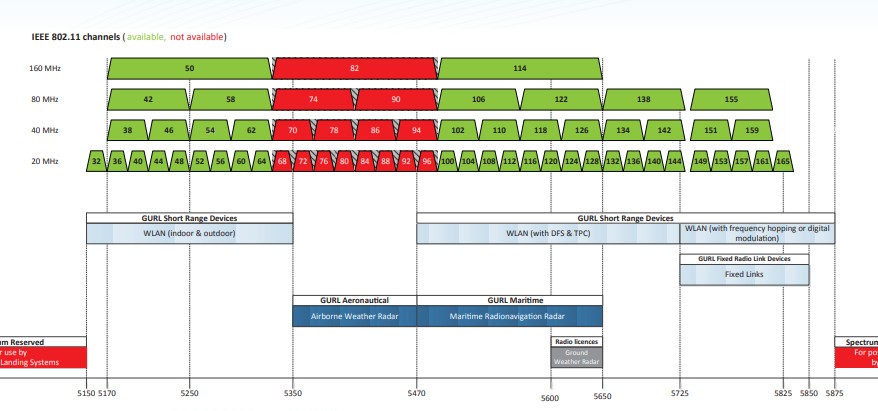
5GHz is shared with other uses. Some channels are not allowed, others (DFS) are shared with aeronautical and maritime radar.


From RSM:


Create new topic


Geekzone Live »

Try automatic live updates from Geekzone directly in your browser, without refreshing the page, with Geekzone Live now.


Are you subscribed to our RSS feed? You can download the latest headlines and summaries from our stories directly to your computer or smartphone by using a feed reader.