Geekzone: technology news, blogs, forums
Guest
Welcome Guest.
You haven't logged in yet. If you don't have an account you can register now.


alisam

878 posts

Ultimate Geek
+1 received by user: 83


#295468 31-Mar-2022 08:13
Send private message

A) When Chorus installed UFB I simply told the technician that I had a landline and could it be made to work with UFB. He said yes, and it was done.


After a long time (and thinking of the future) I thought I had better find out what they did.


The ONT is a type 200. The first grey cable on the ONT goes to the smaller box to the right (Line 1). I can't see what happens after that. What is that little box and what is it attached to?


B) I don't know the correct terminology but I understand that POTS will be phased out. I do understand I will need a new phone (current phone's base station connects to the old/standard telephone jack). How will a new phone be connected to the ONT and will I need a technician from Chorus (I can read a Manual).


C) I have an Edgerouter ER-X (not SFP Model) and 3 x GWN7610 AP's ( 2 x Ethernet, 1 x Powerline Ethernet), but I am thinking of getting a Spark Smart Modem 2 and Mesh (Spark website says Smart Mesh 2 will arrive sometime in April 2022), simply because as I get older, I would prefer to have my wife being able to talk to Spark as to why there is no internet connection should it happen. I am on the Spark 300/100 plan. The ONT and router are in the garage and the landline wiring to 2 jacks is 31 years old.




PC: Dell Inspiron 16 5640 (Windows 11 Home), Dell Inspiron 7591 2n1 (Windows 11 Pro), HP ProBook 470G1 (Windows 10 Pro), Intel NUC7I5BNH (Zorin)
Net: Grandstream 1 x GWN7062 Router, 1 x GWN7665 Access Point
Storage: Synology DS216play NAS, 2 x 6TB
Media: 3 x Amazon FireTV. Echo, Dot, Spot
TV: 2 x Samsung H6400 55" LED TV, Panasonic TH-P50G10Z 50" Plasma TV
Mobile: Samsung Galaxy A52 5G
Wearable: Gear S3 Frontier


Create new topic
Behodar
11094 posts

Uber Geek
+1 received by user: 6071

Trusted
Lifetime subscriber

  #2894475 31-Mar-2022 08:14
Send private message

Since you're with Spark, everything should "just work". Your old phones, assuming they're connected to the POTS port, will continue to work.


cyril7
9073 posts

Uber Geek
+1 received by user: 2499

ID Verified
Trusted
Subscriber

  #2894535 31-Mar-2022 08:56
Send private message

As Behodarbsays it all should be currently working and functional, the phasing out of pots will not impact you.

If you get your phone handset and stand Infront of the ont and then loop the line with the handset, is press dial, does the pots led on the ont light?, If so as stated nothing to do your phone is already delivered by fibre.

Cyril

alisam

878 posts

Ultimate Geek
+1 received by user: 83


  #2894592 31-Mar-2022 11:03
Send private message

Thank you both for the information.


Out of interest, if in the future I bought a VOIP phone with base station e.g. Yealink W53P, could I keep my Spark Landline Telephone Number?


PC: Dell Inspiron 16 5640 (Windows 11 Home), Dell Inspiron 7591 2n1 (Windows 11 Pro), HP ProBook 470G1 (Windows 10 Pro), Intel NUC7I5BNH (Zorin)
Net: Grandstream 1 x GWN7062 Router, 1 x GWN7665 Access Point
Storage: Synology DS216play NAS, 2 x 6TB
Media: 3 x Amazon FireTV. Echo, Dot, Spot
TV: 2 x Samsung H6400 55" LED TV, Panasonic TH-P50G10Z 50" Plasma TV
Mobile: Samsung Galaxy A52 5G
Wearable: Gear S3 Frontier


cyril7
9073 posts

Uber Geek
+1 received by user: 2499

ID Verified
Trusted
Subscriber

  #2894594 31-Mar-2022 11:10
Send private message

Hi, you would need to port the number to another provider such as 2Talk or Hero, but to remain with Spark as the voice provider I have to say I am not sure if they can provide an online SIP service to use, they do for business and yes they do support Yealinks and any generic SIP phones, but not so sure about residential, I suspect its only via the ONT. Maybe someone else has more knowledge of what residential SIP services Spark may or may not have.


Cyril 


MarkM536
321 posts

Ultimate Geek
+1 received by user: 146


  #2894611 31-Mar-2022 11:46
Send private message

Spark should be alright to use the analogue telephone adaptor (ATA) on the bottom of the ONT unit.


Off on a tangent;


Not all ISPs support this ATA. Which is why some ISPs require you to use their router if you want a phone line.


Sucks aye!


Some people have had Chorus wire a phone line to the ONT so that all their existing phone line plugs work.


Your lucky it's a standard wall jack and then to the ONT, instead of it literally be hardwired in.


Chorus say that all ISPs get access to using the ONT's ATA.


But there's no requirement for all ISPs to support it.


A downfall to the system where not every ISP is consistent.


alisam

878 posts

Ultimate Geek
+1 received by user: 83


  #2895039 1-Apr-2022 07:50
Send private message

cyril7: 
If you get your phone handset and stand Infront of the ont and then loop the line with the handset, is press dial, does the pots led on the ont light?, If so as stated nothing to do your phone is already delivered by fibre.

Cyril


Tried it and the POTS light does light up.


Would the box next to the ONT have a name (just so I could look it up to see what it does)?


So presumably, the ONT feeds into the box.


I cannot see what the box connects to. Presumably, my phone wiring, but is it just good luck that the Chorus technician could tap into the wiring inside the wall?


PC: Dell Inspiron 16 5640 (Windows 11 Home), Dell Inspiron 7591 2n1 (Windows 11 Pro), HP ProBook 470G1 (Windows 10 Pro), Intel NUC7I5BNH (Zorin)
Net: Grandstream 1 x GWN7062 Router, 1 x GWN7665 Access Point
Storage: Synology DS216play NAS, 2 x 6TB
Media: 3 x Amazon FireTV. Echo, Dot, Spot
TV: 2 x Samsung H6400 55" LED TV, Panasonic TH-P50G10Z 50" Plasma TV
Mobile: Samsung Galaxy A52 5G
Wearable: Gear S3 Frontier


Shop now for Dell laptops and other devices (affiliate link).
cyril7
9073 posts

Uber Geek
+1 received by user: 2499

ID Verified
Trusted
Subscriber

  #2895062 1-Apr-2022 08:48
Send private message

Hi yes the small box to the right simply let's the ata port of the ont connect to your house wiring.

As you can see your phone service is as expected provided by the VoIP ata in the ont and is infact a spark VoIP line.


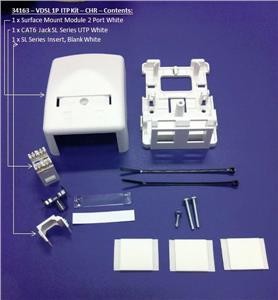
Edit: the small white box is just a surface mount data outlet box that contains an RJ45 socket that the ONT connects to and the wiring terminates on.


To save you opening the box an image is below that explains all, its just a connector in a box.


Cyril


Create new topic


Geekzone Live »

Try automatic live updates from Geekzone directly in your browser, without refreshing the page, with Geekzone Live now.


Are you subscribed to our RSS feed? You can download the latest headlines and summaries from our stories directly to your computer or smartphone by using a feed reader.