Geekzone: technology news, blogs, forums
Guest
Welcome Guest.
You haven't logged in yet. If you don't have an account you can register now.


diablo2nd

84 posts

Master Geek
+1 received by user: 15


#296049 17-May-2022 11:24
Send private message

Hi - 

I've got a Mikrotik router and so far I love it. But I have a couple of minor issues and i'm not sure where to start. 


Firstly, I hate needing to ask for help. :-D So this is not a post asking for you to solve my problems. This is me asking for some guidance on things i can start looking at/studying/researching/trying/experimenting with, so that I can improve my understanding of my system, and solve my own problems :-)


Hopefully that makes sense? I never know how to start these types of posts... So i'll jump straight into it. 


I've got a Mikrotik Router - it's setup in NZ on gigabit Fiber. On a direct cable connection (M1 Macbook Pro with gigabit usb ethernet, cat6 cable to router), I get close-enough to gigabit speeds (about 950-980mb on speedtests) but - The router is only 5 ports. So i attach a repurposed ISP modem thats configured to run in switch only mode. Now i'm topping out at about 400mb speeds. 


So that issue could well be a device not intended to be used as a switch - and thats totally fine. But - i have a second issue, which i suspect is actually related. 


The second issue a Mikrotik cAP directly connected to the Router - also has the same top speeds on a good day. I know there is heaps of tuning that i can work through for the AP - and I have done a lot of it - improving the speeds through tuning. 


I cant help but thinking the two things are related - That something in the router isn't setup correctly to allow traffic to efficiently get to the edge devices for switching to clients. I've got no idea what to google for, or what concepts i needs to study up on. Any advice and direction is greatly appreciated. 


View this topic in a long page with up to 500 replies per page Create new topic
 1 | 2
cyril7
9073 posts

Uber Geek
+1 received by user: 2499

ID Verified
Trusted
Subscriber

  #2914980 17-May-2022 11:57
Send private message

Hi, would definitely get a standalone GigE switch to expand the ports of the router, the ISPs router should not be an issue, but if any software is involved in L2 forwarding then you will have an issue.


As for the cAP speeds, assuming your using 40MHz channels, then 400Mb's is good, if not exceptional, can you export the /interface wireless settings?


Cyril


diablo2nd

84 posts

Master Geek
+1 received by user: 15


  #2914990 17-May-2022 12:17
Send private message

Thanks - The ISP router has a 'switch only' mode which _should_ disable the layer 2 stuff. It's a fritzbox issued by 2degrees a few years back. I dont have 2 gigibit capable wired devices to test throughput independently on the fritzbox (Technically my Nas is gigabit but I don't trust that as far as i can through it) 


Wireless is managed via Capsman - so - exported capsman settings instead. 


# may/17/2022 12:10:39 by RouterOS 6.49.2
# software id = 18TL-G9BF
#
# model = RB960PGS

/caps-man channel
add band=2ghz-g/n control-channel-width=20mhz frequency=2457,2462,2467 name="JackHammer 2.4g Zone 1"
add band=5ghz-onlyac extension-channel=XXXX name="JackHammer 5g Zone 1" skip-dfs-channels=no
/caps-man datapath
add bridge=bridge client-to-client-forwarding=yes name=JackHammer
add bridge=bridge-iot interface-list=IOT name="JackHammer IOT"
/caps-man security
add authentication-types=wpa2-psk encryption=aes-ccm group-encryption=aes-ccm name="JackHammer Security "
add authentication-types=wpa2-psk encryption=aes-ccm name="JackHammer IOT"
/caps-man configuration
add channel="JackHammer 2.4g Zone 1" country="new zealand" datapath=JackHammer hide-ssid=no installation=indoor mode=ap name=\
    "Jackhammer Home 2.4g" security="JackHammer Security " ssid=JackHammer
add channel="JackHammer 5g Zone 1" country="new zealand 5.8 fixed p-p" datapath=JackHammer hide-ssid=no installation=any mode=\
    ap name="JackHammer Home 5g" security="JackHammer Security " ssid=JackHammer5g
add channel="JackHammer 2.4g Zone 1" country="new zealand" datapath="JackHammer IOT" installation=indoor mode=ap name=\
    "JackHammer IOT 2.4g " security="JackHammer IOT" ssid=Jackhammer-iot
/caps-man manager
set enabled=yes
/caps-man manager interface
set [ find default=yes ] forbid=yes
add disabled=no interface=bridge
/caps-man provisioning
add action=create-dynamic-enabled hw-supported-modes=ac master-configuration="JackHammer Home 5g" name-prefix=5g
add action=create-dynamic-enabled hw-supported-modes=gn master-configuration="Jackhammer Home 2.4g" name-prefix=2.4g \
    slave-configurations="JackHammer IOT 2.4g "


cyril7
9073 posts

Uber Geek
+1 received by user: 2499

ID Verified
Trusted
Subscriber

  #2915038 17-May-2022 12:34
Send private message

Hi, firstly, the 960PGS is a pretty low rent single core router, whilst it can probably achieve near full GigE through put I would imagine its going to be sweating it to achieve that. 


When you do the testing what does the CAPMAN registered table tab show the test client is Tx and Rx conneciton rate. Also if you login to the cAP and go into the /interface wireless it will show exactly what channel and BW the cAP has assigned, I see its on create-dynamic-enabled, I normally just use create-enable and manually assign channels.


Cyril


diablo2nd

84 posts

Master Geek
+1 received by user: 15


  #2915049 17-May-2022 13:01
Send private message

Thanks - I 'm aware the 960PGS is underpowered. i'm exploring whats possible, and using as a learning experience. I'm exploring if it' a physical router limitation to chain devices, or if it's a chained device limitation, or a software issue. In addition - i'm looking to the wireless issue as seperate, but maybe related.

Main reason for this device in particular, was that it has Gigibit POE ports. (I Replaced a EdgeRouterX that bricked during a power outage - and used the situation to ditch a couple of POE Injectors)

Heres the export from the cAP /interface wireless 


[code]
# may/17/2022 12:47:55 by RouterOS 6.47.9
# software id = ULYY-UN7W
#
# model = RBcAPGi-5acD2nD
/interface wireless
# managed by CAPsMAN
# channel: 2457/20-eC/gn(28dBm), SSID: JackHammer, CAPsMAN forwarding
set [ find default-name=wlan1 ] ssid=MikroTik
# managed by CAPsMAN
# channel: 5765/20-Ceee/ac(50dBm), SSID: JackHammer5g, CAPsMAN forwarding
set [ find default-name=wlan2 ] ssid=MikroTik
/interface wireless security-profiles
set [ find default=yes ] supplicant-identity=MikroTik
/interface wireless cap
set bridge=bridgeLocal discovery-interfaces=bridgeLocal enabled=yes interfaces=wlan1,wlan2
[/code]


From what I understand - it's picking up the channel and BW correctly.

Although - based on https://en.wikipedia.org/wiki/List_of_WLAN_channels#5_GHz_(802.11a/h/j/n/ac/ax) Mabey i should be on channel 155 (5775) 


cyril7
9073 posts

Uber Geek
+1 received by user: 2499

ID Verified
Trusted
Subscriber

  #2915057 17-May-2022 13:13
Send private message

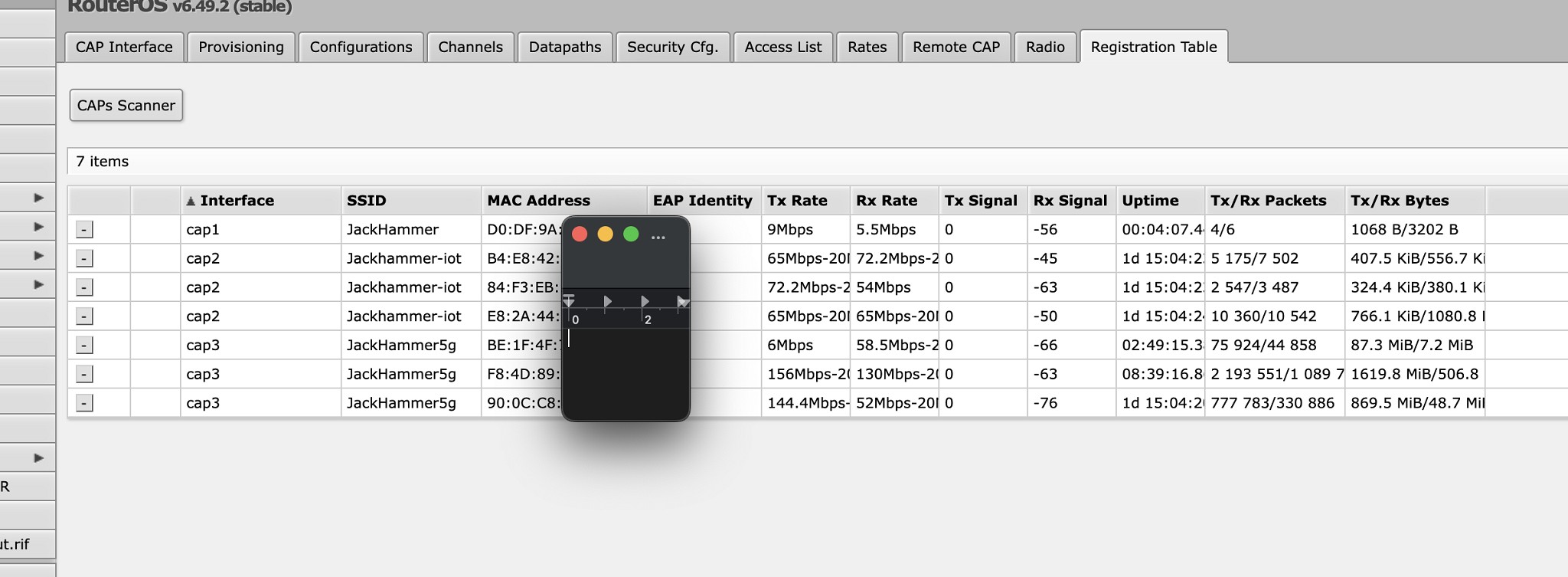
Hi, do you have the registration tab from the Capsman showing the "actual" speed that the test client is connecting at.


Cyril


diablo2nd

84 posts

Master Geek
+1 received by user: 15


  #2915117 17-May-2022 14:32
Send private message

This page? 


My client is

 F8:4D:89:xx:xx:xx


Shop now at Mighty Ape (affiliate link).
diablo2nd

84 posts

Master Geek
+1 received by user: 15


  #2915120 17-May-2022 14:36
Send private message

Those connection rates explain my current (today) slow speeds. When i'm not in video meetings for work i might reboot see if i can get closer to where i was last time i looked. 


cyril7
9073 posts

Uber Geek
+1 received by user: 2499

ID Verified
Trusted
Subscriber

  #2915130 17-May-2022 14:47
Send private message

Hi, yep, so your AP setting is to allow from 20 to 80MHz bandwidth depending on the client negotiation, but currently only using 20MHz, Signal level at -63 is sufficient to support way more, so either interference or some other issue is holding it back to 20MHz.


Personally I set my APs for 20/40MHz only and have the following in my stock setup, and as mentioned I dont create-dynamic-enable, rather just create-enable and then once the interface has joined set its channel to one of the following. Also you should leave the high end of the band for p2p links, and indoor APs use the lowedr end of the band as I have shown below.


-------------


add band=5ghz-n/ac control-channel-width=20mhz extension-channel=Ce frequency=5180 name=Ch36+40


add band=5ghz-n/ac control-channel-width=20mhz extension-channel=Ce frequency=5220 name=Ch44+48


add band=5ghz-n/ac control-channel-width=20mhz extension-channel=Ce frequency=5260 name=Ch52+56


Cyril


diablo2nd

84 posts

Master Geek
+1 received by user: 15


  #2915245 17-May-2022 17:38
Send private message

Huh - not sure why it was set to a range between 20 and 80 - looks like at some point i'd removed the channel width specification, and set the extension to XXXX which created the issues.  

I've explicitly called out my channel width, and defined my channel at the lower end of the 5g spectrum. I've tested on both 40 and 80mhz and getting nearly twice the throughput on 80mhz - so i'm happy to leave that there. Did another scan of my local wifi noise and there is only one other, 20mhz channel visible around my property - and its not overlapping. So i'm happy with that for now. 

I've got profiles and rules setup for the dynamic interfaces, i looked at whats involved to switch to static and it appears to be a start-over with the config :-D might leave that one for another day 

Managed to get myself tied in knots with regards to channel specifications - i was specifying the middle of the channel frequency, and specifying extension-channel of Ceee which was putting the channel outside of the preloading frequencies allowed in NZ - and not starting the radio. However, being mikrotik, it was silently failing (i would love to be wrong about silently failing - i've often been into so many similar issues where i cant find logs to help diagnose)


So now with that sorted, i find myself back on the original topic, of maxing out between 300-400mb on wifi and wired (when wired is via an isp router(fritzbox) in switch mode) still wondering if its a coincidence the speeds seem capped at the same rate. 


fe31nz
1294 posts

Uber Geek
+1 received by user: 423


  #2915359 18-May-2022 00:06
Send private message

diablo2nd:


So now with that sorted, i find myself back on the original topic, of maxing out between 300-400mb on wifi and wired (when wired is via an isp router(fritzbox) in switch mode) still wondering if its a coincidence the speeds seem capped at the same rate. 


That looks to me to be a problem with the "switch" in the FritzBox.  If it was a switch, it would run at full speed, but that speed indicates that the packets are being routed by the FritzBox's CPU rather than switched by hardware.  Hardware switches do not slow down traffic, so anything other than full speed is not a switch.


diablo2nd

84 posts

Master Geek
+1 received by user: 15


  #2915361 18-May-2022 00:16
Send private message

Here comes a lack of understanding of the fundamental difference between the two...

If the Fritz can support gigabit through put when operating as a router, shouldn't or still be able to support it as a switch? Yeah I already know the answer isn't that straight forward.

I.e client to internet on the Fritz is full speed in the 900 range. Mabey I could test this theory by putting the Fritz in router mode and setting if up as DHCP to"the internet" which is just the mikrotik. Might try that tomorrow. Would actually work for my use case well temporarily.

Thanks for the reply, always happy to learn and get new ideas to research!


Move to New Zealand's best fibre broadband service (affiliate link). Free setup code: R587125ERQ6VE. Note that to use Quic Broadband you must be comfortable with configuring your own router.
fe31nz
1294 posts

Uber Geek
+1 received by user: 423


  #2915364 18-May-2022 01:10
Send private message

diablo2nd: Here comes a lack of understanding of the fundamental difference between the two...

If the Fritz can support gigabit through put when operating as a router, shouldn't or still be able to support it as a switch? Yeah I already know the answer isn't that straight forward.

I.e client to internet on the Fritz is full speed in the 900 range. Mabey I could test this theory by putting the Fritz in router mode and setting if up as DHCP to"the internet" which is just the mikrotik. Might try that tomorrow. Would actually work for my use case well temporarily.

Thanks for the reply, always happy to learn and get new ideas to research!


Yes, you are missing a piece of fundamental understanding.  Routers with small CPUs (most) are able to route at gigabit speed only by using special routing hardware to offload most of the routing work.  Generally, the only packets that the CPU sees and routes are the first packets starting a connection.  After that, the CPU loads the data specifying what packets that match that connection into the offloading hardware, and any packets for that connection that arrive after that will be matched against that connection info and routed by the offloading hardware - the CPU never sees them.  With my EdgeRouter 4, I can see this by running tcpdump or tshark on the router CPU and telling it to show me all the packets.  It only shows connection packets, and nothing after that.  This is layer 3 - the routing is done on IP packets, and that is what the offloading hardware handles.


If such a "small CPU" type router needs to do routing work that is unable to be offloaded, then the throughput becomes dependent entirely on how fast the CPU can handle the packets.  If there is only one stream of traffic that is being routed via the CPU, it may be able to route at something like 3-400 Mbit/s on a typical home or small office type router.  If there are lots of routing or firewall rules to be applied, the maximum speed will drop significantly.  And if there are multiple streams of data being handled by the CPU, the throughput will also drop.  The usual thing that causes the CPU to be used for routing is when you have quality of service (QoS) rules.  Routing hardware will typically handle priority based routing based on the DSCP bits in the IP header, but nothing more complex than that, so as soon as you enable more complex QoS, the routing all gets done in the CPU and the router will perform very badly on a gigabit connection.  Fortunately, complex QoS is not usually needed on gigabit connections - it is much more useful when the speed is much slower (ADSL or VDSL).


Switches are layer 2 devices - they switch Ethernet packets, which may or may not contain IP packets.  The switching is done using the Ethernet addresses, and is all done in hardware.  Switches may have a small management CPU, but it never sees the packets that are being switched.


Routers can be designed to have a hardware switch as well as the routing hardware and CPU.  If they are well designed, you can use the switch hardware like any other Ethernet switch with the packets being switched between the switch ports without ever being seen by the router part of the router.  But the switch can also optionally send the traffic via the router part of the device where it can be routed using the Layer 3 routing and firewall rules, either by the router CPU or its routing hardware.


Not all routers have a hardware switch - my EdgeRouter 4 has four routeable ports and no switch.  The FritzBoxes that I know about (I have a 7390) use a hardware switch for their LAN ports.  The routing part of the box has a CPU and routing hardware with two Ethernet ports, the external WAN port and an internal LAN port connected to a port on the 5 port switch hardware.  The other four Ethernet ports on the switch are the FritzBox's external LAN ports.  This means that all the LAN ports on the FritzBox share a single 1 gigabit Ethernet port to the CPU and routing hardware.  Since the WAN port is only 1 gigabit, this is not a problem in normal use where the traffic is going from the LAN ports to the WAN port and from the WAN port to the LAN ports.  But when the traffic is going between the LAN ports, if it needs routing instead of just being switched, then there is contention for that 1 gigabit of throughput and you can not do routing between multiple LAN ports at full gigabit speed.  Compare that to my EdgeRouter 4 where I can have different subnets on each of the three routeable LAN ports and do full speed routing between them all.  But I can not do full speed switching, which means that if I want two of my LAN ports to be on the same subnet, I can not get full speed traffic between them because there is no way to route the traffic at layer 3 as the routing system does not see the layer 2 Ethernet addresses and can not route based on their values.  So if I want layer 2 switching, I get my switch to do that and never send that traffic to my router.


So, in your case, if you can not get gigabit rate between LAN ports on the FritzBox, the switch is not set up to be switching that traffic and instead it is going over the 5th port on the switch to the router section of the box, which is routing it back over that same switch port to a different LAN port.  If it was being switched at layer 2, it would be full speed.


cyril7
9073 posts

Uber Geek
+1 received by user: 2499

ID Verified
Trusted
Subscriber

  #2915369 18-May-2022 07:26
Send private message

cyril7:


Hi, would definitely get a standalone GigE switch to expand the ports of the router, the ISPs router should not be an issue, but if any software is involved in L2 forwarding then you will have an issue.


As for the cAP speeds, assuming your using 40MHz channels, then 400Mb's is good, if not exceptional, can you export the /interface wireless settings?


Cyril


Hi as mentioned in my first post, if for whatever reason the Fritz decideds for inspect the traffic, its going to suffer, and as fe31nz mentions, if there is a single GigE link between the switch chip and the CPU on the Fritz, immediately you have a halving of throughput. Do you self a favour, get a $30 GigE switch, problem should be solved.


Also have you considered ditching the 960 and just doing all routing on the cAP, its two eth ports have individual paths to the CPU, its a quad core ARM device that will leave the 960 for dead, follow that with a dumb switch to expand the ports and your away.


Cyril


diablo2nd

84 posts

Master Geek
+1 received by user: 15


  #2915371 18-May-2022 07:45
Send private message

[b] fe31nz[\b]

Thanks for taking the time for a detailed explanation - despite many things I've read only, the level of detail you've provided and the application to my problem has helped me to wrap my head around further around these concepts.

Definitely more things for me to experiment with to see if I can get a better experience for my wired client(s)


I've looked at the cAP being my primary router, but it gets complicated quick given its mounted to my ceiling with a single cable run.

diablo2nd

84 posts

Master Geek
+1 received by user: 15


  #2916018 19-May-2022 16:24
Send private message

So - Had a chance to Experiment a bit and got some improved results when Wired

Thanks to the tip that one port on the fritz is CPU connected - and the rest are Switch connected - I made an educated guess that Port 1 was CPU based on the fact the documentation asks port 1 to be connected to ONT. 

So heres some Rough speeds:
Direct
Client -> Mikrotik -> Ont About 900 down 600 up

Fritz, in Switch mode
Client -> Frtiz(port 2) -> Fritz(port 1) -> Mikrotik -> Ont About 500 Down, 80 Up 
Client -> Frtiz(port 2) -> Fritz(port 3) -> Mikrotik -> Ont About 900 Down 450 up

Fritz, in router mode
Client -> Frtiz(port 2) -> Fritz(port 1) -> Mikrotik -> Ont About 800 Down, 300 Up 

Conclusions


  • The fritz is ruining my upload :-D
  • In Past testing, I must have been using port 1 for the uplink
  • This is not a viable option - only 3 usable switch ports (at 'full' speed), and 1 used by the uplink, leave 2 client ports

So - Having learned about the capabilities of my hardware, i'm  off to research some Switches. (Any thoughts on RB260GS) 


 1 | 2
View this topic in a long page with up to 500 replies per page Create new topic


Geekzone Live »

Try automatic live updates from Geekzone directly in your browser, without refreshing the page, with Geekzone Live now.


Are you subscribed to our RSS feed? You can download the latest headlines and summaries from our stories directly to your computer or smartphone by using a feed reader.