I been waiting to see this for probably 6 weeks now, and it has landed:
Spark Smart Mesh 2 | Seamless WiFi coverage at home | Spark NZ
Not the prettiest of units.
I been waiting to see this for probably 6 weeks now, and it has landed:
Spark Smart Mesh 2 | Seamless WiFi coverage at home | Spark NZ
Not the prettiest of units.
PC: Dell Inspiron 16 5640 (Windows 11 Home), Dell Inspiron 7591 2n1 (Windows 11 Pro), HP ProBook 470G1 (Windows 10 Pro), Intel NUC7I5BNH (Zorin)
Net: Grandstream 1 x GWN7062 Router, 1 x GWN7665 Access Point
Storage: Synology DS216play NAS, 2 x 6TB
Media: 3 x Amazon FireTV. Echo, Dot, Spot
TV: 2 x Samsung H6400 55" LED TV, Panasonic TH-P50G10Z 50" Plasma TV
Mobile: Samsung Galaxy A52 5G
Wearable: Gear S3 Frontier
|
|
|
I agree, it reminds me of a heater 😀
quickymart:
I agree, it reminds me of a heater 😀
Perhaps two products for the price of one.
PC: Dell Inspiron 16 5640 (Windows 11 Home), Dell Inspiron 7591 2n1 (Windows 11 Pro), HP ProBook 470G1 (Windows 10 Pro), Intel NUC7I5BNH (Zorin)
Net: Grandstream 1 x GWN7062 Router, 1 x GWN7665 Access Point
Storage: Synology DS216play NAS, 2 x 6TB
Media: 3 x Amazon FireTV. Echo, Dot, Spot
TV: 2 x Samsung H6400 55" LED TV, Panasonic TH-P50G10Z 50" Plasma TV
Mobile: Samsung Galaxy A52 5G
Wearable: Gear S3 Frontier

When these devices (based on my experience with the original Smart Mesh) are used as wired Mesh AP's, rather than wireless MESH units, they all transmit on the same wifi channel. I understand why they need to do that when in wireless mesh mode, but with any other wired AP setup you would choose to have them use non-overlapping channels. Does it matter?
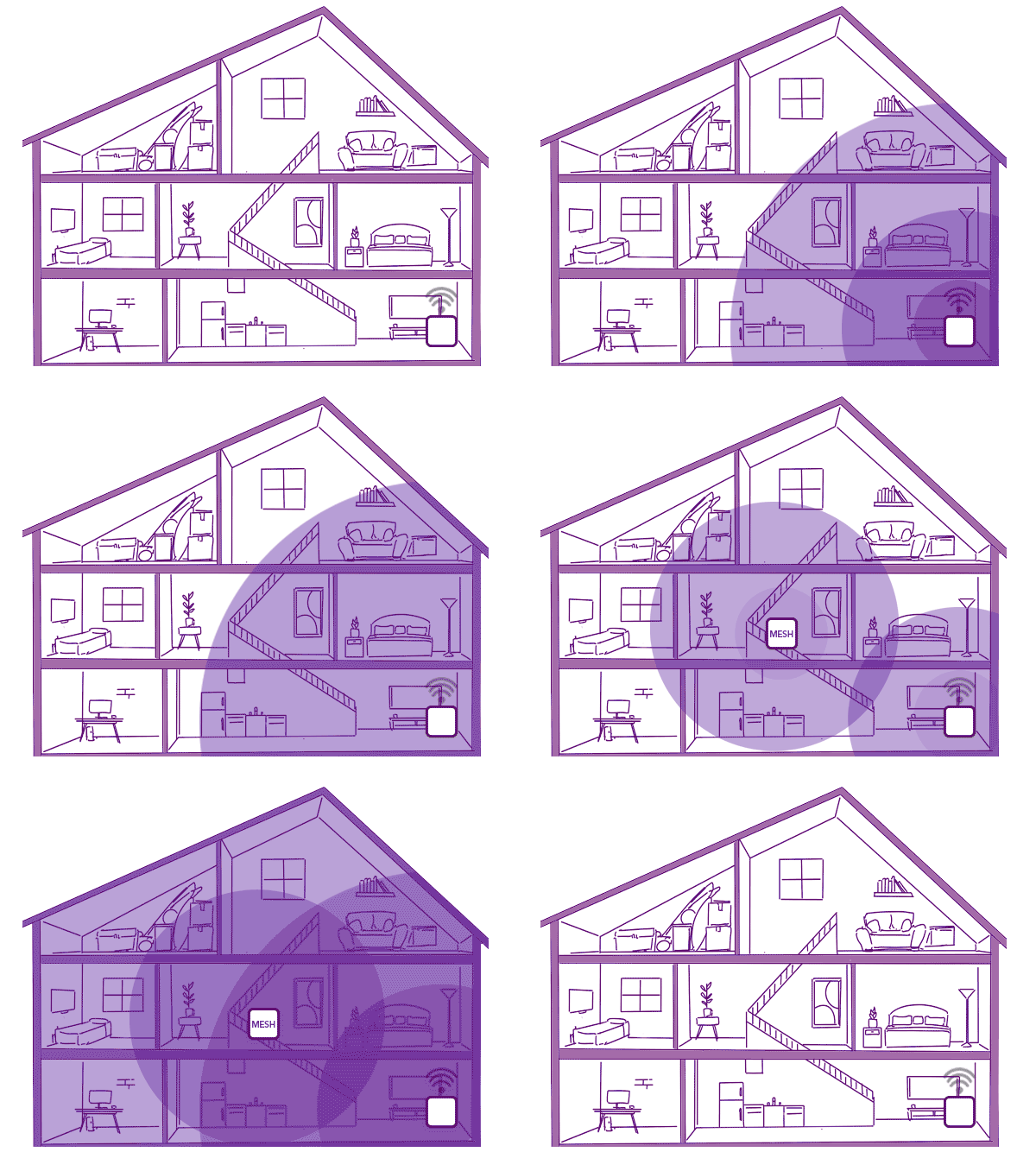
Looking at the image in that page, it makes me wonder why not suggest moving the existing router to the centre of the house (yes, I know sometimes ONT position, ethernet, blah, blah).
But perhaps they could have a different house design to make sure the second node is actually needed.

Referral links: Quic Broadband (free setup code: R587125ERQ6VE) | Samsung | AliExpress | Wise | Sharesies
Support Geekzone by subscribing (browse ads-free), or making a one-off or recurring donation through PressPatron.
quickymart:
I agree, it reminds me of a heater 😀
@quickymart as long as it does a good job

freitasm:
Looking at the image in that page, it makes me wonder why not suggest moving the existing router to the centre of the house (yes, I know sometimes ONT position, ethernet, blah, blah).
But perhaps they could have a different house design to make sure the second node is actually needed.
The Spark Smart Modem 2 lists the Wifi Coverage as 'Up to 4,500 sq.ft.'.
That's a pretty big NZ House but there are walls to contend with.
Presumably (as per the Spark Image) that will be reduced to 1,125 sq.ft (4,500 / 4 [90 degrees]) (correct me if I am wrong as my knowledge is limited in network matters).
My ONT and router are in the garage and the house is 2,650 sq.ft (2 storey), so I would definitely need one Smart Mesh 2 to start with (I cannot find any info. on what the Wifi Coverage is for the Mesh 2 product)
PC: Dell Inspiron 16 5640 (Windows 11 Home), Dell Inspiron 7591 2n1 (Windows 11 Pro), HP ProBook 470G1 (Windows 10 Pro), Intel NUC7I5BNH (Zorin)
Net: Grandstream 1 x GWN7062 Router, 1 x GWN7665 Access Point
Storage: Synology DS216play NAS, 2 x 6TB
Media: 3 x Amazon FireTV. Echo, Dot, Spot
TV: 2 x Samsung H6400 55" LED TV, Panasonic TH-P50G10Z 50" Plasma TV
Mobile: Samsung Galaxy A52 5G
Wearable: Gear S3 Frontier
alisam:
My ONT and router are in the garage and the house is 2,650 sq.ft (2 storey), so I would definitely need one Smart Mesh 2 to start with (I cannot find any info. on what the Wifi Coverage is for the Mesh 2 product)
If you could have the router somewhere else you could probably cover a lot more. Yes, the ONT might be installed somewhere in the garage but isn't there any chance of having an ethernet cable going somewhere else?
Sure, the mesh option is easy to implement but an ideally located router would cut a lot of the e-waste...
Referral links: Quic Broadband (free setup code: R587125ERQ6VE) | Samsung | AliExpress | Wise | Sharesies
Support Geekzone by subscribing (browse ads-free), or making a one-off or recurring donation through PressPatron.
I think if my place was bigger I might get one - but given the wifi with my existing Spark Smart Modem (model 1) goes all the way to the top of my driveway on its own I probably don't need it.
Bung: Is consumer grade wifi intended to have much range? I don't pick up many of the neighbour's and our Smart modem 1 doesn't reach front gate or back fence from middle of small house.
For some comparisons. My "expensive" $300 AX 3000 router from ASUS can be seen from the very bottom of my 7 story apartment block(I live on the 7th floor). You can effectively browse and actually stream YT off of that(5GHz network too). This is also mostly going through concrete and single glazing windows.
I can pick up my in laws SM2 from the front of their gate as well.
It really depends on the material and the design + power is being pushed out on the antennas.
Ramblings from a mysterious lady who's into tech. Warning I may often create zingers.
I would guess the length to the top of my driveway might be 75-100m? For clarity, the modem is right by a window on an upper floor, so no real obstructions to outside.
Admittedly while it still gets a signal at the top of the drive, it's quite weak and often not usable.
Does anyone know how this mesh router compares with what is currently on the market? (E.g. Google Nest?)
I'm thinking of getting a mesh network, but also looking to wire and connect an ethernet cable to the second mesh router in the future. How would this compare to getting separate access points?
The Spec says: 2 x auto-sensing 10/100/1000Mbps Ethernet LAN port.
Once a satellite has been paired with (say) Smart 3 Modem (via ethernet cable) and then moved to a new location, what is the purpose of the 2 Ethernet LAN ports?
PC: Dell Inspiron 16 5640 (Windows 11 Home), Dell Inspiron 7591 2n1 (Windows 11 Pro), HP ProBook 470G1 (Windows 10 Pro), Intel NUC7I5BNH (Zorin)
Net: Grandstream 1 x GWN7062 Router, 1 x GWN7665 Access Point
Storage: Synology DS216play NAS, 2 x 6TB
Media: 3 x Amazon FireTV. Echo, Dot, Spot
TV: 2 x Samsung H6400 55" LED TV, Panasonic TH-P50G10Z 50" Plasma TV
Mobile: Samsung Galaxy A52 5G
Wearable: Gear S3 Frontier
I imagine you could use both of them hardwire peripherals into the unit via ethernet for a more stable experience. Or you could use one to create a wired access point, and the other for a peripheral
|
|
|