Geekzone: technology news, blogs, forums
Guest
Welcome Guest.
You haven't logged in yet. If you don't have an account you can register now.


kiwipearls

431 posts

Ultimate Geek
+1 received by user: 7


#296385 13-Jun-2022 10:36
Send private message

I have a ASUS DSL-AC68U - which I bought back in 2017 - absolutely loved the parental controls and the WiFi range was great.  Have never had problems with this modem at all and has been great for gaming.


Sadly, I have left this modem with my Adult Children as I have moved out.  I didn't want to disturb the home network I had created as it worked well. And I got it working with Fibre Broadband.  I did have to get a Netgear Extender though to help accommodate a boarder and extra wifi devices - and that worked really well with the ASUS.


Now I have moved into my BF's place an he is using the standard ISP supplied Modem from 2D and the Wifi is poo.


I couldnt even get my Android TV to connect to the wifi which is 5 feet away and have had to use Ethernet Cable - and I have had to get the Netgear Xtender to connect the Ring Security cameras - as his wifi on his modem does not have good reach.  The ring camera works great on Extender - but unfortunately my other Android TV in the bedroom keeps dropping WiFi and I can't hardwire that tv in with Ethernet (not unless I run a cable up through the roof (as TV is mounted on Wall high) - and plus there is only 2 LAN ports on the 2d Modem - both now used (android tv and bf's laptop). )


The only device that maintains a good connection to my bf's 2d Wifi is my Acer laptop.  It does not drop connection.  The chromecasts all maintain connection too.


I realise the ASUS above is an older model, so I have not been able to find it new instore, so I am looking to see what would be the latest model.  I would prefer ASUS as it has worked well, but open to other models.  


House is standard 3 bed house, one level.  So wifi range as good as the aSUS or better and more ports - as eventually I will be setting up my desktop and would like that hardwired.  I don't need parental controls anymore.  


We have fibre broadband here.


Looking forward to your recommendations.


"In the real world as in dreams, nothing is quite what it seems" - The Book of Counted Sorrows


Senility Guild


Create new topic
freitasm
BDFL - Memuneh
80646 posts

Uber Geek
+1 received by user: 41028

Administrator
ID Verified
Trusted
Geekzone
Lifetime subscriber

  #2925936 13-Jun-2022 10:53
Send private message

The FritzBox 7590 (2degrees) is usually really good. In any case, the new Synology RT6600ax Review (geekzone.co.nz) is pretty good, with a good feature set (including separate networks and WiFi settings if needed).


Referral links: Quic Broadband (free setup code: R587125ERQ6VE) | Samsung | AliExpress | Wise | Sharesies 


Support Geekzone by subscribing (browse ads-free), or making a one-off or recurring donation through PressPatron.


kiwipearls

431 posts

Ultimate Geek
+1 received by user: 7


  #2925949 13-Jun-2022 11:14
Send private message

freitasm:


The FritzBox 7590 (2degrees) is usually really good. 


I think it is great for some devices but not all. My laptop and the chromecasts have no issues.  The range wasnt great to reach the Ring Security on the Garage at back of house - and since I got the netgear extender that camera works well.


But the new Panasonic Android TV it keeps dropping and I have tested with and without the netgear extender.


I have a Toshiba Android TV which i love and prior to moving in here, just would use Chromecasts with no issues.  So getting the Android TV for the bedroom, I thought great, this should work as that is where the Netgear extender is.   The toshiba Android TV is hardwired so no issues on that.


And my BF's laptop wifi wouldnt even connect, so he had to hardwire and I know his wifi adapter works as he used to connect to my Asus. 


I am wondering if I should see if there are any tweaks I can do on his fritzbox?  But I know settings are limited on isp supplied modems.


"In the real world as in dreams, nothing is quite what it seems" - The Book of Counted Sorrows


Senility Guild


freitasm
BDFL - Memuneh
80646 posts

Uber Geek
+1 received by user: 41028

Administrator
ID Verified
Trusted
Geekzone
Lifetime subscriber

  #2925955 13-Jun-2022 11:18
Send private message

WiFi is hit and miss. Is the router in the middle of the house, or at one end? How busy is the WiFi around your area? Too much interference from other Access Points? Is the laptop having problems a New Zealand model or imported? 


Extenders aren't a great solution as they can cause interference themselves. The best would be to use a second FritzBox in a mesh configuration (connect via ethernet) where the main device manages all the settings and will move connections around depending on signal strength.


Referral links: Quic Broadband (free setup code: R587125ERQ6VE) | Samsung | AliExpress | Wise | Sharesies 


Support Geekzone by subscribing (browse ads-free), or making a one-off or recurring donation through PressPatron.


timmmay
20857 posts

Uber Geek
+1 received by user: 5349

Trusted
Lifetime subscriber

  #2925959 13-Jun-2022 11:21
Send private message

I agree that the Fritzbox 7590 is a good router, WiFi range is very good, and there are four ethernet ports. Call 2degrees and tell them the old one isn't working well and ask for an upgrade. When I committed to a 12 month plan they gave me free rental of the router, though it's not actually mentioned on the invoice at all.


The older Fritzbox's like the 7390 were fine for their time but the WiFi range is much shorter.


freitasm
BDFL - Memuneh
80646 posts

Uber Geek
+1 received by user: 41028

Administrator
ID Verified
Trusted
Geekzone
Lifetime subscriber

  #2925966 13-Jun-2022 11:32
Send private message

As above. Which FritzBox do you have? 7390, 7490 or 7590? The latest one is pretty solid.


Referral links: Quic Broadband (free setup code: R587125ERQ6VE) | Samsung | AliExpress | Wise | Sharesies 


Support Geekzone by subscribing (browse ads-free), or making a one-off or recurring donation through PressPatron.


richms
29097 posts

Uber Geek
+1 received by user: 10205

Trusted
Lifetime subscriber

  #2925969 13-Jun-2022 11:44
Send private message

The fritz seems to be happy to go onto some of the more limited channels. Manually specify a channel that is in the 36-40 range for 5GHz and 1,6, or 11 for 2.4GHz and see if the device that doesn't connect works.


For the TV disconnecting, turn off the green carry on, that's nothing but problems IME.


Richard rich.ms


Shop now for Lego sets and other gifts (affiliate link).
kiwipearls

431 posts

Ultimate Geek
+1 received by user: 7


  #2925978 13-Jun-2022 12:09
Send private message

freitasm:


As above. Which FritzBox do you have? 7390, 7490 or 7590? The latest one is pretty solid.


His is a 7560


I might get him to ring 2d and upgrade the fritzbox first then


"In the real world as in dreams, nothing is quite what it seems" - The Book of Counted Sorrows


Senility Guild


timmmay
20857 posts

Uber Geek
+1 received by user: 5349

Trusted
Lifetime subscriber

  #2926009 13-Jun-2022 13:03
Send private message

7560 is modern, I doubt an upgrade will help. You should consider additional access points, ideally wired with Ethernet, which can be done using power over ethernet if you can't run ethernet cables.


tanivula
998 posts

Ultimate Geek
+1 received by user: 158

Lifetime subscriber

  #2926070 13-Jun-2022 14:20
Send private message

I am really impressed with the 7590. I used to have a couple of 7490's in mesh, but since upgrading the main router to the 7590, I no longer need the 2nd 7490.  The WiFi is significantly better - our router is in middle of a long 220m2 single level house.


I guess the only gripe (not really) is that its missing AX, although there is now a model with it, and setting up VPNs to a window device is PITA (the beta firmware has WireGuard option which I haven't had time to test yet).


Rickles
3107 posts

Uber Geek
+1 received by user: 445

Trusted

  #2926347 14-Jun-2022 10:42
Send private message

@kiwipearls .... whereabouts are you?


I have a brand new Huawei DN8245X6 (WiFi 6) you can try, as well as new Ethernet Powerline Adapters (JCMatthew).


I'm in Wellington.


SavageNZL
52 posts

Master Geek
+1 received by user: 7


  #2930308 16-Jun-2022 11:53
Send private message

Hi KiwiP

This is quite good and recommended if you can find it in stock:
https://playtech.co.nz/collections/networking/products/asus-rt-ac86u-ac2900-wi-fi-dual-band-gigabit-wireless-router

There's also an AX86u which is more expensive but I can't comment on that.

This link has been thrown around a bit and might be good to read: https://duckware.com/wifi.


Quic Broadband Referal Code: https://account.quic.nz/refer/8901 
Use the link above if you want to help me out.
Use this unique promo code at checkout for free setup ($29 value): R8901EZZNPI
Thank you!


Shop now on AliExpress (affiliate link).
michaelmurfy
meow
13579 posts

Uber Geek
+1 received by user: 10910

Moderator
ID Verified
Trusted
Lifetime subscriber

  #2930312 16-Jun-2022 12:04
Send private message

I'm actually very, very surprised people here have not mentioned the Fritz!Box can mesh either with other Fritz!Box routers, or to a mesh unit. This is both the cheapest and best option.


I don't recommend any consumer grade router and especially don't recommend Asus or Netgear routers at all - they're all rubbish especially for the price. Basically you should be using your ISP's provided router unless if you've got a very good reason not to and IMHO there are not many routers that are actually better for your average home user than the Fritz!Box.


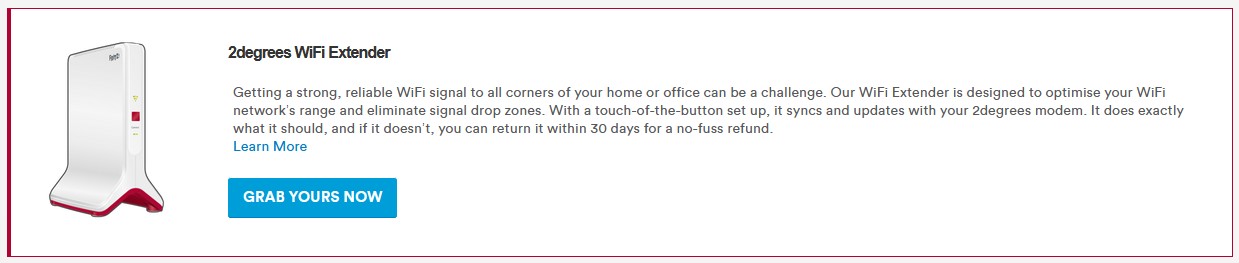
You can either pick up a Fritz!Box 7490 (or above) off Trademe for mesh or purchase a mesh unit from 2degrees directly (they call this a WiFi Extender). This seamlessly links in with the Fritz!Box and provides pretty good WiFi coverage. I personally use this solution at my parents place and it works well. To grab a mesh extender you just need to login to your 2degrees account and hit the button:


Michael Murphy | https://murfy.nz
Referral Links: Quic Broadband (use R122101E7CV7Q for free setup)

Are you happy with what you get from Geekzone? Please consider supporting us by subscribing.
Opinions are my own and not the views of my employer.


MikeAqua
8024 posts

Uber Geek
+1 received by user: 3817


  #2930335 16-Jun-2022 12:40
Send private message

We have a pair of DP-Link's Deco M9 mesh wireless units.  One is configured to act as the modem and the other one is configured to act as a mesh node.  


They have been excellent for coverage and speed.


Mike


Create new topic


Geekzone Live »

Try automatic live updates from Geekzone directly in your browser, without refreshing the page, with Geekzone Live now.


Are you subscribed to our RSS feed? You can download the latest headlines and summaries from our stories directly to your computer or smartphone by using a feed reader.