Geekzone: technology news, blogs, forums
Guest
Welcome Guest.
You haven't logged in yet. If you don't have an account you can register now.


LoganMcArthur

52 posts

Master Geek
+1 received by user: 2


#299071 8-Aug-2022 21:12
Send private message

Hello Guys, first time poster!

Currently me and my partner are living in an apartment (above a shop) our landlord is great - our internet speed - not so much.

Our landlord owns the entire building and is happy for us to have free rain to fix our internet issues.

We’ve been struggling with bad internet speeds since we’ve moved in - now we are both avid gamers and are desperate to increase our speeds! (Another gaming console is on its way!)

Currently we have 2Degrees internet on a “Fibre Max plan” 900/450 speeds.

Although we see a 100/80 and nothing any more then that.

We have been advised that our issue is through our cable from the ONT?

After some novice attempts I tried to learn more about the issue and am reaching out desperately!

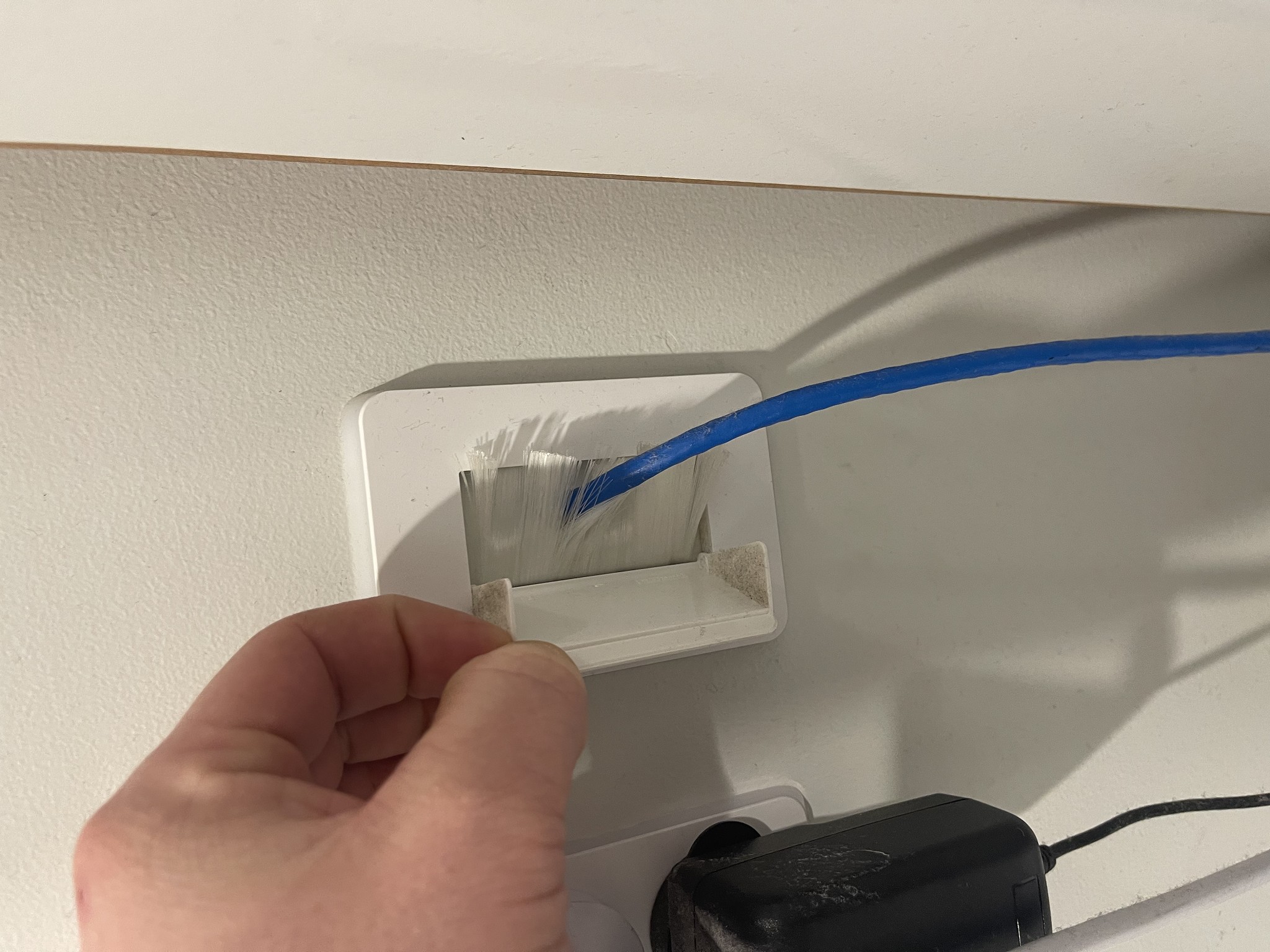
Basically - we have a ONT box in the shop below us. That then has a cat6 cable going through the wall and up to our modem.

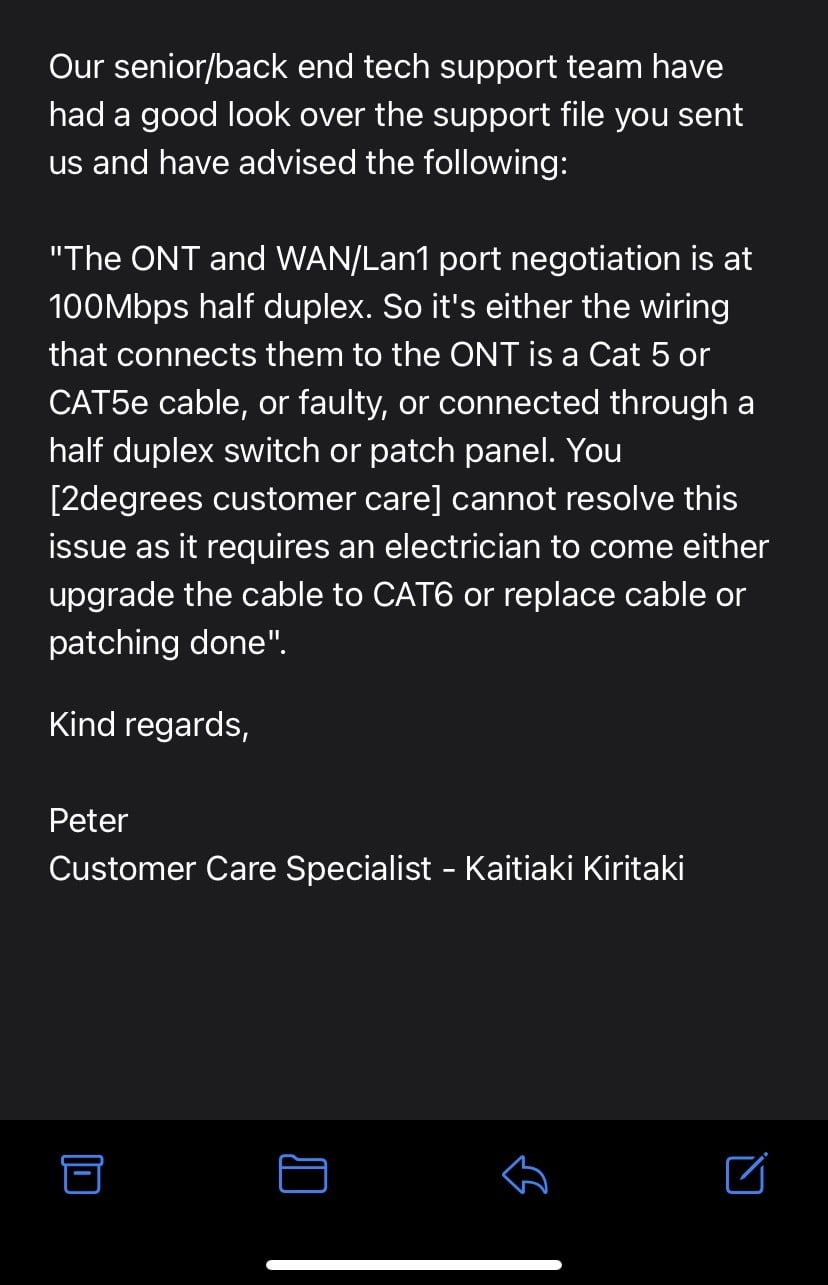
Any ideas as to why we are struggling? I have attached the email sent from our provider:


View this topic in a long page with up to 500 replies per page Create new topic
 1 | 2 | 3
Linux
12173 posts

Uber Geek
+1 received by user: 8469

Trusted
Lifetime subscriber

  #2952262 8-Aug-2022 21:21
Send private message

How are you testing and where are you testing to?


LoganMcArthur

52 posts

Master Geek
+1 received by user: 2


  #2952263 8-Aug-2022 21:24
Send private message

Hey buddy, have been through multiple tests. Speeds test, through fast.com/SpeedTest. Etc etc.

LoganMcArthur

52 posts

Master Geek
+1 received by user: 2


  #2952264 8-Aug-2022 21:27
Send private message

Also for clarification - here is a diagram I’ve created to best explain.

|ONT| ——————————- Modem
(Cable through wall)


Bung
6733 posts

Uber Geek
+1 received by user: 2926

Subscriber

  #2952265 8-Aug-2022 21:28
Send private message

Looks like 2Degrees have been doing the testing. What router do you have? Is the cat6 terminated at a jackpoint with a patch cable to the modem?

rugrat
3141 posts

Uber Geek
+1 received by user: 944

Lifetime subscriber

  #2952266 8-Aug-2022 21:28
Send private message

If it was me, I’d take the modem downstairs and plug in with different cable.


If your speed goes up after that, then yep you’ll need cable replaced.


The cable could easily be the problem. 


lxsw20
3689 posts

Uber Geek
+1 received by user: 2174

Subscriber

  #2952267 8-Aug-2022 21:28
Send private message

If it's connecting at 100mbit half duplex, its likely an issue with the cable run between the ONT and your router.


To test this, can you take the router into the shop below, and plug in directly into the ONT?


HP


Shop now for HP laptops and other devices (affiliate link).
RunningMan
9184 posts

Uber Geek
+1 received by user: 4834


  #2952268 8-Aug-2022 21:29
Send private message

Basically, 2D are advising there is probably a cable fault between your router and the ONT, however, 100Mb half duplex is an odd speed to negotiate. It's very common for a cable fault to cause a negotiation it 100Mb full duplex, but half suggests it has been set wrong in your router.


What router are you using? Can you view/change the WAN ethernet port connection speed? Fritzbox routers often call this power saving or green mode. You're looking for a setting 1000Mb full duplex (i.e. gigabit).


The comment there that the wiring is cat5e and causing it is wrong. Cat5e will support 1000Mb perfectly fine unless it has a fault. Cat6 is fine, but Cat5e should also work.


Jiriteach
1139 posts

Uber Geek
+1 received by user: 373

ID Verified
Trusted
Lifetime subscriber

  #2952270 8-Aug-2022 21:31
Send private message

So it looks like 2degrees has checked with Chrous and its showing that the connection between your ONT and Router is at 100mb which implies somehting is wrong with the cable or wiring or you have that port incorrect set on your router.


What router are you using? and secondly have you tried a different cable ethernet cable between the ONT and the router? Even with a Cat5e cable - you should be seeing speeds higher than 100mb but you wont see if that if its not negotating properly.


-- opinions expressed by me are solely my own. ie - personal


LoganMcArthur

52 posts

Master Geek
+1 received by user: 2


  #2952271 8-Aug-2022 21:32
Send private message

Hey Guys, thanks so much for the quick replies. Is it possible to plug the router directly into the ONT?

I can literally wip down quickly and do that if so. I’ll tag an image in of the situation.

LoganMcArthur

52 posts

Master Geek
+1 received by user: 2


  #2952272 8-Aug-2022 21:36
Send private message

Hey guys, I am using the supplied router.

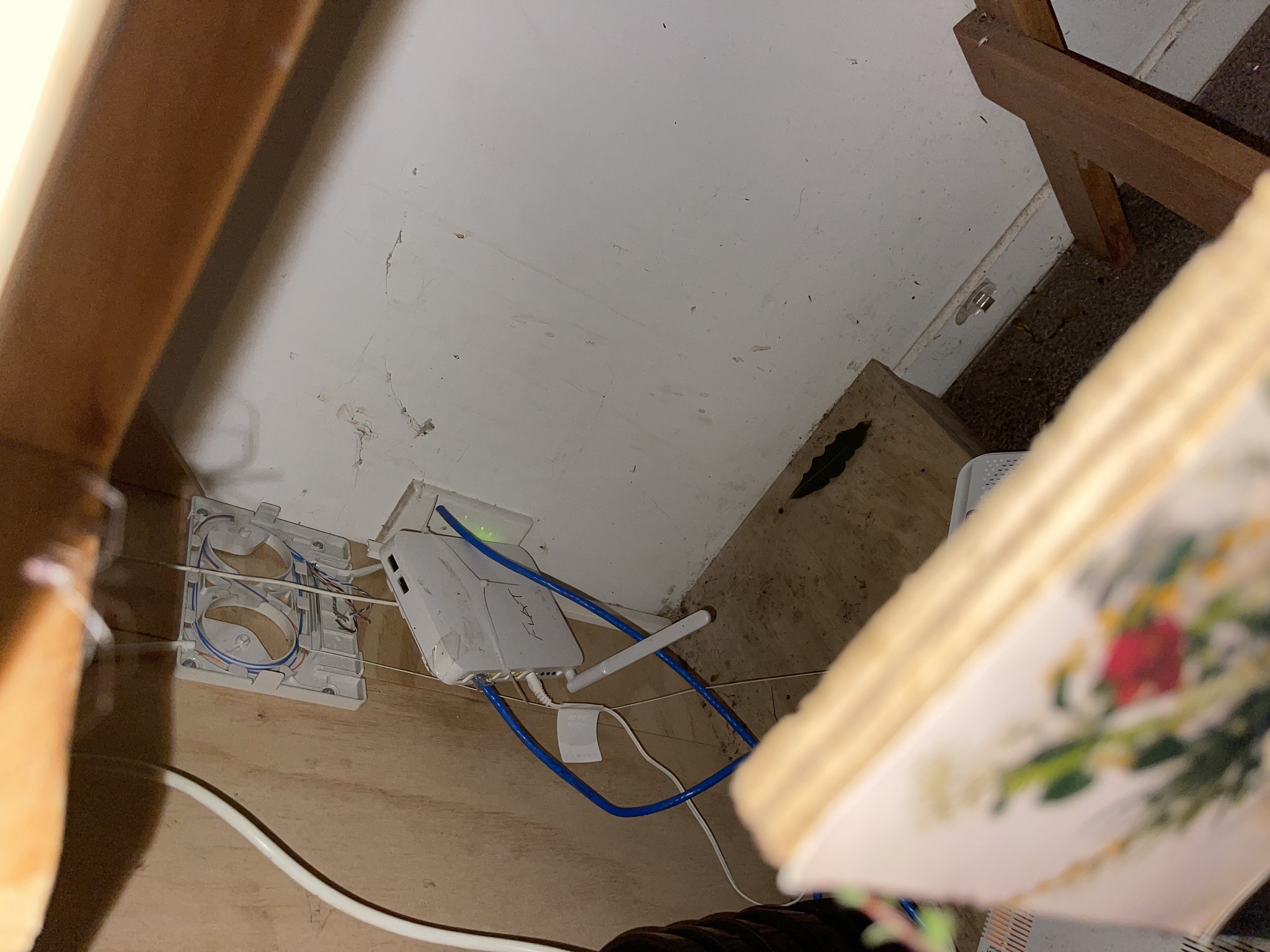
Here is an image from the ONT.


Jiriteach
1139 posts

Uber Geek
+1 received by user: 373

ID Verified
Trusted
Lifetime subscriber

  #2952273 8-Aug-2022 21:39
Send private message

LoganMcArthur: Hey Guys, thanks so much for the quick replies. Is it possible to plug the router directly into the ONT?

I can literally wip down quickly and do that if so. I’ll tag an image in of the situation.


You mean directly as is a new shorter ethernet cable plugged into the ONT? Yes. That will eliminate the existing cable.


-- opinions expressed by me are solely my own. ie - personal


Shop now on Samsung phones, tablets, TVs and more (affiliate link).
lxsw20
3689 posts

Uber Geek
+1 received by user: 2174

Subscriber

  #2952274 8-Aug-2022 21:40
Send private message

unplug the blue cable, plug your router into the ONT with a ethernet lead (the one in port 1 currently will do)


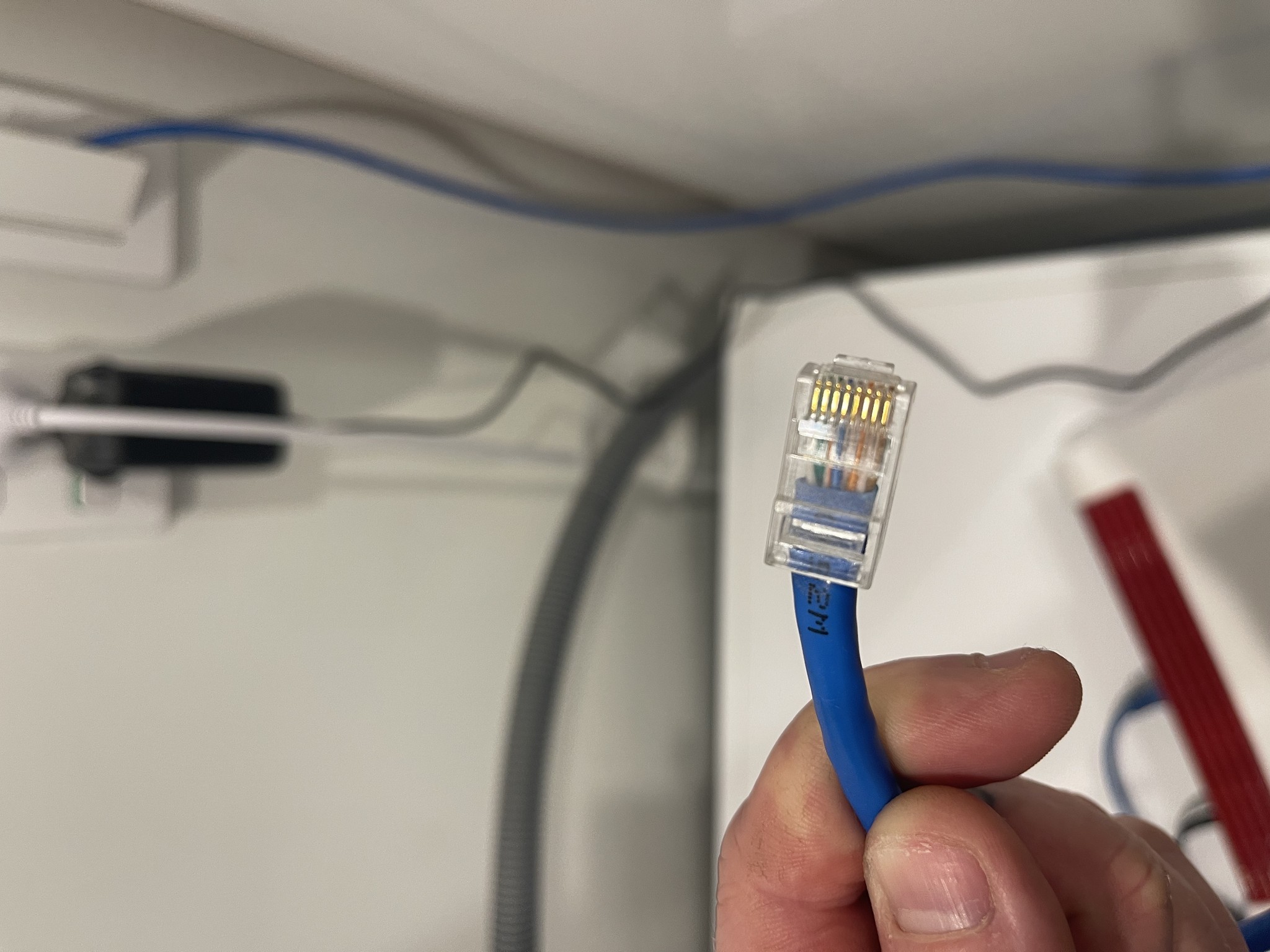
That sorta looks like solid core ethernet cable, and my bet is its not a solid core rated ethernet RJ45 end.


Jiriteach
1139 posts

Uber Geek
+1 received by user: 373

ID Verified
Trusted
Lifetime subscriber

  #2952276 8-Aug-2022 21:44
Send private message

LoganMcArthur: Hey guys, I am using the supplied router.

Here is an image from the ONT.


That ONT has seen better days! - shouldn’t be installed like that which doesn’t help the overall situation but that aside - Plug the router in the port that the blue ethernet cable is plugged into and the plug an ethernet cable from the router into your laptop/PC and run some tests to check speed.


-- opinions expressed by me are solely my own. ie - personal


LoganMcArthur

52 posts

Master Geek
+1 received by user: 2


  #2952277 8-Aug-2022 21:48
Send private message

Hey guys, yeah I know! Rough and tumble alright 😂 sorry I took so long to respond I’ve got a few more images here.

LoganMcArthur

52 posts

Master Geek
+1 received by user: 2


  #2952278 8-Aug-2022 21:50
Send private message


 1 | 2 | 3
View this topic in a long page with up to 500 replies per page Create new topic


Geekzone Live »

Try automatic live updates from Geekzone directly in your browser, without refreshing the page, with Geekzone Live now.


Are you subscribed to our RSS feed? You can download the latest headlines and summaries from our stories directly to your computer or smartphone by using a feed reader.