Geekzone: technology news, blogs, forums
Guest
Welcome Guest.
You haven't logged in yet. If you don't have an account you can register now.


broonie27

109 posts

Master Geek
+1 received by user: 3


#299076 9-Aug-2022 11:38
Send private message

Hi There,


I'm in Wellington so Vodafone have moved from my old cable broadband connection to HFC. I have a Ubiquiti EdgeRouter X (firmware v2.0.9) and need some help with re-configuring it. I realise there is a EdgeRouterX tutorial thread on this site but I can't see anything about setting it up for HFC.

I can see the I now have a new public IP address on my Vodafone modem and I've tried simply updating the "System gateway address" on EdgeRouter but that hasn't fixed it. After doing that update I can see a new static route is added but there is still a route below that which has my old public address in it.

What am I missing here?


View this topic in a long page with up to 500 replies per page Create new topic
 1 | 2
michaelmurfy
meow
13579 posts

Uber Geek
+1 received by user: 10910

Moderator
ID Verified
Trusted
Lifetime subscriber

  #2952431 9-Aug-2022 11:48
Send private message

You clearly didn't look hard enough :)


Follow the "Fibre X" part. It is all there...


https://www.geekzone.co.nz/forums.asp?forumid=66&topicid=205740


IPoE (DHCP) with VLAN 10.


BUT! I'd seriously recommend using the router that Vodafone provide unless if you've got a very, very good reason not to.


Michael Murphy | https://murfy.nz
Referral Links: Quic Broadband (use R122101E7CV7Q for free setup)

Are you happy with what you get from Geekzone? Please consider supporting us by subscribing.
Opinions are my own and not the views of my employer.


broonie27

109 posts

Master Geek
+1 received by user: 3


  #2952444 9-Aug-2022 12:07
Send private message

michaelmurfy:


You clearly didn't look hard enough :)


Follow the "Fibre X" part. It is all there...


https://www.geekzone.co.nz/forums.asp?forumid=66&topicid=205740


IPoE (DHCP) with VLAN 10.


BUT! I'd seriously recommend using the router that Vodafone provide unless if you've got a very, very good reason not to.


I didn't know if "Fibre X" was the same as HFC.

So all I need to do is run the WAN-2LAN2 wizard and and tick the VLAN box and enter "10"?

Why do you recommend using the Vodafone device? I have my 3 Unfii meshed APs connected to my EdgeRouter and the thought of having to reconfigure those just now is a bit much. Just want to get connected to the internet.


broonie27

109 posts

Master Geek
+1 received by user: 3


  #2952515 9-Aug-2022 15:30
Send private message

OK, so I got my internet connection working using the wizard. What I'm seeing now is that every time I reboot the Vodafone technicolor modem I lose internet connectivity and need to rerun the EdgeRouter config wizard to get things working again. I have the config set to DHCP and each time the EdgeRouter reboots after the config change it picks up the same public IP address but it's a different IP address from what appears when go to whatismyip.com? Can I avoid having to rerun the wizard?

I have paid for a static IP address from Vodafone but not sure which one of the above it is.


michaelmurfy
meow
13579 posts

Uber Geek
+1 received by user: 10910

Moderator
ID Verified
Trusted
Lifetime subscriber

  #2952651 9-Aug-2022 17:32
Send private message

Why not just use the router that Vodafone provides? It doesn’t sound like you’re needing anything that it doesn’t do.

Just use the Vodafone router as a drop in replacement with WiFi turned off. Your UniFi access points will still continue to work fine.


Michael Murphy | https://murfy.nz
Referral Links: Quic Broadband (use R122101E7CV7Q for free setup)

Are you happy with what you get from Geekzone? Please consider supporting us by subscribing.
Opinions are my own and not the views of my employer.


broonie27

109 posts

Master Geek
+1 received by user: 3


  #2952677 9-Aug-2022 18:53
Send private message

Well currently I'm getting ~35 Mb/s download on the Vodafone device and I'm getting 275 Mb/s on the EdgeRouter. Not entirely sure why that is but the Vodafone "tech" said there was an issue with a device further downstream and that he would get someone to look at it.

However I would just prefer to stick with EdgeRouter for now as it's a better device, despite what you've stated about EdgeOS (although I see latest firmware update was on July 18th of this year so they are still maintaining it).


Can you help with the issue when I reboot the Vodafone modem?


nztim
4012 posts

Uber Geek
+1 received by user: 2710

ID Verified
Trusted
TEAMnetwork
Subscriber

  #2952695 9-Aug-2022 19:22
Send private message

The base underlying operating system on the edge router is EOL, they can patch all they want but it doesn’t get past that fact.


Any views expressed on these forums are my own and don't necessarily reflect those of my employer. 


Move to New Zealand's best fibre broadband service (affiliate link). Free setup code: R587125ERQ6VE. Note that to use Quic Broadband you must be comfortable with configuring your own router.
Sideface
9649 posts

Uber Geek
+1 received by user: 15596

Trusted
DR
Lifetime subscriber

  #2952701 9-Aug-2022 19:36
Send private message

broonie27:


Hi There,


I'm in Wellington so Vodafone have moved from my old cable broadband connection to HFC. I have a Ubiquiti EdgeRouter X (firmware v2.0.9) and need some help with re-configuring it. ...


Please clarify: What sort of connection are you now on?


"Cable" = Hybrid Fibre Coaxial (HFC) = "Fibre X" (confusing, because it's not "real" fibre)


Are you now on "Vodafone Fibre" or "Vodafone Fibre Max" (real fibre) ?


I have used an EdgeRouter X on both HFC and fibre (in Wellington), and have got the full advertised speeds each time.


I used the Geekzone forum settings for each option.


Sideface


broonie27

109 posts

Master Geek
+1 received by user: 3


  #2952863 10-Aug-2022 09:43
Send private message

Sideface:


broonie27:


Hi There,


I'm in Wellington so Vodafone have moved from my old cable broadband connection to HFC. I have a Ubiquiti EdgeRouter X (firmware v2.0.9) and need some help with re-configuring it. ...


Please clarify: What sort of connection are you now on?


"Cable" = Hybrid Fibre Coaxial (HFC) = "Fibre X" (confusing, because it's not "real" fibre)


Are you now on "Vodafone Fibre" or "Vodafone Fibre Max" (real fibre) ?


I have used an EdgeRouter X on both HFC and fibre (in Wellington), and have got the full advertised speeds each time.


I used the Geekzone forum settings for each option.


Hi Sideface,


I am on Hybrid Fibre Coaxial.


As per EdgeRouterX post on this site am I using the WAN-2LAN2 wizard to configure my internet connectivity with "Internet Connection Type" set to DHCP and VLAN set to 10. I have also enabled hwnat offload and IPsec offload.

My main problem is that when I reboot the Vodafone technicolor modem I lose internet connectivity and the only way to get it back is to re-run the WAN-2LAN2 wizard, which doesn't seem right. I certainly didn't need to do that with my old Vodafone connection.

At this stage I'm not sure if the download speed issue is actually EdgeRouter related as I'm getting the poorest performance when I use try using the Vodafone provided router (I'm using the EdgeRouter and Vodafone devices in isolation, they are not connected to each other). When the Vodafone tech set up the new connection yesterday he said there was a problem with others on the street so I assumed it was related to a downstream device and nothing to do with my own connection.

So for now I'd like to fix the first issue.


Spyware
3818 posts

Uber Geek
+1 received by user: 1366

Lifetime subscriber

  #2952864 10-Aug-2022 09:46
Send private message

Don't reboot the cable modem. Problem solved. I'm not sure what you think you achieve by doing this anyway, absolutely nothing.


Spark Max Fibre using Mikrotik CCR1009-8G-1S-1S+, CRS125-24G-1S, Unifi UAP, U6-Pro, UAP-AC-M-Pro, Apple TV 4K (2022), Apple TV 4K (2017), iPad Air 1st gen, iPad Air 4th gen, iPhone 13, SkyNZ3151 (the white box). If it doesn't move then it's data cabled.


broonie27

109 posts

Master Geek
+1 received by user: 3


  #2952873 10-Aug-2022 10:21
Send private message

Spyware:


Don't reboot the cable modem. Problem solved. I'm not sure what you think you achieve by doing this anyway, absolutely nothing.


Sorry, not sure where you're coming from here. I may have to reboot the cable modem from time to time to troubleshoot and previously I didn't have to re-configure the router every time I did that. So that's what I'm trying to "achieve".


Spyware
3818 posts

Uber Geek
+1 received by user: 1366

Lifetime subscriber

  #2952882 10-Aug-2022 10:37
Send private message

Troubleshoot what exactly?? If the cable connection isn't 100% reliable then shift to fibre with an ONT (no need to reboot ever).


Spark Max Fibre using Mikrotik CCR1009-8G-1S-1S+, CRS125-24G-1S, Unifi UAP, U6-Pro, UAP-AC-M-Pro, Apple TV 4K (2022), Apple TV 4K (2017), iPad Air 1st gen, iPad Air 4th gen, iPhone 13, SkyNZ3151 (the white box). If it doesn't move then it's data cabled.


Shop now for Dell laptops and other devices (affiliate link).
broonie27

109 posts

Master Geek
+1 received by user: 3


  #2952886 10-Aug-2022 10:43
Send private message

Spyware:


Troubleshoot what exactly?? If the cable connection isn't 100% reliable then shift to fibre with an ONT (no need to reboot ever).


Troubleshoot connectivity issues with Vodafone. If you aren't going to provide any assistance to this thread I'd prefer you just didn't respond at all. You're comments aren't remotely helpful.


broonie27

109 posts

Master Geek
+1 received by user: 3


  #2952890 10-Aug-2022 10:47
Send private message

On the download speed front something has changed since yesterday,  when connected to the Vodafone router I am now getting ~700 Mb/s download so that's good but when connected via the EdgeRouter I'm since only getting 275 Mb/s.


Sideface
9649 posts

Uber Geek
+1 received by user: 15596

Trusted
DR
Lifetime subscriber

  #2952898 10-Aug-2022 11:03
Send private message

I used an EdgeRouter X on HFC for 5 years, and got ~700 Mb/s download with DOCSIS 3.1 (the current version of HFC).


from: https://www.geekzone.co.nz/forums.asp?forumid=66&topicid=205740


"Do not tick Bridging - this will severely hinder the performance of the Edgerouter."


I never needed to reboot the HFC modem (except for the DOCSIS upgrade).


I have since upgraded to "real fibre", and have not regretted it.


Sideface


broonie27

109 posts

Master Geek
+1 received by user: 3


  #2953014 10-Aug-2022 13:30
Send private message

The Wizard I'm using doesn't have the option to enable or disable bridging (i'm on EdgeRouterX with firmware v2.0.9) and I've looked under the config tree and can't anything relating bridging.

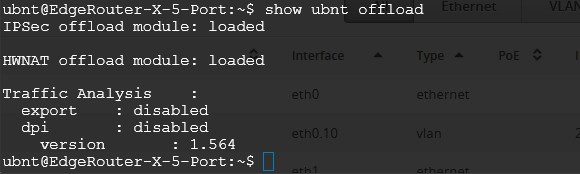
As for offloading I assume the below is correct?


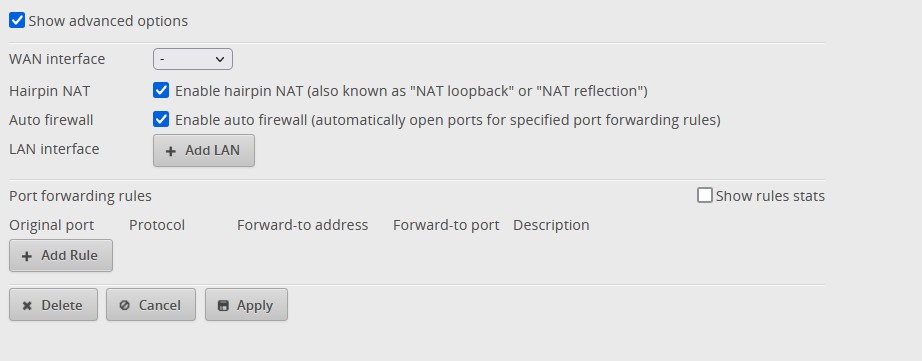
And this is the port forwarding and hairpin settings.


 1 | 2
View this topic in a long page with up to 500 replies per page Create new topic


Geekzone Live »

Try automatic live updates from Geekzone directly in your browser, without refreshing the page, with Geekzone Live now.


Are you subscribed to our RSS feed? You can download the latest headlines and summaries from our stories directly to your computer or smartphone by using a feed reader.